
Увод
Thank you for choosing the GGSTOPWATER XG99PRO Open Ear Headphones. These wireless Bluetooth 5.4 earbuds are designed for comfort and stability, featuring an open-ear design, earhooks, and IPX5 water resistance. This manual provides detailed instructions to help you set up, operate, and maintain your headphones for optimal performance.
The ergonomic design ensures a firm fit, preventing slippage during activities. With multi-point support, the weight is evenly distributed for comfortable long-term wear. Bluetooth 5.4 technology provides a stable and fast connection. The open-ear design helps prevent pressure and irritation to the ear canal and eardrum, promoting extended comfortable use.
Садржај пакета
- GGSTOPWATER XG99PRO Open Ear Headphones (Left and Right)
- Футрола за бежично пуњење
- УСБ кабл за пуњење
- Кориснички приручник (овај документ)
Производ је завршенview
Familiarize yourself with the components of your GGSTOPWATER XG99PRO Open Ear Headphones.
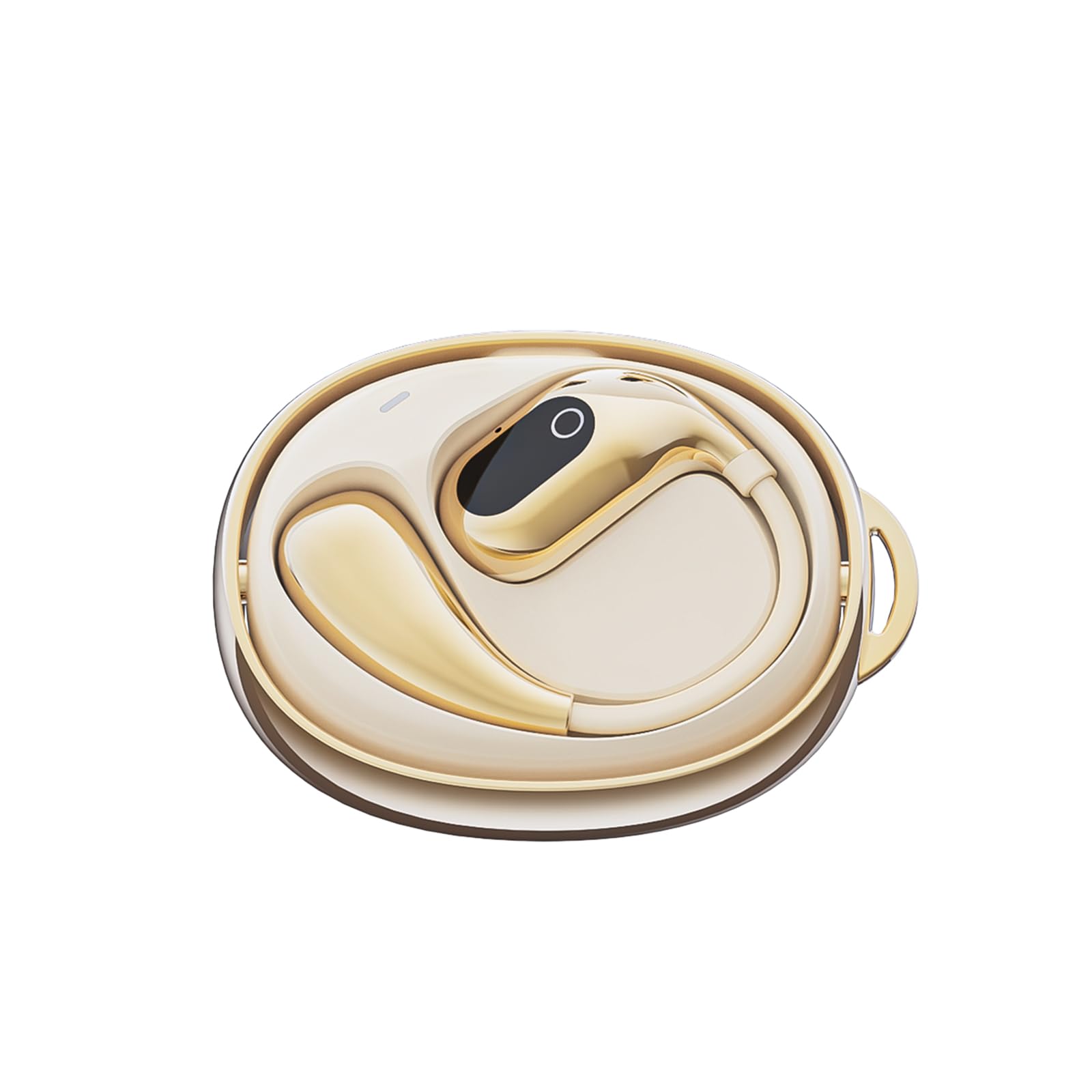
Слика 1: The GGSTOPWATER XG99PRO wireless charging case. This compact case protects and charges your earbuds.

Слика 2: The XG99PRO earbuds securely placed within their charging case. The case ensures the earbuds are charged and ready for use.

Слика 3: An XG99PRO earbud worn on the ear, demonstrating its open-ear design and secure earhook fit. This design allows for situational awareness while listening.
Сетуп
1. Пуњење слушалица
- Ставите обе слушалице у кутијицу за пуњење. Уверите се да су правилно постављене.
- Повежите УСБ кабл за пуњење са портом за пуњење на кућишту и са извором напајања (нпр. УСБ адаптер за зид, УСБ порт рачунара).
- The indicator light on the charging case will show the charging status. A full charge for the case and earbuds typically takes approximately 1.5-2 hours.
- The earbuds provide up to 6 hours of listening time on a single charge, and the charging case extends the total battery life to up to 60 hours.
2. Упаривање са Блуетоотх уређајем
- Уверите се да су слушалице напуњене.
- Отворите кућиште за пуњење. Слушалице ће аутоматски ући у режим упаривања, што ће бити назначено трепћућим ЛЕД светлом на слушалицама.
- На свом уређају (паметном телефону, таблету, рачунару) омогућите Блутут.
- Тражи available Bluetooth devices. Select "КСГ99ПРО“ са листе.
- Once connected, the LED indicator on the earbuds will stop flashing, and you will hear a confirmation tone.
- Слушалице ће се аутоматски поново повезати са последњим упареним уређајем када се изваде из футроле, ако је Блутут омогућен на уређају.
Упутство за употребу
The XG99PRO headphones feature touch controls for easy management of audio and calls.
Укључивање/искључивање
- Укључено: Open the charging case, and the earbuds will power on automatically. Alternatively, press and hold the touch control area on both earbuds for 3 seconds.
- Искључивање: Place the earbuds back into the charging case and close the lid. They will power off automatically. Alternatively, press and hold the touch control area on both earbuds for 5 seconds.
Контрола музике
- Пусти/паузирај: Single tap the touch control area on either earbud.
- Следећа нумера: Double tap the touch control area on the right earbud.
- Претходни запис: Double tap the touch control area on the left earbud.
- Појачавање звука: Triple tap the touch control area on the right earbud.
- Смањивање јачине звука: Triple tap the touch control area on the left earbud.
Контрола позива
- Одговори/заврши позив: Single tap the touch control area on either earbud.
- Одбиј позив: Притисните и држите подручје за контролу додиром на било којој слушалици 2 секунде.
Гласовни асистент
- Активирање гласовног помоћника: Притисните и држите подручје за контролу додиром на било којој слушалици 3 секунде (када нисте у току позива).
Одржавање
Правилно одржавање осигурава дуготрајност и оптималне перформансе ваших слушалица.
Чишћење
- Нежно обришите слушалице и кућиште за пуњење меком, сувом крпом која не оставља влакна.
- Не користите абразивна средства за чишћење, раствараче или аеросолне спрејеве.
- Avoid getting moisture into any openings. The earbuds are IPX5 water-resistant, meaning they can withstand splashes and sweat, but are not designed for submersion.
Складиштење
- Када се не користе, увек чувајте слушалице у њиховој футроли за пуњење како бисте их заштитили и одржали напуњеним.
- Чувати на хладном и сувом месту, даље од екстремних температура и директне сунчеве светлости.
Решавање проблема
Ако наиђете на било какве проблеме, погледајте следеће уобичајене проблеме и решења:
| Проблем | Решење |
|---|---|
| Слушалице се не упарују са уређајем. |
|
| Нема звука из једне или обе слушалице. |
|
| Кућиште за пуњење се не пуни. |
|
Спецификације
| Феатуре | Детаљ |
|---|---|
| Назив модела | КСГ99ПРО |
| Бранд | ГГСТОПВАТЕР |
| Технологија повезивања | Бежично (Bluetooth 5.4) |
| Постављање уха | On Ear (Open Ear Design) |
| Форм Фацтор | Он Еар |
| Отпорност на воду | ИПКС5 |
| Импеданса | 40 Охмс |
| Тежина артикла | 2 унци |
| Батерије | Потребна је 2 C батерија (укључена) |
| Укључене компоненте | Футрола за бежично пуњење |
Информације о гаранцији
GGSTOPWATER products are covered by a limited warranty from the date of purchase. Please retain your proof of purchase for warranty claims. This warranty covers manufacturing defects and does not cover damage caused by misuse, accidents, unauthorized modifications, or normal wear and tear. For specific warranty terms and conditions, please refer to the warranty card included with your product or contact customer support.
Корисничка подршка
If you have any questions, require technical assistance, or need further support, please contact our customer service team. You can find contact information on our official webсајту или преко продавца где сте купили производ.
Подршка на мрежи: Visit the GGSTOPWATER official webсајт за често постављана питања и ресурсе за подршку.
Подршка путем е-поште: [Placeholder for Support Email Address]