
1. Важна безбедносна упутства
Please read all instructions carefully before using this appliance and retain them for future reference. Always follow basic safety precautions to reduce the risk of fire, electric shock, and injury to persons.
- Уверите се да напајање одговара запреминиtagе наведен на етикети са рејтингом.
- Do not operate the unit with a damaged cord or plug. If the supply cord is damaged, it must be replaced by the manufacturer or a qualified service agent.
- Do not block air outlets or inlets. Maintain a minimum distance of 20 cm from walls or other objects.
- Не стављајте прсте или стране предмете у улаз или излаз ваздуха.
- Увек искључите јединицу пре чишћења или сервисирања.
- Овај уређај није намењен за употребу од стране особа (укључујући децу) са смањеним физичким, чулним или менталним способностима, или недостатком искуства и знања, осим ако им је дат надзор или упутства о употреби уређаја од стране особе одговорне за њихову безбедност.
- Не користите уређај у влажним срединама као што су купатила или вешераји.
- Place the unit on a flat, stable surface to prevent tipping.
2. Производ је готовview
The Euker 12,000 BTUs Portable Air Conditioner is a versatile 3-in-1 unit designed to provide cooling, dehumidification, and fan functions for rooms up to 450 square feet. It features an intelligent touch panel, remote control, 24-hour timer, and Smart/Sleep modes for enhanced comfort and energy efficiency.
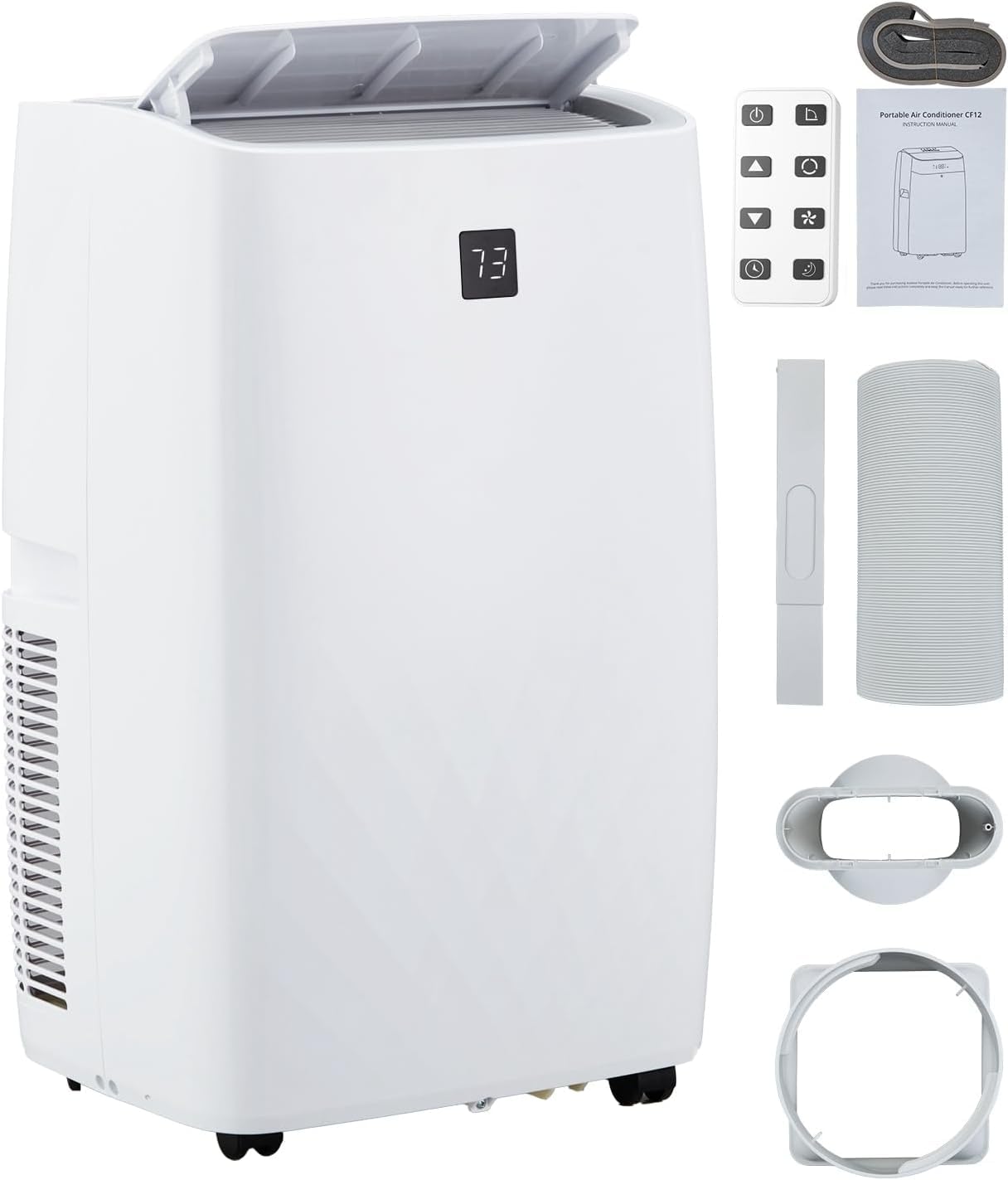
Image: The Euker 12,000 BTUs Portable Air Conditioner, a compact white unit with a top-mounted control panel.
Контролна табла и даљински управљач
The unit can be operated using the intuitive touch control panel located on top of the appliance or via the included remote control. Both offer access to all functions and settings.

Image: Close-up of the unit's LED display showing '73' and touch buttons for Swing, Fan, Timer, Sleep, Mode, and On/Off. Below, a hand holds the remote control with similar function buttons.
3. Подешавање
Proper installation is crucial for optimal performance. The portable air conditioner comes with a window seal kit and exhaust hose for easy setup.
Пласман
- Поставите јединицу на чврсту, равну површину.
- Уверите се да има најмање 20 цм (8 инча) простора око уређаја за правилан проток ваздуха.
- Поставите уређај близу прозора за постављање издувног црева.
Инсталација комплета за прозоре
The included window kit is designed for quick and easy installation in various window types without the need for screws or nails.
- Assemble the window slider kit according to your window type (double/single-hung or sliding sash window).
- Extend the exhaust hose and connect one end to the unit's exhaust outlet and the other end to the window kit adapter.
- Причврстите комплет за прозор у отвореном прозору, осигуравајући чврсто заптивање како бисте спречили цурење ваздуха.

Image: Diagram illustrating the window kit setup for double/single-hung and sliding sash windows, showing adjustable lengths from 20.47" to 39.9". The portable AC unit is shown next to a window, with dimensions 17.2" (width), 13.1" (depth), and 27.7" (height).
4. Упутство за употребу
Familiarize yourself with the operating modes and features to maximize your comfort.
Оперативни режими
The unit offers three primary operating modes: Cooling, Dehumidifying, and Fan.
- Режим хлађења: Reduces room temperature. Set your desired temperature between 64°F and 90°F. The 12,000 BTUs capacity quickly cools rooms up to 450 sq. ft.
- Режим одвлаживања (сушење): Removes excess moisture from the air, with a capacity of up to 75 pints per day. This helps create a drier, more comfortable environment.
- Режим вентилатора: Circulates air without cooling or dehumidifying. Choose between High, Low, or Auto fan speeds.

Image: Visual representation of the three modes: Cooling (snowflake icon, 64°F-90°F), Dry (water droplet icon, 75 pints/day), and Fan (fan icon, High, Low, Auto).
Посебне карактеристике
- Smart/Sleep Mode: Maintains an optimal temperature at a low fan speed with reduced noise levels (as low as 48 dB) for a quiet and comfortable night's sleep.
- 24-часовни тајмер: Allows you to program the unit to turn on or off automatically within a 24-hour period, saving energy and ensuring comfort when needed.
- Аутоматско искључивање: За енергетску ефикасност и безбедност.

Image: A graphic illustrating the low noise level of 48 dB during sleep mode, with icons for 24h Smart Timer, Auto Shut Off, Sleep Mode, and Ultra Quiet operation.
5. Одржавање
Редовно одржавање осигурава дуготрајност и ефикасан рад вашег преносивог клима уређаја.
Чишћење ваздушног филтера
Ваздушни филтер треба чистити сваке две недеље или чешће, у зависности од употребе и квалитета ваздуха. Прљав филтер може смањити ефикасност и проток ваздуха.
- Искључите јединицу из електричне утичнице.
- Пронађите и уклоните ваздушни филтер са задње или бочне стране уређаја.
- Оперите филтер топлом водом са сапуном. Добро исперите.
- Оставите филтер да се потпуно осуши на ваздуху пре него што га поново инсталирате. Не излажите га директној сунчевој светлости.
Water Drainage (Self-Evaporation)
This unit features a self-evaporation system, which significantly reduces the need for manual water drainage. Most condensed water is evaporated and expelled through the exhaust hose.
In high humidity conditions, some water may accumulate in the internal reservoir. If the reservoir becomes full, the unit will stop operating and display an error code. In such cases, manually drain the water:
- Искључите јединицу.
- Поставите плитку посуду или посуду испод отвора за одвод (обично се налази на доњој задњој страни уређаја).
- Уклоните чеп за одвод како бисте омогућили да вода истекне.
- Када се испразни, чврсто вратите чеп за испуштање.

Слика: Крупни план view of the rear of the portable air conditioner, highlighting the internal components related to the self-evaporation system, indicating reduced need for manual drainage.
КСНУМКС. Решавање проблема
Пре него што контактирате корисничку подршку, погледајте следеће уобичајене проблеме и решења.
- Јединица се не укључује: Check if the power cord is securely plugged into a working outlet. Ensure the unit is not in standby mode and the timer is not set to off.
- Unit is running but not cooling: Verify that the air filter is clean. Check if the exhaust hose is properly installed and not blocked. Ensure windows and doors are closed to prevent warm air from entering the room. The room temperature might be below the set temperature.
- Јединица је бучна: Ensure the unit is placed on a flat, stable surface. Check for any obstructions in the air inlets or outlets.
- Вода цурење: Check if the drain plug is securely in place. In high humidity, manual drainage might be required.
- Кодови грешака: Refer to the specific error code displayed on the LED panel. Common codes relate to full water tanks or sensor malfunctions.
7. Спецификације
| Феатуре | Спецификација |
|---|---|
| Бранд | Euker |
| Назив модела | преносиви клима уређај |
| ASIN | B0F29J5DMX |
| Цоолинг Повер | 12,000 БТУ |
| Област покривености | До 450 квадратних стопа |
| Димензије производа (Д x Ш x В) | 18.5 к 15.35 к 35.24 инча |
| Тежина артикла | 76.8 фунти |
| Волtage | 115 Волтс |
| Ниво буке | 51 децибела |
| Капацитет одвлаживања | 75 пинта дневно |
| Укључене компоненте | Remote control, Window seal kit, Exhaust hose |
8. Гаранција и подршка
Информације о гаранцији
The manufacturer states that there is НО specific warranty description provided for this product. Please refer to your retailer's return policy or contact the seller directly for any warranty-related inquiries.
Корисничка подршка
For technical assistance, troubleshooting not covered in this manual, or other inquiries, please contact Euker customer support. You can visit the official Euker store on Amazon for more information: Euker Store.