
1. Увод
This manual provides essential information for the setup, operation, maintenance, and troubleshooting of your ViewSonic IFP55G1 55-inch 4K UHD ViewBoard Interactive Display. Please read this manual thoroughly before using the product to ensure proper and safe operation.
Тхе ViewSonic IFP55G1 is a 55-inch 4K Ultra HD (3840x2160p) interactive display designed for educational and business environments. It features multi-point touch recognition, an OPS slot for external PCs, 10W dual speakers, and versatile connectivity options including HDMI, VGA, USB Hub, and USB-C inputs. Its OS-free design allows flexibility with various computing solutions.
Кључне карактеристике:
- Ултра ХД резолуција: 55 Inch 4K Ultra HD (3840x2160p) interactive display for crisp visuals.
- Advanced Multi-Touch: Allows multiple users to write and interact simultaneously with fingers and passive pens.
- Флексибилно повезивање: Equipped with a powerful quad-core processor and versatile ports including HDMI, VGA, RJ45, and USB.
- OS-Free Design: Provides enhanced security and flexibility to integrate with your preferred operating system via external PC or OPS device.
- Write-Away Technology: Enables instant writing with the stylus without extended setup.
2. Шта је у кутији
Проверите да ли су све ставке наведене у наставку укључене у ваше паковање. Ако неке ставке недостају или су оштећене, одмах контактирајте свог продавца.
- ViewSonic IFP55G1 Interactive Display
- 3m USB 2.0 touch cable x 1
- Touch pen (Passive pen) x 2 (VB-PEN-002)
- Кабл за напајање од 3 м
- HDMI 2.0 cable 3m x 1
- Водич за брзи почетак + изјава о усклађености
- РС232 адаптер
- Screw (wall mount 4)
- Цамера Плате
- Remote control with AAA battery (Optional)
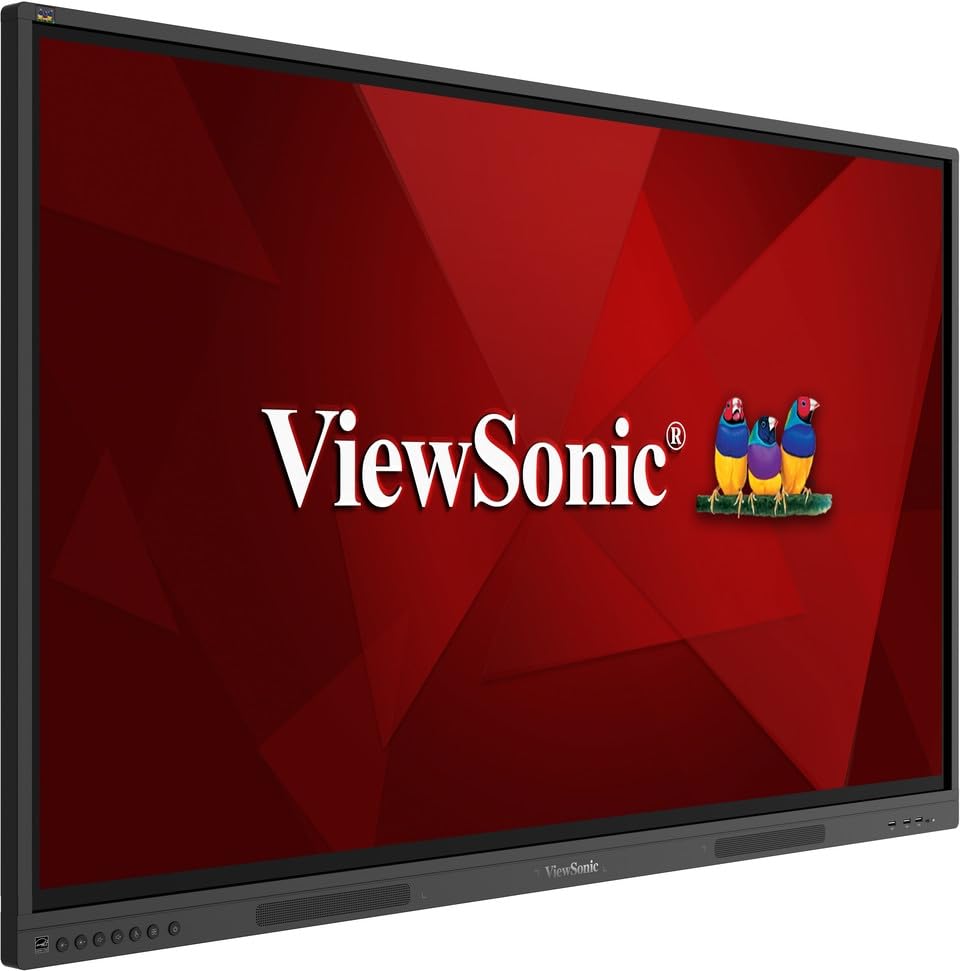
слика: ViewSonic IFP55G1 55-inch ViewBoard Interactive Display, front view.
3. Упутства за подешавање
3.1 Монтирање дисплеја
The IFP55G1 can be wall-mounted or installed on a compatible mobile cart (sold separately). Ensure the mounting solution supports the display's weight (approximately 59.3 lbs / 26.9 kg) and dimensions (3.37 x 49.7 x 30.3 inches).
- For wall mounting, use the provided wall mount screws and ensure the wall structure is robust enough.
- Follow the instructions provided with your specific wall mount or mobile cart.
3.2 Повезивање периферних уређаја
The display offers various ports for connecting external devices. Refer to the image below for port locations.

Слика: Са стране view оф тхе ViewSonic IFP55G1 interactive display showing various input ports including HDMI, VGA, and USB.
- Прикључак за напајање: Connect the 3m power cable to the display and a grounded power outlet.
- Видео улаз: Connect your external PC or media player to the display using an HDMI 2.0 cable (provided), VGA cable, or USB-C cable. The display has 3 HDMI ports, 1 VGA port, and USB-C connectivity.
- Функционалност додира: For interactive touch features with an external PC, connect the 3m USB 2.0 touch cable from the display's USB-B (Touch) port to a USB-A port on your PC.
- ОПС слот: If using an optional ViewSonic Slot-in PC (OPS device), insert it into the dedicated OPS slot on the rear of the display. This provides an integrated computing solution.
- Мрежа: Повежите Етернет кабл са RJ45 портом за жичани мрежни приступ.
- УСБ уређаји: Use the available USB-A ports to connect USB drives, keyboards, mice, or other peripherals.

Слика: Тхе ViewSonic IFP55G1 display demonstrating connectivity with various external devices, including laptops and mini PCs, highlighting its 'Bring Your Own Devices' capability.
4. Упутство за употребу
4.1 Укључивање/искључивање
- Укључено: Press the power button located on the display's front or side panel, or use the remote control. The display will power on and show the input source.
- Искључивање: Press the power button again. A confirmation message may appear; select 'Power Off'. For complete power disconnection, unplug the power cable.
4.2 Избор улазног извора
Use the 'Source' button on the display or remote control to cycle through available input sources (HDMI 1, HDMI 2, HDMI 3, VGA, USB-C, OPS).
4.3 Using Touch Functionality
Once the USB touch cable is connected to your external PC, the display will function as a multi-touch input device. You can use your fingers or the provided passive pens for interaction.
- Додир прстом: Use gestures similar to a tablet or smartphone for navigation, zooming, and drawing.
- Passive Pens: The two included passive pens (VB-PEN-002) allow for precise writing and drawing on the screen. The display's Write-Away technology enables instant use of the pens.

Image: A group of individuals collaborating around a ViewSonic IFP55G1 interactive display in a modern meeting room, demonstrating its multi-touch capabilities for instantaneous collaboration.
4.4 Контрола звука
The display features integrated 10W dual speakers. Adjust volume using the remote control or the buttons on the display panel.
5. Одржавање
5.1 Чишћење екрана
- Екран: Нежно обришите екран меком крпом која не оставља влакна. За тврдокорне мрље, лагано дampОперите крпу водом или неабразивним средством за чишћење екрана без амонијака. Не прскајте средство за чишћење директно на екран.
- Casing: Обришите цasing with a soft, dry cloth. Avoid using harsh chemicals or abrasive materials.
5.2 Општа нега
- Avoid placing heavy objects on the display.
- Do not block ventilation openings on the rear of the display.
- Држите екран даље од директне сунчеве светлости, извора топлоте и прекомерне влаге.
КСНУМКС. Решавање проблема
Ако наиђете на проблеме са својим ViewSonic IFP55G1, refer to the following common problems and solutions.
6.1 No Display / Black Screen
- Уверите се да је кабл за напајање безбедно повезан и са екраном и са исправном утичницом.
- Verify that the display is powered on (power indicator light should be active).
- Check that the video cable (HDMI, VGA, USB-C) is securely connected to both the display and the source device (PC, OPS).
- Select the correct input source using the 'Source' button on the display or remote control.
- Ensure the source device (PC, OPS) is powered on and outputting a video signal.
6.2 Функционалност додира не ради
- Confirm the USB touch cable is securely connected from the display's USB-B (Touch) port to a USB-A port on your external PC.
- Ensure your external PC's operating system has the necessary drivers installed for touch input.
- Restart both the display and the connected PC.
6.3 Нема звука
- Check the volume level on the display and the connected source device.
- Ensure the audio output from your source device is routed correctly to the display (e.g., via HDMI).
- If using an external audio system, ensure it is properly connected and powered on.
7. Спецификације
Испод су техничке спецификације за ViewSonic IFP55G1 interactive display.
| Феатуре | Спецификација |
|---|---|
| Бранд | ViewСониц |
| Назив модела | ИФП55Г1 |
| Величина екрана | 55 инча |
| Максимална резолуција екрана | 3840x2160 Pixels (4K UHD) |
| Нативе Ресолутион | 3840 к 2160 |
| Дисплаи Типе | ЛЦД |
| Аспецт Ратио | 16:9 |
| Унос људског интерфејса | Тоуцхсцреен |
| Технологија повезивања | Ethernet, HDMI, USB Type C, VGA |
| Total Number of HDMI Ports | 3 |
| Укупно УСБ портова | 9 |
| Видео излазни интерфејс | ДисплаиПорт |
| Аудио излаз | Integrated 10W Dual Speakers |
| Димензије артикла (ДкШкВ) | 3.37 к 49.7 к 30.3 инча |
| Тежина артикла | 59.3 фунти |
| Боја | Црно |
| Посебне карактеристике | All-in-one USB port, Anti Glare Display, Light Sensor, Speakers, Touchscreen |
| Компатибилни уређаји | Стони рачунар, Лаптоп |
| УПЦ | 766907024654 |
8. Гаранција и подршка
8.1 Информације о гаранцији
Тхе ViewSonic IFP55G1 interactive display comes with an industry-leading 3-годишња ограничена гаранција on parts, labor, and backlight. Onsite warranty service may also be available. Please refer to the warranty card included in your package or visit the official ViewСониц website for detailed terms and conditions, and information on optional warranty extensions.
8.2 Корисничка подршка
За техничку помоћ, упите у вези са производом или рекламације у вези са гаранцијом, обратите се ViewSonic's award-winning customer service team. Contact information can be found on the official ViewСониц webсајту или у Водичу за брзи почетак који се испоручује уз ваш производ.