
Увод
Thank you for choosing the Billboard Soul Advance True Wireless Stereo (TWS) Earbuds. These earbuds are designed to provide a superior audio experience with Active Noise Cancellation (ANC), Environmental Noise Cancellation (ENC), and a comfortable, splash-resistant design. This manual will guide you through the setup, operation, and maintenance of your new earbuds.
Безбедносне информације
- Не излажите слушалице или кућиште за пуњење екстремним температурама или директној сунчевој светлости током дужег периода.
- Избегавајте испуштање или примену прекомерне силе на уређај.
- Keep the earbuds and charging case away from water and liquids, except for light splashes as per IPX4 rating. Do not submerge.
- Не покушавајте да растављате или модификујете производ. То ће поништити гаранцију.
- Користите само приложени кабл за пуњење или сертификовани еквивалент.
- Listening at high volumes for prolonged periods can cause hearing damage. Adjust volume to a safe level.
Садржај пакета
- Billboard Soul Advance TWS Earbuds (Left and Right)
- Футрола за пуњење
- УСБ кабл за пуњење
- Упутство за употребу
Производ је завршенview
Familiarize yourself with the components of your Billboard Soul Advance TWS Earbuds and charging case.
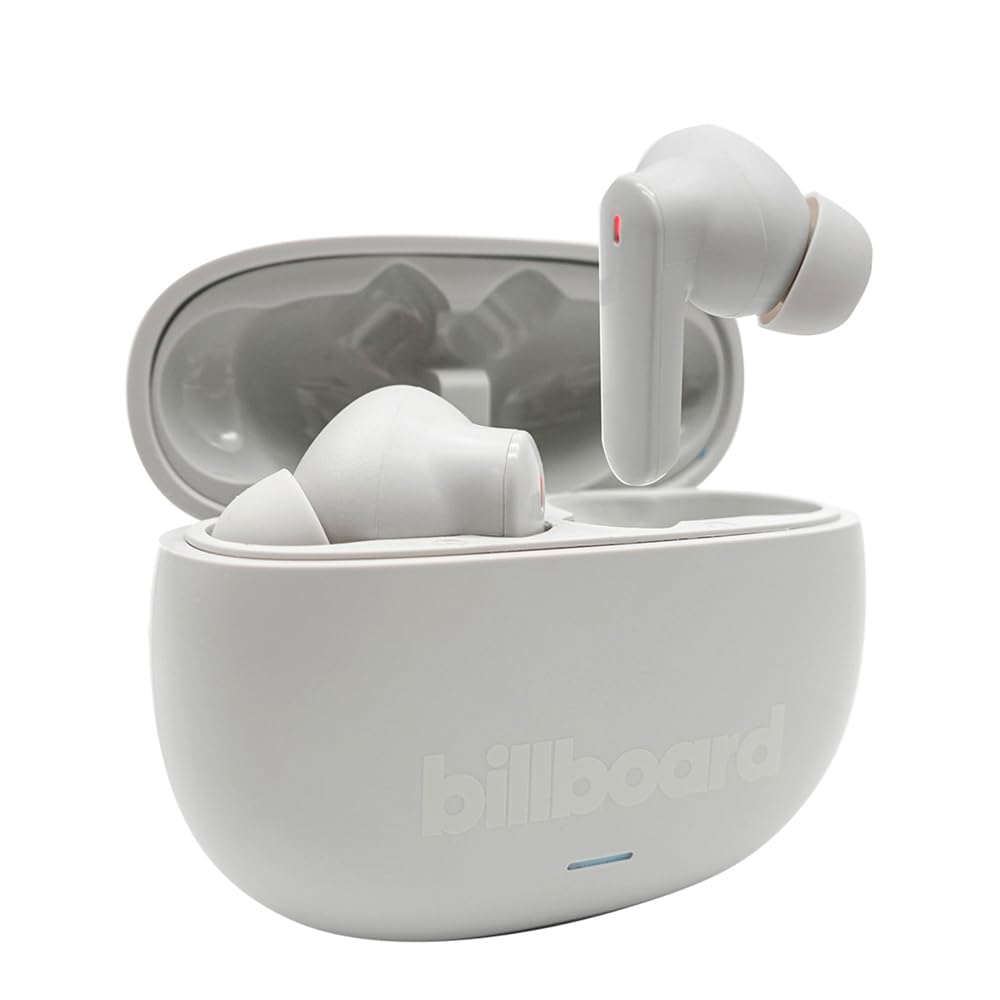
Image: The Billboard Soul Advance TWS Earbuds resting inside their open charging case. The earbuds are grey with red indicator lights visible, and the case is also grey with the 'billboard' logo embossed on the front.

Image: The Billboard Soul Advance TWS Earbuds charging case in a closed position. The case is grey with the 'billboard' logo embossed on the front and a small indicator light at the bottom.
Image: A person holding a single Billboard Soul Advance TWS earbud and the open charging case, demonstrating the compact size and design.
Сетуп
1. Пуњење слушалица и футроле
Пре прве употребе, потпуно напуните слушалице и кућиште за пуњење.
- Ставите слушалице у кутијицу за пуњење. Уверите се да су правилно постављене у одговарајуће отворе.
- Connect the USB charging cable to the charging port on the case and to a USB power source (e.g., computer, wall adapter).
- The indicator light on the case will show charging status. Once fully charged, the indicator will change or turn off. A full charge takes approximately 5 hours for the case and earbuds.
2. Упаривање са уређајем
Да бисте повезали слушалице са паметним телефоном или другим уређајем који подржава Bluetooth:
- Open the charging case. The earbuds will automatically enter pairing mode, indicated by flashing lights on the earbuds.
- На свом уређају идите на подешавања Bluetooth-а и уверите се да је Bluetooth омогућен.
- Тражи available devices and select "Billboard Soul Advance" from the list.
- Када се повежу, индикаторска светла на слушалицама ће престати да трепере.
- Слушалице ће се аутоматски поново повезати са последњим упареним уређајем када се изваде из футроле, ако је Блутут омогућен на уређају.
Оперативни
Додирните контроле
The earbuds feature touch-sensitive controls on their outer surface. Specific functions may vary slightly by device or app.
| Акција | Функција |
|---|---|
| Један додир (лево/десно) | Пусти/паузирај музику, одговори/заврши позив |
| Двоструки додир (десно) | Следећа нумера |
| Двоструки додир (лево) | Претходна нумера |
| Троструки додир (лево/десно) | Активирајте гласовни помоћник |
| Дуги притисак (лево/десно) | Укључи/искључи ANC/режим транспарентности |
| Incoming Call Long Press | Одбијте позив |
Активно поништавање буке (ANC) и поништавање буке из окружења (ENC)
The Soul Advance earbuds feature both ANC and ENC for an optimized listening and calling experience.
- Активно поништавање буке (АНЦ): Reduces external ambient noise, allowing for a more immersive audio experience. Activate/deactivate by long-pressing an earbud.
- Поништавање буке у животној средини (ЕНЦ): Utilizes 4 built-in microphones to filter out background noise during calls, ensuring clearer conversations for both you and the listener. This feature is active automatically during calls.

Image: A graphic illustrating the concept of Ultra ANC (Active Noise Cancellation), showing sound waves being blocked by headphones, emphasizing a quiet listening experience.
Одржавање
Чишћење
- Нежно обришите слушалице и кућиште за пуњење меком, сувом крпом која не оставља влакна.
- Не користите абразивна средства за чишћење, алкохол или хемијске раствараче.
- Уверите се да су контакти за пуњење на слушалицама и футроли чисти и суви за оптимално пуњење.
Складиштење
Када се не користе, чувајте слушалице у њиховој футроли за пуњење како бисте их заштитили и одржали напуњеним.
Решавање проблема
| Проблем | Решење |
|---|---|
| Слушалице се не упарују | Ensure earbuds are charged. Turn off and on your device's Bluetooth. Forget the device in Bluetooth settings and re-pair. |
| Само једна слушалица ради | Place both earbuds back in the case, close it, then open again. Ensure both are charged. |
| Нема звука | Check device volume. Ensure earbuds are connected. Try playing different audio. |
| Проблеми са пуњењем | Ensure charging cable is securely connected. Clean charging contacts. Try a different USB port or cable. |
Спецификације
- Назив модела: Soul Advance
- Технологија повезивања: Бежични
- Укључене компоненте: Станица за пуњење
- Специфичне употребе: Outdoor activities, Sports
- Време пуњења: Приближно 5 сати
- Компатибилни уређаји: Phones, Tablets
- Ниво водоотпорности: IPX4 (отпорно на прскање)
- Просечан век трајања батерије: 27 сати (са кућиштем за пуњење)
- Положај уха: Ин-Еар
- Фактор форме: Ин-Еар
- Контрола буке: Активно поништавање буке

Image: A graphic highlighting long battery life, showing headphones with '40H' and earbuds with '42H*' (battery + case), indicating extended usage times.
Званични видео снимци производа
Video: Product demonstration video (0:49 duration).
Video: Product feature overview (0:44 duration).
Video: Additional product details (0:44 duration).
Video: Short product highlight (0:24 duration).
Video: Product feature showcase (0:24 duration).
Video: Detailed product review/demonstration (1:57 duration).
Video: Quick product overview (0:34 duration).
Video: Comprehensive product guide (2:00 duration).
Гаранција и подршка
Your Billboard Soul Advance TWS Earbuds come with a standard manufacturer's warranty. For detailed warranty information, please refer to the warranty card included in your package or visit the official Billboard website. For technical support or customer service, please contact the retailer or manufacturer directly.
For returns, a 30-day free return policy is available from the purchase date.