
1. Увод
Хвала вам на куповиниasing the COLSUR K8-WHITE Portable Bluetooth CD Player. This device is designed to provide versatile audio entertainment, combining CD playback with modern features like Bluetooth connectivity, FM radio, and a multi-level table lamp. Please read this manual thoroughly before use to ensure proper operation and to maximize your enjoyment of the product.
2. Безбедносне информације
- Не излажите уређај киши, влази или екстремним температурама.
- Избегавајте постављање уређаја у близини извора топлоте или на директном сунцу.
- Не растављајте и не покушавајте сами да поправите уређај. Све сервисирање препустите квалификованом особљу.
- Држите уређај даље од јаких магнетних поља.
- Use only the provided Type-C charging cable and a compatible power adapter (not included) for charging.
- Обезбедите одговарајућу вентилацију приликом рада уређаја.
3. Садржај пакета
Молимо вас да проверите пакет за следеће ставке:
- COLSUR K8-WHITE Portable Bluetooth CD Player
- Кабл за пуњење типа Ц
- Упутство за употребу
- Wall Mount Kit (if applicable)
- Table Stand (if applicable)
4. Производ је готовview
The COLSUR K8-WHITE is a versatile audio device designed for various listening experiences. It features a compact design suitable for tabletop placement or wall mounting.
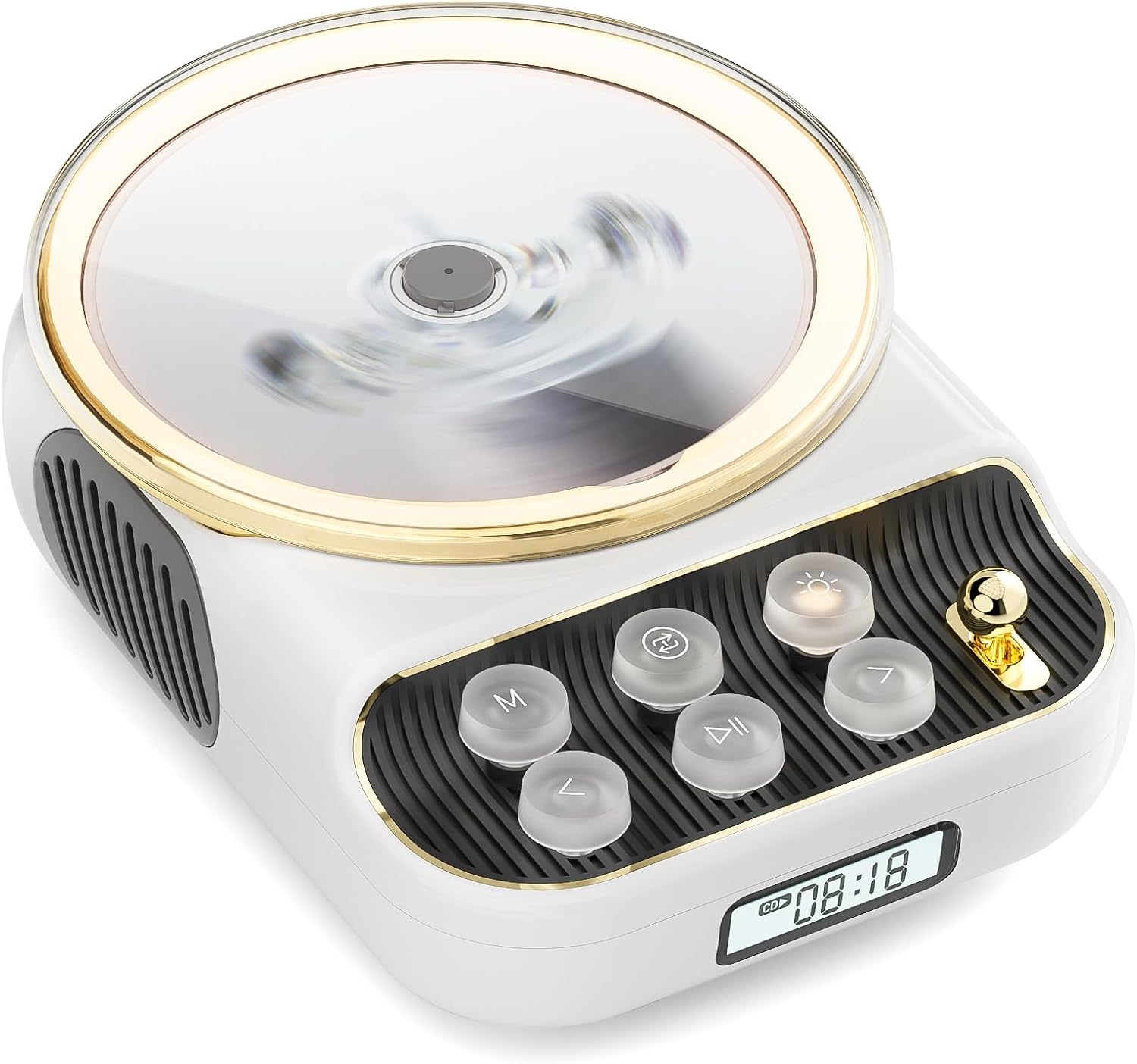
Фронт view of the COLSUR K8-WHITE Portable Bluetooth CD Player, showcasing its circular CD compartment, control buttons, and digital display.

This image illustrates the multifunctionality of the COLSUR K8-WHITE, highlighting its capabilities for CD playback, Bluetooth mode, FM radio, TF card speaker, 3.5mm audio jack, and night light function.
Контролни изглед

A detailed diagram showing the various buttons, ports, and features of the COLSUR K8-WHITE CD Player, including the CD cover, function buttons, display, Type-C charging port, TF card interface, and speaker.
- Преграда за CD-ове: За уметање аудио ЦД-ова.
- Приказ: Shows current mode, track number, time, or FM frequency.
- Функционална дугмад: (M) Mode, (Loop) Repeat, (Light) Light/Bluetooth Transmit, (Play/Pause), (Previous/Volume Down), (Next/Volume Up).
- Дугме за јачину звука: Подешава јачину звука.
- Порт за пуњење типа Ц: For power input and charging the internal battery.
- Интерфејс ТФ картице: For playing music from a TF card.
- 3.5 мм аудио излаз: За повезивање слушалица или екстерних звучника.
5. Подешавање
5.1 Пуњење уређаја
The device has a built-in 4000mAh rechargeable Lithium-ion battery. Before first use, fully charge the device.
- Connect the provided Type-C charging cable to the Type-C port on the device.
- Connect the other end of the cable to a compatible USB power adapter (5V/2A recommended, not included).
- The charging indicator on the display will show charging status. It will turn off or change color when fully charged.
5.2 Укључивање/искључивање
To power on the device, press and hold the Power button (often integrated with Play/Pause or a dedicated button, refer to the control layout diagram). To power off, press and hold the Power button again.
5.3 Опције пласмана
The COLSUR K8-WHITE can be used as a tabletop device or mounted on a wall.
- Употреба стола: Place the device on a stable, flat surface. Ensure the non-slip feet are securely positioned.
- Монтажа на зид: Use the provided wall mount kit (if included) to securely attach the device to a wall. Follow the instructions provided with the wall mount kit for safe installation.
6. Упутство за употребу
6.1 Репродукција ЦД-а

The image shows the COLSUR K8-WHITE CD Player on a wooden table, playing a CD, and a separate image illustrating its use as a Bluetooth speaker connected to a smartphone.
The player supports CD, CD-R, CD-RW, MP3, and WMA formats.
- Отворите поклопац одељка за ЦД.
- Carefully place a CD onto the spindle, ensuring it is seated correctly.
- Затворите поклопац одељка за ЦД.
- Притисните тастер М (режим) button repeatedly until "CD" mode is displayed.
- Притисните тастер Пусти/Паузирај дугме за почетак репродукције.
- Користите Претходно/Стишавање звука и Следеће / Волуме Уп дугмад за прескакање нумера.
- Подесите јачину звука помоћу Волуме Квачица.
- Притисните тастер Лооп button to cycle through repeat modes (e.g., repeat one, repeat all, random).
6.2 Режим Блуетоотх пријемника
Connect your smartphone, tablet, or other Bluetooth-enabled devices to stream audio wirelessly. The device features Bluetooth version 5.3 for stable connection.
- Притисните тастер М (режим) button repeatedly until "BT" (Bluetooth) mode is displayed. The device will enter pairing mode, indicated by a flashing Bluetooth icon or specific sound.
- On your external device, enable Bluetooth and search for available devices.
- Select "COLSUR K8-WHITE" (or similar name) from the list to pair.
- Once paired, you can play music from your external device, and the audio will output through the CD player's speakers.
6.3 Режим ФМ радија

The COLSUR K8-WHITE CD Player is shown on a desk, with its display showing an FM radio frequency, indicating its radio function.
Enjoy your favorite radio stations with the built-in FM tuner (frequency range: 76 MHz to 108 MHz).
- Притисните тастер М (режим) button repeatedly until "FM" mode is displayed.
- Притисните и држите Пусти/Паузирај button to initiate an automatic scan for FM stations. The device will save found stations.
- Користите Претходно/Стишавање звука и Следеће / Волуме Уп дугмад за навигацију кроз сачуване станице.
- Подесите јачину звука помоћу Волуме Квачица.
6.4 Репродукција са ТФ картице
Пусти музику files directly from a TF (MicroSD) card.
- Insert a TF card (with MP3/WMA fileс) у слот за ТФ картицу.
- Притисните тастер М (режим) button repeatedly until "TF" mode is displayed. The device should automatically start playing music from the card.
- Користите Претходно/Стишавање звука и Следеће / Волуме Уп дугмад за прескакање нумера.
- Подесите јачину звука помоћу Волуме Квачица.
6.5 АУКС улаз
Connect external audio devices (e.g., MP3 players, older phones) via the 3.5mm AUX jack.
- Connect one end of a 3.5mm audio cable (not included) to the AUX port on the CD player.
- Connect the other end to the audio output of your external device.
- Притисните тастер М (режим) button repeatedly until "AUX" mode is displayed.
- Control playback from your external device. Adjust volume using the Волуме Квачица on the CD player.
6.6 Излаз за слушалице
For private listening, connect headphones to the 3.5mm audio output jack.
- Plug your headphones into the 3.5mm audio output jack.
- The internal speakers will automatically mute.
- Подесите јачину звука помоћу Волуме Квачица.
6.7 Табела Лamp Function and Bluetooth Transmission

The COLSUR K8-WHITE CD Player is shown on a bedside table, emitting a soft glow, functioning as a night light while a person sleeps in the background.
The device includes a table lamp with three brightness levels and a Bluetooth transmission mode.
- Short Press the Light Button:
- First press: Activates a warm light (low brightness).
- Second press: Activates a flashing light (medium brightness).
- Third press: Turns off the light. The lights will cycle through these states.
- Long Press the Light Button: Activates the device's Bluetooth transmission mode. In this mode, the CD player can transmit audio to wireless headphones or other Bluetooth speakers.
7. Одржавање
- Чишћење: Користите меку, суву крпу за чишћење спољашњости уређаја. Не користите течна средства за чишћење или абразивне материјале.
- ЦД Царе: Handle CDs by their edges. Clean CDs with a soft, lint-free cloth, wiping from the center outwards.
- Складиштење: Када се уређај не користи дуже време, чувајте га на хладном и сувом месту.
КСНУМКС. Решавање проблема
| Проблем | Могући узрок | Решење |
|---|---|---|
| Уређај се не укључује. | Батерија је празна. | Connect the device to a power source using the Type-C cable and charge it. |
| Нема звука из звучника. | Volume is too low or muted. Headphones are connected. Incorrect mode selected. | Increase volume. Disconnect headphones. Ensure correct mode (CD, BT, FM, TF, AUX) is selected. |
| CD се не репродукује или прескаче. | CD is dirty, scratched, or inserted incorrectly. CD format not supported. | Clean the CD. Ensure the CD is inserted correctly. Try a different CD. Verify CD format compatibility. |
| Блуетоотх упаривање није успело. | Device is not in pairing mode. External device Bluetooth is off or out of range. | Ensure the CD player is in Bluetooth mode and flashing. Move external device closer. Restart both devices. |
| Пријем ФМ радија је лош. | Weak signal. Interference. | Reposition the device. Extend any external antenna if available. Try scanning again. |
9. Спецификације
- Бренд: ЦОЛСУР
- Модел: K8-WHITE
- Боја: Бела
- Технологија повезивања: Bluetooth 5.3, AUX (3.5mm jack), Type-C (charging)
- Подржани медијски формати: Audio CD, CD-R, CD-RW, MP3, WMA (from CD or TF card)
- ФМ радио фреквенција: 76 MHz - 108 MHz
- батерија: 4000mAh литијум-јонска (пуњива)
- Посебне карактеристике: Built-in speaker, Table lamp with 3 brightness levels, TF card slot, Headphone output
- Компатибилни уређаји: Headphones, Bluetooth speakers, Amplifiers, Bluetooth audio receivers
10. Гаранција и подршка
For warranty information or technical support, please refer to the documentation included with your purchase or contact the retailer/manufacturer directly. Keep your proof of purchase for warranty claims.