
Увод
This manual provides detailed instructions for the setup, operation, and maintenance of your MASTER & DYNAMIC MH40 Over-Ear Wireless Headphones Gen II. Please read this manual thoroughly to ensure optimal performance and longevity of your device.

Image: MASTER & DYNAMIC MH40 Wireless Over-Ear Headphones banner, showcasing the product name and design.
Производ је завршенview
The MH40 Wireless Over-Ear Headphones Gen II are designed for superior audio quality and comfort. Key features include:
- Custom Titanium Drivers: Enhanced, precise sound with deep bass and clear treble.
- Продужено трајање батерије: До 30 сати играња са једним пуњењем.
- Могућност брзог пуњења: 6 hours of listening after just 15 minutes of charging.
- Блуетоотх КСНУМКС: Reliable wireless connectivity up to 30 meters (100 ft).
- Optional USB-C Audio: Digital audio support up to 24-bit/96kHz via USB-C to USB-C cable.
- Двоструки низ микрофона: Features proprietary wind noise reduction technology for clear calls.
- Премиум материјали: Constructed with lightweight anodized aluminum, coated canvas, and soft lambskin-leather for durability and comfort.
- Removable Magnetic Ear Pads: Offers superior noise isolation and ease of maintenance.

Слика: Фронт view of the MH40 Gen II headphones in Silver Metal / Tan Leather.

Слика: Крупни план view of the MH40 earcups and headband, highlighting the material and design.

Image: MH40 headphones shown in a folded position, demonstrating their portability.
Сетуп
1. Пуњење слушалица
Before initial use, fully charge your MH40 Gen II headphones. Connect the provided USB-C charging cable to the headphone's charging port and to a power source (e.g., computer USB port or USB wall adapter).
- A full charge provides up to 30 hours of listening time.
- For quick charging, 15 minutes of charge time yields approximately 6 hours of listening.

Image: MH40 headphones illustrating the "Boundless Battery" feature, emphasizing long battery life.

Image: Close-up of the power buttons on the MH40 headphones, showing the LED indicator.
2. Блуетоотх упаривање
- Уверите се да су слушалице напуњене и искључене.
- Притисните и држите дугме за напајање док индикаторска лампица не затрепери, што указује на режим упаривања.
- На свом уређају (паметном телефону, таблету, рачунару) идите на подешавања за Блутут.
- Select "MH40 Gen II" from the list of available devices.
- Once connected, the indicator light on the headphones will change to a steady color or turn off, depending on the model.
The MH40 Gen II uses Bluetooth 5.2 for a stable connection up to 30 meters (100 ft).
Упутство за употребу
Контроле
The MH40 Gen II headphones feature intuitive controls for managing audio playback and calls. Specific control functions may vary slightly but generally include:
- Дугме за напајање: On/Off, Pairing mode.
- Контроле јачине звука: Подесите ниво аудио излаза.
- Вишенаменско дугме: Репродукција/пауза, прескакање нумера, одговарање/прекидање позива.
- Дугме за утишавање: Located on the right side for quick microphone muting during calls.
For detailed control mapping, refer to the companion mobile application (if available) or the quick start guide included with your product.

Слика: Крупни план view of the controls on the MH40 headphones, showing buttons and ports.
Упућивање и примање позива
The dual microphone array with wind noise reduction ensures clear communication.
- Одговори/заврши позив: Притисните вишефункционално дугме.
- Одбиј позив: Притисните и држите вишефункционално дугме.
- Искључивање микрофона: Use the dedicated mute button during a call.
Жичана веза
For digital audio up to 24-bit/96kHz, connect the headphones to your device using a USB-C to USB-C cable. This bypasses Bluetooth and can be useful for high-fidelity audio or when battery is low.
Одржавање
Proper care will extend the life and maintain the performance of your MH40 Gen II headphones.
- Чишћење: Use a soft, dry cloth to clean the exterior surfaces. For leather parts, use a specialized leather cleaner if necessary. Avoid harsh chemicals or abrasive materials.
- Јастучићи за уши: The magnetic ear pads are removable for easy cleaning or replacement. Gently detach them and clean as needed. Ensure they are securely reattached.
- Складиштење: When not in use, store the headphones in a cool, dry place, away from direct sunlight and extreme temperatures. Use the provided carrying pouch to protect them from dust and scratches.
- Избегавајте влагу: Не излажите слушалице води или прекомерној влази.

Image: MH40 headphones with one ear pad removed, demonstrating the magnetic attachment for easy maintenance.
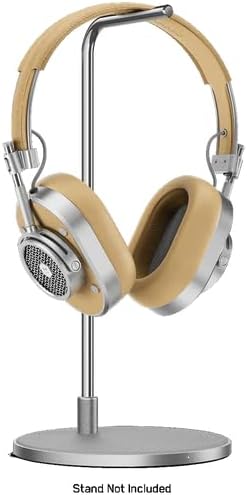
Image: MH40 headphones displayed on a stand, illustrating proper storage.
Решавање проблема
If you encounter issues with your MH40 Gen II headphones, refer to the following common solutions:
| Проблем | Решење |
|---|---|
| Слушалице се не укључују. | Уверите се да су слушалице потпуно напуњене. Прикључите их на извор напајања и проверите индикатор пуњења. |
| Није могуће упаривање преко Bluetooth-а. |
|
| Нема звука или лош квалитет звука. |
|
| Микрофон не ради током позива. |
|
Спецификације
| Феатуре | Детаљ |
|---|---|
| Назив модела | МХ40 |
| Технологија повезивања | Бежично (Блутут), Жично (УСБ-Ц) |
| Бежична комуникациона технологија | Блуетоотх 5.2 |
| Блуетоотх домет | 30 метара (100 стопа) |
| Укључене компоненте | Headphones, USB-C Charging Cable, USB-C to USB-C Audio Cable (specific cables may vary by package) |
| Материјал | Aluminum, Leather, Canvas |
| Контролни метод | App, On-ear controls |
| Трајање батерије | До 30 сати |
| Облик слушалице | Преко уха |
| Контрола буке | Звучна изолација |
| Тежина артикла | 2.38 фунти |
| Произвођач | MASTER & DYNAMIC |
| УПЦ | 850060736537 |
Гаранција и подршка
MASTER & DYNAMIC products are engineered to last and are covered by a limited warranty. For specific warranty terms and conditions, please refer to the warranty card included with your product or visit the official MASTER & DYNAMIC webсајту.
For technical support, product inquiries, or warranty claims, please contact MASTER & DYNAMIC customer service through their official channels. You can often find support information on the manufacturer's webсајту или позивањем на контакт податке наведене на паковању вашег производа.
Произвођач: MASTER & DYNAMIC
За даљу помоћ, посетите MASTER & DYNAMIC Store on Amazon.