
Увод
This manual provides comprehensive instructions for the setup, operation, maintenance, and troubleshooting of your MASTER & DYNAMIC MH40 Wireless Over-Ear Headphones Gen II. Please read this manual carefully to ensure proper use and to maximize your listening experience.
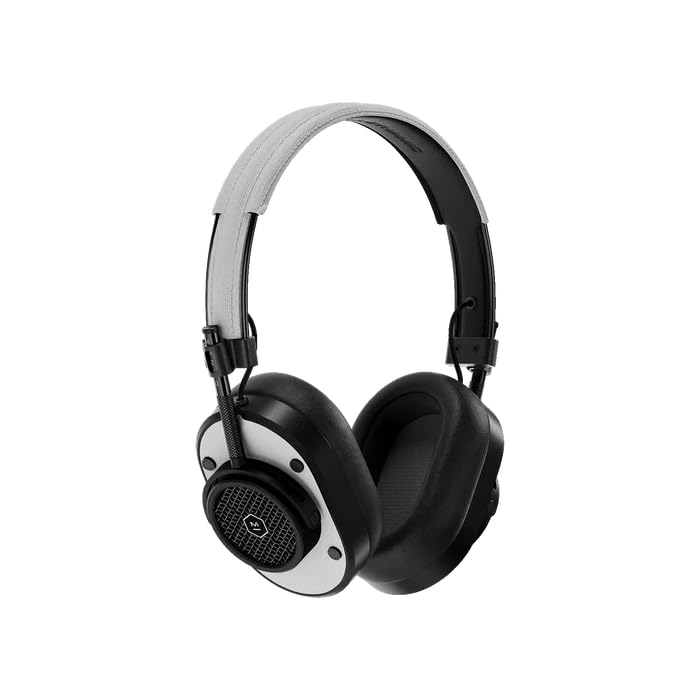
Фронт view of the MH40 Wireless Over-Ear Headphones, showcasing the black metal frame and white leather earcups and headband.
Шта је у кутији
- MASTER & DYNAMIC MH40 Wireless Over-Ear Headphones Gen II
- УСБ-Ц кабл за пуњење
- УСБ-Ц до 3.5 мм аудио кабл
- Торбица за ношење
- Упутство за употребу (овај документ)
Производ је завршенview
The MH40 Gen II headphones feature a timeless design with premium materials for durability and comfort. Key components include custom titanium drivers for enhanced sound, removable magnetic ear pads for superior noise isolation, and a lightweight anodized aluminum frame.
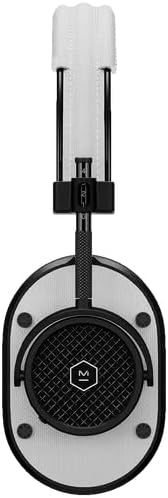
Крупни план view of the MH40 headphones, highlighting the detailed earcup design and the adjustable headband.

Детаљно view of the MH40's removable magnetic ear pads, showing the internal speaker grille and the 'Designed & Developed' inscription.

A close-up shot of the earcup, highlighting the control buttons and the metal mesh design.
Сетуп
1. Пуњење слушалица
Before first use, fully charge your MH40 Gen II headphones. Connect the USB-C charging cable to the headphone's charging port and to a USB power source. The LED indicator will show charging status. A full charge provides up to 30 hours of listening time. A quick 15-minute charge provides approximately 6 hours of listening.
2. Блуетоотх упаривање
- Уверите се да су слушалице искључене.
- Press and hold the power button until the LED indicator flashes blue, indicating pairing mode.
- На свом уређају (паметном телефону, таблету, рачунару) омогућите Блутут и потражите доступне уређаје.
- Select "MH40 Gen II" from the list of devices.
- Once connected, the LED indicator will turn solid white.
The MH40 Gen II uses Bluetooth 5.2 for a stable connection up to 30 meters (100 feet).
3. Жична веза (опционо)
For a wired audio experience, connect the provided USB-C to 3.5mm audio cable to the headphone's USB-C port and to your audio source's 3.5mm jack. Digital audio up to 24-bit/96kHz is supported via USB-C to USB-C connection (cable sold separately).
Оперативни
Укључивање/искључивање
- Укључено: Притисните и држите дугме за напајање док се ЛЕД индикатор не упали.
- Искључивање: Притисните и држите дугме за напајање док се ЛЕД индикатор не искључи.
Репродукција музике
- Пусти/паузирај: Притисните вишенаменско дугме једном.
- Следећа нумера: Press the multi-function button twice.
- Претходни запис: Press the multi-function button three times.
- Појачавање звука: Притисните дугме „+“.
- Смањивање јачине звука: Притисните дугме '-'.
Телефонски позиви
The MH40 Gen II features a dual microphone array with wind noise reduction technology for clear calls.
- Одговори/заврши позив: Притисните вишенаменско дугме једном.
- Одбиј позив: Притисните и држите вишефункционално дугме.
Одржавање
Чишћење
- Обришите слушалице меком, сувом крпом.
- Немојте користити јаке хемикалије или абразивне материјале.
- The magnetic ear pads can be removed for separate cleaning if necessary.
Складиштење
- Store the headphones in the provided carrying pouch when not in use to protect them from dust and scratches.
- Избегавајте излагање слушалица екстремним температурама или влази.
Решавање проблема
| Проблем | Решење |
|---|---|
| Слушалице се не укључују | Уверите се да су слушалице напуњене. Повежите их са извором напајања помоћу USB-C кабла. |
| Нема звука | Check if the headphones are paired correctly. Increase volume on both the headphones and the connected device. Ensure the audio source is playing. |
| Не могу да упарим преко Bluetooth-а | Ensure headphones are in pairing mode (flashing blue LED). Turn off and on Bluetooth on your device. Move closer to the device. Forget the device in your Bluetooth settings and try pairing again. |
| Лош квалитет звука | Ensure the headphones are within Bluetooth range. Check for interference from other wireless devices. For wired connection, ensure the cable is fully inserted. |
Спецификације
| Феатуре | Детаљ |
|---|---|
| Бранд | MASTER & DYNAMIC |
| Назив модела | МХ40 |
| Постављање уха | Преко уха |
| Контрола буке | Звучна изолација |
| Технологија повезивања | бежични (Блуетоотх) |
| Бежична технологија | Блуетоотх |
| Блуетоотх верзија | 5.2 |
| Блуетоотх домет | 30 метара (100 стопа) |
| Тип аудио драјвера | Custom Titanium Drivers |
| Просечан век трајања батерије | 30 сата |
| Време пуњења батерије | 15 минута за 6 сати репродукције |
| Контролни метод | Апликација, дугмад на уређају |
| Материјал кућишта | Aluminum, Leather, Canvas |
| Фреквенцијски опсег | 20Хз - 20,000Хз |
| Додатне карактеристике | Wind Noise Reduction Microphones |
| Компатибилни уређаји | Laptops, Desktops, Tablets, Telephones, Smart Speaker, Television, Gaming Consoles |
Информације о гаранцији
MASTER & DYNAMIC products are designed and built to last. Your MH40 Wireless Over-Ear Headphones Gen II are covered by a manufacturer's limited warranty against defects in materials and workmanship. For specific warranty terms, conditions, and registration, please refer to the warranty card included with your product or visit the official MASTER & DYNAMIC webсајту.
Подршка
If you encounter any issues not covered in this manual or require further assistance, please visit the official MASTER & DYNAMIC support website for FAQs, additional resources, and contact information for customer service. You can typically find support details at www.masterdynamic.com/support.