
Увод
This manual provides essential information for the proper installation, operation, and maintenance of your FUDTYSVC Robot Vacuum Cleaner Dust Box. This replacement part is designed to ensure continued optimal performance of your robot vacuum cleaner.
Компатибилност: This dust box is specifically designed for EU-Reka NER J12 Ultra and Mid-ea V12 Robot Vacuum Cleaners.
Садржај пакета
- 1 x Robot Vacuum Cleaner Dust Box
Note: No other accessories or tools are included unless explicitly stated.
Подешавање и инсталација
Follow these steps to correctly install the replacement dust box into your robot vacuum cleaner.
- Искључивање: Ensure your robot vacuum cleaner is powered off and unplugged from its charging base before beginning installation.
- Remove Old Dust Box: Locate the existing dust box on your robot vacuum cleaner. Typically, there is a release button or latch. Press or pull this mechanism to carefully remove the old dust box.
- Inspect New Dust Box: Before installation, inspect the new FUDTYSVC dust box for any visible damage. Ensure all seals and filters (if pre-installed) are correctly seated.
- Insert New Dust Box: Align the new dust box with the designated slot in your robot vacuum cleaner. Gently push it into place until you hear a click, indicating it is securely latched.
- Проверите инсталацију: Lightly tug on the dust box to confirm it is firmly in position and does not easily dislodge.
- Укључено: You may now power on your robot vacuum cleaner.

Слика 1: Врх view of the FUDTYSVC Robot Vacuum Cleaner Dust Box, showing the clear lid and internal filter compartment. This view helps in identifying the correct orientation for insertion.
Упутство за употребу
Once installed, the dust box operates as an integral part of your robot vacuum cleaner. Its primary function is to collect dust and debris during cleaning cycles.
- Редовна употреба: The dust box will automatically collect debris as your robot vacuum cleaner performs its cleaning tasks.
- Надгледање: Some robot vacuum models may provide notifications when the dust box is full. Refer to your robot vacuum cleaner's main manual for specific alerts.
Одржавање и чишћење
Regular cleaning of the dust box is crucial for maintaining the suction power and efficiency of your robot vacuum cleaner.
- Remove Dust Box: Power off the robot vacuum cleaner. Press the release button and carefully remove the dust box.
- Празан отпад: Open the dust box lid (refer to Image 2 for typical opening mechanism) and empty all collected dust and debris into a waste bin.
- Очисти филтер: If your dust box includes a removable filter, gently tap it to dislodge dust. For washable filters, rinse under cool running water until clean. Ensure the filter is completely dry before reinserting.
- Rinse Dust Box: The dust box itself can often be rinsed with water. Ensure it is thoroughly dried before reinstallation to prevent mold or damage to the vacuum cleaner.
- Поново саставите и поново инсталирајте: Once all components are clean and dry, reassemble the filter (if removed) and reinstall the dust box into the robot vacuum cleaner.

Слика 2: Доња страна view of the FUDTYSVC Robot Vacuum Cleaner Dust Box, highlighting the latch mechanism for opening and emptying the collected debris.
Решавање проблема
If you encounter issues after installing the new dust box, consider the following:
- Dust Box Not Fitting:
- Ensure the dust box is correctly aligned with the vacuum cleaner's slot.
- Verify that your robot vacuum cleaner model (EU-Reka NER J12 Ultra or Mid-ea V12) is compatible with this replacement part.
- Check for any obstructions in the vacuum cleaner's dust box compartment.
- Смањена усисна снага:
- The dust box may be full and needs emptying.
- The filter inside the dust box might be clogged and requires cleaning or replacement.
- Ensure the dust box is securely latched, as a loose connection can cause suction loss.
- Необични звуци:
- Confirm the dust box is properly seated and latched.
- Check for any foreign objects trapped within the dust box or its entry point.
Спецификације
| Феатуре | Детаљ |
|---|---|
| Бранд | FUDTYSVC |
| Назив модела | daishengbaihuo524gs |
| Компатибилни модели | EU-Reka NER J12 Ultra, Mid-ea V12 Robot Vacuum Cleaners |
| Димензије пакета | 1.18 к 0.79 к 0.39 инча |
| Тежина артикла | 1.76 унци (50 грама) |
| Боја | One Color (Transparent/Grey) |
| Материјал | High-quality materials (as per manufacturer) |
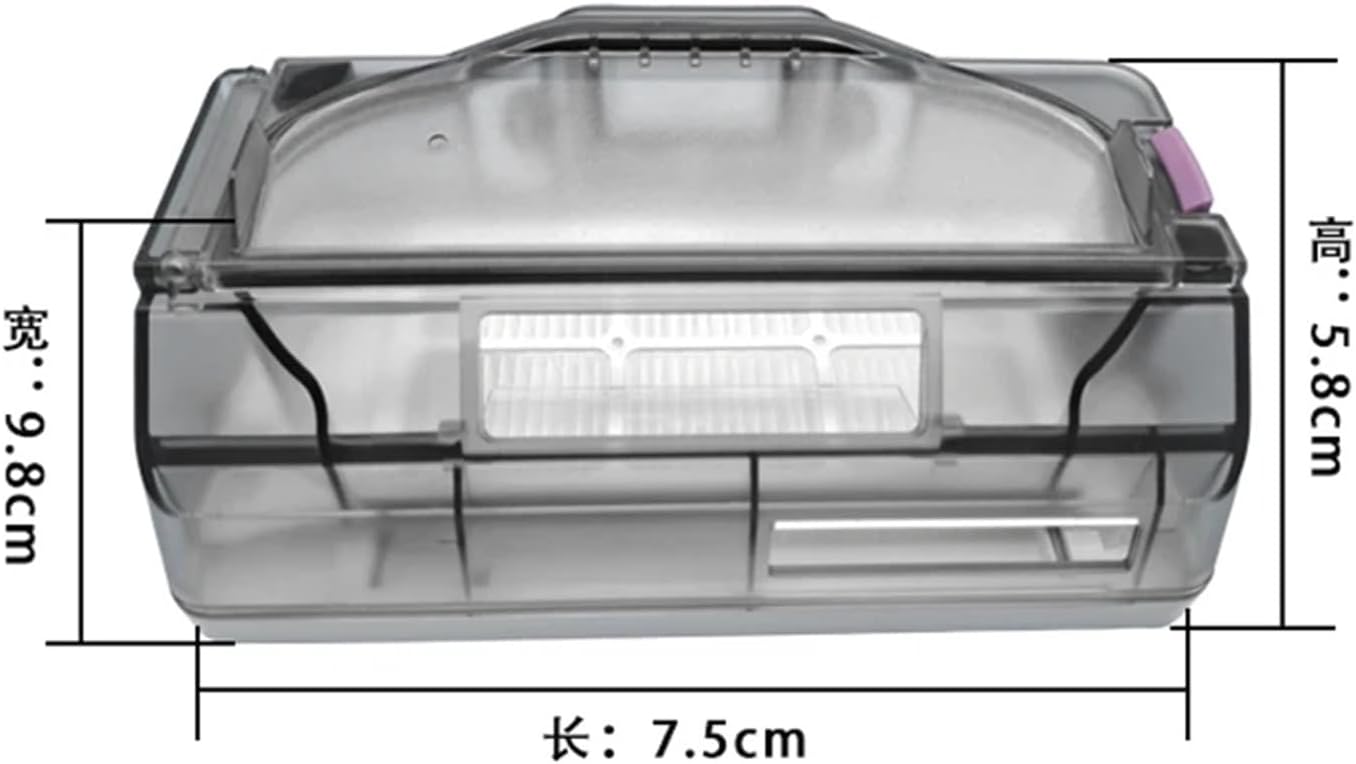
Image 3: Diagram showing the approximate dimensions of the dust box: Length 7.5cm, Width 9.8cm, Height 5.8cm. These measurements are crucial for verifying compatibility.
Гаранција и подршка
This product is a replacement part. For specific warranty information regarding the dust box itself, please refer to the policies of the seller or contact FUDTYSVC directly. For issues related to the robot vacuum cleaner's overall performance, please consult its original manufacturer's manual or support channels.
For further assistance or inquiries about this FUDTYSVC replacement dust box, please contact the seller through the platform where the purchase was made.