
1. Увод
This manual provides detailed instructions for the installation, operation, and maintenance of your EDISION CAM-100 Broadband TV Antenna Amplifier. The CAM-100 is designed to enhance Digital Terrestrial Television (DVB-T/T2) signals, featuring adjustable gain and integrated 5G LTE protection to ensure optimal reception quality.
2. Безбедносна упутства
Please read these safety instructions carefully before installing or operating the device. Failure to follow these instructions may result in electric shock, fire, or damage to the product.
- Уверите се да је напајање волtagе одговара захтевима наведеним на уређају.
- Не излажите уређај киши, влази или екстремним температурама.
- Избегавајте постављање уређаја у близини извора топлоте или на директном сунцу.
- Не отварајте уређај цasinг. Сва сервисирања препустите квалификованом особљу.
- Disconnect the power supply before making any connections or disconnections.
3. Садржај пакета
Проверите да ли су све ставке присутне у пакету:
- EDISION CAM-100 TV Antenna Ampлифиер
- Водич за брзи почетак
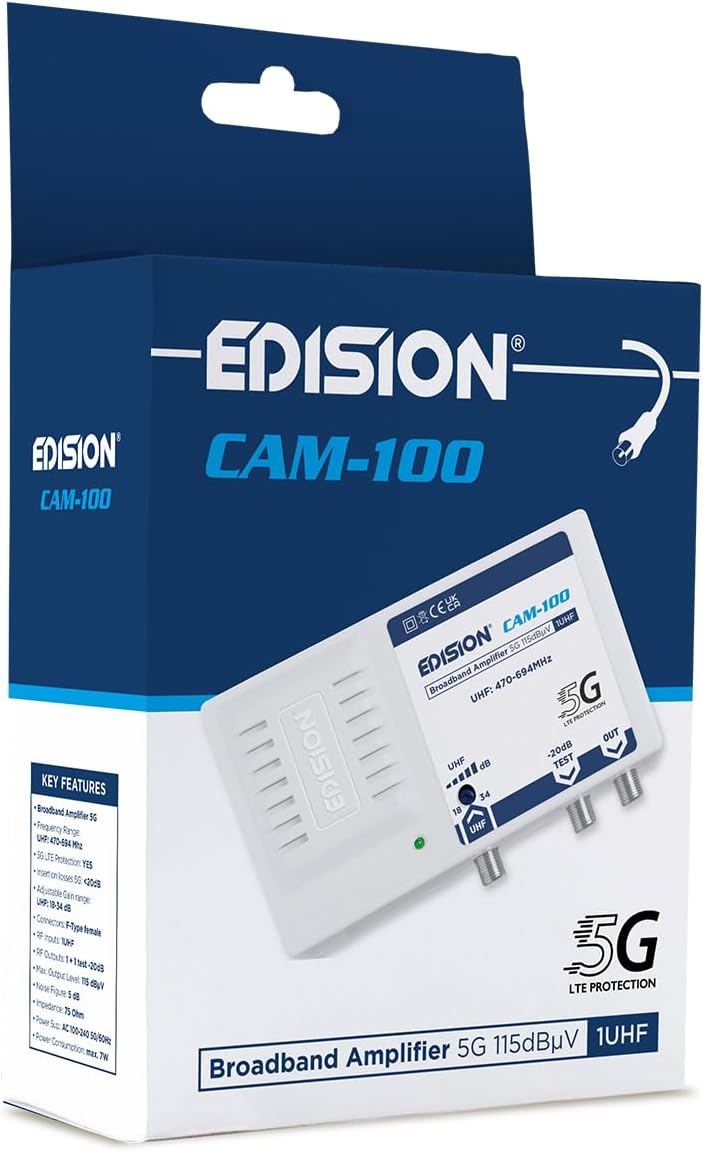
The EDISION CAM-100 amplifier presented in its retail box, showcasing the product branding and key features listed on the packaging.
4. Производ је готовview
The EDISION CAM-100 is a compact broadband amplifier designed for UHF signals. It features adjustable gain and a built-in 5G LTE filter.

The EDISION CAM-100 broadband amplifier, shown with its power plug, features a single UHF input, adjustable gain from 18-34dB, and two output ports (one main, one -20dB test port). It includes 5G LTE protection and operates within the UHF 470-694MHz frequency range.

Крупни план напред view of the EDISION CAM-100, clearly displaying the UHF input, the adjustable gain knob, the -20dB test output, and the main output port. The 5G LTE PROTECTION label is also visible.

The rear side of the EDISION CAM-100 amplifier, featuring keyhole slots for wall mounting, indicating easy installation.
5. Подешавање и инсталација
Follow these steps to properly install your EDISION CAM-100 ampдизалица:
- Монтажа: Choose a suitable indoor location for the amplifier, away from direct heat or moisture. Use the keyhole slots on the back of the unit to securely mount it to a wall or flat surface.
- Антенска веза: Connect your outdoor UHF antenna cable to the UHF IN лука на amplifier. Ensure the connection is secure.
- TV Connections: Connect your television(s) to the ОУТ port(s) of the amplifier using coaxial cables. The main output provides the amplified signal. There is also a -20dB TEST port for signal measurement or connecting a single device with reduced signal.
- Прикључак за напајање: Прикључите amplifier's power cord into a standard AC 100-240V, 50/60Hz electrical outlet. The power indicator LED on the front of the unit should illuminate.
- Подесите појачање: Turn the adjustable gain knob (labeled UHF dB) to set the desired amplification level. Start with a lower setting and gradually increase it until optimal signal quality is achieved on your television.

An illustrative diagram demonstrating a typical installation scenario for the EDISION CAM-100. It shows an outdoor UHF antenna connected to the amplifier, which then distributes the signal to multiple televisions indoors, including connections for a test point.
6. Упутство за употребу
Once installed, the EDISION CAM-100 operates continuously when powered. The primary operational adjustment is the gain control.
- Индикатор напајања: A green LED on the front panel indicates that the amplifier is receiving power and is operational.
- Подешавање појачања: Use the rotary knob to adjust the UHF signal gain between 18dB and 34dB. Adjust this setting while monitoring your TV's signal quality meter (if available) or picture quality. The goal is to achieve a strong, stable signal without over-amplification, which can cause distortion.
- Test Output: The -20dB TEST output provides a reduced signal level, useful for connecting a single TV or for signal strength measurements without affecting the main output.
7. Одржавање
The EDISION CAM-100 requires minimal maintenance to ensure long-term performance.
- Чишћење: Periodically wipe the exterior of the unit with a soft, dry cloth. Do not use liquid cleaners or abrasive materials.
- вентилација: Ensure that the ventilation slots on the device are not obstructed to prevent overheating.
- Везе: Повремено проверите све кабловске спојеве како бисте били сигурни да су безбедни и да немају корозије.
КСНУМКС. Решавање проблема
If you experience issues with your EDISION CAM-100, refer to the following common problems and solutions:
| Проблем | Могући узрок | Решење |
|---|---|---|
| Нема лампице индикатора напајања | Нема напајања за јединицу | Check power cord connection and wall outlet. Ensure the outlet is live. |
| No signal or weak signal on TV |
|
|
| Distorted picture or sound | Signal over-amplification or interference | Reduce the gain setting. Ensure the 5G LTE filter is effective; if interference persists, check for external sources. |
9. Техничке спецификације
| Феатуре | Спецификација |
|---|---|
| Модел | CAM-100 (26-01-0403) |
| Фреквенцијски опсег | УХФ 470-694 МХз |
| Инпут | 1 УХФ |
| Излази | 1 Main Output, 1 Test Output (-20dB) |
| Подесиво појачање | 18-34 dB (UHF) |
| Макс. Излазни ниво | 115 дБµВ |
| Филтер | 5Г ЛТЕ заштита |
| Повер Суппли | АЦ 100-240В, 50/60Хз |
| Димензије | 11 к 14 к 5 цм |
| Тежина | 270 г |
| Компатибилни уређаји | TV antenna, Televisions |
10. Информације о гаранцији
EDISION products are covered by a standard manufacturer's warranty against defects in materials and workmanship. Please refer to the warranty card included with your product or visit the official Edision webсајт за детаљне услове гаранције. Сачувајте доказ о куповини за потребе подношења захтева за гаранцију.
11. Подршка
За додатну помоћ, техничку подршку или view additional products, please visit the official Edision store or contact customer service:
- Edision Store: Visit the Edision Store on Amazon
- Служба за кориснике: Refer to the contact information provided in your Quick Start Guide or on the official Edision webсајту.