
1. Увод
This instruction manual provides essential information for the safe and efficient use of your ApoloSign 32-inch UHD 4K Smart Portable TV Gen2. Please read this manual thoroughly before operating the device and retain it for future reference. This portable smart TV combines a high-resolution display with smart features, offering versatile entertainment and productivity options throughout your home.

Image: The ApoloSign 32-inch Portable TV Gen2 positioned in a modern living room, showcasing its sleek design and portability.
2. Безбедносне информације
Опште мере предострожности
- Не излажите уређај киши или влази како бисте спречили пожар или струјни удар.
- Обезбедите одговарајућу вентилацију. Не блокирајте вентилационе отворе.
- Користите само адаптер за напајање који сте добили уз уређај.
- Avoid placing the device on unstable surfaces.
- Не покушавајте сами да растављате или поправљате уређај. Све сервисирање препустите квалификованом особљу.
Баттери Сафети
- The device contains a built-in 15000mAh lithium-ion battery. Do not expose it to excessive heat, direct sunlight, or fire.
- Пре прве употребе напуните батерију до краја.
- If the battery shows signs of swelling, leakage, or damage, discontinue use immediately and contact support.
- Батерије одложите у складу са локалним прописима.
3. Садржај пакета
Проверите да ли су све ставке присутне у пакету:
- ApoloSign 32-inch UHD 4K Smart Portable TV Gen2 Display
- Rolling Stand Base
- Stand Pole (multiple sections)
- Повер Адаптер
- Гласовни даљински управљач
- 8MP Camera Module
- Assembly Screws and Tools
- Кориснички приручник (овај документ)

Image: The voice remote control, a key accessory for navigating the ApoloSign TV.

Image: The detachable 8MP camera module, designed for video calls and other interactive features.
4. Производ је готовview
The ApoloSign 32-inch UHD 4K Smart Portable TV Gen2 is a versatile device designed for flexible use across various environments. Its main components include:
- 32-inch UHD 4K Touchscreen: A large, high-resolution display with touch functionality for intuitive interaction.
- Rolling Stand: A sturdy base with smooth wheels for easy movement between rooms.
- Adjustable Screen Mount: Allows for height adjustment, left/right swivel, and tilt for optimal viewing angles in both portrait and landscape orientations.
- Интегрисана камера од 8 МП: For video conferencing and other camera-enabled applications.
- Даљинско управљање гласом: Enables hands-free operation and navigation.
- Уграђена батерија од 15000 mAh: Provides up to 8 hours of portable use.
- Портови за повезивање: Includes HDMI, USB 2.0, USB 3.0, Bluetooth 5.3, and Wi-Fi for various connections.
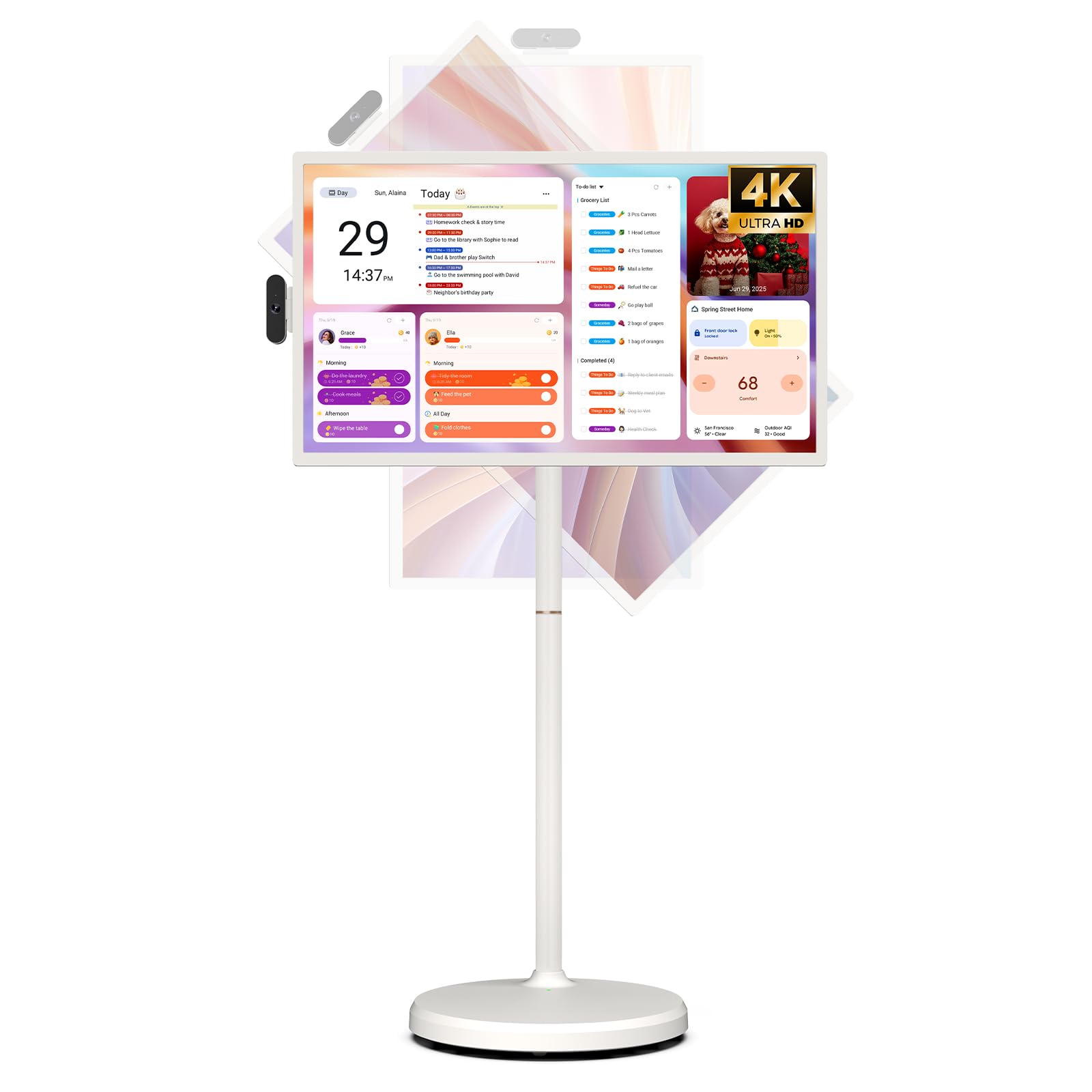
Image: The ApoloSign 32-inch UHD 4K Smart Portable TV Gen2, highlighting its large screen and mobile stand.
5. Подешавање
Скупштина
- Распакујте све компоненте из кутије.
- Attach the stand pole sections to the rolling base using the provided screws.
- Carefully mount the TV display onto the top of the assembled stand pole, ensuring it clicks securely into place.
- Connect the internal power cable from the stand to the display.
- Attach the 8MP camera module to the designated slot on top of the display.
Прво укључивање и мрежно повезивање
- Connect the power adapter to the TV and a power outlet. The device will begin charging.
- Press the power button located on the back of the display to turn on the TV.
- Пратите упутства на екрану да бисте изабрали језик и регион.
- Повежите се са својом Ви-Фи мрежом тако што ћете је изабрати са листе и унети лозинку.
- Sign in with your Google account to access the Google Play Store and other services.
Упаривање даљинског управљача
- Insert batteries into the voice remote control.
- On the TV screen, navigate to Settings > Remotes & Accessories > Add Accessory.
- Press and hold the specified pairing buttons on the remote (refer to remote's mini-guide) until the indicator light blinks.
- Select the remote control from the list on the TV screen to complete pairing.
6. Упутство за употребу
Основна навигација
- екран осетљив на додир: Tap, swipe, and pinch to navigate menus, open apps, and interact with content.
- Гласовни даљински: Use the directional pad and selection buttons for menu navigation. Press the voice button to activate voice commands for searching or launching apps.
Screen Rotation and Adjustment
The screen can be rotated 90 degrees between landscape and portrait modes. It also allows for height adjustment, left/right swivel, and tilting to achieve the desired viewугао уласка.

Image: Illustrations demonstrating the various ways the ApoloSign TV screen can be adjusted: height, tilt, and rotation.
Apps and Google Play Store
Running on a customized Android 15 OS and Google certified, you can download and install any app available on the Google Play Store. Access streaming services, social media, productivity tools, and games.

Image: The ApoloSign TV screen showing the Android 15 interface with icons for popular apps like Netflix, YouTube, Spotify, and TikTok.
Wireless and Wired Casting
Share content from your mobile phone, tablet, or laptop to the TV screen.
- Бежично ливење: Use the built-in MixCast feature or other compatible casting protocols. Ensure your device and the TV are on the same Wi-Fi network.
- Wired Casting: Connect external devices like gaming consoles or laptops via the HDMI port. The TV supports 4K HDMI output.
Video: A demonstration of how to screen mirror a mobile phone, tablet, or laptop to the ApoloSign Smart Portable TV.
Calendar Widget and Screensavers
The interactive desktop calendar widget syncs with Google Calendar, Outlook, and Google Tasks to help manage your schedule. Utilize dynamic screensavers to transform the TV into a digital clock, photo frame, or market billboard.

Image: The ApoloSign TV screen showcasing its digital calendar feature, displaying daily schedules and events.

Image: The ApoloSign TV screen demonstrating different digital screensaver options, including a photo display and a music player interface.
Употреба камере
The integrated 8MP camera is ideal for video calls and conferences. Ensure the camera is correctly installed and facing the desired direction.
7. Одржавање
Чишћење
- Увек искључите уређај пре чишћења.
- Користите меку крпу која не оставља длачицеampОпрати водом или средством за чишћење екрана да бисте обрисали екран. Избегавајте јаке хемикалије.
- Wipe the body of the TV and stand with a dry, soft cloth.
Баттери Царе
- За оптималан век трајања батерије, избегавајте често потпуно пражњење батерије.
- Чувајте уређај на хладном и сувом месту када се не користи дуже време.
- Charge the battery periodically if stored for a long time to prevent deep discharge.
Ажурирања софтвера
Regularly check for and install software updates to ensure optimal performance and access to the latest features. Updates can usually be found in the device's settings menu.
КСНУМКС. Решавање проблема
- Device not powering on or shutting off abruptly:
Ensure the power adapter is securely connected and the battery is charged. If the issue persists, perform a soft reset by holding the power button for 10-15 seconds. If problems continue, contact customer support. - Remote control not responding or selective functionality:
Check the remote's batteries and replace if necessary. Ensure the remote is paired correctly (refer to Section 5). If the remote is still unresponsive, try re-pairing it. - Проблеми са Wi-Fi повезивањем:
Verify that your Wi-Fi router is working correctly. Restart the TV and your router. Ensure the TV is within range of your Wi-Fi signal. - Огледало екрана не ради:
Confirm that both the TV and the source device (phone, tablet, laptop) are connected to the same Wi-Fi network. Ensure the casting feature is activated on both devices. - Poor picture or sound quality:
For streaming content, check your internet connection speed. For wired connections (HDMI), ensure cables are securely connected and undamaged. Adjust display settings (resolution, brightness) as needed.
9. Спецификације
| Феатуре | Детаљ |
|---|---|
| Назив модела | SW3299T-4K |
| Величина екрана | 32 инча |
| Резолуција | 4K UHD 2160p (3840x2160 Pixels) |
| Дисплаи Тецхнологи | ЛЦД |
| Рефресх Рате | 60 Хз |
| Оперативни систем | Андроид 15 |
| РАМ | 16 ГБ (8+8 ГБ) |
| Интерна меморија | 256ГБ |
| Капацитет батерије | 15000mAh (up to 8 hours runtime) |
| Камера | 8МП |
| Повезивање | Блуетоотх 5.3, Ви-Фи |
| Портс | 1x HDMI, 1x USB 2.0, 1x USB 3.0 |
| Опис звучника | 2.1-канални звучници |
| Контролни метод | Touch, Voice Remote |
| Димензије производа | 16.14"Д к 28.87"Ш к 60.26"В |
10. Гаранција и подршка
Гаранција произвођача
This ApoloSign product is covered by a 1 године гаранције произвођача од датума куповине. Ова гаранција покрива недостатке у материјалу и изради при нормалној употреби. Молимо вас да сачувате доказ о куповини за потребе подношења захтева за гаранцију.
Корисничка подршка
For technical assistance, troubleshooting, or warranty inquiries, please contact ApoloSign Official customer support. They offer 24/7 fast support to address any issues you may encounter.
За више информација посетите ApoloSign Store on Amazon.