
SEMIER SM-136
SEMIER SM-136 Cassette Player & Digital Converter User Manual
Модел: СМ-136
Увод
Хвала вам на куповиниasing the SEMIER SM-136 Cassette Player & Digital Converter. This versatile device allows you to play and record audio cassettes, play music from an SD card, and convert your cherished cassette tapes into digital MP3 files, either directly to an SD card or to your computer using the included software. Please read this manual carefully to ensure proper operation and to maximize your enjoyment of this product.
Шта је у кутији
- Cassette Recorder Converter x 1
- 16GB SD картица x 1
- USB Reader x 1
- Software CD-ROM x 1
- Упутство за употребу к 1
- Type-C Charging and Data Cable x 1

Image: All items included in the product package.
Сетуп
Напајање уређаја
The SEMIER SM-136 can be powered by two methods:
- УСБ-Ц кабл: Connect the included USB-C cable to the device's USB-C port and the other end to a USB power adapter (not included) or a computer's USB port.
- АА батерије: Open the battery compartment on the back of the device and insert four (4) AA batteries (not included), ensuring correct polarity.
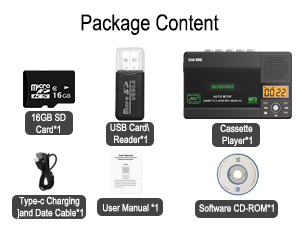
Image: Illustration of inserting AA batteries into the device.
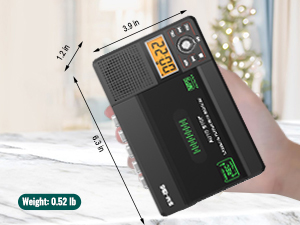
Image: Connecting the USB-C power cable to the device.
Уметање касете
Gently open the cassette compartment door. Insert your cassette tape with the open edge facing upwards and the tape side facing the device. Close the door firmly until it clicks.

Image: Proper insertion of a cassette tape into the player.
Уметање СД картице
Locate the SD card slot on the side of the device. Insert the included 16GB SD card (or another compatible SD card, up to 32GB) into the slot until it clicks into place. Ensure the card is inserted in the correct orientation.

Image: Proper insertion of an SD card into the device's dedicated slot.
Упутство за употребу
Playing Cassette Tapes
- Ensure a cassette tape is inserted.
- Slide the "TAPE/OFF/Micro SD" switch to the "TAPE" position.
- Притисните тастер ПЛАИ дугме (►) за почетак репродукције.
- Подесите јачину звука помоћу ВОЛ дугме.
- Да бисте зауставили репродукцију, притисните СТОП дугме (■).
- Користите ФВД (►►) и РЕВ (◄◄) buttons for fast-forward and rewind.
Playing Music from SD Card
- Ensure an SD card with MP3 fileУбацује се слово с.
- Slide the "TAPE/OFF/Micro SD" switch to the "Micro SD" position. The LCD display will show "SD" and the current track time.
- Притисните тастер ПЛАИ/ПАУСЕ дугме (►⏺) да бисте покренули или паузирали репродукцију.
- Користите ПРЕВ (◄◄) и НЕКСТ (►►) дугмад за навигацију између нумера.
- Притисните тастер РЕП button to repeat the current track or all tracks.
- Притисните тастер ДЕЛ button to delete the current track.
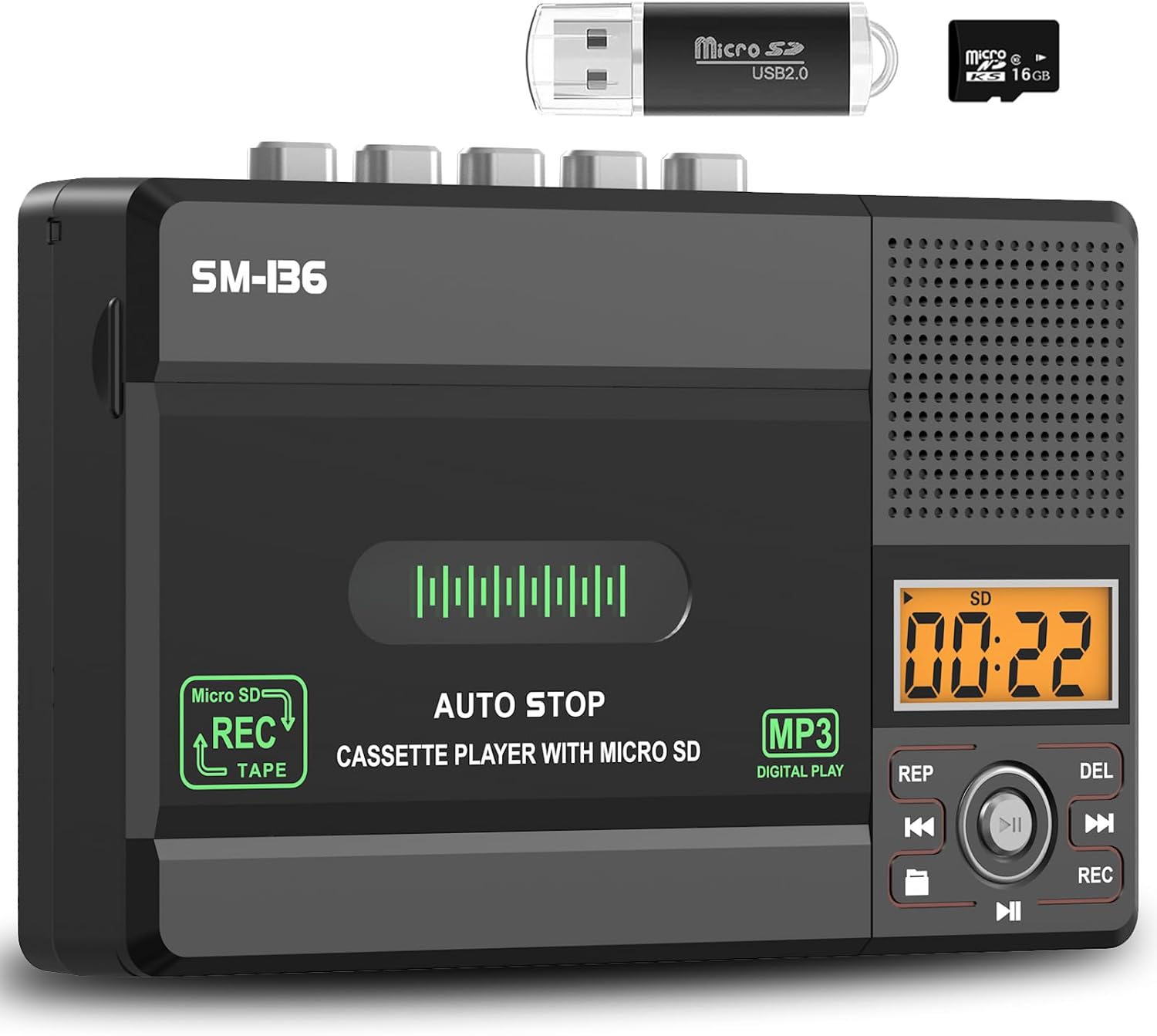
Слика: Прекоview of the device's control panel and LCD screen.
Recording to Cassette Tape (from built-in microphone)
- Insert a blank or recordable cassette tape.
- Slide the "TAPE/OFF/Micro SD" switch to the "TAPE" position.
- Притисните тастер РЕЦ button (red button) to begin recording from the built-in microphone.
- Da biste zaustavili snimanje, pritisnite СТОП дугме (■).

Image: Demonstrates recording audio to a cassette tape using the built-in microphone.
Converting Cassette to MP3 (to SD Card)
This method allows direct conversion without a computer.
- Insert the cassette tape you wish to convert.
- Insert the 16GB SD card (or another compatible SD card) into the SD card slot.
- Slide the "TAPE/OFF/Micro SD" switch to the "TAPE" position.
- Притисните тастер ПЛАИ дугме (►) on the cassette player.
- While the tape is playing, press and hold the РЕЦ button (red button) on the digital control panel until the LCD display shows "REC". This will start recording the cassette audio directly to the SD card as an MP3 file.
- Da biste zaustavili snimanje, pritisnite РЕЦ поново дугме или притисните СТОП дугме (■) on the cassette player.
- The converted MP3 files will be saved on the SD card. You can then play them back on the device by switching to "Micro SD" mode or transfer them to a computer using the included USB reader.

Image: Visual steps for direct cassette to SD card MP3 conversion.
Converting Cassette to MP3 (to Computer via Audacity)
This method requires a computer and the included Audacity software.
- Install Audacity: Insert the included Software CD-ROM into your computer's CD drive and follow the installation instructions for Audacity. Alternatively, you can download the latest version of Audacity from its official webсајту.
- Повежите уређај: Connect the SEMIER SM-136 to your computer using the included USB-C data cable.
- Prepare Audacity: Open Audacity. Ensure the correct input device (usually "USB Audio CODEC" or similar) is selected in Audacity's audio settings.
- Започни снимање: Insert the cassette tape you wish to convert into the player. Press the ПЛАИ дугме (►) on the cassette player. Then, click the Рецорд button in Audacity to begin capturing the audio.
- Monitor and Stop: Monitor the audio levels in Audacity. Once the tape has finished playing, click the Стани button in Audacity and the СТОП дугме (■) on the cassette player.
- Export MP3: In Audacity, you can edit the recorded audio (e.g., trim silence, remove noise). Once satisfied, go to File > Export > Export as MP3 to save your digital audio file.

Image: Illustrates connecting the device to a computer and using Audacity for digital conversion.
Одржавање
- Чишћење: Користите меку, суву крпу за чишћење спољашњости уређаја. Не користите течна средства за чишћење или абразивне материјале.
- Чишћење главе траке: Periodically clean the tape heads and pinch rollers with a cotton swab lightly dampпремазано изопропил алкохолом како би се осигурао оптималан квалитет звука и спречило оштећење траке.
- Складиштење: Уређај чувајте на хладном и сувом месту, даље од директне сунчеве светлости и екстремних температура.
- Уклањање батерије: If the device will not be used for an extended period, remove the AA batteries to prevent leakage.
Решавање проблема
| Проблем | Могући узрок | Решење |
|---|---|---|
| Уређај се не укључује. | No power source; batteries dead or incorrectly inserted; USB-C cable not connected properly. | Check battery polarity and charge; ensure USB-C cable is securely connected to a working power source. |
| No sound during cassette playback. | Volume too low; "TAPE/OFF/Micro SD" switch in wrong position; tape head dirty. | Increase volume; ensure switch is on "TAPE"; clean tape head. |
| Poor sound quality during playback/recording. | Dirty tape heads; worn-out tape; low battery power. | Clean tape heads; try a different tape; replace batteries or use USB-C power. |
| SD card not recognized or "No SD" message. | SD card incorrectly inserted; unsupported SD card format/size; faulty SD card. | Reinsert SD card; ensure it's formatted to FAT32 and is 32GB or less; try a different SD card. |
| Cannot record to SD card. | SD card full; SD card write-protected; incorrect recording procedure. | Избриши files from SD card; check SD card's physical write-protect switch; follow "Converting Cassette to MP3 (to SD Card)" steps carefully. |
| Audacity not detecting device for conversion. | USB-C cable issue; incorrect audio input selected in Audacity; driver issue. | Try a different USB port/cable; ensure "USB Audio CODEC" is selected in Audacity; restart computer and device. |
Спецификације
- Модел: СМ-136
- Функције: Cassette Player, Cassette Recorder (via Mic), SD Card MP3 Player, Cassette to MP3 Converter (to SD Card / PC)
- Извор напајања: DC 5V (USB-C) or 4 x AA Batteries
- Излаз звучника: 2W
- Слушалице: 3.5 мм стерео
- Подршка за СД картицу: До 32 ГБ, ФАТ32 формат
- Димензије: 6.3 к 3.9 к 1.2 инча (16 к 9.9 к 3 цм)
- Тежина: 0.52 фунти (0.24 кг)

Image: Detailed dimensions and weight of the product.
Гаранција и подршка
SEMIER products are designed for reliability and performance. This product comes with a standard manufacturer's warranty. For detailed warranty information, technical support, or customer service inquiries, please refer to the contact information provided on the product packaging or visit the official SEMIER website. Our dedicated customer support team is available to assist you with any questions or concerns.
Такође можете посетити SEMIER Store on Amazon за више информација и ресурса за подршку.
Ask a question about this manual
Ask about setup, troubleshooting, compatibility, parts, safety, or missing instructions. Manuals+ will review the question and use this page’s manual context to help answer it.