
Увод
This manual provides detailed instructions for the Alxum T050A External CD/DVD Drive. This versatile device offers CD/DVD burning capabilities, supports 2.5-inch SATA hard drives, and includes multiple USB 2.0 interfaces, SD, and Micro SD card slots. It is compatible with various operating systems, including Windows, Linux, and macOS.
Карактеристике производа
- 7-у-1 функционалност: Integrates 3 USB 2.0 ports (2 USB-A, 1 USB-C), SATA 2.5-inch hard drive support, SD card slot, Micro SD card slot, and CD/DVD burning capabilities.
- Пренос података велике брзине: Supports 5Gbps data transfer for SATA 2.5-inch hard drives and up to 480MB for SD/Micro SD cards.
- Efficient Optical Drive: Reads 80mm and 120mm discs with 24X CD recording speed and 8X DVD recording speed.
- Широка компатибилност: Works with Windows 2000/XP/Vista/7/8/8.1/10/11, Linux, and macOS 10 operating systems.
- Флексибилно функционисање: Enables mutual recording between SATA-to-CD and SD-to-CD for versatile data management.
- Преносиви дизајн: Lightweight and compact, designed for convenience and easy transport.
Садржај пакета
The Alxum T050A External CD/DVD Drive package includes:
- Alxum T050A External CD/DVD Drive
- USB Type-A to C Data Cable (90cm)
- USB Type-A to C Power Cable (80cm)
- Type-C (Male) to A (Female) Adapter
Упутства за подешавање
1. Connecting the Drive to Your Computer
The Alxum T050A is a plug-and-play device. No driver installation is typically required for most operating systems.
- Connect the USB Type-A end of the data cable to an available USB port on your computer.
- Connect the USB Type-C end of the data cable to the Data Transmission Port on the Alxum T050A drive.
- For stable operation, especially when using the SATA 2.5-inch hard drive or burning discs, connect the USB Type-A to C power cable to a power source (e.g., a USB wall adapter or another USB port on your computer) and the 5V2A Power Port on the drive. If your computer only has USB-C ports, use the provided Type-C (Male) to A (Female) adapter with the data cable.
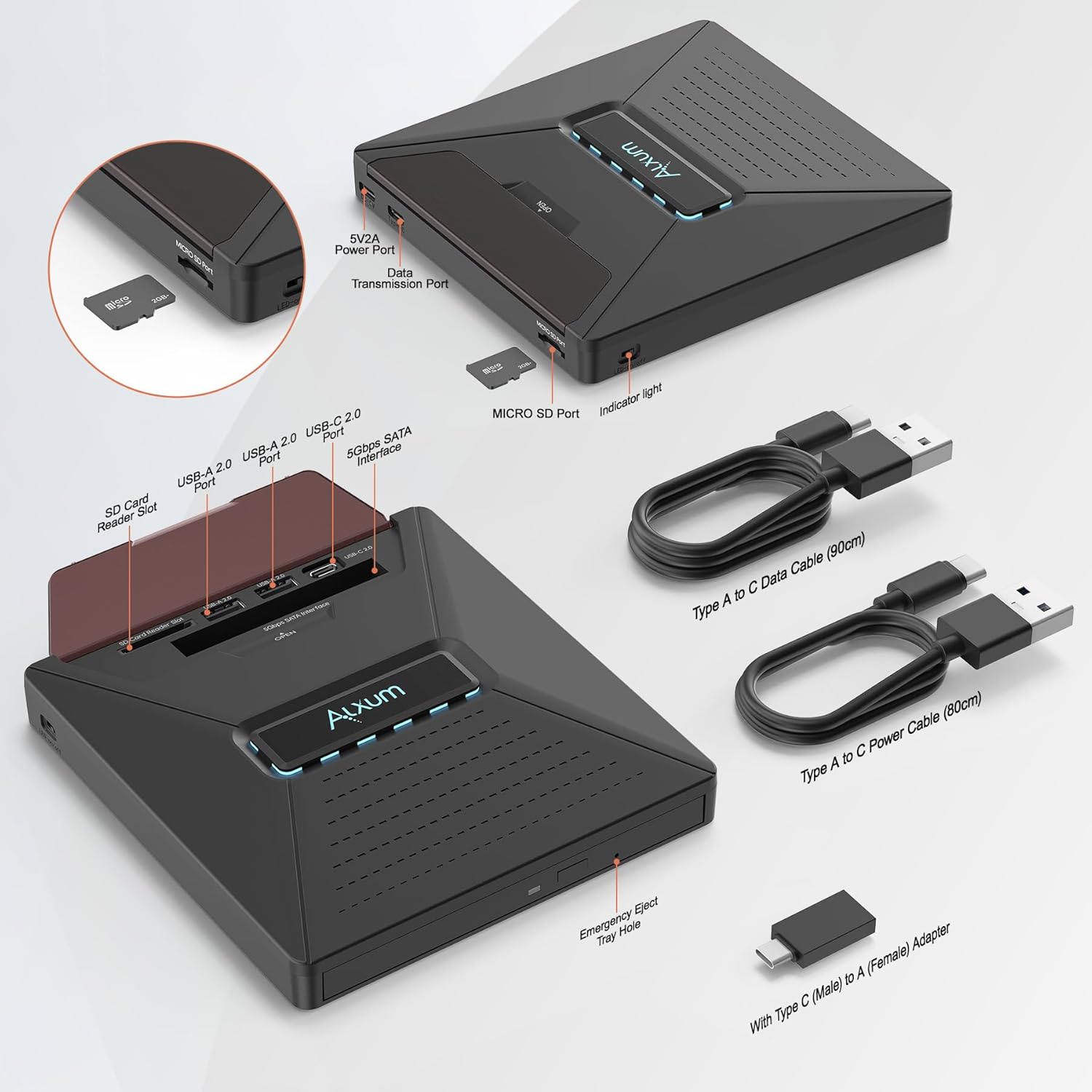
Слика: Детаљна view of the Alxum T050A External CD/DVD Drive ports and included cables for connection.
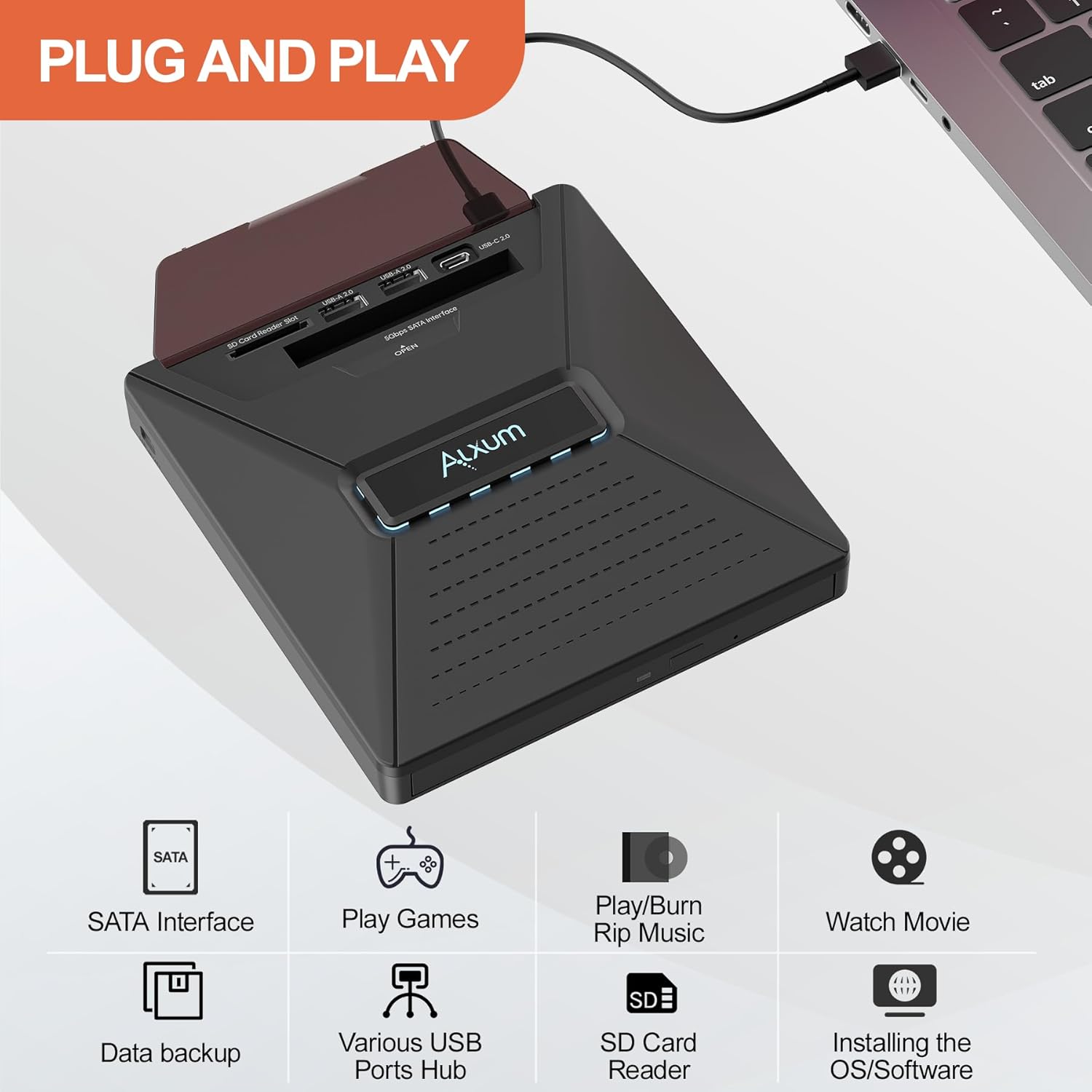
Image: The Alxum T050A External CD/DVD Drive connected to a laptop, illustrating its plug-and-play functionality.
2. Компатибилност оперативних система
The drive is compatible with a wide range of operating systems:
- Windows 2000 / XP / 2003 / Vista / 7 / 8 / 8.1 / 10 / 11
- Линук
- мацОС 10 и новије верзије

Image: Visual representation of the Alxum T050A's compatibility with Windows, macOS, and Linux operating systems.
Упутство за употребу
1. Уметање и избацивање дискова
- To open the disc tray, press the eject button located on the front of the drive.
- Place the CD or DVD onto the tray with the label side facing up. Ensure the disc is properly seated on the spindle.
- Пажљиво гурните лежиште назад у уређај док се не затвори.
- To eject the disc, press the eject button again. In case of power failure or if the eject button does not respond, use a paper clip to manually eject the tray via the emergency eject hole.

Image: The Alxum T050A drive with an open disc tray, highlighting its 24X CD read/write and 8X DVD read/write capabilities.
2. Using the SATA 2.5-inch Hard Drive Interface
The drive features a 5Gbps SATA interface for connecting a 2.5-inch SATA hard drive, expanding your storage options.
- Locate the SATA 2.5-inch interface slot on the top of the drive.
- Carefully insert your 2.5-inch SATA hard drive into the slot until it is securely connected.
- The connected hard drive will appear as an external storage device on your computer.

Image: The Alxum T050A drive with a 2.5-inch SATA hard drive inserted, demonstrating its 5Gbps efficient read and write capabilities.
3. SD and Micro SD Card Usage
The drive includes dedicated slots for SD and Micro SD cards, supporting simultaneous read and write operations with data transfer speeds up to 480MB.
- Insert your SD card into the SD Card Reader Slot or your Micro SD card into the Micro SD Port.
- Уверите се да је картица правилно уметнута док не кликне на своје место.
- The card will be recognized as a removable storage device by your computer.
4. Mutual Burning Functionality
The Alxum T050A supports SATA-to-CD and SD-to-CD mutual recording, allowing you to transfer and back up files between different storage media directly.
- To perform mutual burning, ensure both the source media (SATA drive or SD/Micro SD card) and a blank CD/DVD are inserted into the drive.
- Use appropriate burning software on your computer to initiate the transfer and burning process.
5. ЛЕД индикатори
The drive features LED indicators that provide status information. These lights can be turned on or off using the indicator light switch button.
Video: An official product video from Alxum demonstrating the features and usage of the External CD/DVD Drive, including its various ports and functions.
Одржавање
To ensure the longevity and optimal performance of your Alxum T050A External CD/DVD Drive, follow these maintenance guidelines:
- Чишћење: Use a soft, dry cloth to clean the exterior of the drive. Avoid using liquid cleaners or abrasive materials. For the optical lens, use a specialized CD/DVD lens cleaning kit if necessary, following the kit's instructions carefully.
- Складиштење: Store the drive in a cool, dry place away from direct sunlight, extreme temperatures, and high humidity. When not in use, keep the disc tray closed to prevent dust accumulation.
- Руковање: Handle the drive gently. Avoid dropping it or subjecting it to strong impacts, which can damage internal components.
- Напајање: Always use the provided cables and ensure a stable power supply, especially during read/write operations, to prevent data corruption or drive damage.
Решавање проблема
If you encounter issues with your Alxum T050A External CD/DVD Drive, refer to the following common troubleshooting steps:
Drive Not Recognized by Computer
- Проверите везе: Ensure all USB cables (data and power) are securely connected to both the drive and your computer. Try different USB ports.
- Спољно напајање: If the drive is not receiving sufficient power, it may not be recognized. Connect the additional USB power cable to a reliable power source.
- Поново покрените рачунар: Понекад једноставно поновно покретање може решити проблеме са повезивањем.
- Device Manager (Windows): Open Device Manager, look for "DVD/CD-ROM drives" or "Universal Serial Bus controllers." If the drive appears with a yellow exclamation mark, try updating or reinstalling its driver.
- Disk Utility (macOS): Check Disk Utility to see if the drive is listed, even if not mounted.
Disc Not Reading or Writing
- Чист диск: Ensure the CD/DVD is clean and free from scratches or smudges.
- Тип диска: Verify that the disc type (CD-R, DVD-R, etc.) is compatible with the drive and the operation you are attempting (read or write).
- Бурнинг софтвер: If burning, ensure you are using appropriate and up-to-date burning software.
- Напајање: Insufficient power can lead to read/write errors. Ensure the power cable is connected.
Disc Tray Not Opening/Closing
- Хитно избацивање: If the eject button fails, locate the small emergency eject hole on the front of the drive. Insert a straightened paper clip into the hole and gently push until the tray opens.
- Опструкција: Check for any physical obstructions preventing the tray from moving freely.
SATA HDD or SD/Micro SD Card Not Detected
- Безбедно уметање: Ensure the SATA hard drive or memory card is fully and correctly inserted into its respective slot.
- Формат: Verify that the hard drive or memory card is formatted in a file system compatible with your operating system.
- Снага: Ensure adequate power supply to the drive, as external storage devices may require more power.
Спецификације
| Бранд | Алкум |
| Број модела | Т050А |
| Хардверска платформа | Лаптоп, ПЦ |
| Компатибилност оперативног система | Windows 2000 / XP / 2003 / Vista / 7 / 8 / 8.1 / 10 / 11, Linux, Mac 10 OS |
| Тежина артикла | 9 унци |
| Димензије производа (ДкШкВ) | 5.51 к 0.71 к 5.91 инча |
| Боја | Black Sata |
| Интерфејс чврстог диска | USB 2.0/3.0 (for connection to host), 5Gbps SATA (for internal 2.5" HDD) |
| Брзина писања оптичке меморије | 8X for DVD, 24X for CD |
| Брзина читања оптичке меморије | 24Кс |
| Посебна карактеристика | LED Light, Portable |
| Хардверски интерфејс | USB 3.0 тип A, USB тип C |
| SD/Micro SD Data Transfer | Up to 480MB (Simultaneous Read and Write) |
Гаранција и подршка
For warranty information or technical support regarding your Alxum T050A External CD/DVD Drive, please contact the manufacturer or the seller directly. Refer to your purchase documentation for specific warranty terms and contact details.
Manufacturer: Luban No.1 (Dongguan) Technology Co., LTD
Seller: Abteck
You can often find support contact information on the product packaging, the seller's webсајту или путем ваше платформе за куповину.