
FREEWOLF T96
FREEWOLF T96 Wireless Gaming Keyboard and Mouse Combo User Manual
Модел: Т96
Увод
This user manual provides detailed instructions for the FREEWOLF T96 Smart Display Wireless Gaming Keyboard and Mouse Combo. This combo is designed for a seamless and responsive experience across various devices and applications, from gaming to office work.
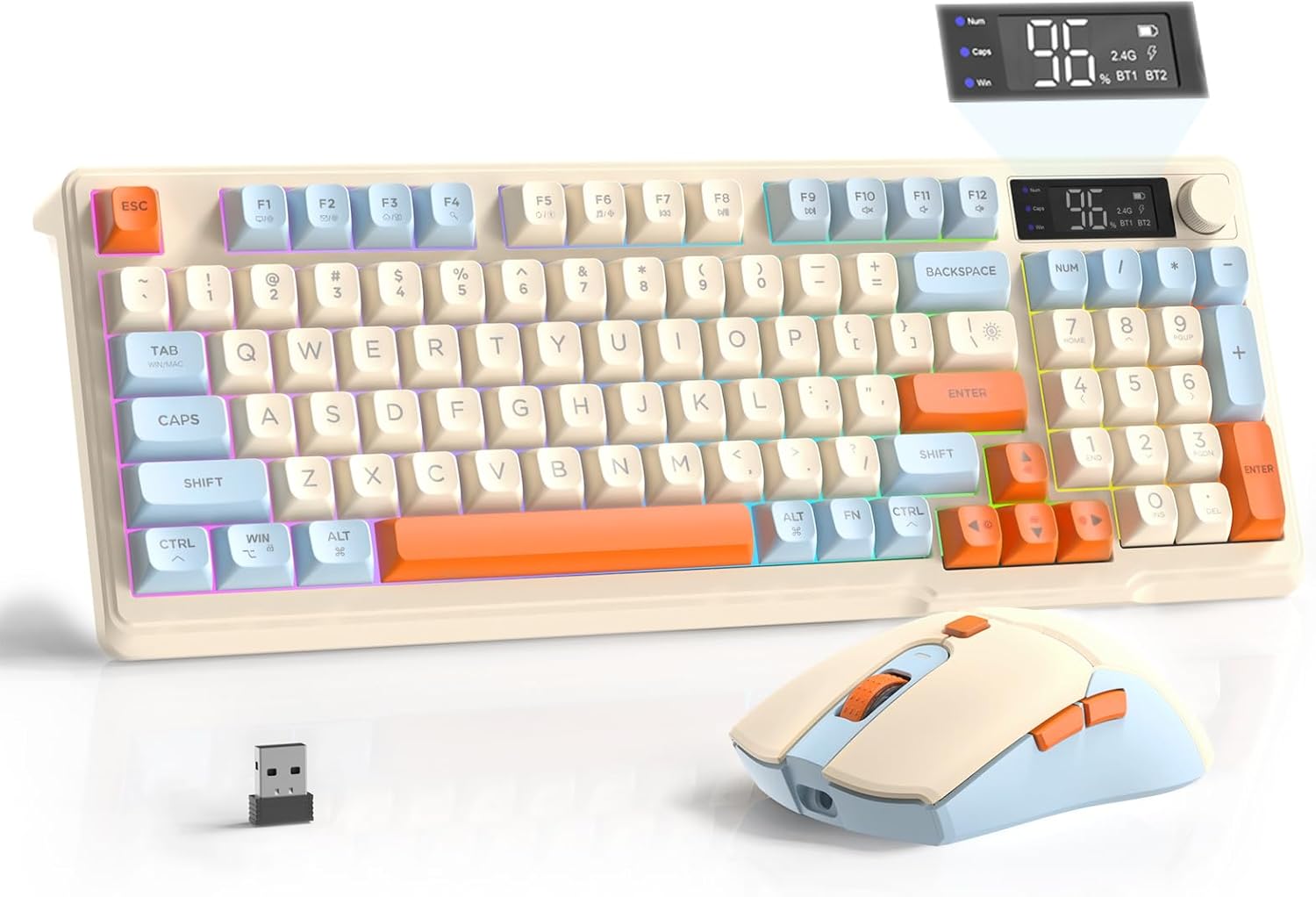
Image: The FREEWOLF T96 Wireless Gaming Keyboard and Mouse Combo, featuring the keyboard, mouse, and USB receiver.
Садржај пакета
Уверите се да су све ставке присутне у пакету:
- 1 x T96 Membrane Keyboard
- 1 x T96 Wireless Mouse
- 1 к УСБ-Ц кабл
- 1 x USB Receiver (stored in mouse bottom slot)
- 1 к Упутство за употребу
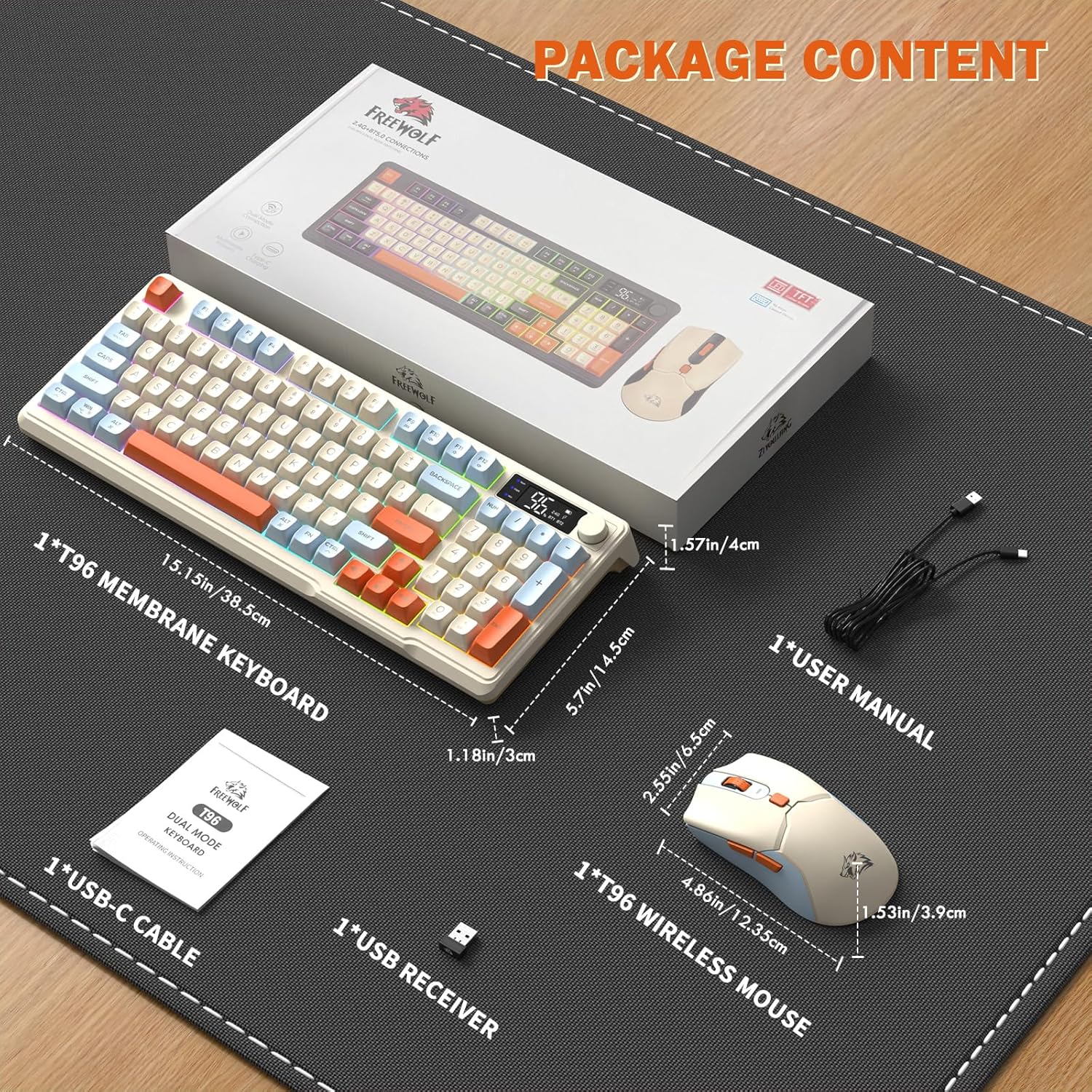
Image: A visual representation of the package contents, including the keyboard, mouse, USB-C cable, USB receiver, and user manual.
Сетуп
Опције повезивања
The T96 combo supports dual-mode wireless connectivity:
- 2.4Г бежична веза: Utilizes the included USB receiver for a stable, plug-and-play connection.
- Bluetooth Connections (BT1/BT2): Allows pairing with up to two Bluetooth-enabled devices, enabling seamless switching.
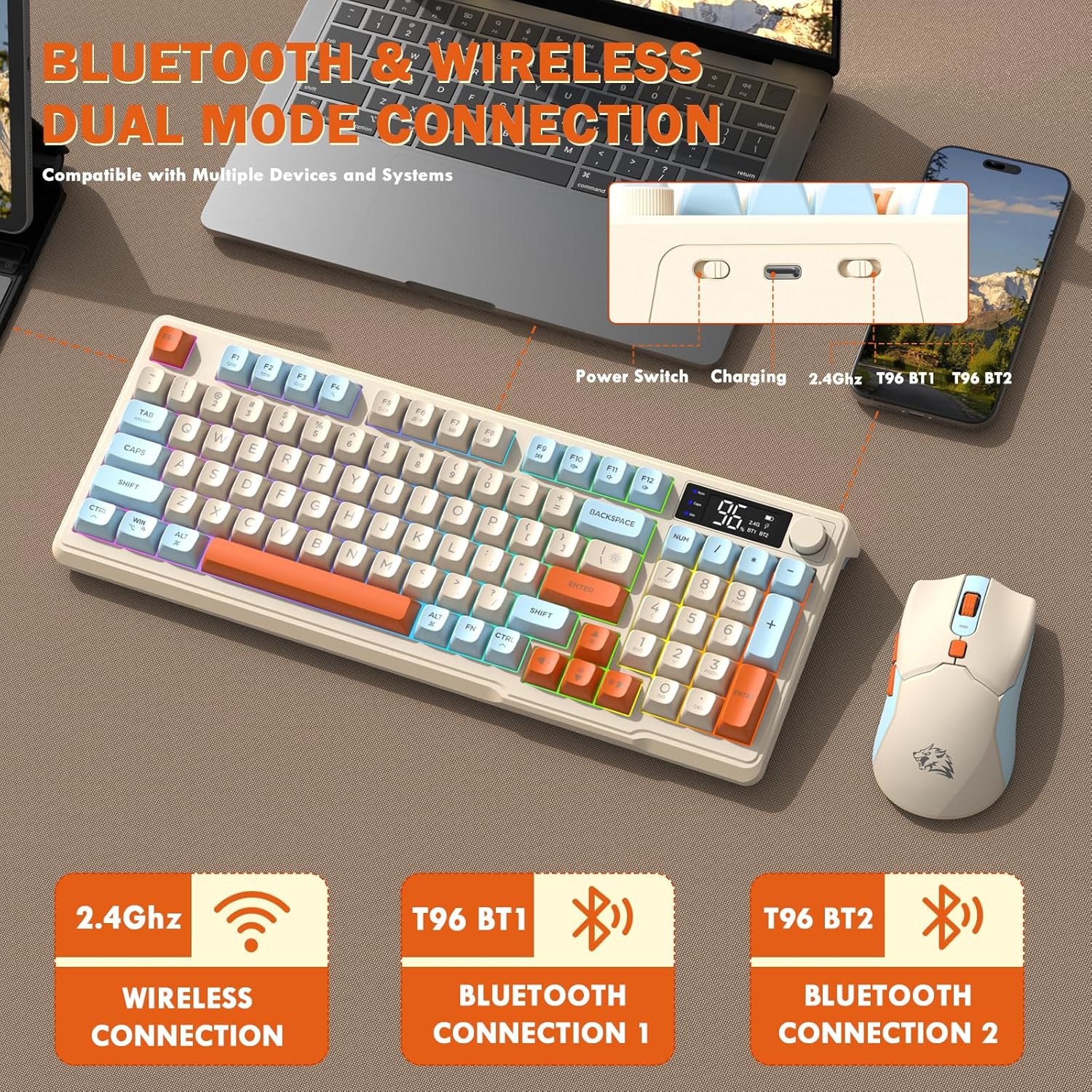
Image: Diagram illustrating the dual-mode connection options (2.4GHz, Bluetooth 1, Bluetooth 2) and the location of the power switch, charging port, and connection indicators on the keyboard.
Почетни кораци подешавања
- Уређаји за пуњење: Before first use, fully charge both the keyboard and mouse using the provided USB-C cable. The keyboard has a 2000mAh battery, and the mouse has a 500mAh battery. The smart display on the keyboard will show charging progress.
- Пронађите УСБ пријемник: The USB receiver for 2.4G wireless connection is stored in a slot on the bottom of the mouse. Remove it for use.
- Укључено: Укључите тастатуру и миш користећи одговарајуће прекидаче за напајање.
- Connect via 2.4G Wireless:
- Уметните УСБ пријемник у слободан УСБ порт на рачунару.
- Ensure the keyboard and mouse are set to 2.4G mode (indicated on the keyboard's smart display). They should connect automatically.
- Повежите се преко Блуетоотх-а:
- Switch the keyboard and mouse to BT1 or BT2 mode.
- On your device (PC, laptop, tablet, smartphone), open Bluetooth settings.
- Тражи "T96 Keyboard" and "T96 Mouse" in the list of available devices and pair them.
- The smart display will indicate the active Bluetooth connection (BT1 or BT2).
Упутство за употребу
Рад са тастатуром
The T96 keyboard features a 94-key compact layout with various functions to enhance your experience.
Функције паметног екрана
The intelligent LED display provides real-time information:
- Статус батерије: Приказује преостали проценат батеријеtage.
- Режим везе: Indicates active connection (2.4G, BT1, BT2).
- Напредак пуњења: Displays charging status when connected to power.
- Caps Lock/Num Lock/Win Lock Indicators: Shows status of these keys.
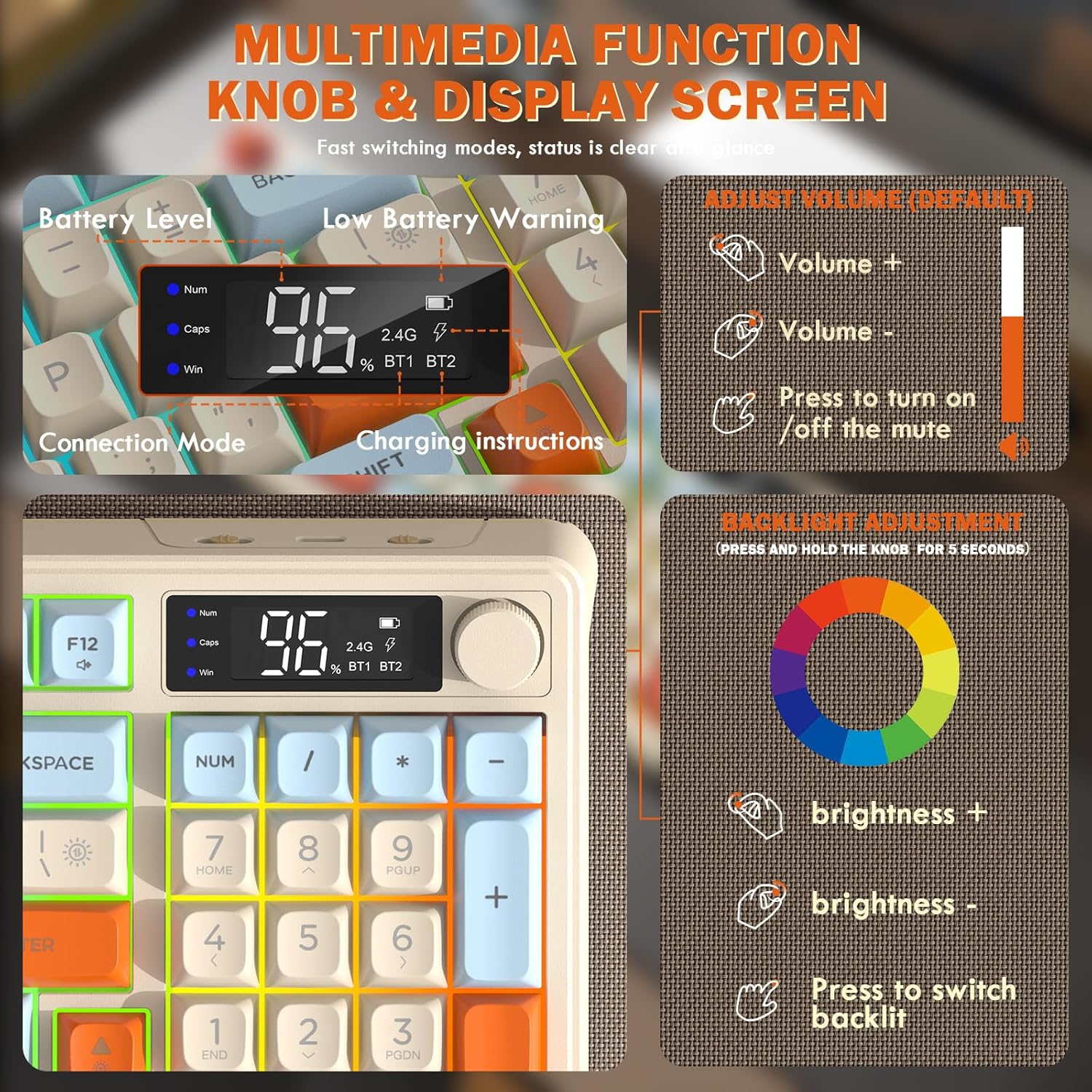
Image: Close-up of the keyboard's smart display showing battery level, connection mode, and charging instructions. Also details the multimedia knob's functions for volume and backlight control.
Multimedia Control Knob
Located on the top right of the keyboard, this knob offers quick control:
- ротирати: Adjusts system volume (clockwise for volume up, counter-clockwise for volume down).
- Притисните: Toggles mute on/off.
- Press and Hold (5 seconds): Activates backlight adjustment mode. Rotate to change brightness, press to switch light effects.
Multimedia Hotkeys (FN Combinations)
The keyboard includes 12 dedicated multimedia hotkeys accessible via the FN кључ:
- FN + F1-F12: Access various multimedia and system functions (e.g., media playback, volume, browser, email). Refer to keycap legends for specific functions.
Контрола позадинског осветљења
The keyboard features vibrant rainbow LED backlighting. Control it using the following combinations:
- ФН + стрелица нагоре: Повећајте осветљеност позадинског осветљења.
- ФН + стрелица надоле: Смањите осветљеност позадинског осветљења.
- ФН + стрелица удесно: Повећајте брзину позадинског осветљења.
- FN + стрелица улево: Смањите брзину позадинског осветљења.
- ФН + \|: Switch between different lighting modes (e.g., always on, breathing, off).
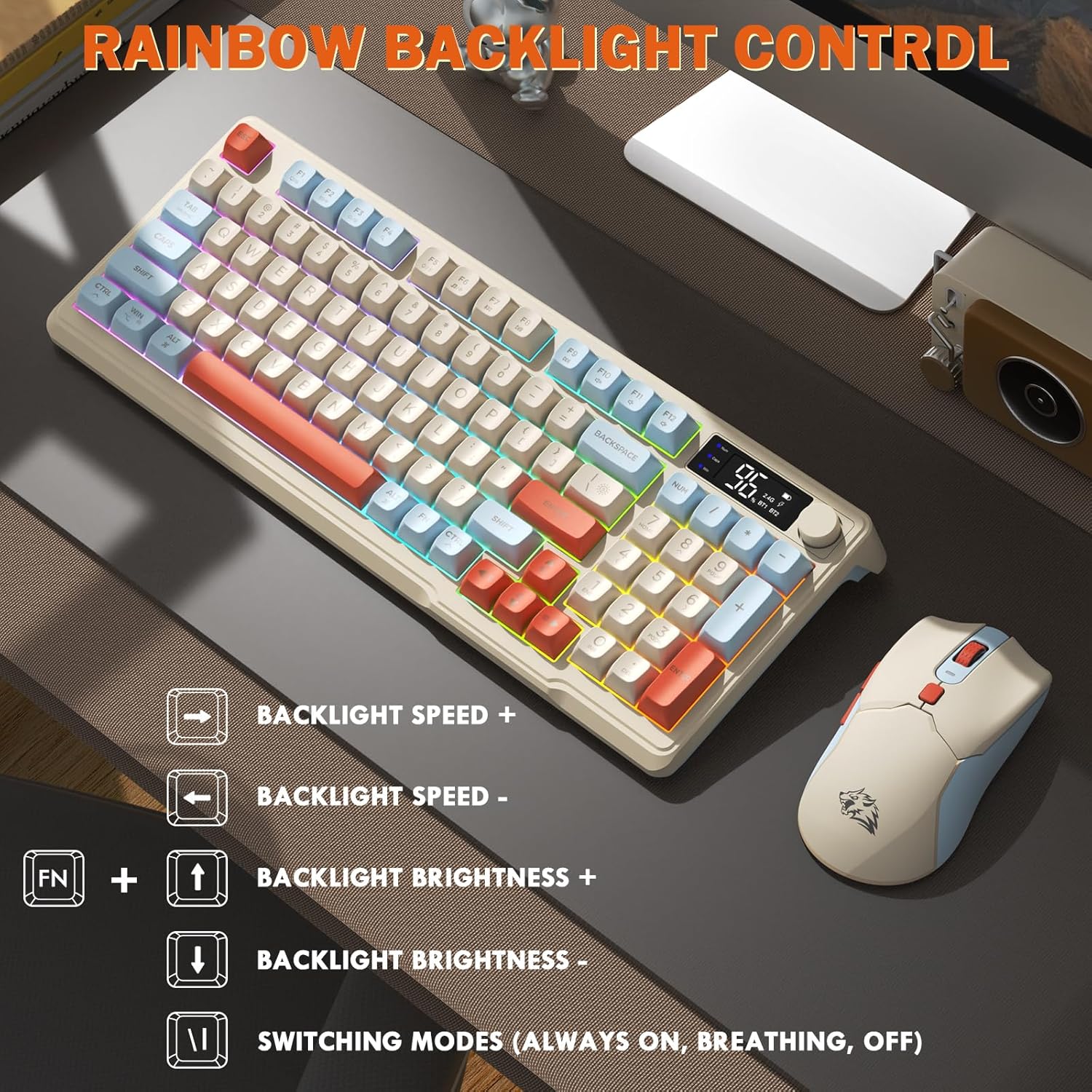
Image: Visual guide for controlling the rainbow LED backlight, showing key combinations for brightness, speed, and mode switching.
Анти-Гхостинг
The keyboard supports 26-key rollover anti-ghosting technology, ensuring accurate registration of multiple simultaneous key presses, crucial for gaming.
Операција мишем
The T96 gaming mouse is designed for precision and comfort.
ДПИ Адјустмент
Adjust the mouse sensitivity (DPI) to suit your preference:
- Притисните тастер Дугме ДПИ (located behind the scroll wheel) to cycle through available DPI settings: 800 / 1600 / 2400 / 4000 DPI.
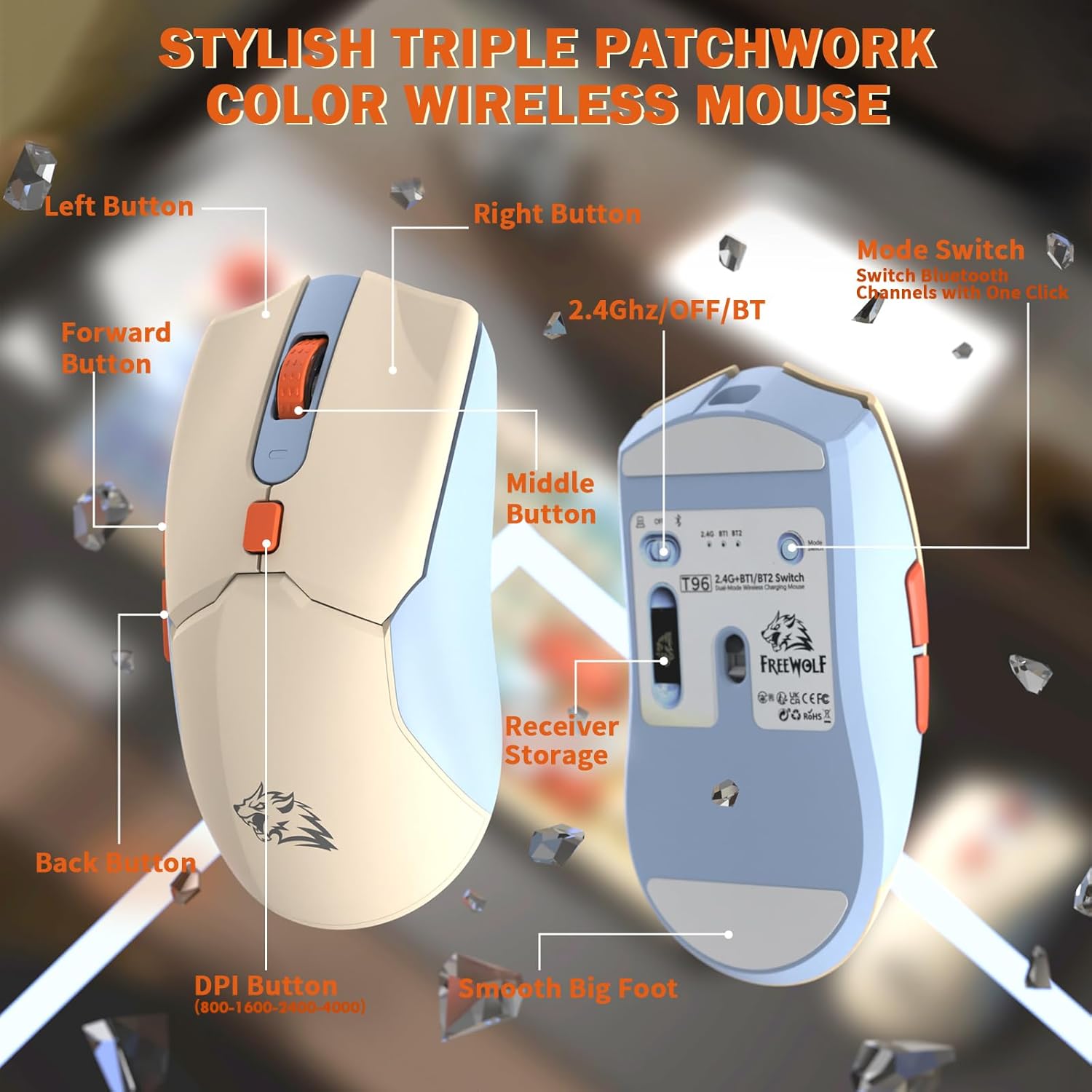
Слика: Детаљна view of the T96 wireless mouse, highlighting its buttons (Left, Right, Middle, Forward, Back, DPI) and the receiver storage compartment on the bottom.
Програмабилна дугмад
The mouse features six programmable buttons. Refer to specific software (if applicable, not mentioned in data) or operating system settings for customization options.
Поллинг Ратес
The mouse operates at different polling rates depending on the connection mode:
- Блуетоотх (БТ): 115Хз
- 2.4G бежична мрежа: 125Хз
Одржавање
Чишћење
- Користите меку, суву крпу за чишћење површина тастатуре и миша.
- За тврдокорну прљавштину, благо дampи крпу са водом или благим, неабразивним средством за чишћење.
- Избегавајте употребу јаких хемикалија, растварача или абразивних материјала, јер они могу оштетити завршну обраду.
- Не потапајте уређаје у воду или било коју течност.
Баттери Царе
Да бисте максимално повећали трајање батерије и перформансе:
- Recharge the devices when the low battery indicator appears on the keyboard's smart display.
- Избегавајте често потпуно пражњење батерије.
- Чувајте уређаје на хладном и сувом месту када се не користе дуже време.
- The devices feature smart power-saving modes: the keyboard enters sleep mode after 3 minutes of inactivity, and the mouse after 2 minutes. They wake instantly upon touch.

Image: Illustration showing the 2000mAh battery capacity of the keyboard and 500mAh battery capacity of the mouse, emphasizing long-lasting power.
Решавање проблема
If you encounter issues with your T96 combo, refer to the following common solutions:
| Проблем | Могући узрок | Решење |
|---|---|---|
| Тастатура/миш не реагује | Low battery; Incorrect connection mode; USB receiver not connected (2.4G); Bluetooth not paired. |
|
| Кашњење или повремена веза | Сметње; Удаљеност од пријемника/уређаја; Слаба батерија. |
|
| Позадинско осветљење не ради или је пригушено | Backlight turned off; Brightness set too low; Low battery. |
|
| Mouse DPI not changing | Дугме DPI није правилно притиснуто. |
|
Спецификације
| Феатуре | Детаљ |
|---|---|
| Бранд | Слободни вук |
| Модел | Т96 |
| Технологија повезивања | 2.4Ghz Wireless, Bluetooth (BT1, BT2) |
| Тип тастатуре | Membrane, 94-Key Compact Layout |
| Кеицапс | PBT Triple-Tone Spherical Keycaps |
| Позадинско осветљење | Rainbow LED Backlight |
| Анти-Гхостинг | Прелазак са 26 тастера |
| Капацитет батерије тастатуре | 2000мАх |
| ДПИ миша | 800 / 1600 / 2400 / 4000 DPI (Adjustable) |
| Mouse Polling Rate (BT) | 115Хз |
| Mouse Polling Rate (2.4G) | 125Хз |
| Капацитет батерије миша | 500мАх |
| Компатибилни уређаји | Лаптоп, играчка конзола, рачунар, таблет, паметни телефон |
| Оперативни системи | Виндоус, macOS, Линукс, iOS, Андроид |
| Тежина артикла | 2.12 фунти (приближно 0.96 кг) |
| Димензије пакета | 16.26 x 8.78 x 1.85 инча (приближно 41.3 x 22.3 x 4.7 цм) |
Гаранција и подршка
Информације о гаранцији производа и корисничкој подршци нису биле дате у доступним подацима. Молимо погледајте паковање производа или званичне информације произвођача. webсајт за детаље о гаранцији и како да контактирате корисничку подршку за помоћ.
Ask a question about this manual
Ask about setup, troubleshooting, compatibility, parts, safety, or missing instructions. Manuals+ will review the question and use this page’s manual context to help answer it.