
1. Увод
Thank you for choosing the GRIFEMA GA2006 Digital Luggage Scale. This portable and accurate scale is designed to help you measure the weight of your luggage, preventing unexpected excess baggage fees. Please read this manual carefully before use to ensure proper operation and to maximize the lifespan of your device.
2. Безбедносне информације
- Не потапајте вагу у воду или друге течности.
- Избегавајте испуштање ваге или њено излагање јаким ударцима.
- Чувати ван домашаја деце.
- Не покушавајте сами да расклапате или поправљате вагу. Уколико се појаве проблеми, обратите се корисничкој подршци.
- Уверите се да је одељак за батерије безбедно затворен након инсталације батерије.
3. Садржај пакета
The GRIFEMA GA2006 Digital Luggage Scale package includes:
- 1 x GRIFEMA GA2006 Digital Luggage Scale
- 1 x CR2032 батерија (унапред инсталирана или укључена засебно)
4. Производ је готовview
Familiarize yourself with the components of your digital luggage scale:

Слика: Фронт view of the GRIFEMA GA2006 Digital Luggage Scale, highlighting the LCD screen, power/tare button, and unit selection button.
- ЛЦД екран: Shows weight readings and unit indicators.
- Power/Tare Button (⏸/T/A): Press to power on/off, or to activate the tare function.
- Unit Button (U/SET/▼): Press to switch between measurement units (kg/lb).
- Strap and Hook: For attaching luggage to be weighed.
5. Подешавање
5.1 Инсталација батерије
The scale uses one CR2032 lithium battery. If the battery is not pre-installed or needs replacement, follow these steps:
- Пронађите одељак за батерије на полеђини ваге.
- Користите мали одвијач да отворите поклопац батерије.
- Уметните батерију CR2032 са позитивном (+) страном окренутом нагоре.
- Вратите поклопац батерије и причврстите га завртњем.
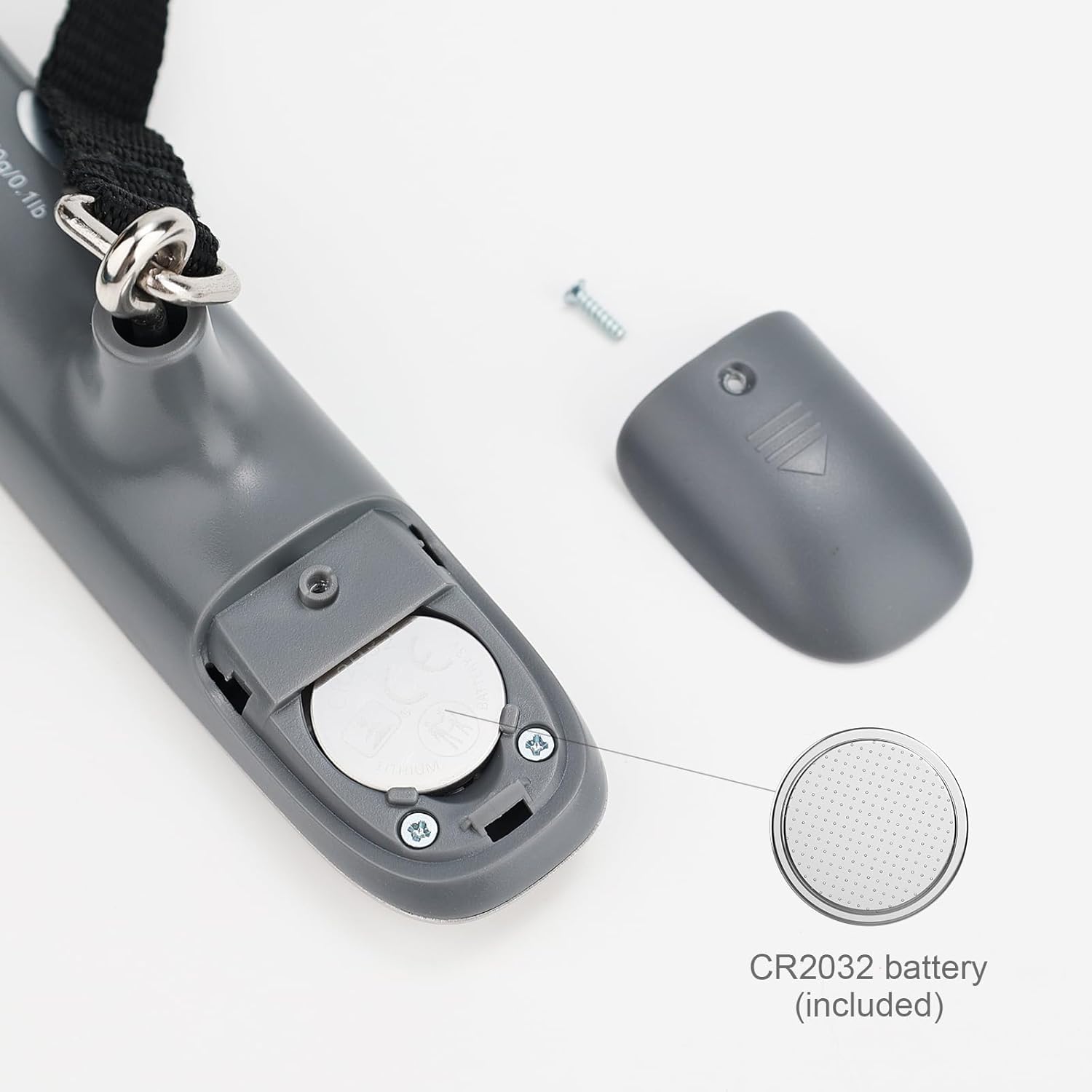
Слика: Детаљна view of the battery compartment, showing the CR2032 battery and how to open the cover.
6. Упутство за употребу
6.1 Укључивање/искључивање
- To power on, press the Power/Tare button (⏸/T/A). The display will show "8888" then "0.00 kg" or "0.0 lb".
- To power off, press and hold the Power/Tare button (⏸/T/A) for 3 seconds. The scale will also automatically shut off after 60 seconds of inactivity to conserve battery.
6.2 Unit Conversion (kg/lb)
While the scale is powered on and displaying "0.00", press the Unit button (U/SET/▼) to switch between kilograms (kg) and pounds (lb). The selected unit will be displayed on the LCD screen.
6.3 Мерење пртљага
- Ensure the scale is powered on and displaying "0.00".
- Attach the luggage strap to the handle of your luggage.
- Lift the scale by its body, holding it steady, so the luggage hangs freely from the strap and hook.
- Wait for the display to stabilize. The weight will flash three times and then lock, indicating the final measurement.
- Lower the luggage. The display will show the locked weight for a few seconds before returning to "0.00" or powering off automatically.

Image: A person demonstrating how to weigh a suitcase using the digital luggage scale, showing the scale held above the luggage.
6.4 Функција таре
The tare function allows you to subtract the weight of a container or additional items to get the net weight of the contents.
- With the scale powered on and displaying "0.00", attach the empty container or item you wish to tare.
- Once the weight stabilizes, press the Power/Tare button (⏸/T/A). The display will reset to "0.00" and show a "T" indicator, meaning the tare weight has been subtracted.
- Now, add the items you want to weigh into the container. The display will show only the weight of the added items.
7. Одржавање
7.1 Чишћење
Обришите вагу меком, дamp крпа. Не користите абразивна средства за чишћење нити потапајте вагу у воду.
7.2 Складиштење
Store the scale in a cool, dry place. If not used for an extended period, it is recommended to remove the battery to prevent leakage.
7.3 Замена батерије
When the display shows a "Lo" indicator, it's time to replace the battery. Refer to section 5.1 for battery installation instructions.
КСНУМКС. Решавање проблема
| Проблем | Могући узрок | Решење |
|---|---|---|
| Вага се не укључује. | Мртва или неправилно инсталирана батерија. | Check battery installation or replace the CR2032 battery. |
| На дисплеју се приказује „Lo“. | Ниска снага батерије. | Замените ЦР2032 батерију. |
| На дисплеју се приказује „Err“ или „O-Ld“. | Overload. The weight exceeds the maximum capacity. | Remove some weight. The maximum capacity is 50 kg (110 lb). |
| Нетачна очитавања. | Scale not held steadily, or external interference. | Ensure the scale is held steady and the luggage hangs freely. Avoid strong air currents or vibrations during weighing. |
9. Спецификације
Detailed specifications for the GRIFEMA GA2006 Digital Luggage Scale:

Image: Technical drawing illustrating the dimensions of the GRIFEMA GA2006 Digital Luggage Scale.
- Модел: ГА2006
- Максимални капацитет тежине: 50 кг / 110 лб
- Прецизност мерења: 50 g / 0.1 lb (+/- 0.5%)
- Јединице: Килограми (кг), фунте (лб)
- Приказ: ЛЦД са позадинским осветљењем
- Материјал: Нерђајући челик, пластика
- Тип батерије: 1 x CR2032 Alkaline (included)
- аутоматско искључивање: 60 секунди неактивности
- Димензије: 14.5 cm x 3.2 cm x 3.5 cm (approximate, main body)
- Нето тежина: 85 г
10. Информације о гаранцији
GRIFEMA products are manufactured to high-quality standards. This product is covered by a standard warranty against manufacturing defects. Please retain your proof of purchase for any warranty claims. For specific warranty terms and conditions, refer to the documentation provided at the time of purchase or contact customer support.
Additionally, a 30-day free return policy may apply, as per retailer terms.
11. Корисничка подршка
If you have any questions, concerns, or require assistance with your GRIFEMA GA2006 Digital Luggage Scale, please contact your retailer or the manufacturer's customer service. Please have your product model number (GA2006) and purchase details ready when contacting support.