
MSXTTLY Vmag-S1
MSXTTLY Vmag-S1 Magnetic Car Phone Holder Instruction Manual
Model: Vmag-S1
Comprehensive guide for setup, operation, and maintenance of your MSXTTLY Vmag-S1 magnetic car phone holder.
Увод
Thank you for choosing the MSXTTLY Vmag-S1 Magnetic Car Phone Holder. This manual provides detailed instructions to ensure proper installation, safe operation, and effective maintenance of your device. Please read this manual thoroughly before use.
Садржај пакета
Проверите да ли су све ставке наведене у наставку укључене у ваш пакет:
- 1 x MSXTTLY Vmag-S1 Vacuum Magnetic Phone Holder
- 1 x Magnetic Ring (for non-MagSafe devices)
- 1 x Round PC Pad (for textured surfaces)
- 2 x MSXTTLY Exclusive Nano Gel Pads (reusable)
- 1 x Cleaning Kit (wet and dry wipes)
- 1 к Упутство за употребу

Image: Contents of the MSXTTLY Vmag-S1 package, including the holder, magnetic ring, PC pad, nano gel pads, and cleaning kit.
Подешавање и инсталација
Choosing the Right Mounting Surface
The MSXTTLY Vmag-S1 holder can be installed on various smooth, flat surfaces. For optimal adhesion and longevity, consider the following:
- Smooth Surfaces: Direct application of the suction cup is suitable for glass (windshield), smooth plastic, or metal surfaces.
- Textured or Porous Surfaces: For dashboards or other textured areas, use the provided Round PC Pad to create a smooth base for the suction cup.
- Nano Gel Pads: The reusable Nano Gel Pads offer enhanced adhesion and can be used on surfaces where direct suction might be less effective. These pads are washable and reusable.
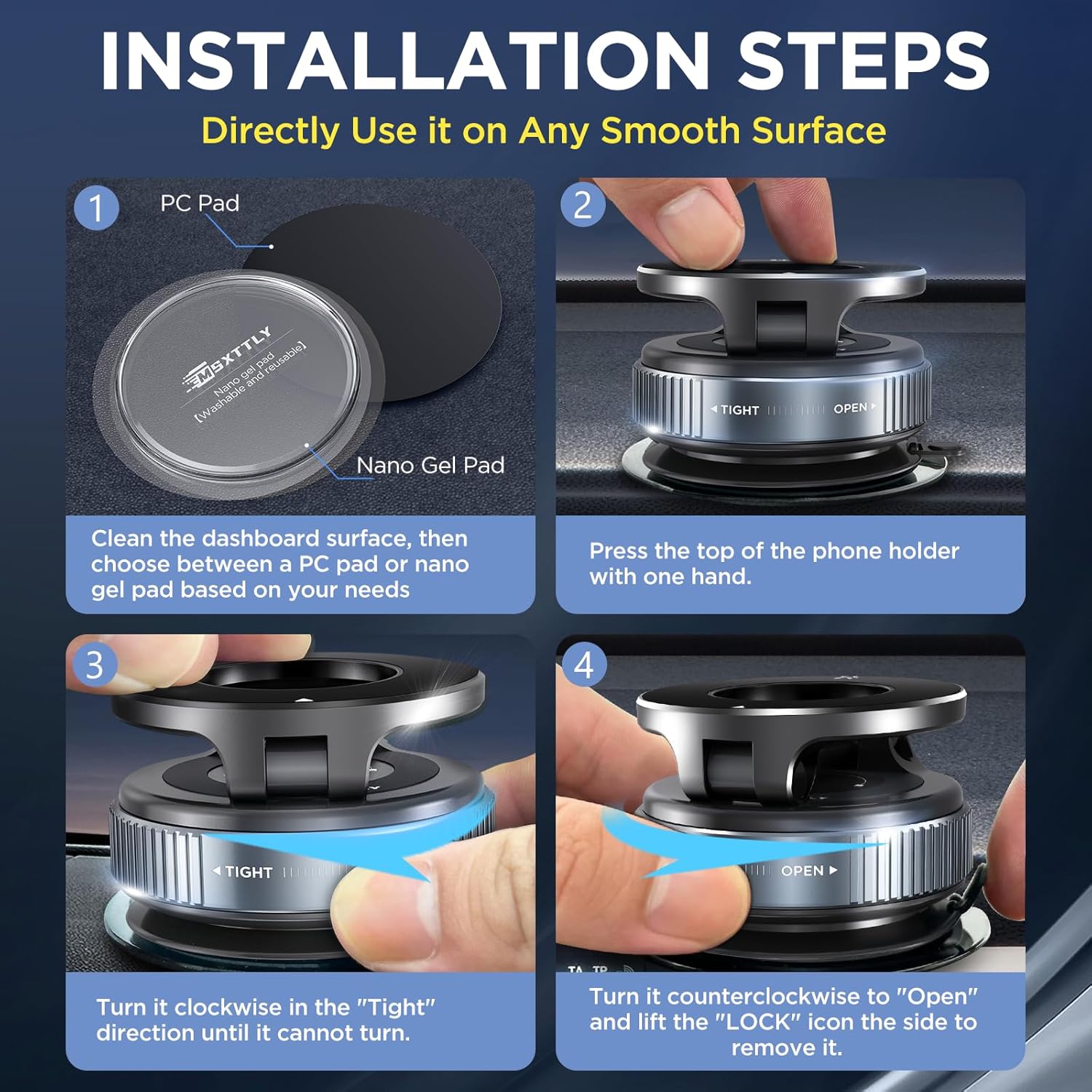
Image: Illustration of the Nano Gel Pads and PC Pad, highlighting their reusability and strong adhesion properties.
Кораци инсталације
- Очистите површину: Wipe the chosen installation area with the provided cleaning kit (wet and dry wipes) to ensure it is flat, clean, and free of moisture, oil, or contaminants.
- Apply PC Pad (if needed): If installing on a textured dashboard, remove the transparent protective film from the back side of the Round PC Pad and firmly press it onto the desired location. Allow at least 2 hours for the adhesive to set before attaching the phone holder.
- Причврстите држач: Press the suction cup firmly onto the cleaned surface (or PC Pad). While pressing, turn the knob clockwise in the "TIGHT" direction until it cannot turn further. This creates a strong vacuum seal.
- Припремите свој телефон:
- For MagSafe Compatible Phones (iPhone 12 series and newer, or MagSafe cases): No additional steps are needed. The phone will attach directly to the magnetic ring.
- For Non-MagSafe Phones or Cases: Clean the back of your phone or phone case. Paste the provided Magnetic Ring in the center of the back of your phone or mobile phone case. Wait at least 2 hours after attaching the magnetic ring for better adhesion.

Image: Visual guide demonstrating the installation process, from cleaning the surface to securing the holder.
Упутство за употребу
Attaching Your Phone
Simply bring your MagSafe-compatible phone or phone with the attached magnetic ring close to the holder's magnetic surface. The strong N52 magnet will securely hold your device in place.
Подешавање држача
The MSXTTLY Vmag-S1 features a double-axis metallic bar, allowing for extensive adjustment:
- ротација: The magnetic head rotates 360 degrees, enabling both portrait and landscape viewинг углова.
- Подешавање угла: The arm can be adjusted up to 210 degrees vertically, providing optimal viewинг са разних позиција.

Image: Demonstrates the 360-degree rotation and multi-angle adjustment capabilities of the phone holder for comfortable viewинг.
Уклањање телефона
Gently pull your phone away from the magnetic surface. The strong magnet ensures a secure hold but allows for easy detachment when needed.
Компатибилност
The MSXTTLY Vmag-S1 is designed for broad smartphone compatibility:
- Директна употреба: Compatible with iPhone 12 series and newer models, or any phone using a MagSafe-compatible case.
- With Magnetic Ring: For non-magnetic phones or phones with standard cases, use the included magnetic ring for secure attachment. This includes devices from Samsung, Google Pixel, OnePlus, Motorola, Xiaomi, OPPO, and older iPhone models.
Важне напомене о компатибилности:
The holder is generally not compatible with:
- Leather, suede, or uneven phone surfaces.
- Ring-type or glass-back phones (without proper magnetic ring application).
- Thick armor or rugged cases (may interfere with magnetic connection).

Image: Guide illustrating direct compatibility with MagSafe devices and the use of the magnetic ring for other smartphones.

Image: Details on how to attach the magnetic ring to the outside of a phone case and examples of incompatible case types.
Одржавање
Cleaning the Suction Cup and Gel Pads
To maintain optimal suction and adhesion, regularly clean the suction cup and Nano Gel Pads:
- Вакуумска чаша: If the suction cup loses its grip, rinse it under running water to remove any dust or debris. Allow it to air dry completely before re-installation.
- Nano Gel Pads: These pads are washable and reusable. If they become dirty or lose stickiness, rinse them with water and let them air dry. Do not wipe with a cloth, as this may leave fibers.
Решавање проблема
- Holder not sticking:
- Уверите се да је површина за монтажу чиста, сува и глатка.
- Verify the suction cup knob is fully tightened in the "TIGHT" direction.
- If the surface is textured, use the provided PC Pad or Nano Gel Pad.
- Clean the suction cup or Nano Gel Pad as described in the Maintenance section.
- Phone not holding securely:
- Ensure your phone is MagSafe compatible or has the magnetic ring properly attached to its center.
- Check if your phone case is too thick or made of an incompatible material (e.g., leather, rugged cases).
- Avoid placing metal objects between the phone and the holder.
- Difficulty removing the holder:
- Turn the knob counter-clockwise to the "OPEN" position.
- Lift the small tab on the side of the suction cup to release the vacuum seal.
Спецификације
| Бранд | МСКСТТЛИ |
| Назив модела | Vmag-S1 |
| Боја | Црно |
| Компатибилни уређаји | iPhone 12, 13, 14, 15, 16 series (Pro, Pro Max, Plus, Mini), MagSafe cases, and Android phones with magnetic ring. |
| Тип монтаже | Вакуумска усисна чаша |
| Посебне карактеристике | Reusable Nano Gel Pads, Multi-scenario Use, 360° Adjustable, Strong Magnetic Hold |
| Материјал | Акрилонитрил бутадиен стирен (ABS), легура цинка |
| Димензије артикла (Д к Ш к В) | 6 x 59 x 64 милиметара (приближно 0.23 x 2.32 x 2.5 инча) |
| Ограничење тежине | 10 килограма (приближно 22 лбс) |

Image: Diagram showing the physical dimensions of the MSXTTLY Vmag-S1 holder.
Гаранција и подршка
Информације о гаранцији
MSXTTLY products are backed by a 365-Day Guarantee, ensuring quality and performance.
Корисничка подршка
For any questions, technical assistance, or support, please contact our customer service team. We offer Lifetime Tech Assistance and 24/7 Fast Support to address your needs.
- Емаил: Refer to your product packaging or the official MSXTTLY webсајт за контакт детаље.
- Онлине ресурси: Visit the MSXTTLY webсајт за често постављана питања и додатне информације о производу.

Image: Highlights MSXTTLY's commitment to customer support, including a 365-day guarantee and lifetime technical assistance.
Повезани документи - Vmag-S1
 |
U2A-L9 Android Auto Wireless Adapter User Manual - MSXTTLY Comprehensive user manual for the MSXTTLY U2A-L9 Android Auto Wireless Adapter. Learn how to connect, upgrade firmware, and troubleshoot common issues for a seamless wireless Android Auto experience. |
 |
MSXTTLY Wireless CarPlay Adapter U2C-AIR Connection Guide Detailed instructions for setting up the MSXTTLY U2C-AIR Wireless CarPlay Adapter with your iPhone and compatible car models. Covers USB connection and Bluetooth pairing for seamless CarPlay integration. |
 |
U2C-AIR Pro Wireless CarPlay Adapter User Manual User manual for the U2C-AIR Pro Wireless CarPlay Adapter, providing setup instructions, firmware upgrade guide, troubleshooting tips, and contact information for MSXTTLY. |
 |
U2C-AIR Wireless CarPlay Adapter User Manual User manual for the U2C-AIR Wireless CarPlay Adapter, detailing setup, connection to iPhone, firmware updates, and support information. Converts wired CarPlay to wireless for compatible car units and aftermarket radios. |
 |
MSXTTLY Android Auto Wireless Adapter Connection Steps A guide to connecting the MSXTTLY Android Auto Wireless Adapter to your smartphone and vehicle, enabling wireless Android Auto functionality. |
 |
AC01 2-in-1 Wireless Adapter User Manual User manual for the MSXTTLY AC01 2-in-1 Wireless Adapter, providing detailed instructions on setup, connecting to Apple CarPlay and Android Auto, firmware updates, and customer support. |
Ask a question about this manual
Ask about setup, troubleshooting, compatibility, parts, safety, or missing instructions. Manuals+ will review the question and use this page’s manual context to help answer it.