
Infinity DM 56
Infiniity DM56 Sport Smartwatch User Manual
Модел: ДМ 56
1. Увод
Thank you for choosing the Infiniity DM56 Sport Smartwatch. This device is designed to enhance your active lifestyle with advanced fitness tracking, health monitoring, and smart connectivity features. Equipped with a vibrant 1.43-inch AMOLED display, built-in GPS, and comprehensive health sensors, the DM56 is your reliable companion for both daily wear and intense workouts.
This manual provides detailed instructions on how to set up, operate, maintain, and troubleshoot your smartwatch to ensure optimal performance and longevity.

Слика 1.1: Предња страна view of the Infiniity DM56 Sport Smartwatch, showcasing its round AMOLED display and rugged design.
2. Шта је у кутији
Upon opening your Infiniity DM56 Sport Smartwatch package, please ensure all the following items are present:
- Infiniity DM56 Sport Smartwatch
- Кабл за пуњење
- Кориснички приручник (овај документ)
3. Подешавање
3.1 Пуњење паметног сата
Before first use, fully charge your DM56 smartwatch. A full charge typically takes approximately 2 hours.
- Connect the magnetic charging cable to the charging contacts on the back of the smartwatch. Ensure the pins align correctly.
- Прикључите УСБ крај кабла за пуњење у стандардни УСБ адаптер за напајање (препоручује се 5V/1A) или УСБ порт рачунара.
- The watch display will show a charging indicator. Once fully charged, the indicator will change or disappear.
3.2 Упаривање са вашим паметним телефоном
To unlock the full potential of your DM56 smartwatch, you need to pair it with your smartphone via Bluetooth using the dedicated companion application. The DM56 is compatible with Android 5.0+ and iOS 11 and above.
- Преузмите апликацију: Тражи the official Infiniity companion app (refer to the packaging or quick start guide for the exact app name) on the Google Play Store (for Android) or Apple App Store (for iOS) and install it.
- Омогући Блуетоотх: Уверите се да је Блуетоотх омогућен на вашем паметном телефону.
- Отворите апликацију: Launch the companion app on your smartphone and follow the on-screen instructions to create an account or log in.
- Додај уређај: Within the app, navigate to the 'Add Device' or 'Pair Device' section. The app will search for available smartwatches.
- Select DM56: Select 'DM56' from the list of found devices. A pairing request may appear on both your phone and the watch. Confirm the pairing on both devices.
- Комплетно подешавање: Once paired, the app will guide you through initial settings, such as profile information, notification permissions, and data synchronization.
4. Управљање паметним сатом
4.1 Основна навигација
The DM56 features a responsive touchscreen and physical buttons for intuitive control.
- екран осетљив на додир: Превуците прстом нагоре, надоле, лево или десно да бисте се кретали кроз меније и обавештења. Додирните да бисте изабрали ставке.
- Физичка дугмад: The watch has multiple buttons, typically labeled 'SPORT', 'SEL', 'BACK', and a dedicated 'GPS' button. Their functions may vary depending on the current screen or mode.
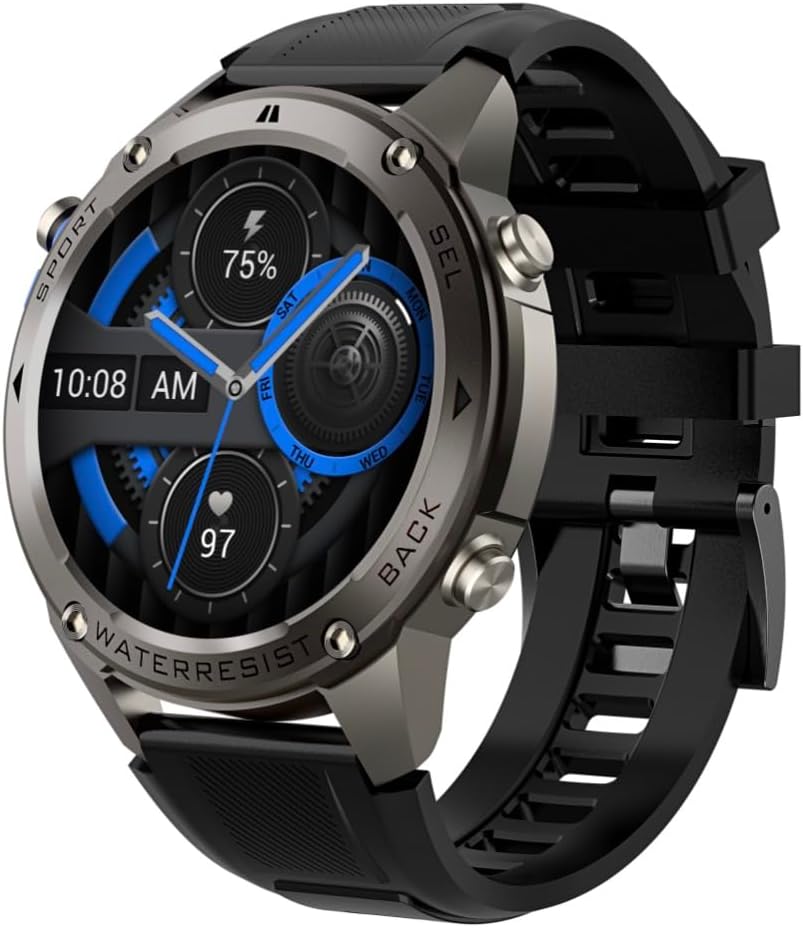
Слика 4.1: Бочна страна view of the Infiniity DM56 Sport Smartwatch, highlighting the physical control buttons.
4.2 Карактеристике екрана
The 1.43-inch AMOLED display offers vibrant colors and deep blacks with a resolution of 466x466 pixels.
- Увек на екрану: The DM56 supports Always-On Display functionality, allowing you to see the time and essential information at a glance without needing to raise your wrist or press a button. This feature can be configured in the watch settings.

Image 4.2: The Infiniity DM56 Sport Smartwatch display, showcasing a typical watch face with various data points.
4.3 Built-in GPS & Compass
The DM56 features dual-frequency GPS (L1+L5) and supports multiple satellite systems (GPS, GLONASS, BDS, Galileo, NAVIC, QZSS) for precise outdoor tracking. A built-in compass further aids navigation.
- ГПС праћење: When starting an outdoor activity (e.g., running, cycling), the watch will automatically attempt to acquire a GPS signal. Ensure you are in an open area for faster signal acquisition. Your route, distance, and pace will be recorded.
- компас: Access the compass feature from the watch's menu to get real-time directional information.

Image 4.3: The Infiniity DM56 Sport Smartwatch from an angle, highlighting the dedicated GPS button on the side.

Слика 4.4: Крупни план view of the GPS button on the Infiniity DM56 Sport Smartwatch, indicating its function.
4.4 All-Day Health Monitoring
The DM56 is equipped with the VC30F sensor for continuous health monitoring.
- Мониторинг срчане фреквенције: Track your heart rate in real-time throughout the day. View your current heart rate on the watch face or in the dedicated heart rate app.
- Праћење кисеоника у крви (СпО2): Измерите ниво засићености крви кисеоником.
- Праћење спавања: Сат аутоматски прати ваше обрасце спавања, укључујући дубок сан, лаган сан и време буђења. View detailed sleep analysis in the companion app.
- Праћење стреса: Пратите ниво стреса током дана.
- Педометар: Counts your daily steps, distance, and estimated calories burned.
Note: The Infiniity DM56 Smartwatch is NOT A MEDICAL DEVICE. All health monitoring data is for reference only and should not be used for medical diagnosis or treatment.
4.5 спортских режима
The DM56 offers over 170 customizable sports modes, with 14 built-in modes such as outdoor running, cycling, and swimming. You can add up to 10 additional modes manually via the companion app.
- Започињање активности: Navigate to the 'Workout' or 'Sports' menu on the watch, select your desired activity, and tap to start.
- Током активности: The watch will display real-time metrics such as duration, distance, heart rate, and calories burned.
- Ending Activity: Swipe or press the designated button to pause or end the activity. Your workout data will be saved and synchronized with the app.
4.6 Smart Notifications & Calls
Once paired with your smartphone, the DM56 can receive notifications and handle calls directly on your wrist.
- Обавештења: Receive alerts for incoming calls, SMS messages, and app notifications (e.g., social media, email). Configure which app notifications you want to receive in the companion app.
- Make/Answer Call: The DM56 allows you to make and answer calls directly from the watch, utilizing its built-in microphone and speaker. Ensure the watch is connected to your phone via Bluetooth.
5. Одржавање
5.1 Оцена водоотпорности
The DM56 has a 5ATM waterproof rating, meaning it can withstand water pressures equivalent to a depth of 50 meters. This makes it suitable for swimming, showering, and other water-based activities. However, it is not recommended for diving or high-pressure water activities.
- Avoid exposing the watch to hot water, steam, or strong detergents.
- Након излагања сланој води, исперите сат слатком водом и темељно га осушите.
5.2 Чишћење и нега
Да бисте одржали изглед и функционалност свог паметног сата:
- Редовно чистите кућиште сата и каиш меком крпомamp тканина.
- Уверите се да су контакти за пуњење на полеђини сата чисти и суви пре пуњења.
- Избегавајте употребу абразивних средстава за чишћење или растварача.
5.3 Оптимизација трајања батерије
The DM56 is powered by a 500mAh high-voltage battery, offering extended usage. To maximize battery life:
- Подесите осветљеност екрана на нижи ниво.
- Limit the use of Always-On Display if not essential.
- Искључите непотребна обавештења.
- Онемогућите континуирано праћење откуцаја срца ако није потребно 24/7.
КСНУМКС. Решавање проблема
If you encounter issues with your Infiniity DM56 smartwatch, try the following common solutions:
- Сат се не укључује: Уверите се да је сат потпуно напуњен. Прикључите га на пуњач и сачекајте неколико минута пре него што покушате да га поново укључите.
- Не могу да упарим телефон:
- Уверите се да је Bluetooth омогућен на вашем телефону и сату.
- Уверите се да је сат у домету Bluetooth везе вашег телефона.
- Поново покрените и сат и телефон.
- Обришите Bluetooth кеш меморију на телефону (Android) или заборавите уређај и поново га упарите.
- Уверите се да је пратећа апликација ажурирана на најновију верзију.
- Нетачни здравствени подаци:
- Уверите се да сат чврсто приања на зглоб, не превише стегнут или превише лабав.
- Очистите сензор на задњој страни сата.
- Note that environmental factors and individual physiology can affect readings. Remember, it is not a medical device.
- Обавештења која нису примљена:
- Проверите подешавања обавештења у пратећој апликацији.
- Ensure the app has necessary permissions on your phone (e.g., notification access).
- Verify that the watch is connected to your phone.
- Kratko trajanje baterije: Погледајте одељак 5.3 за савете за оптимизацију батерије.
Ако проблем и даље постоји након што сте испробали ове кораке, обратите се корисничкој подршци за додатну помоћ.
7. Спецификације
| Феатуре | Спецификација |
|---|---|
| Број модела | ДМ 56 |
| Дисплаи | 1.43-инчни AMOLED, 466x466 пиксела |
| Сензори | Heart Rate (VC30F), Accelerometer (STK8321), Magnetometer (Compass), Barometer+Altitude (SPL07-03) |
| Повезивање | Блуетоотх 5.3 |
| Капацитет батерије | 500мАх |
| Водоотпорни ниво | 5АТМ |
| Компатибилност | Android 5.0+ and iOS 11 and above |
| Тежина артикла | 3 унци |
| Димензије пакета | 4.25 к 4.25 к 2.8 инча |
| Оперативни систем | Android Wear 2.7 (Note: This refers to the underlying OS, not necessarily full Android Wear functionality) |
| ГПС | Уграђени GPS (L1+L5 двофреквентни) |
| Облик | Роунд |
| Тип батерије | Nonstandard Battery, Lithium Ion |
8. Гаранција и подршка
The Infiniity DM56 Sport Smartwatch comes with a standard manufacturer's warranty. Please refer to the warranty card included in your product packaging for specific terms and conditions, including warranty duration and coverage details.
For technical support, troubleshooting assistance beyond what is covered in this manual, or warranty claims, please contact Infiniity customer service through the contact information provided on the product packaging or the official Infiniity webсајту.
Молимо вас да сачувате доказ о куповини ради гаранције.
Ask a question about this manual
Ask about setup, troubleshooting, compatibility, parts, safety, or missing instructions. Manuals+ will review the question and use this page’s manual context to help answer it.