
1. Увод
Хвала вам на куповиниasing the THINKYA TH-A10 Portable CD Player. This device combines classic CD playback with modern connectivity options, including Bluetooth 5.1, USB, AUX, and optical output. Designed for high-fidelity audio, it features built-in stereo speakers, a rechargeable battery, and anti-skip protection for stable playback. Please read this manual thoroughly before use to ensure proper operation and to maximize your listening experience.

Image: The THINKYA TH-A10 Portable CD Player, highlighting its elegant wooden finish and compact form factor.
2. Производ је готовview
2.1 Компоненте и контроле
The TH-A10 CD player is designed with user-friendly controls and a robust build. It features a wooden cabinet for enhanced sound quality and reduced resonance.
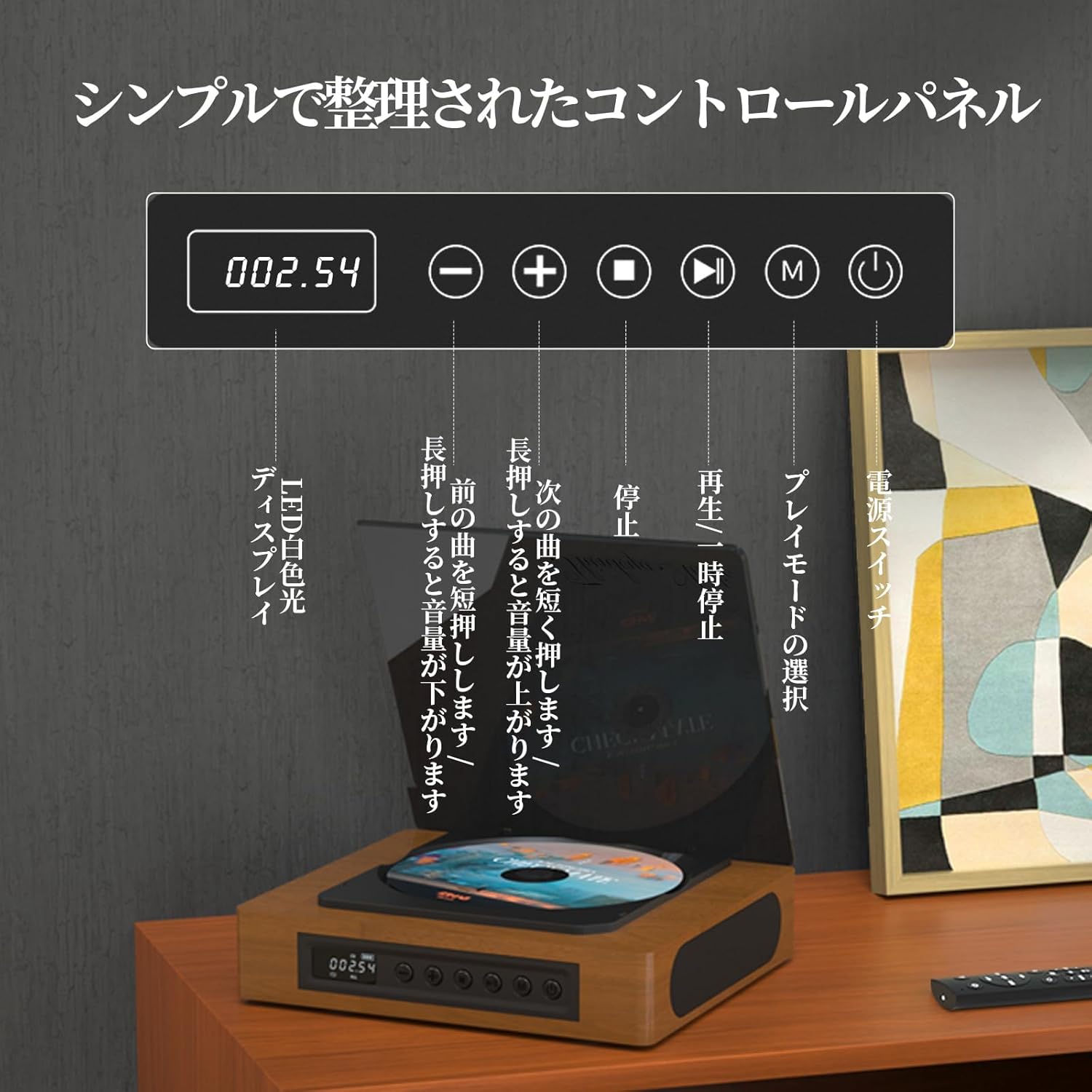
Image: The control panel and LED display of the TH-A10 CD Player. The LED display shows track number and time, while buttons control playback, volume, and mode selection.
Функције контролне табле:
- ЛЕД дисплеј: Shows current track, time, and mode.
- Прекидач: Укључује/искључује уређај.
- Дугме за репродукцију/паузу: Покреће или паузира репродукцију.
- Дугме за претходно/стишавање звука: Кратак притисак за претходну нумеру, дуг притисак за смањење јачине звука.
- Дугме за следеће/појачавање звука: Кратак притисак за следећу нумеру, дуг притисак за повећање јачине звука.
- Стоп дугме: Зауставља репродукцију.
- Дугме за режим (М): Selects playback mode (CD, Bluetooth, USB, AUX, Optical).

Слика: Детаљна view of the LED display, indicating operational status and battery level.
2.2 Прикључци задње плоче
The rear panel provides various ports for external connections.

Image: The rear panel of the TH-A10, displaying the various input/output ports including USB, AUX, Type-C for charging, and Optical output.
Портови:
- DC IN (Type-C): For charging the internal battery or powering the device.
- УСБ порт: За репродукцију звука fileса УСБ меморије.
- AUX IN/OUT (3.5mm Jack): For connecting external audio devices or outputting audio to headphones/speakers.
- Optical Output (SPDIF): За повезивање са екстерним amplifier or DAC for high-fidelity audio.
3. Подешавање
3.1 Укључивање и пуњење
- Connect the provided Type-C charging cable to the DC IN port on the rear of the player.
- Повежите други крај кабла са USB адаптером за напајање (није укључен) или USB портом са напајањем.
- The LED display will indicate charging status. A full charge provides approximately 6 hours of playback.
- Press the Power Switch to turn on the device.

Image: Charging options for the TH-A10, including wall adapter, car charger, and power bank, connected via the Type-C port.
3.2 Почетно смештање
Place the CD player on a stable, flat surface. Ensure adequate ventilation around the unit.
4. Упутство за употребу
4.1 Репродукција ЦД-а
- Пажљиво отворите поклопац за прашину.
- Place a CD (CD, CD-R, CD-RW) onto the spindle, label side up.
- Затворите поклопац за прашину.
- Press the 'M' (Mode) button until 'CD' mode is selected.
- Притисните дугме Плаи/Паусе да започнете репродукцију.
- Use the Previous/Next buttons to skip tracks. Long press for volume adjustment.
Напомена: This player does not support Blu-ray discs.

Image: Playback modes (sequential, repeat one, repeat all, random) and the ASP anti-shock function are shown, indicating versatile and stable audio experience.
4.2 Bluetooth Operation (Receive/Transmit)
The TH-A10 supports Bluetooth 5.1 for both receiving and transmitting audio.

Image: The TH-A10's Bluetooth functionality, demonstrating connections to various devices like smartphones, tablets (receiving), and Bluetooth speakers or headphones (transmitting).
4.2.1 Bluetooth Receive Mode:
- Press the 'M' (Mode) button until 'BT' mode is selected. The LED display will show 'BT' and flash, indicating pairing mode.
- На паметном телефону или таблету омогућите Блуетоотх и потражите доступне уређаје.
- Select 'TH-A10' from the list to pair. Once connected, the 'BT' indicator will stop flashing.
- You can now play audio from your device through the TH-A10's speakers.
4.2.2 Bluetooth Transmit Mode:
- Уверите се да су ваше Bluetooth слушалице или звучник у режиму упаривања.
- Press the 'M' (Mode) button until 'BT' mode is selected.
- The TH-A10 will automatically search for nearby Bluetooth receiving devices.
- Once connected, audio from the CD player (or other selected source) will be transmitted to your Bluetooth headphones/speaker.
4.3 Репродукција са УСБ-а
- Insert a USB memory stick containing MP3, WMA, or WAV audio fileу УСБ порт на задњој плочи.
- Press the 'M' (Mode) button until 'USB' mode is selected.
- The player will automatically begin playing audio fileс са УСБ стицка.
4.4 AUX Input/Output
4.4.1 AUX Input:
- Connect an external audio device (e.g., smartphone, MP3 player) to the AUX port using a 3.5mm audio cable.
- Press the 'M' (Mode) button until 'AUX' mode is selected.
- Play audio from your external device. The sound will be output through the TH-A10's speakers.
4.4.2 AUX Output (Headphones/External Speakers):
- Connect headphones or external speakers to the AUX port using a 3.5mm audio cable.
- Select your desired playback mode (CD, Bluetooth, USB).
- Audio will be routed to the connected headphones or external speakers.
4.5 Оптички излаз
For the highest audio fidelity, use the optical output.
- Connect an optical cable (not included) from the SPDIF Optical Output port on the TH-A10 to an optical input on your ampлифиер или ДАЦ.
- Select the optical input on your ampспасилац/DAC.
- Play audio from the TH-A10 (CD, USB, or Bluetooth source).
4.6 Даљински управљач
The included remote control allows for convenient operation from a distance of up to 10 meters.
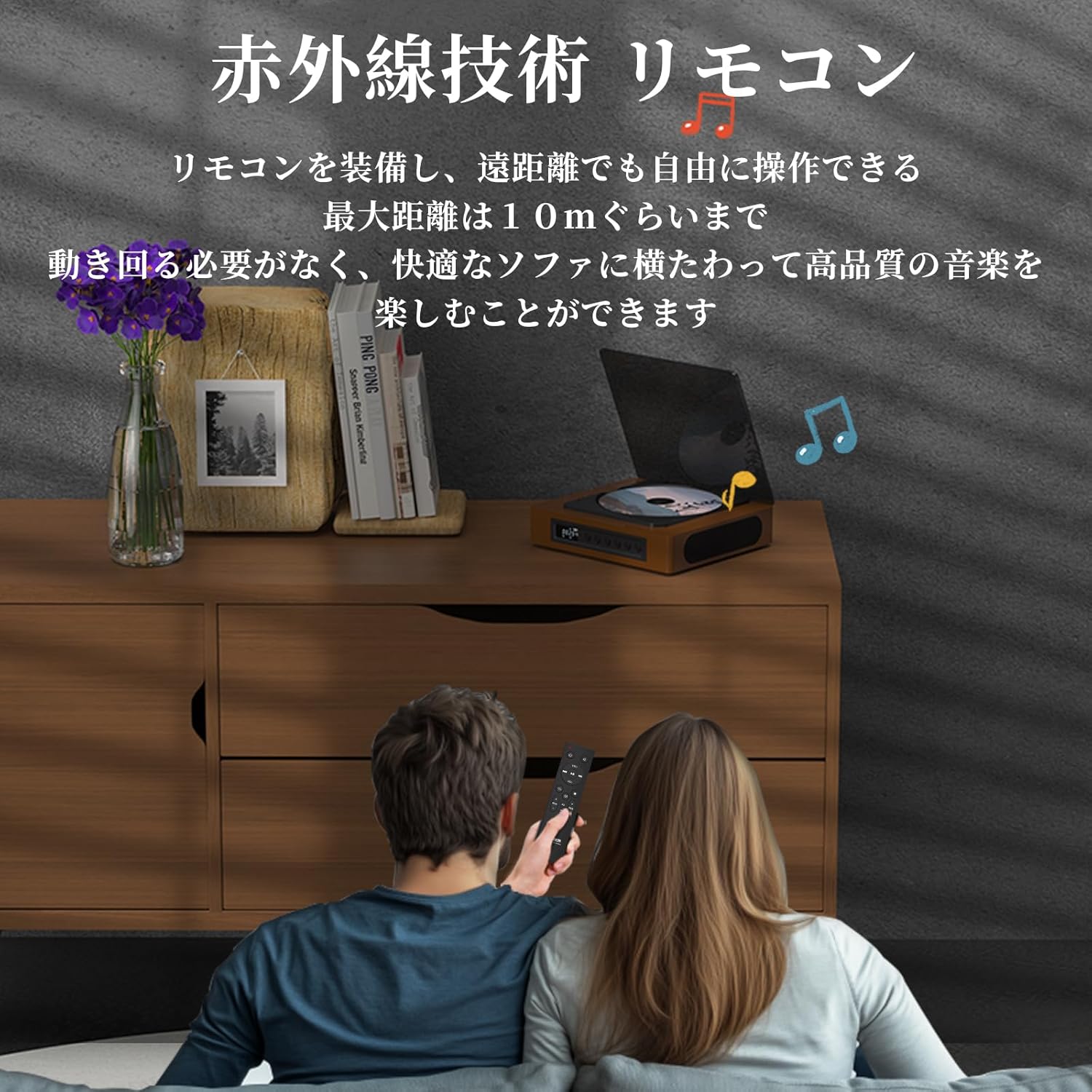
Image: A couple using the remote control for the TH-A10 CD Player, demonstrating its convenience for remote operation.
5. Одржавање
5.1 Чишћење
- Обришите спољашњост уређаја меком, сувом крпом.
- For the CD lens, use a specialized CD lens cleaner. Do not touch the lens directly.
- Keep the transparent dust cover clean to prevent dust accumulation on the CD.

Image: The transparent dust cover of the TH-A10, designed to protect the CD mechanism from dust and moisture.
5.2 Складиштење
Када се плејер не користи дуже време, чувајте га на хладном и сувом месту, даље од директне сунчеве светлости и екстремних температура.
КСНУМКС. Решавање проблема
| Проблем | Могући узрок | Решење |
|---|---|---|
| Нема струје | Battery drained; Power cable not connected. | Charge the battery; Ensure power cable is securely connected. |
| CD се не репродукује | CD inserted incorrectly; Disc is dirty or scratched; Incorrect mode selected; Blu-ray disc inserted. | Reinsert CD correctly; Clean or replace disc; Select 'CD' mode; Blu-ray discs are not supported. |
| Нема звука из звучника | Volume too low; Mute activated; External headphones/speakers connected to AUX out. | Increase volume; Check mute status; Disconnect external audio devices from AUX out if using internal speakers. |
| Блуетоотх упаривање није успело | Уређај није у режиму упаривања; Ван домета; Сметње. | Ensure both devices are in pairing mode; Move devices closer; Restart Bluetooth on both devices. |
| Skipping during CD playback | Player is unstable; Disc is damaged; Excessive vibration. | Place player on a stable surface; Clean or replace disc; ASP anti-shock function is active for minor vibrations. |
7. Спецификације
| Феатуре | Детаљ |
|---|---|
| Број модела | TH-A10 |
| Бранд | ТХИНКИА |
| Повезивање | Bluetooth 5.1 (Receive/Transmit), USB, AUX (3.5mm), Optical (SPDIF), Type-C (Power) |
| Подржани формати дискова | CD, CD-R, CD-RW (Not compatible with Blu-ray discs) |
| Подржани аудио формати | MP3, WMA, WAV, APE, FLAC (from USB) |
| Капацитет батерије | 2600мАх |
| Playback Time (Battery) | Приближно 6-8 сати (у зависности од употребе) |
| Звучници | Built-in Stereo Speakers (2x50mm Neodymium Iron Boron Magnetic Units) |
| Anti-Shock Protection (ASP) | 60 секунди за CD, 120 секунди за MP3 |
| Димензије (Д к Ш к В) | 17.8 к 15.8 к 4.85 цм |
| Тежина | 1.12 кг |
| Додатна опрема укључена | CD Player, Audio Line, Type-C Charging Cable, Remote Control, Instruction Manual |
8. Гаранција и подршка
8.1 Информације о гаранцији
This THINKYA TH-A10 CD Player comes with a 1 година гаранције from the date of purchase. This warranty covers defects in materials and workmanship under normal use. If the product fails due to a manufacturing defect within this period, we will provide a free replacement. Please retain your proof of purchase for warranty claims.
Напомена: Гаранција не покрива оштећења настала услед злоупотребе, несреће, неовлашћене модификације или нормалног хабања.
8.2 Корисничка подршка
For any questions, technical assistance, or warranty claims, please contact THINKYA customer support through the retailer where you purchased the product. Our team is dedicated to providing prompt and helpful service.