
Евент ЕВ3295
Упутство за употребу бежичне тастатуре са позадинским осветљењем Ewent EW3295
Model: EW3295 | Brand: Ewent
1. Увод
Thank you for choosing the Ewent EW3295 Backlit Wireless Keyboard. This full-size keyboard offers versatile connectivity options, including Bluetooth 5.0 and 2.4GHz wireless, allowing you to connect up to three devices simultaneously. Its slim design, silent keys, and adjustable backlight provide a comfortable and efficient typing experience. This manual provides detailed instructions for setup, operation, and maintenance to ensure optimal performance of your keyboard.

Figure 1.1: Slim and sturdy design of the EW3295 keyboard.
2. Кључне карактеристике
- Wireless Multi-Device Connection: Connect up to 3 devices simultaneously via Bluetooth 5.0 (x2) or wireless 2.4 GHz. Easily switch between devices with just one button.
- Подесиво позадинско осветљење: The keyboard's backlight is dimmable and can be turned off completely, ideal for various lighting conditions.
- Flat & Quiet Design: Flat, silent keys ensure a comfortable and low-noise typing experience, suitable for quiet environments.
- 12 мултимедијалних тастера: Quick access to functions like volume control, email, and other operations.
- Дуготрајна пуњива батерија: Equipped with a 300mAh lithium battery and intelligent energy-saving function for extended use.
- Широка компатибилност: Compatible with Windows (XP, 7, 8.1, 10, 11) and Android, suitable for PCs, laptops, and tablets.
- Чврст и издржљив дизајн: Made of high-density polycarbonate, lightweight yet durable, with a compact design.
- Italian Layout: Features an Italian QWERTY keyboard layout.
3. Садржај пакета
Молимо вас да проверите садржај пакета након распакивања:
- Ewent EW3295 Backlit Wireless Keyboard
- USB-A 2.4GHz Wireless Receiver
- УСБ-Ц на УСБ-А кабл за пуњење
- Кориснички приручник (овај документ)
4. Водич за подешавање
4.1 Пуњење тастатуре
The EW3295 keyboard is equipped with a built-in rechargeable 300mAh lithium battery. Before first use, it is recommended to fully charge the keyboard.
- Locate the USB Type-C charging port on the rear panel of the keyboard.
- Connect one end of the provided USB-C charging cable to the keyboard's USB-C port.
- Connect the other end of the USB-A cable to a USB power source (e.g., computer USB port, USB wall adapter).
- The charging indicator light (if present) will illuminate during charging and turn off when fully charged. A full charge takes less than 1 hour and provides over 1 month of use.

Figure 4.1: Rear panel of the keyboard with charging port and receiver compartment.
4.2 Повезивање тастатуре
The EW3295 keyboard supports three connection modes: 2.4GHz wireless and two Bluetooth 5.0 channels (BT1, BT2). You can connect up to three devices and switch between them.
4.2.1 Бежична веза од 2.4 GHz
- Locate the USB-A wireless receiver, typically stored in a compartment on the rear panel of the keyboard.
- Plug the USB-A receiver into an available USB port on your computer or device.
- Притисните тастер Фн + КСНУМКС keys on the keyboard to switch to 2.4GHz mode. The indicator light for channel 1 will illuminate.
- Тастатура би требало аутоматски да се повеже са вашим уређајем.

Figure 4.2: Ewent EW3295 keyboard and its USB wireless receiver.
4.2.2 Блутут веза (БТ1 / БТ2)
- Притисните тастер Фн + КСНУМКС keys to select Bluetooth channel 1 (BT1) or Фн + КСНУМКС keys to select Bluetooth channel 2 (BT2). The corresponding indicator light will flash, indicating pairing mode.
- На свом уређају (рачунар, лаптоп, таблет) омогућите Блутут и потражите нове уређаје.
- Select "EW3295" or a similar name from the list of available Bluetooth devices.
- Follow any on-screen prompts to complete the pairing process. Once connected, the indicator light will stop flashing and remain solid.
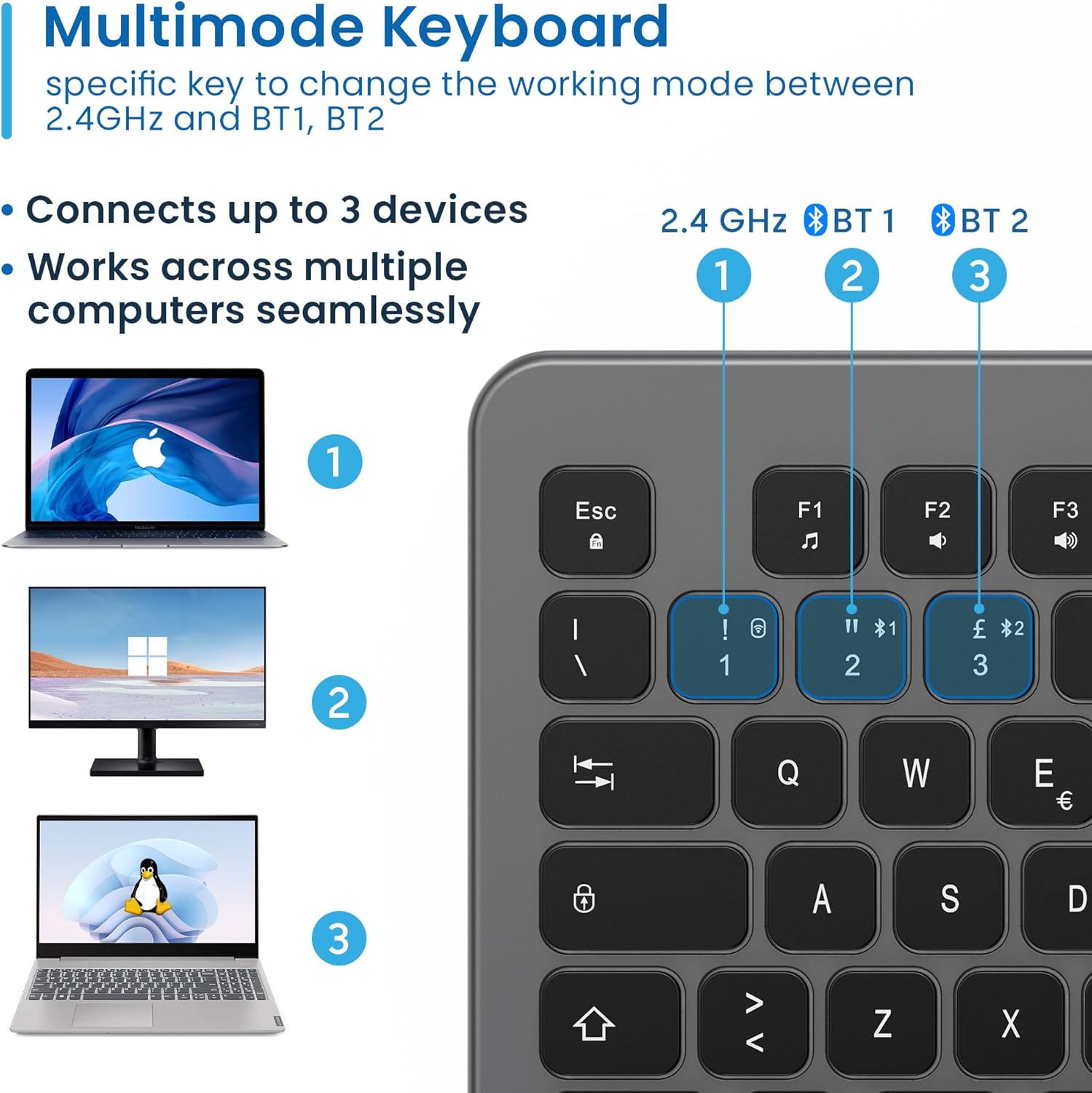
Figure 4.3: Multi-device connectivity options for the EW3295 keyboard.
4.2.3 Пребацивање између повезаних уређаја
Once multiple devices are paired, you can easily switch between them:
- Притисните Фн + КСНУМКС to switch to the 2.4GHz connected device.
- Притисните Фн + КСНУМКС to switch to the Bluetooth 1 connected device.
- Притисните Фн + КСНУМКС to switch to the Bluetooth 2 connected device.
5. Упутство за употребу
5.1 Основно куцање
The EW3295 features a full-size Italian QWERTY layout. Its flat and silent keys provide a comfortable and precise typing experience, reducing noise in quiet environments.

Figure 5.1: Illuminated Italian QWERTY Keyboard Layout.

Figure 5.2: Silent keys for reduced noise.
5.2 Контрола позадинског осветљења
The keyboard features an adjustable backlight for improved visibility in low-light conditions.
- Позадинско осветљење ОН/ОФФ: Притисните тастер Блоц Сцорр key (often labeled with a lightbulb icon) to toggle the backlight on or off.
- Backlight Brightness Up: Притисните Fn + Pag ↑ да бисте повећали осветљеност позадинског осветљења.
- Backlight Brightness Down: Притисните Fn + Pag ↓ да бисте смањили јачину позадинског осветљења.
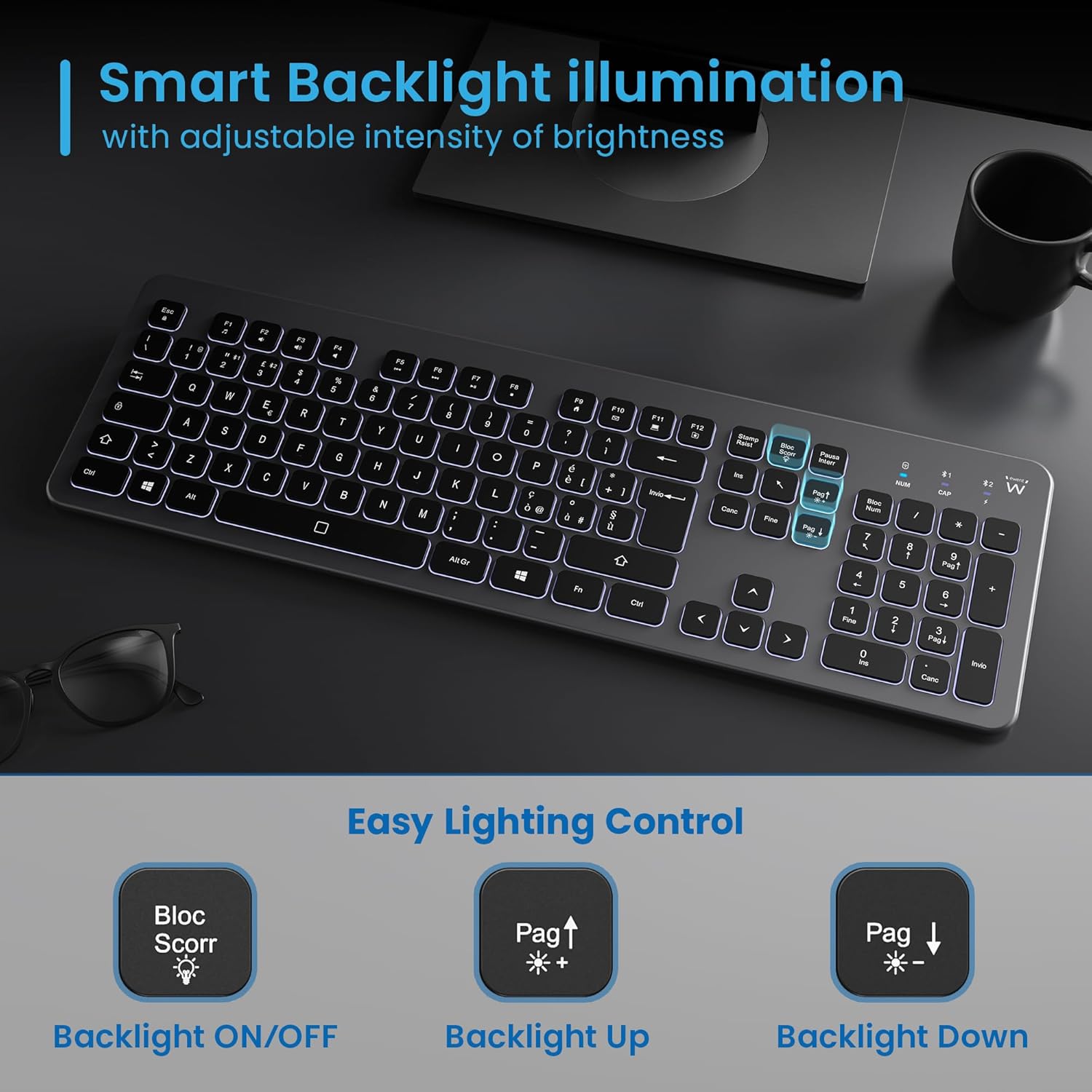
Figure 5.3: Backlight control keys.
5.3 мултимедијалних тастера
The keyboard includes 12 dedicated multimedia keys (F1-F12) that provide quick access to various functions. To use these functions, press the Fn тастер истовремено са жељеним F-тастером.
| Комбинација тастера | Функција |
|---|---|
| Фн + Ф1 | Медиа Плаиер |
| Фн + Ф2 | Утишавање звука |
| Фн + Ф3 | Волуме Уп |
| Фн + Ф4 | Муте |
| Фн + Ф5 | Превиоус Трацк |
| Фн + Ф6 | Нект Трацк |
| Фн + Ф7 | Пусти/Паузирај |
| Фн + Ф8 | Стани |
| Фн + Ф9 | Почетна страница |
| Фн + Ф10 | Емаил |
| Фн + Ф11 | Мој рачунар |
| Фн + Ф12 | Калкулатор |
6. Одржавање и њега
Правилно одржавање осигурава дуготрајност и оптималне перформансе ваше тастатуре.
- Чишћење: Користите меку, суву крпу која не оставља влакна за чишћење површине тастатуре. За тврдокорну прљавштину, благо обришитеampОперите крпу водом или благим, неабразивним средством за чишћење. Избегавајте прекомерну влагу.
- Избегавајте течности: Do not spill liquids on the keyboard. In case of accidental spills, immediately disconnect the keyboard and allow it to dry completely before re-using.
- Складиштење: Када се тастатура не користи дуже време, чувајте је на хладном и сувом месту, даље од директне сунчеве светлости и екстремних температура.
- Одржавање батерије: To prolong battery life, avoid fully discharging the battery frequently. Charge the keyboard when the low battery indicator appears.
- Складиштење пријемника: When transporting the keyboard, store the USB wireless receiver in its dedicated compartment on the rear panel to prevent loss.
КСНУМКС. Решавање проблема
If you encounter issues with your EW3295 keyboard, please refer to the following common solutions:
| Проблем | Могући узрок | Решење |
|---|---|---|
| Keyboard not responding (2.4GHz) | Low battery; Receiver not plugged in; Incorrect channel selected. | Charge the keyboard; Ensure USB receiver is securely plugged in; Press Фн + КСНУМКС to select 2.4GHz mode. |
| Тастатура не реагује (Блутут) | Low battery; Bluetooth not enabled on device; Not paired; Incorrect channel selected. | Charge the keyboard; Enable Bluetooth on your device; Re-pair the keyboard (see Section 4.2.2); Press Фн + КСНУМКС or Фн + КСНУМКС to select the correct Bluetooth channel. |
| Позадинско осветљење не ради | Позадинско осветљење искључено; Батерија је празна. | Притисните Блоц Сцорр to turn on/off; Increase brightness with Fn + Pag ↑; Charge the keyboard. |
| Тастери су лепљиви или не реагују | Dirt or debris under keys; Physical damage. | Clean the keyboard (see Section 6); If physical damage, contact support. |
| Кратко трајање батерије | Frequent backlight use; Battery degradation over time. | Reduce backlight brightness or turn it off when not needed; Ensure full charge cycles. |
8. Спецификације
| Феатуре | Детаљ |
|---|---|
| Назив модела | Tastiera Wireless Retroilluminata EW3295 |
| Број модела ставке | ЕВ3295 |
| Бранд | Евент |
| Технологија повезивања | Bluetooth 5.0 (x2), 2.4GHz Wireless |
| Опис тастатуре | Multimedia, Full-size, Italian Layout |
| Компатибилни уређаји | PC (Windows XP, 7, 8.1, 10, 11), Android |
| Тип батерије | Пуњива литијумска батерија од 300мАх |
| Позадинско осветљење | Подесиви интензитет |
| Димензије (Д к Ш к В) | Прибл. 432 мм к 122 мм к 22 мм |
| Тежина | Прибл. 390г |
| Материјал | High-density Polycarbonate |

Figure 8.1: Keyboard dimensions and weight.
9. Информације о гаранцији
Ewent products are designed and manufactured to the highest quality standards. This product is covered by a limited warranty from the date of purchase. Please refer to the warranty card included with your product or visit the official Ewent website for detailed warranty terms and conditions specific to your region. The warranty typically covers defects in materials and workmanship under normal use.
10. Корисничка подршка
For technical support, troubleshooting assistance, or any questions regarding your Ewent EW3295 keyboard, please contact Ewent customer support. You can typically find contact information (phone, email, support portal) on the official Ewent webсајту или у паковању производа.
Please have your product model number (EW3295) and purchase details ready when contacting support.
Ask a question about this manual
Ask about setup, troubleshooting, compatibility, parts, safety, or missing instructions. Manuals+ will review the question and use this page’s manual context to help answer it.