
1. Увод
Хвала вам на куповиниasing the JVC XS-N3214PB Portable Bluetooth Party Speaker. This manual provides important information regarding the setup, operation, and maintenance of your speaker. Please read it thoroughly before using the product to ensure proper function and to maximize your listening experience. Keep this manual for future reference.
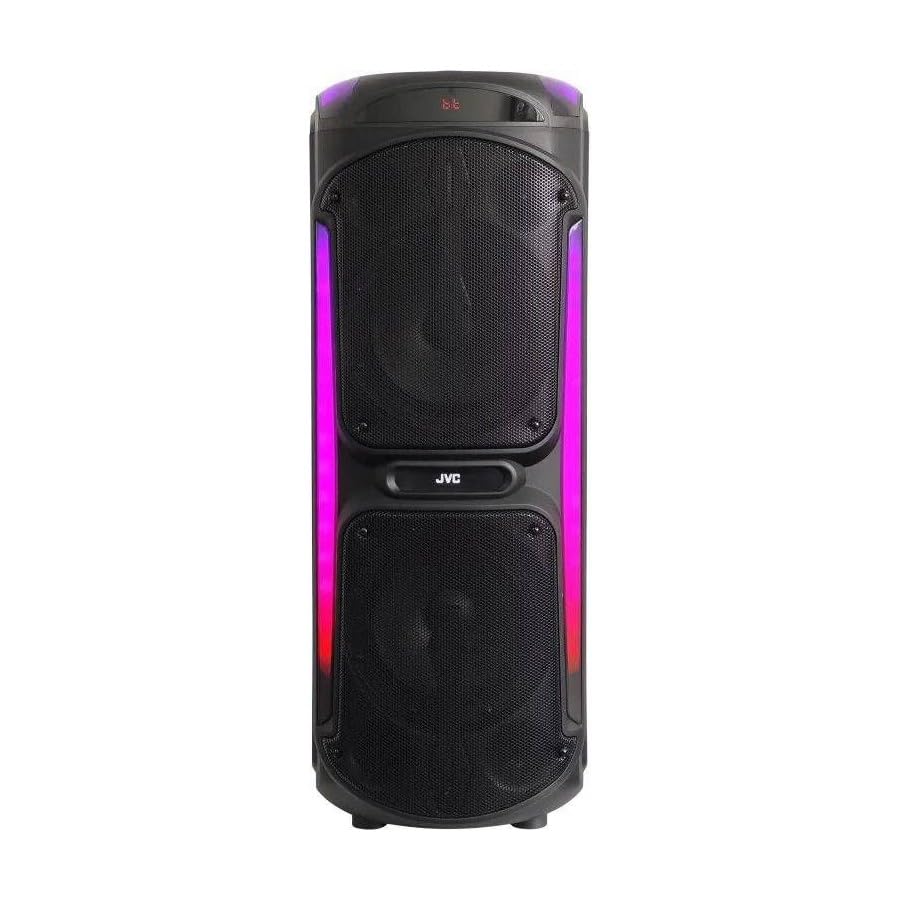
Image: The JVC XS-N3214PB Portable Bluetooth Party Speaker, shown with two microphones, highlighting its versatile connectivity options including Bluetooth, FM Radio, MP3 playback, AUX input, and USB input. The speaker features integrated LED lighting.
2. Безбедносне информације
Да бисте осигурали безбедан рад и спречили оштећења, молимо вас да се придржавате следећих мера предострожности:
- Не излажите звучник води, влази или екстремним температурама.
- Не покушавајте да растављате или модификујете звучник. Сво сервисирање препустите квалификованом особљу.
- Држите звучник даље од извора топлоте, директне сунчеве светлости и запаљивих материјала.
- Користите само назначени адаптер за пуњење.
- Avoid placing heavy objects on the speaker.
- Clean the speaker with a soft, dry cloth. Do not use liquid cleaners or aerosols.
- Ensure proper ventilation around the speaker during use.
3. Садржај пакета
Проверите да ли су све ставке присутне у пакету:
- JVC XS-N3214PB Portable Bluetooth Party Speaker (1 unit)
- Power Adapter/Charging Cable (1 unit)
- Даљински управљач (1 јединица)
- Кориснички приручник (овај документ)
- (Optional: Microphone, if included with your specific purchase)
4. Производ је готовview
4.1. Карактеристике
- Powerful 800W Audio Output
- Блуетоотх бежична веза
- Уграђена пуњива батерија за преносивост
- Integrated LED Party Lights
- ФМ радио тјунер
- УСБ репродукција
- АУКС улаз
- Microphone Input for Karaoke
- Рад на даљинском управљачу
- Deep Bass Performance
4.2. Контроле и портови
Familiarize yourself with the speaker's control panel and connection ports. (Refer to diagrams in the full printed manual for exact locations).
- Дугме за напајање: Укључује/искључује звучник.
- Дугме за режим: Switches between Bluetooth, FM, USB, and AUX modes.
- Контрола јачине звука: Подешава главну јачину звука.
- Дугме за репродукцију/паузу: Контролише репродукцију медија.
- Дугмад за претходну/следећу нумеру: Навигација кроз нумере или ФМ станице.
- Дугме са ЛЕД светлом: Укључује/искључује ЛЕД светлосне ефекте.
- Контроле јачине звука/еха микрофона: Adjusts microphone input and echo effect.
- УСБ порт: За репродукцију са УСБ диска.
- AUX улаз (3.5 мм): За повезивање спољних аудио уређаја.
- Microphone Input (6.35mm): For connecting a wired microphone.
- ДЦ ИН порт: For connecting the power adapter to charge the speaker.
5. Подешавање
5.1. Пуњење звучника
- Connect the power adapter to the DC IN port on the speaker.
- Укључите други крај адаптера за напајање у зидну утичницу.
- The charging indicator light will illuminate (color may vary) to show the speaker is charging.
- Allow approximately 4-6 hours for a full charge. The indicator light may change or turn off when fully charged.
- Disconnect the power adapter once charging is complete or when using the speaker on battery power.
5.2. Укључивање/искључивање
- За укључивање: Притисните и држите дугме за напајање неколико секунди док се екран не осветли.
- За искључивање: Поново притисните и држите дугме за напајање неколико секунди док се екран не искључи.
6. Упутство за употребу
6.1. Блуетоотх упаривање
- Power on the speaker. It will automatically enter Bluetooth pairing mode, indicated by a flashing Bluetooth icon or voice prompt.
- На свом мобилном уређају (паметном телефону, таблету итд.) омогућите Блутут и потражите доступне уређаје.
- Select "JVC XS-N3214PB" from the list of devices.
- Once paired, the speaker will confirm with an audible tone or a solid Bluetooth icon.
- Сада можете да репродукујете звук са свог уређаја преко звучника.
6.2. ФМ радио
- Press the Mode button until "FM" is displayed.
- Press the Play/Pause button to automatically scan and save available FM stations.
- Use the Previous/Next Track buttons to navigate between saved stations.
6.3. УСБ репродукција
- Уметните USB флеш диск (форматиран у FAT32) који садржи MP3 аудио fileс у УСБ порт.
- The speaker will automatically switch to USB mode and begin playing the first track. If not, press the Mode button to select USB.
- Користите дугмад Репродукција/Пауза и Претходна/Следећа нумера за контролу репродукције.
6.4. АУКС улаз
- Повежите један крај аудио кабла од 3.5 мм (није укључен) са AUX IN портом на звучнику.
- Connect the other end of the cable to the audio output of your external device (e.g., MP3 player, laptop).
- Press the Mode button until "AUX" is displayed.
- Контролишите репродукцију и јачину звука са свог екстерног уређаја.
6.5. Microphone and Karaoke Function
- Connect a wired microphone (not included) to the Microphone Input port.
- Adjust the microphone volume and echo effect using the dedicated controls on the speaker.
- Play music via Bluetooth, USB, or AUX, and sing along through the microphone.
6.6. LED Party Lights
Press the LED Light button to cycle through different lighting modes or to turn the lights off.
6.7. Даљински управљач
The included remote control allows for convenient operation of the speaker from a distance. Functions include power on/off, mode selection, volume adjustment, track control, and LED light control. Ensure the remote control has working batteries and is pointed towards the speaker's sensor.
7. Одржавање
- Чишћење: Wipe the speaker's exterior with a soft, dry, lint-free cloth. Do not use abrasive cleaners, waxes, or solvents.
- Складиштење: If storing the speaker for an extended period, ensure it is fully charged, then power it off. Store in a cool, dry place away from direct sunlight. Recharge the battery every few months to maintain its lifespan.
- Одржавање батерије: To prolong battery life, avoid fully discharging the speaker frequently. Charge it before the battery is completely depleted.
КСНУМКС. Решавање проблема
| Проблем | Могући узрок | Решење |
|---|---|---|
| Звучник се не укључује. | Батерија је празна. Кабл за напајање није повезан. | Charge the speaker. Ensure power cable is securely connected to both speaker and outlet. |
| Нема звука. | Volume is too low. Incorrect mode selected. Device not paired (Bluetooth). AUX cable loose. | Increase volume on speaker and source device. Press Mode button to select correct input. Re-pair Bluetooth device. Check AUX cable connection. |
| Блутут уређај не може да се упари. | Звучник није у режиму упаривања. Уређај је предалеко. Сметње. | Ensure speaker is in Bluetooth mode and flashing. Move device closer to speaker. Turn off other Bluetooth devices. |
| Репродукција са УСБ-а не ради. | USB drive not formatted correctly (FAT32). Unsupported file format. USB drive faulty. | Ensure USB drive is FAT32 and contains MP3 files. Try a different USB drive. |
| Даљински управљач не ради. | Batteries depleted. Obstruction between remote and speaker. | Replace remote control batteries. Ensure clear line of sight to speaker's IR sensor. |
9. Спецификације
| Број модела | XS-N3214PB |
| Бранд | ЈВЦ |
| Излазна снага | 800В (врх) |
| Повезивање | Bluetooth, USB, AUX (3.5mm), FM Radio, Microphone Input (6.35mm) |
| Режим аудио излаза | Стерео |
| Материјал | Пластика |
| Тип монтаже | Флоор Стандинг |
| Контролни метод | Даљински, дугме |
| Димензије (Д к Ш к В) | 35Д к 31Ш к 94В центиметара |
| Укључене компоненте | 1 x JVC XS-N3214PB 800W Party Portable Bluetooth Speaker, Power Adapter, Remote Control, User Manual |
10. Гаранција и подршка
10.1. Информације о гаранцији
This JVC XS-N3214PB speaker comes with a 1 година гаранције од датума куповине. Ова гаранција покрива производне недостатке и недостатке у изради при нормалној употреби. Не покрива штету насталу услед злоупотребе, несрећа, неовлашћених модификација или нормалног хабања. Молимо вас да сачувате доказ о куповини за потребе подношења захтева за гаранцију.
10.2. Корисничка подршка
For technical assistance, warranty claims, or product inquiries, please contact JVC customer support through the retailer where the product was purchased or visit the official JVC webсајт за контакт информације специфичне за ваш регион.