
Увод
Welcome to your MENDUNER Earbud Translator. This manual provides detailed instructions for the proper use and care of your device. Please read it thoroughly before operation to ensure optimal performance and longevity.
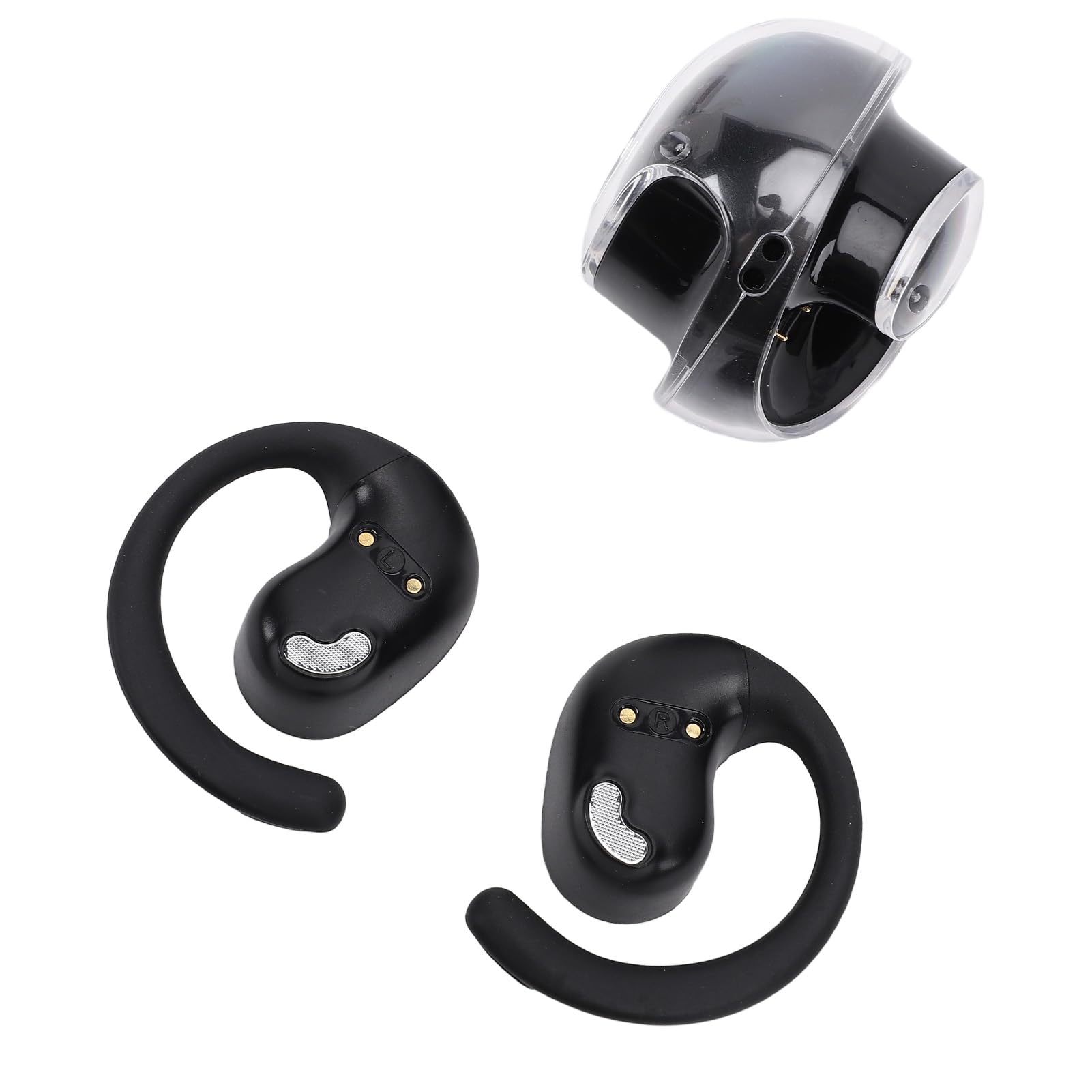
The MENDUNER Earbud Translator offers real-time language translation, music playback, and call functions, supporting 144 languages. It features 5.4 wireless technology for stable connections and a comfortable ergonomic design, making it ideal for travel, social interaction, and learning.
Садржај пакета
Проверите да ли су све ставке присутне у пакету:
- 1 к кућиште за пуњење
- 2 x Language Earbuds (Left and Right)
- 1 к Ланиард
- 1 к кабл за пренос података

Спецификације
| Феатуре | Детаљ |
|---|---|
| Врста ставке | Слушалице за превођење језика |
| Материјал | ПЦ, АБС |
| Приближна тежина | 86.00 г / 3.03 оз |
| Single Earbud Battery | LiPo Battery, 40mAh (Included) |
| Батерија кућишта за пуњење | LiPo Battery, 300mAh (Included) |
| Формат репродукције | Single Ear or Double Ear |
| Метод операције | Контрола додиром |
| Удаљеност везе | 10 до 15 метара |
| Онлајн језичка подршка | 144 Languages (e.g., African, Albanian, Amharic, Arabic) |
| Број модела | MENDUNER76zb8wh2sp-11 |
| Бранд | MENDUNER |
| Боја | Црно и Сребрно |
Сетуп
Пуњење уређаја
Пре прве употребе, потпуно напуните слушалице и кућиште за пуњење.
- Place both earbuds into the charging case. Ensure they are correctly seated to make contact with the charging pins.
- Connect the provided data cable to the charging case and a compatible USB power source (e.g., computer USB port, USB wall adapter).
- The indicator lights on the charging case and/or earbuds will show charging status. Refer to the app for detailed battery levels.
Упаривање са вашим уређајем
- Уверите се да су слушалице напуњене и извађене из кућишта за пуњење. Аутоматски ће ући у режим упаривања.
- On your smartphone or tablet, enable 5.4 (Bluetooth) and search for available devices.
- Select "MENDUNER Translator" (or similar name) from the list of found devices to pair.
- Once paired, a confirmation sound or indicator light will signal a successful connection.
Инсталација апликације
Download and install the dedicated MENDUNER translator application from your device's app store. This app is essential for accessing translation features and managing settings.
Упутство за употребу
Укључивање/искључивање
The earbuds typically power on automatically when removed from the charging case and power off when placed back in the case. Manual power control may be available via touch controls (refer to app for customization).
Translation Mode
- Open the MENDUNER translator app on your paired device.
- Select the desired source and target languages from the app interface (supports 144 languages).
- Activate the real-time translation function within the app.
- Speak into the earbud's microphone. The translated audio will be played through the other earbud or your paired device.
- For two-way conversation, the other person can speak, and their words will be translated and played back to you.
Репродукција музике
After pairing, the earbuds can be used for music playback. Use your paired device's media controls or the earbud's touch controls (if configured) to play, pause, skip tracks, and adjust volume.
Одговарање на позиве
When a call comes in, you can answer it using the earbud's touch controls (if configured) or directly from your paired smartphone. Audio will be routed through the earbuds.

Одржавање
Proper maintenance ensures the longevity and optimal performance of your MENDUNER Earbud Translator.
- Чишћење: Regularly wipe the earbuds and charging case with a soft, dry, lint-free cloth. Avoid using abrasive materials, solvents, or harsh chemicals.
- Складиштење: Када се не користе, чувајте слушалице у њиховој футроли за пуњење како бисте их заштитили и одржали напуњеним. Чувајте на хладном и сувом месту, даље од директне сунчеве светлости и екстремних температура.
- Одржавање батерије: Да бисте продужили век трајања батерије, избегавајте често потпуно пражњење слушалица и кућишта за пуњење. Редовно их пуните, чак и ако их не користите стално.
- Отпорност на воду: Слушалице нису водоотпорне. Избегавајте излагање води, зноју или високој влажности.

Решавање проблема
If you encounter issues with your MENDUNER Earbud Translator, refer to the following common solutions:
| Проблем | Могући узрок | Решење |
|---|---|---|
| Слушалице се не упарују | Not in pairing mode, low battery, Bluetooth off | Ensure earbuds are out of case and charged. Turn Bluetooth off and on on your device. Restart both devices. |
| Нема звука | Volume too low, not connected, app issue | Increase volume on your device. Re-pair earbuds. Check app settings. |
| Превод не ради | Internet connection, incorrect language settings, app error | Ensure stable internet connection. Verify language selections in the app. Restart the app. |
| Проблем са пуњењем | Loose connection, dirty pins, faulty cable | Ensure earbuds are correctly seated. Clean charging pins. Try a different USB cable or power source. |
| Poor connection/range | Obstacles, interference, distance | Reduce distance between earbuds and paired device. Avoid physical obstructions. |

Информације о гаранцији
MENDUNER products are typically covered by a limited manufacturer's warranty. Please refer to the warranty card included in your product packaging or visit the official MENDUNER webсајт за детаљне услове и одредбе. Сачувајте доказ о куповини за потребе гаранције.
Note: Information regarding specific warranty duration or coverage was not provided in the product details.
Подршка
For further assistance, technical support, or inquiries, please contact MENDUNER customer service.
- Подршка на мрежи: Visit the official MENDUNER webсајт за често постављана питања, чланке подршке и контакт форме.
- Подршка путем е-поште: Refer to your product packaging or the MENDUNER webсајт за имејл адресе корисничке службе.
- Телефонска подршка: Check the MENDUNER website for available phone support numbers in your region.
When contacting support, please have your model number (MENDUNER76zb8wh2sp-11) and proof of purchase ready.