
1. Увод
Thank you for choosing the Altera Homestep Walking Pad. This manual provides essential information for the safe and efficient use of your new walking pad. Please read all instructions carefully before operation and retain this manual for future reference.
2. Безбедносна упутства
To reduce the risk of serious injury, read all important precautions and instructions in this manual and on your walking pad before use.
- Always place the walking pad on a level, stable surface.
- Keep children and pets away from the walking pad during operation.
- Ensure adequate clear space around the walking pad (at least 0.6 meters on all sides).
- Do not use the walking pad if you weigh more than 90 kg (198 lbs).
- Носите одговарајућу спортску обућу.
- Always attach the safety key clip to your clothing before starting the walking pad.
- Ако осетите слабост, вртоглавицу или бол, одмах престаните са вежбањем.
- Unplug the walking pad from the power outlet when not in use or before cleaning/maintenance.
- Do not operate the walking pad if it has a damaged cord or plug, or if it is not working properly.
3. Садржај пакета
- Altera Homestep Walking Pad
- Ремоте Цонтрол
- Повер Цабле
- Кориснички приручник (овај документ)
4. Производ је готовview
Familiarize yourself with the main components and features of your Altera Homestep Walking Pad.

Image 4.1: The Altera Homestep Walking Pad shown with its remote control.

Слика 4.2: Детаљно view of the LED display and remote control buttons. The display shows Time, Speed, Distance, and Calories. The remote has buttons for Speed Control (+/-), Mode (M), Start/Hold, and Stop.

Image 4.3: Diagram illustrating remote control functions: '+' to increase speed, 'M' to change mode, '-' to reduce speed, 'START/HOLD' to start/continue, and 'STOP' to pause.

Слика 4.4: View of the walking pad's underside, highlighting anti-slip leveling feet, transport wheels, and the manual power switch.

Image 4.5: Diagram showing the multi-layered running belt construction, including wear-resistant surface, noise reduction, impact absorption, and high-resistance support layers.
5. Подешавање
- Raspakujte: Carefully remove the walking pad and all components from the packaging.
- Пласман: Place the walking pad on a flat, stable, and non-slip surface. Ensure there is sufficient space around the unit for safe operation.
- Прикључак за напајање: Connect the power cable to the walking pad and then to a grounded electrical outlet.
- Сигурносни кључ: Locate the safety key. This key must be in place for the walking pad to operate. Attach the clip of the safety key to your clothing before starting.
- Укључено: Flip the manual power switch (refer to Image 4.4) to the 'ON' position. The LED display should illuminate.
6. Упутство за употребу
6.1 Коришћење даљинског управљача
The walking pad is controlled via the included remote control. Ensure the remote has working batteries.
- Почетак/Задржавање: Press the "START/HOLD" button to begin or resume your workout. The walking pad will start at a low speed.
- Зауставити: Press the "STOP" button to pause or end your workout.
- Подешавање брзине: Use the "+" button to increase speed and the "-" button to decrease speed. The speed range is 1 km/h to 6 km/h.
- Избор режима: Press the "M" button to cycle through different display modes (Time, Speed, Distance, Calories).
6.2 ЛЕД дисплеја
The integrated LED display provides real-time feedback on your workout progress (refer to Image 4.2).
- ВРЕМЕ: Приказује трајање вашег тренинга.
- БРЗИНА: Shows your current walking speed in km/h.
- ДИСТ: Indicates the distance you have walked.
- ЦАЛ: Процењује број сагорених калорија током сесије.
6.3 Adjustable Incline
The Altera Homestep Walking Pad features two manual incline positions to vary your workout intensity.
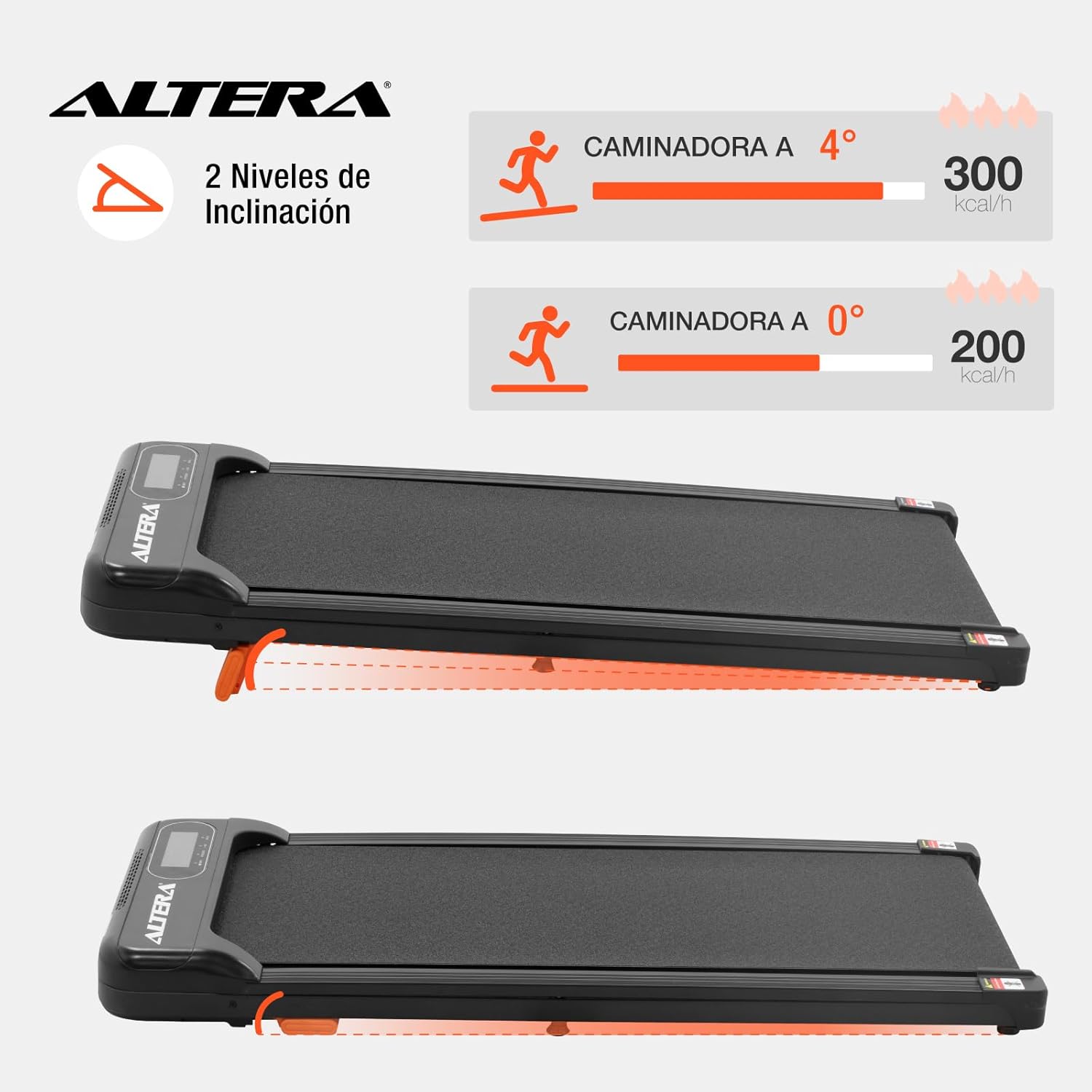
Image 6.1: Illustration of the two incline levels: 0 degrees (flat) and 4 degrees (inclined), showing estimated calorie burn difference.
To adjust the incline:
- Ensure the walking pad is turned off and unplugged.
- Carefully lift the front of the walking pad.
- Deploy or retract the small orange support feet located at the front underside of the unit to select your desired incline level.
- Ensure the support feet are securely locked in place before resuming use.
6.4 Транспорт и складиштење
The walking pad is designed for easy storage and portability.
- To move the unit, ensure it is powered off and unplugged.
- Lift the front end slightly to engage the transport wheels (refer to Image 4.4).
- Roll the walking pad to your desired storage location. Its compact design allows it to fit in small spaces.
7. Одржавање
Regular maintenance ensures the longevity and optimal performance of your walking pad.
- Чишћење: Обришите подлогу за ходање огласомamp крпом након сваке употребе. Не користите абразивна средства за чишћење или раствараче.
- Подмазивање каиша: The walking belt may require lubrication periodically. Refer to the manufacturer's guidelines for specific lubrication instructions and recommended lubricants.
- Затегнутост појаса: Check the walking belt tension regularly. If the belt slips or feels loose, it may need adjustment. Consult a qualified technician if you are unsure how to adjust it.
- Складиштење: Store the walking pad in a dry, cool place away from direct sunlight and moisture.
КСНУМКС. Решавање проблема
| Проблем | Могући узрок | Решење |
|---|---|---|
| Подлога за ходање се не покреће. |
|
|
| Каиш клизи или оклева. |
|
|
| Даљински управљач не реагује. |
|
|
9. Спецификације

Image 9.1: Technical specifications table and dimensional diagram of the Altera Homestep Walking Pad.
| Феатуре | Детаљ |
|---|---|
| Број модела | CAM-HOM-02 |
| Снага мотора | 1.5 ХП |
| Спеед Ранге | 1 - 6 км/х |
| Максимална тежина корисника | 90 кг (198 лбс) |
| Нивои нагиба | 2 (manual, up to 4 degrees) |
| Димензије појаса за трчање | 95 цм к 36 цм |
| Димензије производа (Д к Ш к В) | 110 к 46 к 10 цм |
| Тежина производа | 17 кг |
| Материјал | Метал, Пластика |
| Карактеристике | Bluetooth, Portable, LED Display, Anti-slip belt, Transport wheels |
| Извор напајања | Electric Cord (110V) |
10. Гаранција и подршка
For warranty information or technical support, please refer to the contact details provided with your purchase or visit the official Altera webсајт. Сачувајте доказ о куповини за потребе гаранције.