
1. Увод
This manual provides essential instructions for the safe and efficient operation of your VOLTCRAFT DOV1004 Digital Oscilloscope. The DOV1004 is a compact, high-performance digital storage oscilloscope featuring a 12-bit analog-to-digital converter (ADC), a 7-inch touchscreen with gesture control, and multiple connectivity options including USB, LAN, and HDMI. It is designed for precise measurement and analysis of electronic signals in various applications. Please read this manual thoroughly before using the device and keep it for future reference.
2. Безбедносне информације
Увек се придржавајте следећих мера безбедности како бисте спречили повреде и оштећење уређаја.
- Напајање: Use only the provided USB Type-C power adapter. Ensure the voltagе одговара захтевима уређаја (12 волти).
- Окружење: Operate the oscilloscope in a dry, well-ventilated area, away from direct sunlight, extreme temperatures, and high humidity. Avoid dusty or corrosive environments.
- Сонде: Always use properly rated probes for the voltage and frequency being measured. Ensure probes are correctly connected before taking measurements.
- уземљење: Ensure the oscilloscope is properly grounded to prevent electric shock.
- Одржавање: Не покушавајте сами да отворите или поправите уређај. Све сервисирање препустите квалификованом особљу.
- Чишћење: Искључите напајање пре чишћења. Користите меку, суву крпу. Не користите течна или аеросолна средства за чишћење.
3. Садржај пакета
Verify that all items listed below are present in your package. If any items are missing or damaged, contact your supplier.
- VOLTCRAFT DOV1004 Digital Oscilloscope (1 unit)
- УСБ адаптер за напајање типа Ц
- УСБ кабл
- Probe Tips (4 units)
- Sampле Волtage Sets (2 units)
- Software CD with English User Manual
- Сажети кориснички приручник
4. Производ је готовview
The VOLTCRAFT DOV1004 features a user-friendly interface and robust design for accurate signal analysis.
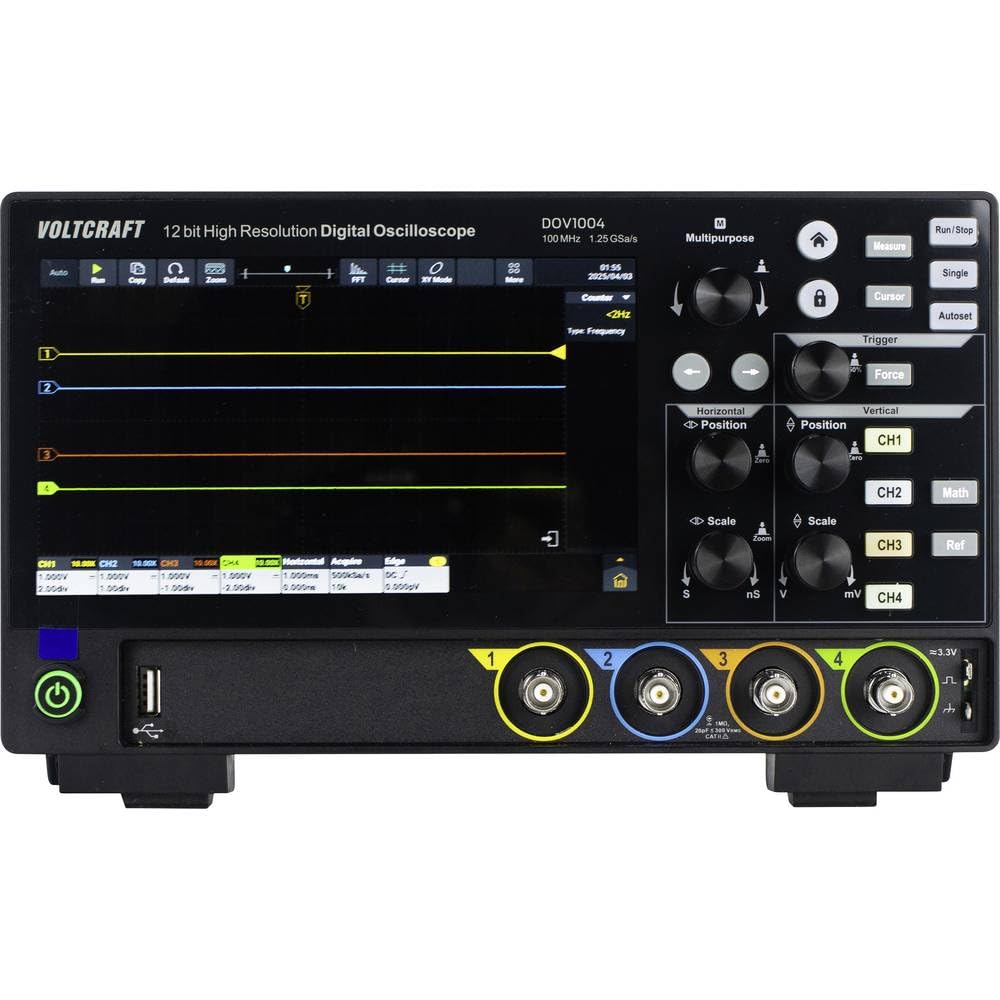
Слика 4.1: Предња страна View of DOV1004 Oscilloscope
This image displays the front panel of the VOLTCRAFT DOV1004 Digital Oscilloscope. Key features visible include the large 7-inch touchscreen display, various control knobs for horizontal and vertical adjustments, trigger settings, and the four analog input channels (CH1 to CH4) at the bottom right. A USB port is also visible on the front.
4.1 Front Panel Controls and Connectors
- 7-инчни екран осетљив на додир: High-resolution (1024 x 600 pixels) interface for waveform visualization and menu navigation. Supports touch and gesture control.
- Хоризонталне контроле: Knobs for adjusting horizontal position and scale (time/div).
- Вертикалне контроле: Knobs for adjusting vertical position and scale (volts/div) for each channel.
- Контроле окидача: Buttons and knobs for setting trigger type, level, and mode.
- Channel Inputs (CH1-CH4): БНЦ конектори за повезивање осцилоскопских сонди.
- УСБ портови: For data transfer and connecting peripherals.
- Дугме за напајање: Да бисте укључили/искључили уређај.

Слика 4.2: Страна View of DOV1004 Oscilloscope
Ова слика приказује бочног професионалцаfile of the VOLTCRAFT DOV1004 Digital Oscilloscope. Visible features include ventilation grilles for heat dissipation and potential side-mounted connectivity ports (though not clearly visible in this specific angle, typical for such devices).
4.2 Rear Panel and Connectivity
The rear panel typically houses additional connectivity options for advanced functionality.
- USB Type-C Power Input: За повезивање адаптера за напајање.
- ЛАН порт: For network connectivity and remote control.
- ХДМИ излаз: За повезивање екстерног дисплеја.
- USB Host/Device Ports: Additional USB ports for connecting to a PC or external storage.
5. Подешавање
Follow these steps to set up your VOLTCRAFT DOV1004 oscilloscope for the first time.
- Распакивање: Carefully remove the oscilloscope and all accessories from the packaging. Retain the packaging for future transport or storage.
- Прикључак за напајање: Connect the USB Type-C power adapter to the power input port on the rear of the oscilloscope and then plug the adapter into a suitable power outlet.
- Укључено: Press the power button on the front panel to turn on the oscilloscope. The display should illuminate.
- Веза сонде: Connect the oscilloscope probes to the desired input channels (CH1-CH4) using the BNC connectors. Ensure a secure connection.
- Компензација сонде: Before taking measurements, it is recommended to compensate your probes. Connect the probe to the probe compensation output (usually a dedicated terminal on the front panel, often labeled "Probe Comp" or similar, or use a known square wave source). Adjust the probe's compensation trimmer until a flat-top square wave is displayed on the screen.
- Почетна подешавања: The oscilloscope may perform an automatic self-calibration upon first power-on. You can adjust basic settings like language, date, and time through the system menu on the touchscreen.
6. Операција
This section covers the basic operation and key features of the VOLTCRAFT DOV1004 oscilloscope.
6.1 Основна мерења
- Сигнал за повезивање: Connect the compensated probe to the circuit point you wish to measure.
- Auto-Set: Притисните тастер Ауто button (if available) to automatically adjust horizontal and vertical settings for a stable waveform display.
- Ручно подешавање:
- Користите Vertical Scale (V/div) дугмад за подешавање ampјачина таласног облика.
- Користите Вертикални положај knobs to move the waveform up or down.
- Користите Horizontal Scale (s/div) knob to adjust the time base.
- Користите Хоризонтални положај knob to move the waveform left or right.
- Trigger Setup:
- Select the trigger source (e.g., CH1, CH2).
- Choose the trigger type (e.g., Edge, Pulse, Video).
- Adjust the trigger level to stabilize the waveform.
6.2 Напредне функције
- Touchscreen and Gesture Control: Utilize the 7-inch touchscreen for intuitive navigation. Pinch-to-zoom and swipe gestures can be used for waveform manipulation, eliminating tedious menu navigation.
- High-Resolution ADC: The 12-bit ADC provides enhanced vertical resolution for more precise measurements.
- Visoka Sampлинг рате: With a maximum sampling rate of 1.25 GSa/s (single channel), the oscilloscope can capture fast-changing signals accurately.
- Дубоко памћење: A record length of 50 Mpts allows for capturing long signal durations at high sampле рате.
- Брзина снимања таласног облика: Real-time waveform capture of 50,000 wfms/s and segment capture of 700,000 wfms/s enable the observation of infrequent events.
- Multiple Trigger Types: Supports a wide range of trigger types including Edge, Video, Pulse, Slope, Runt, Window, Timeout, Nth, Logic, RS232/UART, I2C, SPI, CAN, and LIN for isolating specific events.
- Повезивање: USB, LAN, and HDMI interfaces allow for data transfer, remote control, and external display connection. Real-time signal display on a computer is possible.
7. Одржавање
Proper maintenance ensures the longevity and optimal performance of your oscilloscope.
- Чишћење: Regularly clean the exterior of the oscilloscope with a soft, dry, lint-free cloth. For stubborn dirt, slightly dampу крпу са водом. Do not use abrasive cleaners, solvents, or alcohol. Уверите се да је уређај искључен и искључен пре чишћења.
- Брига о екрану: The touchscreen is a sensitive component. Clean it gently with a microfiber cloth. Avoid pressing too hard or using sharp objects.
- Складиштење: When not in use for extended periods, store the oscilloscope in a cool, dry place, away from direct sunlight and extreme temperatures. Use the original packaging if available.
- Брига о сонди: Редовно проверавајте сонде да ли су каблови или конектори оштећени. Одмах замените оштећене сонде.
- вентилација: Уверите се да су вентилационе решетке без прашине и зачепљења како бисте спречили прегревање.
КСНУМКС. Решавање проблема
Овај одељак пружа решења за уобичајене проблеме на које можете наићи.
| Проблем | Могући узрок | Решење |
|---|---|---|
| Но Повер | Power adapter not connected or faulty. Power outlet not working. | Ensure the power adapter is securely connected to the oscilloscope and a working power outlet. Test the outlet with another device. |
| No Waveform Displayed | Probe not connected. Signal too small or too large. Incorrect trigger settings. Channel turned off. | Check probe connections. Adjust Vertical Scale (V/div) and Horizontal Scale (s/div). Press the Ауто button. Verify trigger source and level. Ensure the channel is enabled. |
| Нестабилан таласни облик | Incorrect trigger level or mode. No trigger source selected. | Adjust the trigger level. Select an appropriate trigger source and type (e.g., Edge trigger for repetitive signals). |
| Distorted Waveform | Probe compensation incorrect. Probe faulty. Signal exceeding input limits. | Perform probe compensation. Try a different probe. Ensure the input signal voltage does not exceed the oscilloscope's maximum input rating. |
| Екран осетљив на додир не реагује | Temporary software glitch. Screen dirty. | Restart the oscilloscope. Clean the screen with a soft, dry cloth. If the issue persists, contact support. |
9. Спецификације
Detailed technical specifications for the VOLTCRAFT DOV1004 Digital Oscilloscope.
| Феатуре | Спецификација |
|---|---|
| Број модела | DOV1004 (VC-16753920) |
| Бранд | ВОЛТЦРАФТ |
| Бандвидтх | 100 МХз |
| Аналогни канали | 4 |
| Max. Real-time Sampле Рате | 1.25 GSa/s (single channel), 625 MSa/s (two channels or all channels) |
| Рецорд Ленгтх | 50 Мптс |
| Вертикална резолуција | 12-битни АДЦ |
| Брзина снимања таласног облика | 50,000 wfms/s (real-time), 700,000 wfms/s (segment) |
| Хоризонтални опсег | 1 ns/div to 1000 s/div (1-2-5 steps) |
| Вертицал Сенситивити | 500 µV/div to 10 V/div |
| Дисплаи | 7-inch Touchscreen, 1024 x 600 pixels, gesture control |
| Типови окидача | Edge, Video, Pulse, Slope, Runt, Window, Timeout, Nth, Logic, RS232/UART, I2C, SPI, CAN, LIN |
| Интерфејси | USB, LAN, HDMI |
| Повер Суппли | 12 Volts (via USB Type-C adapter) |
| Димензије (Д к Ш к В) | 16 к 26 к 7.8 цм |
10. Подршка и гаранција
For technical assistance, troubleshooting beyond this manual, or warranty inquiries, please refer to the following resources:
- Included Software CD: Contains a comprehensive English user manual and additional software.
- Произвођач Webсајт: Посетите званичну страницу VOLTCRAFT-а website for the latest documentation, software updates, and support contact information.
- Служба за кориснике: Contact your point of purchase or VOLTCRAFT customer service for direct support.
Warranty information is typically provided with the product documentation or available on the manufacturer's webсајт. Молимо вас да сачувате доказ о куповини за потребе гаранције.