
1. Увод
This manual provides essential information for the safe and efficient operation of your Voltcraft DOV704 Digital Oscilloscope. The DOV704 is a high-quality, innovative, and compact 4-channel digital storage oscilloscope featuring a 70 MHz bandwidth, 1.25 GSa/s maximum sampling rate, and a 12-bit analog-to-digital converter. It is equipped with a 7-inch touchscreen display supporting gesture control, USB, LAN, and HDMI interfaces. Please read this manual thoroughly before using the device.
2. Безбедносне информације
Увек се придржавајте следећих мера предострожности како бисте спречили повреде и оштећења уређаја:
- Уверите се да је напајање волtagе одговара захтевима наведеним на уређају.
- Do not operate the oscilloscope in wet or damp условима.
- Избегавајте излагање уређаја директној сунчевој светлости или екстремним температурама.
- Користите само испоручени адаптер за напајање и додатну опрему.
- Не покушавајте да отворите или модификујете уређај. Сва сервисирања препустите квалификованом особљу.
- Before making any connections, ensure the device is powered off.
3. Садржај пакета
Проверите да ли се у вашем пакету налазе све ставке наведене у наставку:
- Voltcraft DOV704 Digital Oscilloscope
- УСБ адаптер за напајање типа Ц
- УСБ кабл
- Four (4) Test Probes
- Two (2) Probe Adjustment Kits
- Software with English Manual (on CD)
- Водич за брзи почетак
- Лист са подацима о производу
4. Производ је готовview
The Voltcraft DOV704 is designed for precise signal analysis. Below are key features and a visual representation of the device.
4.1 Кључне карактеристике
- Пропусни опсег од 70 MHz
- 4 аналогних улазних канала
- 7-inch (17.78 cm) Touchscreen Display with Gesture Control (1024 x 600 pixels)
- 12-bit Analog-to-Digital Converter
- Максимално С.ampling Rate: 1.25 GSa/s
- Real-time Waveform Capture Rate: 50,000 wfms/s
- Segmented Waveform Capture Rate: 700,000 wfms/s
- Record Length: 50 Mpts
- Horizontal Scan Speed: 1 ns/div to 1000 s/div (1-2-5 steps)
- Vertical Sensitivity: 500 µV/div to 10 V/div
- Multiple Trigger Functions: Edge, Video, Pulse, Slope, Runt, Window, Timeout, Nth, Logic, RS232/UART, I2C, SPI, CAN, LIN
- Connectivity: USB, LAN, HDMI
4.2 Изглед уређаја
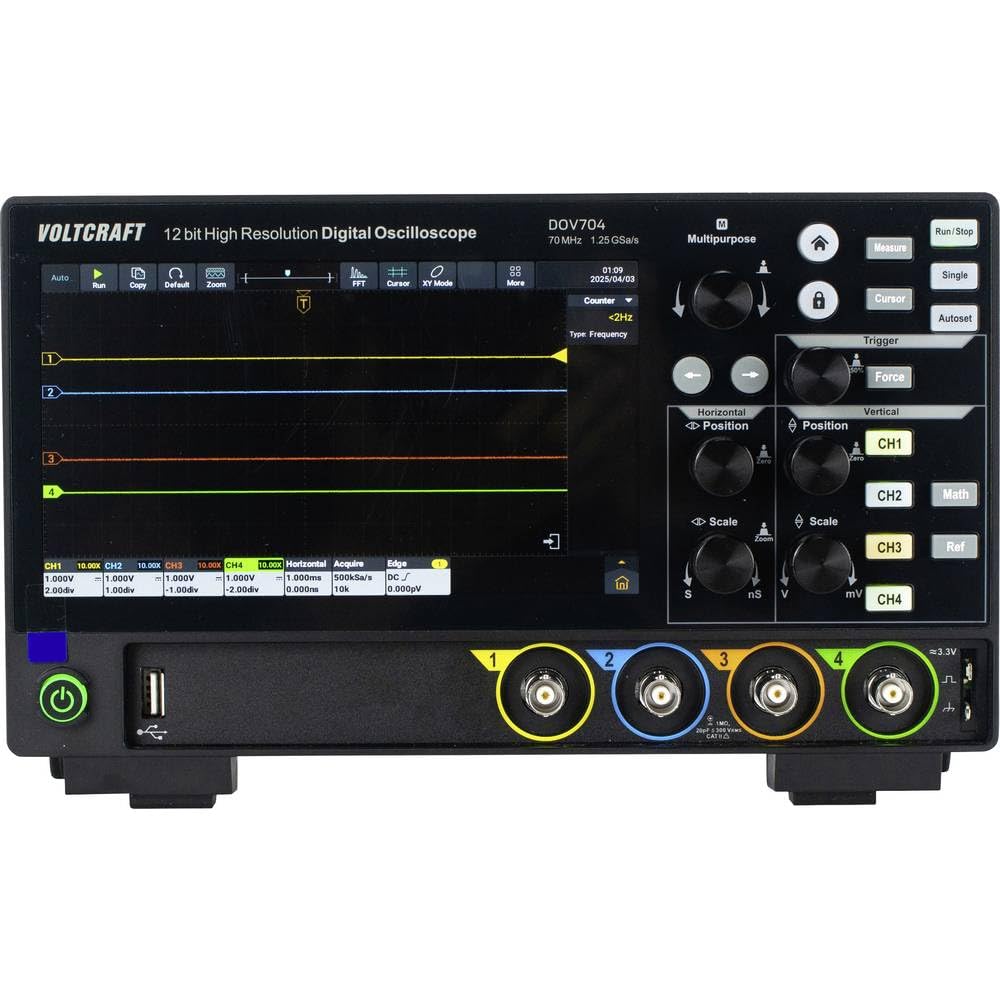
Слика 1: Фронт view of the Voltcraft DOV704 Digital Oscilloscope, showing the 7-inch touchscreen display, control knobs, buttons, and four BNC input connectors at the bottom. The power button and USB ports are also visible.

Слика 2: Угаони предњи део view of the Voltcraft DOV704 Digital Oscilloscope, providing a clearer perspective of the control panel and input ports. The screen displays a waveform.

Слика 3: Сиде view of the Voltcraft DOV704 Digital Oscilloscope, illustrating its compact profile и вентилационе решетке.
5. Подешавање
5.1 Укључивање уређаја
- Connect the USB Type-C power adapter to the oscilloscope's power input port.
- Укључите адаптер за напајање у одговарајућу електричну утичницу.
- Притисните дугме за напајање које се налази на предњој плочи да бисте укључили осцилоскоп. Екран ће се осветлити.
5.2 Повезивање сонде и компензација
- Connect a test probe to one of the BNC input channels (CH1-CH4) on the front panel.
- Attach the probe tip to the probe compensation output (usually a square wave signal output on the front or side).
- Adjust the probe compensation screw (located on the probe body) until the square wave displayed on the screen has flat tops and bottoms, without overshoot or undershoot.
- Repeat this process for all probes you intend to use.
6. Упутство за употребу
6.1 Основни приказ таласног облика
- Избор канала: Press the CH1, CH2, CH3, or CH4 buttons to enable or disable a channel.
- Вертикална скала: Користите Вертикална скала knob to adjust the volts per division (V/div) for the selected channel.
- Вертикални положај: Користите Вертикални положај knob to move the waveform up or down on the screen.
- Horizontal Scale: Користите Хоризонтал Сцале knob to adjust the time per division (s/div).
- Хоризонтални положај: Користите Хоризонтални положај knob to shift the waveform left or right.
6.2 Функције окидача
The oscilloscope offers various trigger types to stabilize and capture specific parts of a waveform.
- Притисните тастер Триггер button to access trigger settings.
- Select the desired trigger type (e.g., Edge, Pulse, Video) from the menu.
- Adjust the trigger level using the dedicated Ниво окидача knob or via the touchscreen.
- Choose the trigger source (CH1-CH4) as needed.
6.3 Touchscreen and Gesture Control
The 7-inch touchscreen allows for intuitive control.
- Додирните: Select menu items, buttons, or adjust settings.
- Зумирање штипкањем прстију: Use two fingers to zoom in or out on waveforms (horizontal and vertical scaling).
- Превлачење: Move waveforms or menu elements across the screen.
6.4 Data Storage and Connectivity
The DOV704 supports various methods for data storage and external connectivity.
- УСБ: Connect a USB flash drive to save waveform data, screenshots, or settings. Use the USB cable to connect to a computer for data transfer.
- ЛАН: Connect the oscilloscope to a network for remote control and data access using the provided software.
- ДВИ: Connect an external display via the HDMI port for larger viewing of waveforms.
7. Одржавање
7.1 Чишћење
- Искључите напајање пре чишћења.
- Користите меку, суву крпу да обришете спољашњост уређаја.
- For the touchscreen, use a soft, lint-free cloth slightly dampened with a screen cleaner. Avoid abrasive cleaners.
- Не дозволите да течности уђу у уређај.
7.2 Складиштење
Када се не користи, чувајте осцилоскоп на чистом и сувом месту, даље од директне сунчеве светлости и екстремних температура.
КСНУМКС. Решавање проблема
| Проблем | Могући узрок | Решење |
|---|---|---|
| Уређај се не укључује. | Power cable not connected or faulty. | Check power cable connection. Ensure power outlet is functional. Use the provided power adapter. |
| Није приказан таласни облик. | Channel disabled, probe not connected, or signal too weak/strong. | Ensure the desired channel is enabled. Check probe connection. Adjust vertical scale (V/div) and horizontal scale (s/div). Check trigger settings. |
| Waveform is unstable. | Incorrect trigger settings. | Adjust trigger level and trigger type. Ensure trigger source is correctly selected. |
| Екран на додир не реагује. | Привремени софтверски квар. | Restart the device. If the problem persists, contact support. |
9. Спецификације
| Параметар | Валуе |
|---|---|
| Број модела | ВЦ-16753910 |
| Бандвидтх | 70 МХз |
| Аналогни канали | 4 |
| Макс. Сampлинг Рате | 1.25 ГСа/с |
| Рецорд Ленгтх | 50 Мптс |
| Резолуција АДЦ-а | 12 Бит |
| Waveform Capture Rate (Real-time) | 50,000 вфмс/с |
| Waveform Capture Rate (Segmented) | 700,000 вфмс/с |
| Дисплаи | 7-inch Touchscreen (1024 x 600 pixels) |
| Horizontal Scan Speed | 1 ns/div to 1000 s/div |
| Вертицал Сенситивити | 500 µV/div to 10 V/div |
| Интерфејси | USB, LAN, HDMI |
| Димензије производа (Ш к Д к В) | 26 к 7.8 к 16 цм |
| Тежина | 2.71 кг |
10. Гаранција и подршка
For warranty information, please refer to the product data sheet included in your package or visit the official VOLTCRAFT website. For technical support, troubleshooting assistance beyond this manual, or service inquiries, please contact VOLTCRAFT customer service. Contact details can typically be found on the manufacturer's webсајту или у документацији која се испоручује уз ваш производ.