
1. Увод
Welcome to the user manual for your new ASUS ROG Strix SCAR 16 G635LX-RW158WS gaming laptop. This document provides essential information for setting up, operating, maintaining, and troubleshooting your device. The ROG Strix SCAR 16 is engineered for high-performance gaming, featuring an Intel Core Ultra 9 processor, NVIDIA GeForce RTX 5090 graphics, and a high-refresh-rate display.

Figure 1.1: The ASUS ROG Strix SCAR 16 Gaming Laptop.
2. Шта је у кутији
Upon unboxing your ASUS ROG Strix SCAR 16, please verify that all the following items are included:
- ASUS ROG Strix SCAR 16 Gaming Laptop
- Повер Адаптер
- Упутство за употребу (овај документ)
- Гарантни документи
3. Производ је готовview
The ASUS ROG Strix SCAR 16 is designed for peak gaming performance and productivity. Key features include:
- процесор: Intel Core Ultra 9 275HX with Intel AI Boost NPU
- Графика: NVIDIA GeForce RTX 5090 Laptop GPU with 24GB GDDR7 RAM
- Приказ: 16-inch, 2.5K (2560 x 1600) WQXGA, 240Hz Refresh Rate, 1200nits Brightness ROG Nebula HDR Display
- Меморија: 32ГБ ДДР5 РАМ
- Складиштење: 2TB PCIe 4.0 NVMe M.2 Performance SSD
- Хлађење: ROG Intelligent Cooling with Vapor Chamber, Sandwiched Heatsink, Tri-Fan Technology, and Conductonaut Extreme Liquid Metal
- тастатура: Backlit Chiclet Keyboard Per-Key RGB with Copilot key and Touchpad-based NumberPad
- Повезивање: Wi-Fi 7, 2.5G LAN, Thunderbolt 5, HDMI 2.1, USB 3.2 Gen2 Type-A
- аудио: Паметно Amp Technology, 5.1.2 Channel Virtual Surround Sound, Two-Way AI Noise Cancelation
3.1 Core Components

Слика 3.1: Завршеноview of the laptop's core specifications.
3.2 Систем хлађења
The ROG Intelligent Cooling system ensures optimal thermal performance, even during intense gaming sessions. It features an end-to-end Vapor Chamber, a sandwiched heatsink design, Tri-Fan Technology, and Conductonaut Extreme Liquid Metal for efficient heat dissipation.

Figure 3.2: ROG Intelligent Cooling system components.
3.3 Технологија приказа
Experience stunning visuals with the ROG Nebula HDR display. This 16-inch Mini LED panel offers over 2000 dimming zones, 1200 nits peak brightness, a 240Hz refresh rate with 3ms response time, and 100% DCI-P3 color gamut coverage. It supports Dolby Vision, NVIDIA G-SYNC, and is VESA Certified DisplayHDR 1000.

Figure 3.3: ROG Nebula HDR Display specifications.
3.4 Повезивање и портови
The laptop offers comprehensive connectivity options for all your peripherals and networking needs, including Wi-Fi 7, 2.5G Ethernet, Thunderbolt 5, HDMI 2.1, and multiple USB ports.

Figure 3.4: Port layout and connectivity options.
3.5 Аудио систем
Enjoy immersive audio with Smart Amp Technology, 5.1.2 Channel Virtual Surround Sound, and Two-Way AI Noise Cancelation for clear communication.

Figure 3.5: Studio-quality sound features.
3.6 Тастатура и тачпед
The full-size Chiclet keyboard features Per-Key RGB backlighting, dedicated gaming hotkeys, and a touchpad with an integrated NumberPad for enhanced functionality.

Figure 3.6: Keyboard and touchpad with NumberPad.
3.7 Upgradability
The laptop features a tool-less access design, allowing for easy upgrades. It supports up to 64GB 5600MHz DDR5 memory and up to 4TB PCIe 4.0 storage in RAID 0 configuration.
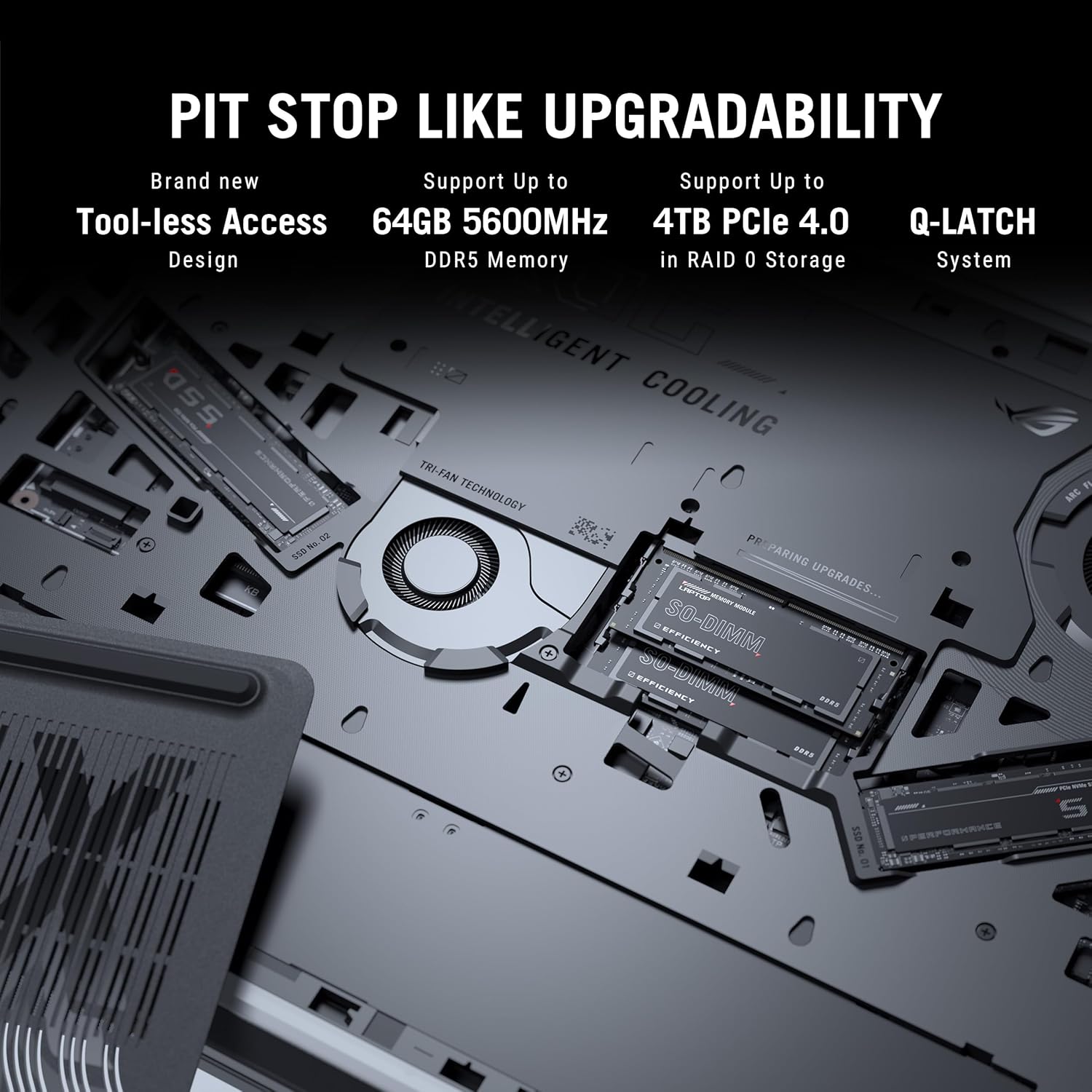
Figure 3.7: Internal components for upgradability.
4. Подешавање
4.1 Почетно укључивање
- Прикључите напајање: Plug the power adaptor into the laptop's power port and then into a wall outlet. Ensure the power indicator light illuminates.
- Отвори екран: Пажљиво отворите екран лаптопа у удобан положај viewугао уласка.
- Укључено: Притисните дугме за напајање, које се обично налази у горњем десном углу тастатуре.
- Почетно подешавање: Пратите упутства на екрану да бисте завршили подешавање система Windows 11 Home, укључујући избор језика, мрежну везу и креирање корисничког налога.
4.2 Повезивање периферних уређаја
Connect external devices such as a mouse, keyboard, external display, or storage devices to the available USB, HDMI, or Thunderbolt ports as needed.
5. Упутство за употребу
5.1 Управљање напајањем
- Режим спавања: Затворите поклопац или кратко притисните дугме за напајање да бисте ушли у режим спавања.
- Искључи: Кликните на дугме Старт, затим на Напајање > Искључи.
- Поново покрени: Кликните на дугме Старт, затим на Напајање > Рестартуј.
5.2 Функције тастатуре
Користите функцијске тастере (F1-F12) у комбинацији са Fn key for quick access to system controls such as volume, brightness, and wireless settings. The dedicated gaming hotkeys provide quick access to performance modes and other ROG-specific features.
5.3 Подешавања екрана
Adjust display settings through Windows Settings or the NVIDIA Control Panel for optimal gaming and visual experience. You can configure refresh rate, resolution, and color profiles.
6. Одржавање
6.1 Чишћење
- Екран: Лагано користите меку крпу која не оставља длачице дampводом или средством за чишћење екрана. Избегавајте јаке хемикалије.
- Тастатура и кућиште: Use a soft brush or compressed air to remove dust. Wipe surfaces with a slightly damp тканина.
- Вентс: Regularly clean the cooling vents with compressed air to prevent dust buildup and maintain airflow.
6.2 Одржавање батерије
- Избегавајте често потпуно пражњење батерије.
- Чувајте лаптоп на хладном и сувом месту ако га не користите дуже време.
- For optimal battery longevity, consider using battery health management features available in ASUS software.
6.3 Ажурирања софтвера
Regularly update your operating system, drivers (especially graphics drivers), and ASUS utilities to ensure optimal performance, security, and compatibility.
КСНУМКС. Решавање проблема
This section addresses common issues you might encounter. For more complex problems, refer to the ASUS support webсајту или контактирајте корисничку подршку.
7.1 Проблеми са напајањем
- Лаптоп се не укључује: Ensure the power adaptor is securely connected to both the laptop and a working power outlet. Check if the power adaptor's LED is lit. Try a different outlet.
- Батерија се не пуни: Verify the power adaptor connection. Check for any physical damage to the adaptor or charging port.
7.2 Проблеми са приказом
- Нема приказа на екрану: Connect an external monitor to check if the issue is with the laptop's internal display. Ensure the display cable (if external) is properly connected. Try pressing Фн + Ф8 (or the corresponding display toggle key) to switch display output.
- Треперење или искривљени приказ: Ажурирајте драјвере за графичку картицу. Проверите каблове екрана ако користите спољни монитор.
7.3 Проблеми са перформансама
- Споре перформансе: Close unnecessary applications. Check for background processes consuming high CPU/RAM. Ensure adequate ventilation and clean cooling vents. Update drivers.
- прегревање: Ensure the laptop is on a hard, flat surface to allow proper airflow. Clean the cooling vents. Consider using a laptop cooling pad.
8. Спецификације
Detailed technical specifications for the ASUS ROG Strix SCAR 16 G635LX-RW158WS.
| Феатуре | Спецификација |
|---|---|
| Бранд | АСУС |
| Назив модела | ROG Strix SCAR 16 |
| Број модела | G635LX-RW158WS |
| Процесор | Intel Core Ultra 9 275HX (2.7 GHz, up to 5.4 GHz, 24 cores, 24 Threads) |
| Графика | NVIDIA GeForce RTX 5090 Laptop GPU, 24GB GDDR7 RAM |
| Дисплаи | 16-inch, 2.5K (2560 x 1600) WQXGA, 16:10, 240Hz, 1200nits, ROG Nebula HDR |
| Меморија | 32GB DDR5 RAM (Max 64GB) |
| Складиштење | 2TB PCIe 4.0 NVMe M.2 Performance SSD |
| Оперативни систем | Виндовс 11 Хоме |
| Тастатура | Backlit Chiclet Keyboard Per-Key RGB, Copilot key |
| Webцам | 1080P FHD IR камера за Windows Hello |
| Бежично повезивање | Wi-Fi 7 (802.11.be), Bluetooth |
| Портс | Thunderbolt 5 (USB Type-C), HDMI 2.1, USB 3.2 Gen2 Type-A, 2.5G Ethernet, Audio Jack |
| Батерија | 90 Watt Hours Lithium Ion |
| Dimensions (L x W x Thickness) | 35.4L x 26.8W x 2.3Th Centimeters |
| Тежина артикла | 2.8 килограма |
9. Гаранција и подршка
9.1 Информације о гаранцији
This genuine ASUS laptop comes with a 1-year Global Warranty and Onsite Domestic Warranty from ASUS, covering manufacturing defects. Physical damage is not covered. To activate your warranty, please register on the ASUS brand webсајту.
9.2 Корисничка подршка
For product-related queries or immediate assistance, you can contact ASUS customer support:
- Бесплатан број: 18002090365 (Monday - Saturday, 09:00 AM - 06:00 PM)
- Емаил: rc_india@asus.com
- Подршка на мрежи: Посетите званичну ASUS подршку website for service centers and further assistance: www.asus.com/in/support

Figure 9.1: ASUS 4A Guarantee and support contact details.
10. Важне напомене
No official product videos were available in the provided data for embedding in this manual.