
1. Готовоview
The VAIO SX-R Laptop is a high-performance portable computer designed for productivity and creative tasks. It features an Intel Core Ultra 7 processor, a vibrant 14-inch WQXGA touch display, ampмеморија и брза меморија, све то ради на Windows 11 Pro.

Figure 1: VAIO SX-R Laptop, open view.
2. Карактеристике производа
- Процесор Intel Core Ultra 7: Equipped with 16 cores and AI-enhanced performance for speed and intelligent task management.
- 14" WQXGA Touch Display (2560x1600): High-resolution screen with wide color gamut and touch capability.
- 32 ГБ LPDDR5 РАМ меморије: Provides superior multitasking capabilities with instant responsiveness.
- 1TB PCIe NVMe SSD: Offers massive storage with ultra-fast read/write speeds.
- Виндоус 11 Про: Includes enterprise-grade security and productivity features.
- IR Camera & Fingerprint Reader: Enhanced security and convenient login options.
- Carbon Fiber Chassis: Лагана и издржљива конструкција.
- Water Resistant Keyboard: Designed to withstand accidental spills.

Figure 2: Key features of the VAIO SX-R Laptop.
3. Физички претекview
3.1 Портови и конектори
The VAIO SX-R Laptop is equipped with a variety of ports for connectivity. Refer to the diagram below for port locations and types.
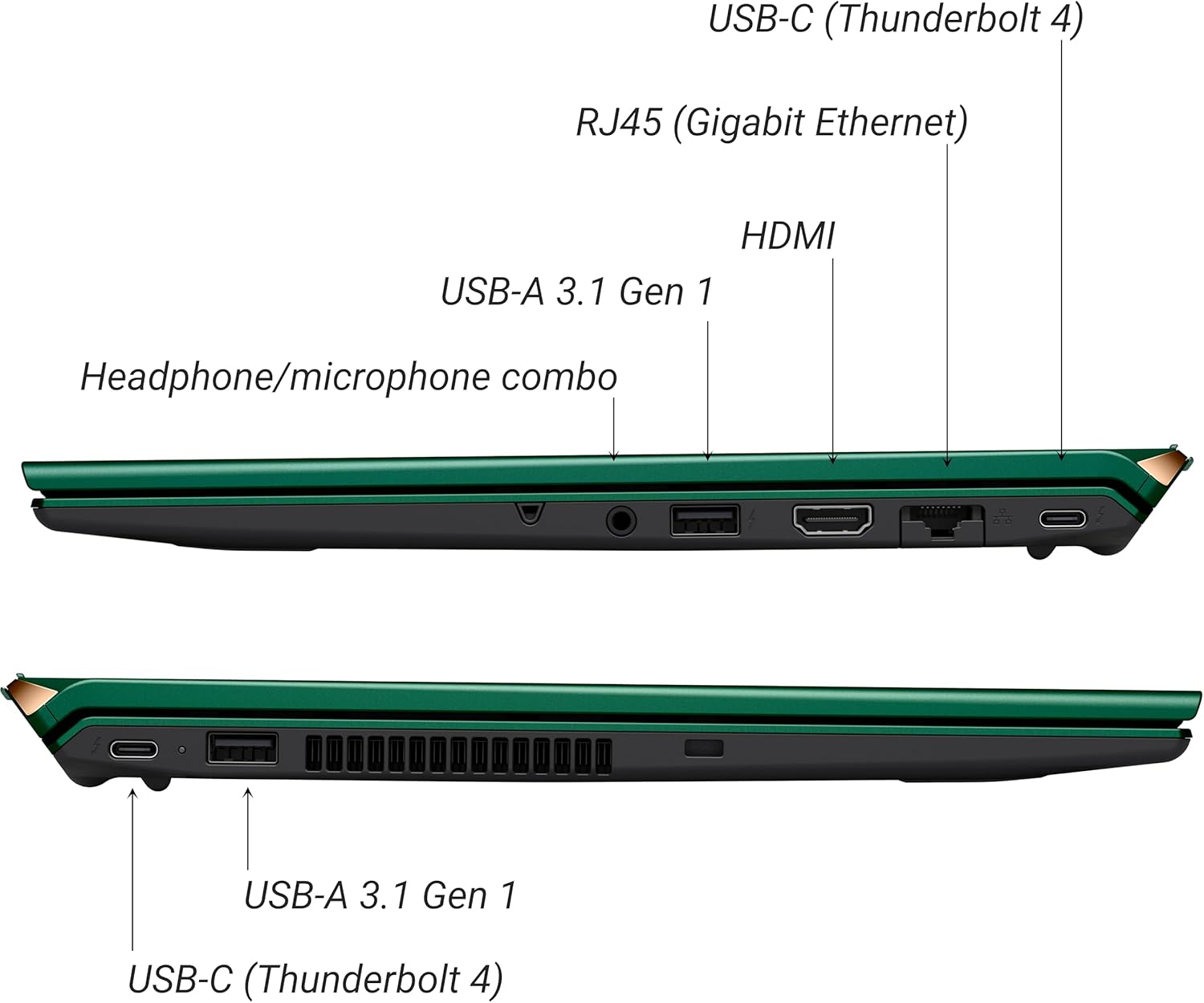
Слика 3: Страна view of VAIO SX-R Laptop ports.
- USB-C (Thunderbolt 4): Брзи пренос података, видео излаз и напајање.
- RJ45 (Gigabit Ethernet): За жичане мрежне везе.
- ДВИ: За повезивање са екстерним екранима.
- УСБ-А 3.1 Ген 1: За повезивање УСБ уређаја.
- Комбиновани прикључак за слушалице/микрофон: За аудио улаз и излаз.
3.2 Тастатура и тачпед
The laptop features a full-sized keyboard and a responsive touchpad for navigation and input.

Слика 4: Распоред тастатуре и тачпеда.
4. Подешавање
4.1 Почетно укључивање
- Unpack the VAIO SX-R laptop and all accessories.
- Прикључите адаптер за напајање на порт за пуњење лаптопа, а затим на утичницу.
- Open the laptop lid. The system may power on automatically or you may need to press the power button located on the top right of the keyboard.
- Пратите упутства на екрану да бисте завршили подешавање система Windows 11 Pro, укључујући језик, регион, мрежну везу и креирање корисничког налога.
4.2 Повезивање на мрежу
- Ви-Фи: During initial setup or via Windows settings, select your preferred Wi-Fi network and enter the password. The VAIO SX-R supports Wi-Fi 7 for fast and stable wireless connectivity.
- Жична (Етернет): Connect an Ethernet cable from your router or modem to the RJ45 port on the laptop.
5. Упутство за употребу
5.1 Укључивање/искључивање и режим спавања
- Укључено: Отворите поклопац или притисните дугме за напајање.
- Искључи: Кликните на дугме Старт, затим на Напајање > Искључи.
- спавање: Затворите поклопац или кликните на дугме Старт, затим на Напајање > Спавање.
5.2 Коришћење екрана осетљивог на додир
The 14-inch WQXGA display supports touch input. You can interact with the screen using gestures similar to a tablet or smartphone.
5.3 IR Camera and Fingerprint Reader
For enhanced security and convenience, the laptop includes an IR camera for Windows Hello face recognition and a fingerprint reader.
- Windows Hello Face Recognition: Configure this feature in Windows Settings > Accounts > Sign-in options. The IR camera will recognize your face to unlock the device.
- Читач отиска прста: Set up your fingerprint in Windows Settings > Accounts > Sign-in options for quick and secure access.
6. Одржавање
6.1 Општа нега
- Keep the laptop in a clean, dry environment.
- Избегавајте излагање лаптопа екстремним температурама или директној сунчевој светлости.
- Do not place heavy objects on the laptop.
6.2 Чишћење
- Користите меку крпу која не оставља влакна за чишћење екрана и спољашњости.
- За тврдокорне мрље, лагано обришитеampобришите крпу водом или средством за чишћење екрана.
- Do not spray cleaners directly onto the laptop.
6.3 Одржавање батерије
- Да бисте продужили век трајања батерије, избегавајте често потпуно пражњење батерије.
- Чувајте лаптоп са делимично напуњеним (око 50%) ако се не користи дуже време.
КСНУМКС. Решавање проблема
7.1 Проблеми са напајањем
- Лаптоп се не укључује: Уверите се да је адаптер за напајање безбедно повезан и да је утичница функционална. Покушајте са другом утичницом.
- Батерија се не пуни: Проверите да ли су адаптер за напајање и кабл оштећени. Уверите се да је порт за пуњење чист.
7.2 Проблеми са екраном
- Нема приказа: Повежите спољни монитор да бисте проверили да ли је проблем са унутрашњим екраном лаптопа.
- Екран осетљив на додир не реагује: Поново покрените лаптоп. Уверите се да су драјвери за екран ажурирани.
7.3 Проблеми са повезивањем
- Нема Ви-Фи везе: Check if Wi-Fi is enabled in Windows settings. Restart your router. Update wireless drivers.
- Блутут не ради: Ensure Bluetooth is enabled and your device is discoverable.
8. Спецификације
| Феатуре | Детаљ |
|---|---|
| Назив модела | VAIO SX-R (VJS4R1X0811G) |
| Процесор | Intel Core Ultra 7 (16-Core, AI-Boosted) |
| Оперативни систем | Виндовс 11 Про |
| Дисплаи | 14 Inches WQXGA Touch (2560x1600) |
| РАМ | 32ГБ ЛПДДР5 |
| Складиштење | 1TB PCIe NVMe SSD |
| Графика | Integrated Intel Arc Graphics |
| Бежично повезивање | 802.11ax (Wi-Fi 7), Bluetooth |
| Портс | USB-C (Thunderbolt 4) x2, USB-A 3.1 Gen 1 x3, HDMI x1, RJ45 (Gigabit Ethernet) x1, Headphone/microphone combo x1 |
| Камера | IR Camera (Windows Hello compatible) |
| Сигурносне карактеристике | Fingerprint Reader, IR Camera |
| Трајање батерије | До 10 сати (просек) |
| Тежина | 3.1 фунти |
| Димензије (ДкШкВ) | 14.2 к 15 к 3.3 инча |
9. Издржљивост и тестирање
VAIO laptops are engineered with Japanese precision and undergo rigorous quality control to ensure reliability and performance. This includes various tests to withstand daily use.
9.1 Manufacturing and Quality Assurance
Video 1: VAIO Manufacturing and Durability Testing. This video demonstrates the quality control processes and durability tests performed on VAIO laptops, including keystroke testing, dust testing, LCD screen pressure testing, and opening/closure testing.
9.2 Key Durability Features
- Water Resistant Keyboard: The keyboard is designed to resist damage from accidental liquid spills.
- Screen Durability: The display undergoes pressure testing to ensure resilience.
- Тест издржљивости: The laptop is tested to withstand drops from up to 3 feet.

Figure 5: Water resistant keyboard testing.

Figure 6: Screen durability test in progress.

Figure 7: 3-foot drop test for VAIO laptops.
10. Гаранција и подршка
Your VAIO SX-R Laptop comes with a standard manufacturer's warranty. For specific warranty terms and conditions, please refer to the documentation included with your product or visit the official VAIO support webсајту.
For technical support, troubleshooting assistance, or service requests, please contact VAIO customer support. Information regarding support channels can be found on the VAIO webсајту или у паковању вашег производа.
Protection plans are available for purchase to extend coverage beyond the standard warranty. Options include 2-Year and 4-Year Protection Plans, as well as a Complete Protect + Norton 360 monthly plan.