
1. Увод
This manual provides detailed instructions for the safe and effective operation of your TOOLTOP ET120M 120MHz Handheld Digital Oscilloscope. Please read this manual thoroughly before using the device to ensure proper functionality and to prevent damage.
2. Безбедносне информације
Always observe the following safety precautions when using the ET120M oscilloscope:
- Немојте користити уређај на влажном или дamp условима.
- Ensure the device is powered off before connecting or disconnecting probes.
- Користите само приложену додатну опрему или одобрене заменске делове.
- Do not attempt to open or modify the device; refer all servicing to qualified personnel.
- Држите уређај даље од јаких електромагнетних поља.
3. Садржај пакета
Проверите да ли се у вашем пакету налазе све ставке наведене у наставку:
- TOOLTOP ET120M Handheld Digital Oscilloscope
- 100MHz Oscilloscope Probe
- УСБ кабл за пуњење
- Упутство за употребу
- Цлотх Баг

Слика 3.1: Садржај пакета
4. Производ је готовview
4.1. Карактеристике уређаја
The TOOLTOP ET120M is a compact and portable handheld digital oscilloscope designed for various electrical testing and repair applications. Key features include:
- 120MHz analog bandwidth and 500MS/s real-time sampлинг рате.
- 2.4-inch 320x240 clear color LCD screen.
- Integrated square wave signal output (1kHz, 10KHz, 100KHz, 1MHz).
- 12 types of automatic parameter measurements (Vpp, Vrms, Vavg, Vp, Vmax, Vmin, F, T, T+, T-, Du+, Du-).
- Three scan modes: Auto, Normal, and Single.
- Ability to store 2500 DSO waveforms with thumbnail browsing.
- Built-in rechargeable lithium battery for up to 6 hours of continuous use.
- Durable design with a silicone protective cover.

Слика 4.1: Кључне карактеристике изнадview
4.2. Идентификација компоненте
Familiarize yourself with the main components and controls of the ET120M oscilloscope:

Слика 4.2: Предња страна View of ET120M Oscilloscope
- Екран: 2.4-inch LCD for waveform display and menu navigation.
- Input BNC Connector: For connecting the oscilloscope probe.
- Контролна дугмад: Including MENU, F1, F2, SAVE, AC/DC, 1X/10X, 50%, TRIG, EDGE, STOP, AUTO, and directional/OK buttons for navigation and settings adjustment.
- УСБ порт: За пуњење уређаја.
5. Подешавање
5.1. Почетно пуњење
Before first use, fully charge the built-in lithium battery using the provided USB charging cable and a standard USB power adapter (not included). The charging indicator will show the charging status.
5.2. Прикључак сонде
Connect the oscilloscope probe to the BNC input connector on the top of the device. Ensure the connection is secure. Set the probe attenuation switch (if applicable) to the desired setting (e.g., 1X or 10X) and match this setting on the oscilloscope via the 1X/10X button.
6. Упутство за употребу
6.1. Укључивање/искључивање
Притисните и држите дугме за напајање (обично се налази са стране или на врху) да бисте укључили или искључили уређај.
6.2. Basic Waveform Acquisition
After powering on, connect the probe to the circuit under test. The oscilloscope will display the waveform. Use the directional buttons to navigate menus and adjust settings.
6.3. Waveform Acquisition Modes
The ET120M supports three scan modes:
- Ауто: Automatically adjusts time base and vertical amplitude for a stable waveform display. Press the АУТО button for one-key waveform adaptation.
- нормално: Displays a waveform only when a trigger condition is met.
- самац: Captures and displays a single waveform when a trigger condition is met, then stops.

Figure 6.1: Auto Waveform Adaptation
6.4. Parameter Measurement
The device can automatically measure 12 different waveform parameters. Access these measurements through the menu system. Parameters include Peak-to-Peak Voltage (Vpp), Root Mean Square Voltage (Vrms), Average Voltage (Vavg), Peak Voltage (Vp), Maximum Voltage (Vmax), Minimum Voltage (Vmin), Frequency (F), Period (T), Positive Pulse Width (T+), Negative Pulse Width (T-), Positive Duty Cycle (Du+), and Negative Duty Cycle (Du-).
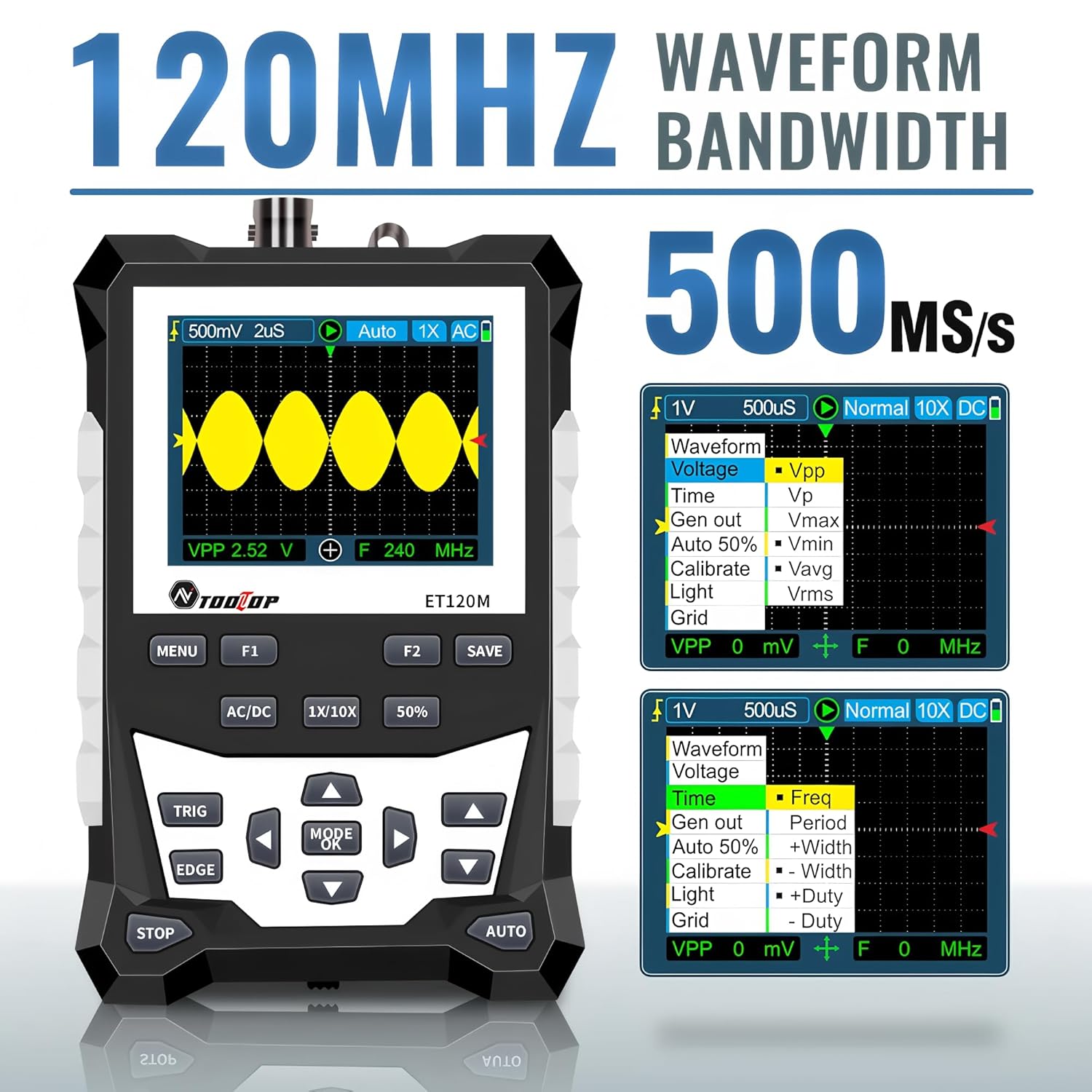
Figure 6.2: Automatic Measurement Functions
6.5. Square Wave Signal Output
The ET120M can generate square wave signals at specific frequencies. Navigate to the signal output function in the menu to select between 1kHz, 10KHz, 100KHz, and 1MHz output frequencies. This feature is useful for testing circuits.

Figure 6.3: Square Wave Signal Output Function
6.6. Waveform Storage and Recall
The device can store up to 2500 DSO waveforms. Use the САВЕ button to store the current waveform. Stored waveforms can be browsed via thumbnails for easy recall and analysis.

Figure 6.4: Waveform Storage and Browsing
6.7. Adjusting Waveform Parameters
You can manually adjust various waveform display parameters to fine-tune your measurements:
- Временска база: Adjusts the horizontal scale (time per division).
- Amplitude (Vertical Sensitivity): Adjusts the vertical scale (volts per division).
- Trigger Slope: Sets the trigger to rising or falling edge.
- Ниво окидача: Поставља волtage level at which the waveform is triggered.

Figure 6.5: Adjusting Waveform Display Parameters
7. Одржавање
7.1. Чишћење
За чишћење уређаја користите меку, суву крпу. За тврдокорну прљавштину, благоamp Може се користити крпа са благим детерџентом, водећи рачуна да течност не уђе у уређај. Не користите абразивна средства за чишћење или раствараче.
7.2. Складиштење
When not in use for extended periods, store the oscilloscope in a cool, dry place, away from direct sunlight and extreme temperatures. It is recommended to store it in the provided cloth bag to protect it from dust and scratches.
7.3. Брига о батерији
To prolong battery life, avoid fully discharging the battery frequently. If storing for a long time, charge the battery to approximately 50% every few months.
КСНУМКС. Решавање проблема
If you encounter issues with your ET120M oscilloscope, refer to the following common problems and solutions:
- Уређај се не укључује: Уверите се да је батерија напуњена. Повежите УСБ кабл за пуњење и покушајте поново.
- Није приказан таласни облик: Check probe connection. Ensure the probe is properly connected to the circuit under test. Adjust vertical sensitivity and time base settings. Try the AUTO function.
- Нестабилан облик таласа: Adjust the trigger level and trigger slope. Ensure the trigger mode is appropriate for the signal.
- Нетачна мерења: Verify probe attenuation setting (1X/10X) matches the device setting. Perform a probe compensation if necessary (refer to advanced operation in a full manual).
For persistent issues, contact TOOLTOP customer support.
9. Спецификације
9.1. Опште спецификације
| Дисплаи | 320x240 LCD screen |
| Дисплаи Ареа | 50 мм к 40 мм |
| Позадинско осветљење | White, brightness adjustable |
| Импеданса | x1: 1MΩ / x10: 10MΩ |
| Батерија | 18650 lithium battery (built-in) |
| Ауто Схутдовн | Без операције 15 минута |
| Складиштење таласних облика | 2500 DSO waveforms |
| Величина | 124 мм к 80 мм к 35 мм |
| Услови рада | 0°C ~ +40°C; <75%RH |
| Услови складиштења | -10°C ~ +60°C; <90%RH |
9.2. Oscilloscope Specifications
| Аналог Бандвидтх | 120МХз |
| Максимални S у реалном временуampлинг Рате | 500MSps |
| Вертикална резолуција | 8 бита |
| Вертицал Аццураци | ± (5% + 0.2 див) |
| Auto Zero Reference | Током мерења једносмерне струје |
| Ниво окидача | ±3.8div (0.1div per step) |
| Позиција окидача | ±6div (0.1div per step) |
| Cursor Function | ΔV, Δt, 1/Δt |
| Нелинеарност | ±1 bits |
| Метода спајања | ДЦ/АЦ |
| Division Vertical | ±3.8 Horizontal: 12 |
| Тиме Басе Ранге | 6нс/див ~ 50с/див |
| Прецизност временске базе | ±(0.01%+0.1див) |
| Режим скенирања | Аутоматски/Једноструки/Нормални |
| Нагиб окидача | Растући / Опадајући |
| Рецорд Ленгтх | 12див |
| Ауто Цонфигуратион | Automatically set time base and vertical ampлитуде |
| Automatic Measurement Functions | Vpp, Vrms, Vavg, Vp, Vmax, Vmin, F, T, T+, T-, Du+, Du- |
| Vertical Sensitivity Range | x1: 50mV/div ~ 10V/div; x10: 500mV/div ~ 100V/div |
10. Гаранција и подршка
For warranty information or technical support, please refer to the documentation provided with your purchase or contact TOOLTOP customer service directly. Keep your purchase receipt as proof of purchase.