
TOOLTOP TT-ET15S+Macro lens
TOOLTOP ET15S Professional Thermal Imager Camera & Digital Multimeter User Manual
Model: TT-ET15S+Macro lens
Увод
This manual provides comprehensive instructions for the operation, maintenance, and troubleshooting of your TOOLTOP ET15S Professional Thermal Imager Camera with integrated Digital Multimeter. Please read this manual thoroughly before using the device to ensure safe and efficient operation.
The TOOLTOP ET15S is an industrial-grade thermal camera combined with a high-precision digital multimeter, designed for various applications including PCB inspection, HVAC repair, and general electrical measurements.
Кључне карактеристике
- 256x192 Resolution Thermal Imaging Sensor: Provides clear thermal images with a 25Hz refresh rate.
- 19,999 Counts Digital Multimeter: High-precision measurements for voltage, current, resistance, capacitance, diode, frequency, NCV, and temperature.
- 3.5-инчни IPS екран: Large, high-definition display for clear viewing of thermal images and multimeter readings.
- Waveform Graph Visualization: Multimeter measurement results can be displayed as waveform graphs for data trend analysis.
- Optional Macro Lens: Captures small details (1mm x 1mm) for precise inspections like smartphone or PCB repairs.
- Подршка за више језика: Available in 11 languages.
- Дуг век трајања батерије: Detachable 18650 lithium battery provides up to 8 hours of runtime.
- PC Software Support: Allows transfer and analysis of multimeter data charts and thermal images.
Садржај пакета
Проверите да ли су све ставке присутне у пакету:
- ET15S Thermal Imager & Multimeter Unit
- Macro Lens (if purchased with this option)
- Упутство за производ
- Instrument Storage Bag
- Мултиметрске сонде
- УСБ кабл за пренос података

Figure 1: Included components of the ET15S package.
Сетуп
1. Инсталација и пуњење батерије
The ET15S is powered by a detachable 18650 lithium battery. Ensure the battery is fully charged before first use.
- Пронађите одељак за батерију на уређају.
- Insert the 18650 battery, observing the correct polarity (+/-).
- Добро затворите одељак за батерије.
- Connect the device to a USB power source using the provided USB data cable for charging. The charging indicator will show the charging status.
2. Macro Lens Installation (Optional)
If your model includes the optional macro lens, follow these steps for installation:
- Identify the macro lens attachment point on the top of the ET15S unit.
- Carefully align the macro lens with the attachment point.
- Gently slide or click the macro lens into place until it is secure.
- When using, the macro lens can be moved left and right to adjust focus for optimal small detail capture.

Figure 2: Installation and adjustment of the optional macro lens.
Упутство за употребу
1. Укључивање/искључивање
Press and hold the power button (usually located on the side or front) to turn the device on or off.
2. Кретање кроз интерфејс
The ET15S features a 3.5-inch IPS screen. Use the navigation buttons (e.g., directional pad, SELECT, MENU) to move through menus and select options.

Figure 3: ET15S display and control layout.
3. Thermal Imaging Mode
To activate thermal imaging:
- Select the "IR Camera" mode from the main menu.
- Point the camera lens towards the object or area you wish to inspect.
- The screen will display the thermal image with temperature readings.
- Adjust emissivity (0.1 – 0.99, default 0.95) as needed for accurate temperature measurements based on the material being inspected.
- Choose from various color palettes (e.g., White Heat, Black Heat, Rainbow, Iron Red) to visualize temperature differences effectively.

Figure 4: Thermal imaging display showing temperature distribution.
4. Digital Multimeter Mode
The ET15S integrates a full-featured digital multimeter. To use:
- Connect the multimeter probes to the appropriate input jacks (COM, VΩ, 10A MAX).
- Select the "Multimeter" mode from the main menu.
- Choose the desired measurement function (e.g., DCV, ACV, Resistance, Capacitance, Diode, Frequency, NCV).
- The device supports both manual and automatic ranging.
- For waveform visualization, select the appropriate option within the multimeter interface to view data trends.
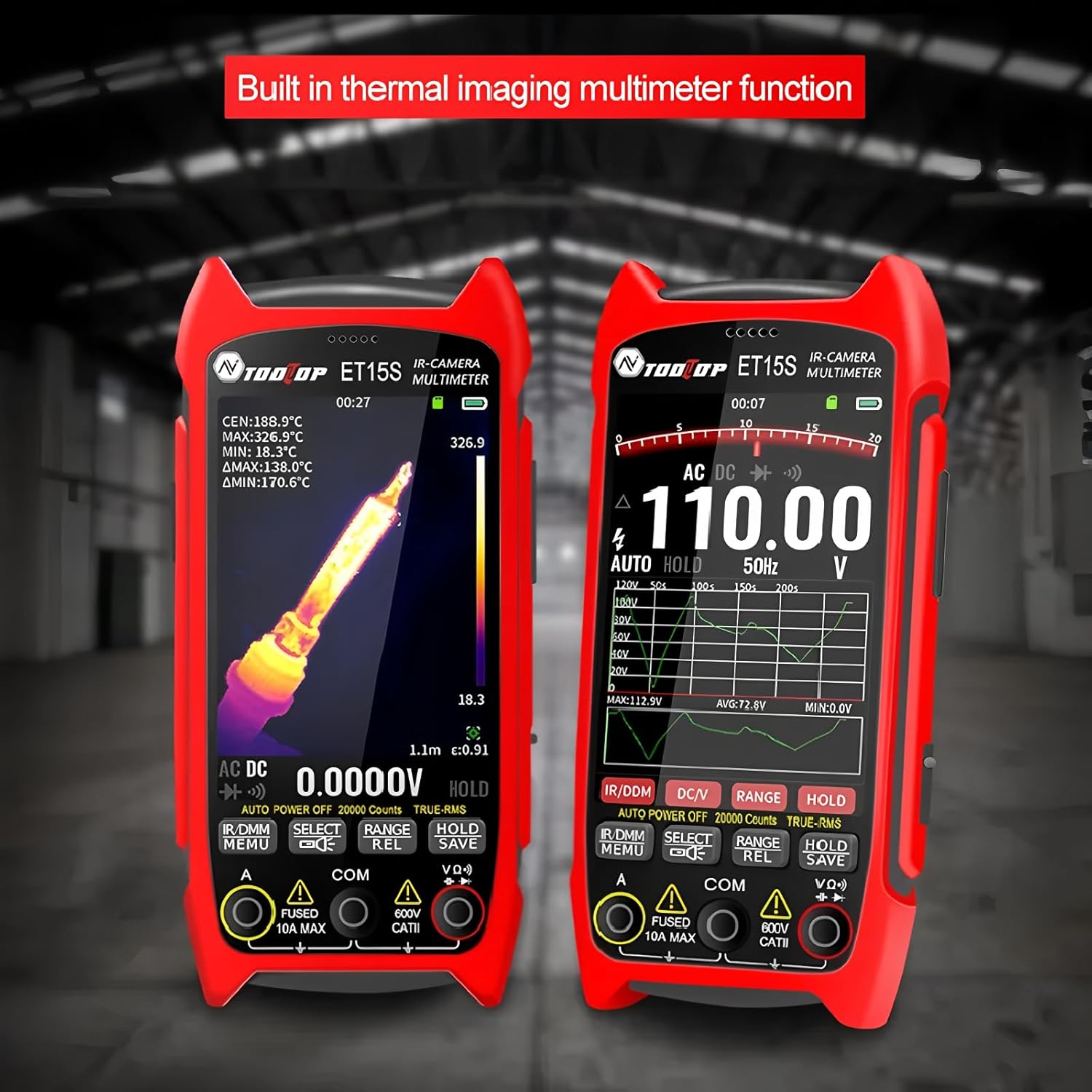
Figure 5: Multimeter interface showing voltage measurement and waveform graph.
5. Data Storage and PC Connectivity
The ET15S allows for saving thermal images and multimeter data. To transfer data to a PC:
- Connect the ET15S to your computer using the USB data cable.
- Уређај би требало да се појави као преносиви уређај за складиштење.
- Access saved images and data files.
- Use the dedicated PC software (available for download from the manufacturer's website) for advanced analysis of multimeter data charts and thermal images.

Figure 6: Connecting the ET15S to a PC for data transfer and analysis.
Одржавање
1. Чишћење уређаја
Редовно чишћење помаже у одржавању перформанси и дугог века трајања уређаја.
- Користите меку, суву крпу да обришете спољашњост уређаја.
- For the screen and lens, use a microfiber cloth specifically designed for optics. Avoid abrasive materials or harsh chemicals.
- Уверите се да је уређај искључен пре чишћења.
2. Брига о батерији
- Чувајте уређај и батерију на хладном и сувом месту када се не користе.
- Избегавајте често потпуно пражњење батерије.
- If storing for extended periods, charge the battery to approximately 50% to prolong its lifespan.
3. Складиштење
When not in use, store the ET15S in its provided instrument storage bag to protect it from dust, moisture, and physical damage.
Решавање проблема
| Проблем | Могући узрок | Решење |
|---|---|---|
| Уређај се не укључује. | Battery is discharged or incorrectly installed. | Напуните батерију. Уверите се да је батерија уметнута са исправним поларитетом. |
| Термална слика је мутна или нејасна. | Lens is dirty; incorrect focus (with macro lens); object is out of range. | Clean the lens. Adjust the macro lens position. Ensure the object is within the optimal working distance. |
| Очитавања мултиметра су нетачна. | Probes are not properly connected; incorrect measurement function selected; battery low. | Check probe connections. Select the correct measurement mode. Charge the battery. |
| Не могу се повезати са рачунаром. | USB cable issue; driver not installed; device not in data transfer mode. | Try a different USB cable/port. Install necessary drivers (if prompted). Ensure the device is in USB mode. |
Спецификације
Параметри термичке слике
- Сензор: Ванадијум оксид (VOx)
- Учесталост снимања слике: 25Хз
- Thermal Imaging Pixels: 256к192
- Display Image Resolution: 427 к 320
- Поље оф View (ФОВ): 50.0°(H) × 37.2°(V)
- Емисивност: 0.1 – 0.99 adjustable (0.95 by default)
- Температурни опсег: -20℃ ~ +550℃
- тачност: ±2℃ или ±2%
- Резолуција мерења: 0.1 ℃/0.1 ℉
- Палете боја: White Heat, Black Heat, Fusion 1, Rainbow, Fusion 2, Iron Red 1, Iron Red 2, Dark Brown, Color 1, Color 2, Ice Fire, Rain, Green Heat, Red Heat, Deep Blue
- Macro Lens Working Distance: Approximately 5cm (Optional)
Параметри мултиметра
- Приказ: 19999 бројања, ажурирања 3/сек
- DC Maximum Input Voltage: 1000В
- AC Maximum Input Voltage: 750В
- Максимална струја мерења: 10А
- Maximum Resistance: 99.99МΩ
Опште спецификације
- Број модела: TT-ET15S+Macro lens
- Бренд: ТООЛТОП
- Тежина артикла: 1 килограма
- Димензије пакета: 7.87 к 5.91 к 3.94 инча
- Земља порекла: Кина
- Сертификати: ЦЕ, РоХС
Информације о гаранцији
TOOLTOP provides a limited warranty for the ET15S Professional Thermal Imager Camera & Digital Multimeter. Please refer to the warranty card included with your product or visit the official TOOLTOP website for detailed warranty terms and conditions. This warranty typically covers manufacturing defects and material flaws under normal use.
Трајање доступности резервних делова у ЕУ: 1 година
Корисничка подршка
For technical assistance, product inquiries, or service requests, please contact TOOLTOP customer support through the following channels:
- Webсајт: Visit the official TOOLTOP website for FAQs, software downloads, and contact forms.
- Емаил: Погледајте паковање производа или званична упутства webсајт за имејл адресе корисничке службе.
- Телефон: Контакт бројеви могу бити доступни на званичном webсајт за ваш регион.
When contacting support, please have your product model number (TT-ET15S+Macro lens) and purchase information ready.