
Увод
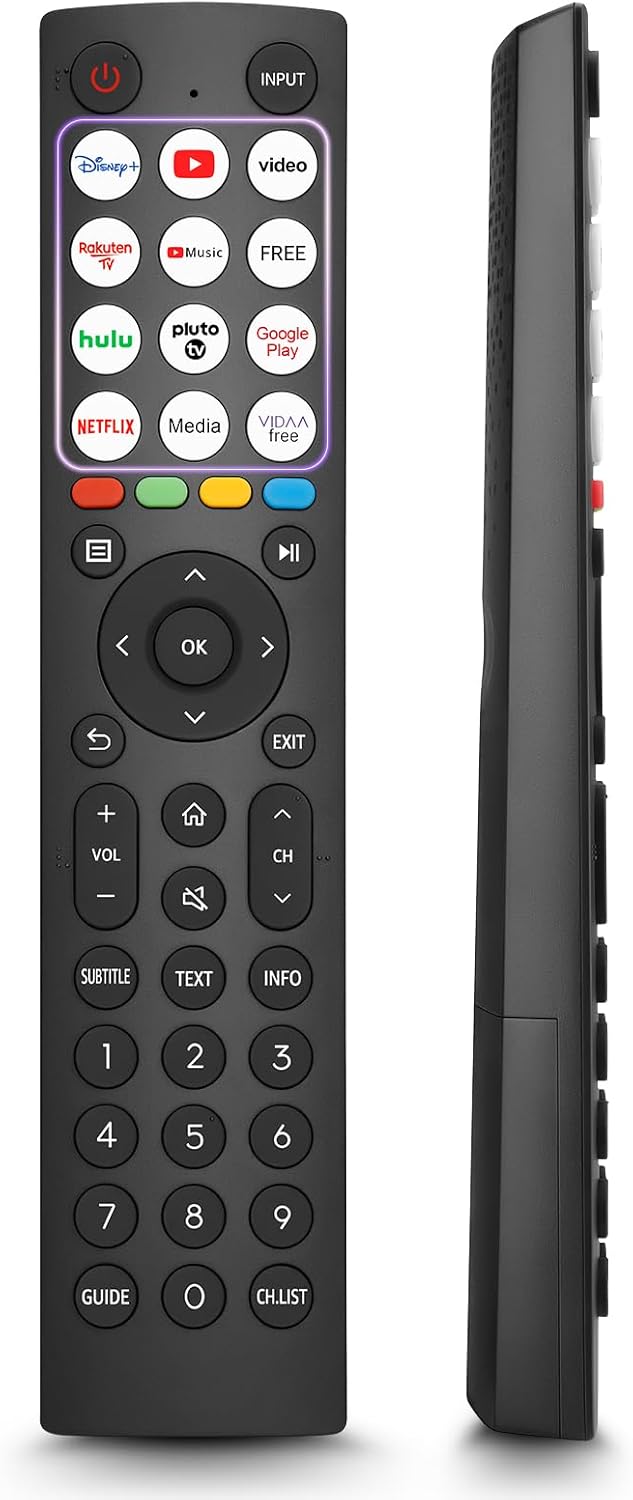
This manual provides comprehensive instructions for the OMAIC EN2Q36H replacement remote control, designed for Hisense Smart TVs. It covers essential information regarding setup, operation, and maintenance to ensure optimal performance and user experience. This remote offers a direct replacement solution without the need for complex programming.
Сетуп
The OMAIC EN2Q36H remote control is designed for immediate use with compatible Hisense Smart TVs. No programming or pairing is required.
Инсталација батерије
- Пронађите одељак за батерије на полеђини даљинског управљача.
- Померите поклопац батерије надоле или у смеру који показује стрелица да бисте га отворили.
- Insert two AAA alkaline batteries (not included), ensuring the positive (+) and negative (-) terminals align correctly with the markings inside the compartment.
- Вратите поклопац батерије тако што ћете га вратити на место док не кликне чврсто.
Once batteries are installed, the remote is ready to operate your Hisense Smart TV.

Упутство за употребу
This remote control utilizes infrared (IR) technology for communication with your Hisense Smart TV. Ensure a clear line of sight between the remote and the TV's IR receiver for optimal performance.
Кључне карактеристике
- 12 Shortcut Buttons: Quickly access popular streaming services and applications with dedicated buttons.
- Strong IR Signal: Provides a longer transmission distance and quick response without noticeable delay.
- Издржљива конструкција: Made from high-quality ABS and silicone materials for extended lifespan.

Функције дугмета
Familiarize yourself with the functions of each button on your OMAIC EN2Q36H remote control:
| Дугме | Функција |
|---|---|
| ПОВЕР | Switches the TV on or into standby mode. |
| ИНПУТ | Бира улазне изворе (HDMI, AV, итд.). |
| APP Buttons | Quick access buttons for specific applications (e.g., Disney+, Netflix, YouTube). |
| МЕНУ | Displays the Quick Setup menu. |
| МЕДИА Цонтрол | Buttons for Play, Pause, Stop, Fast Forward, Rewind. |
| Навигација (горе/доле/лево/десно) | Navigates on-screen menus and adjusts system settings. |
| OK | Confirms selection in on-screen menus. |
| НАЗАД | Повратак на претходни мени. |
| ЕКСИТ | Излази из тренутног менија. |
| ВОЛ +/- | Подешава ниво јачине звука. |
| ХОМЕ | Enters the Home screen. |
| МУТЕ | Искључује или враћа звук ТВ-а. |
| CH ^/v | Switches channels. |
| ПОДНАСЛОВ | Activates or deactivates subtitle mode. |
| ТЕКСТ | Turns teletext function on and off. |
| ИНФО | Приказује информације о тренутном програму. |
| NUMBER Buttons (0-9) | Direct channel selection or number input. |
| ГУИДЕ | Displays the Electronic Programme Guide (DTV input). |
| ЦХ.ЛИСТ | Displays the Channel List on the screen. |

Compatible Hisense TV Models
The OMAIC EN2Q36H replacement remote control is compatible with the following Hisense VIDAA 4K HDTV Smart TV series:
- 32A4K, 40A4K, 43A4K
- 32A5KQ, 40A5KQ
- 43A6K, 50A6K, 55A6K, 58A6K, 65A6K, 70A6K, 75A6K, 85A6K
- 55U6KQ, 65U6KQ
- 43A7KQ, 50A7KQ, 55A7KQ, 65A7KQ, 75A7KQ
- 43E7KQ, 50E7KQ, 55E7KQ, 65E7KQ, 75E7KQ
Одржавање
Да бисте осигурали дуготрајност и правилно функционисање вашег даљинског управљача, пратите ова упутства за одржавање:
- Чишћење: Use a soft, dry cloth to clean the remote. Avoid using liquid cleaners or abrasive materials, as they may damage the surface or internal components.
- Замена батерије: Replace batteries when the remote's response becomes sluggish or stops working. Always replace both batteries at the same time with new ones of the same type (AAA alkaline).
- Складиштење: Даљински управљач чувајте на хладном и сувом месту, даље од директне сунчеве светлости, екстремних температура и високе влажности.
- Избегавајте капи: Заштитите даљински управљач од физичких удара, јер падови могу оштетити унутрашња кола.
Решавање проблема
If you encounter issues with your remote control, refer to the following troubleshooting steps:
| Проблем | Могући узрок | Решење |
|---|---|---|
| Даљински не реагује | Празне или неправилно уметнуте батерије. | Замените батерије новим алкалним батеријама типа ААА, водећи рачуна о исправном поларитету. |
| Даљински не реагује | Obstruction between remote and TV. | Ensure a clear line of sight to the TV's IR receiver. Remove any objects blocking the path. |
| Даљински не реагује | Remote is too far from the TV. | Move closer to the TV. The remote has an extended range, but extreme distances may affect performance. |
| Дугмад су лепљива или не реагују | Прљавштина или остаци испод дугмади. | Gently clean around the buttons with a soft, dry cloth. Avoid liquids. |
| Specific functions not working | TV model incompatibility (rare). | Verify your Hisense TV model is listed in the 'Compatible Hisense TV Models' section. |
Спецификације
| Феатуре | Детаљ |
|---|---|
| Назив модела | EN2Q36H |
| Бранд | ОМАИЦ |
| Компатибилни уређаји | Hisense Smart TVs |
| Технологија повезивања | Инфрацрвени (ИР) |
| Број дугмади | 48 |
| Тип контроле | Контрола дугмета |
| Посебне карактеристике | Universal, Comfortable |
| Боја | Црно |
| Опис батерије | AAA (Alkaline) |
| Supported Devices (Max) | 1 |
| Димензије производа (приближно) | 34.7 к 24.7 к 2.2 цм |
| Тежина производа (приближно) | 80 грама |

Гаранција и подршка
OMAIC is committed to the quality and compatibility of its replacement remote controls. We provide professional after-sales support to ensure customer satisfaction.
If you have any questions or concerns regarding your OMAIC EN2Q36H remote control or your order, please contact us directly. Our support team aims to respond to inquiries within 12 working hours.