
1. Производ је готовview
The JUSTONE A1 is an 11.3-inch portable touch screen designed to bring wireless CarPlay and Android Auto functionality to your vehicle. It features an in-Cell fully laminated display, 1920x720 resolution, and supports up to 60 frames per second for a smooth user experience. Control is available via the capacitive touchscreen or a wireless button knob. It also includes a BT Display Only Mode for audio streaming and offers multiple mounting options.
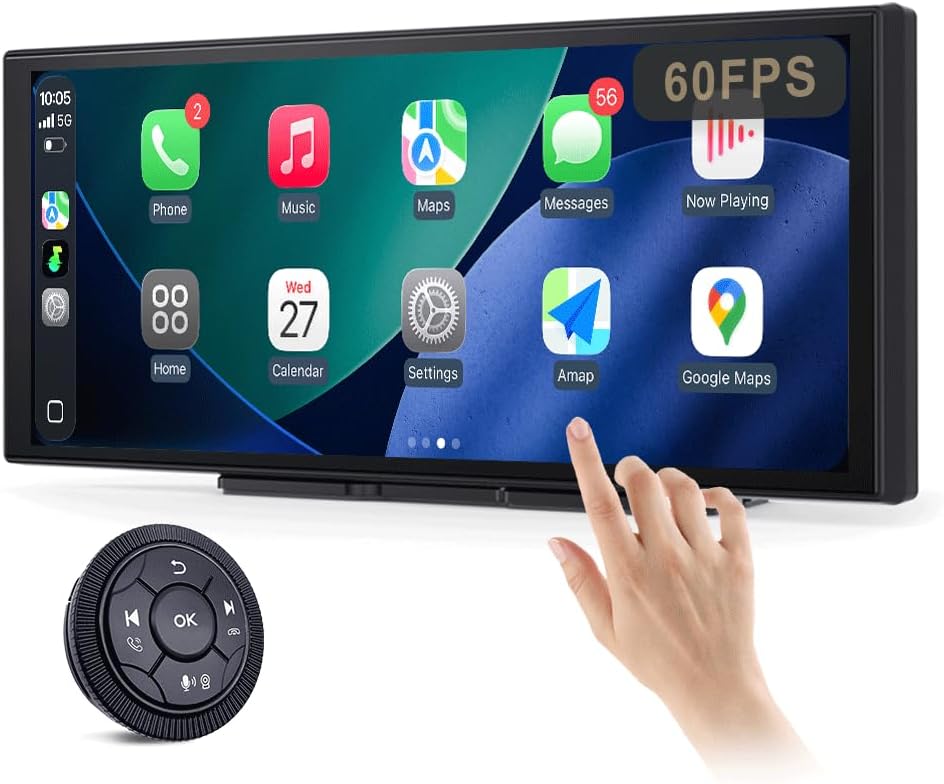
Figure 1: JUSTONE A1 Portable Touch Screen with CarPlay interface and wireless control knob.
2. Садржај пакета
Проверите да ли су све ставке наведене у наставку укључене у ваш пакет. Ако неке ставке недостају или су оштећене, обратите се корисничкој подршци.

Figure 2: Included accessories for the JUSTONE A1.
- Screen Host
- 4 Clip Bracket
- Двострана трака
- Држач за усисну чашу
- Control Button (Wireless Knob)
- Ауто адаптер за напајање
- Ball Shaped Bracket Converter
- TYPE-C Power Cable
- АУКС аудио кабл
- Base for Suction Cup
- Camera Input Cable (Camera optional)
- Упутство за употребу
3. Подешавање
3.1 Опције монтаже
The JUSTONE A1 offers two primary mounting methods to suit various vehicle dashboards. Ensure the screen is securely mounted and does not obstruct your view на путу.

Слика 3: Прamples of suction cup and dashboard mounting.
- 4-Clip Vertical Base: Use this bracket to rest the bottom of the screen directly on your dashboard. Secure it with the provided double-sided tape for stability.
- 17mm Ball-Joint Extendable Arm Mount (Suction Cup Bracket): This option allows for more flexible positioning, typically on the windshield or a smooth dashboard surface. Ensure the suction cup is firmly attached.
Напомена: Always ensure the chosen mounting location complies with local traffic laws regarding windshield obstructions.
3.2 Прикључак за напајање
- Connect the TYPE-C Power Cable to the screen host.
- Plug the Car Power Adapter into your vehicle's 12V power outlet (cigarette lighter socket).
- The screen will power on automatically when the vehicle's ignition is turned on.
3.3 Initial Wireless Connection (CarPlay/Android Auto)
- Уверите се да су Блуетоотх и Ви-Фи омогућени на вашем паметном телефону.
- On the JUSTONE A1 screen, select either 'CarPlay' or 'Android Auto' from the main menu.
- Follow the on-screen instructions to pair your phone via Bluetooth.
- Once Bluetooth is paired, the system will automatically establish a Wi-Fi connection for wireless CarPlay or Android Auto.
- The device is designed to auto-connect to your paired phone when you start your car after the initial setup.
4. Упутство за употребу
4.1 Карактеристике екрана

Figure 4: Display features including 11.3-inch size and in-cell full lamination.
- 11.3" In-Cell Full-Laminated Display: Provides a premium look and feel, appearing darker when off compared to standard lamination. The actual panel size is approximately 10.5" x 4.13".
- 1920x720 Resolution: Delivers clear and sharp visuals.
- Брзина освежавања од 60Хз: Ensures smoother performance, especially for CarPlay.
4.2 Методе контроле
The device offers two ways to interact with its interface:

Figure 5: Touchscreen and wireless knob control options.
- Capacitive Touchscreen: Directly interact with the display by touching icons and swiping.
- Wireless Button Knob: For safer operation while driving, especially if the screen is difficult to reach. This knob allows navigation, volume control, and other functions without direct screen interaction.
4.3 Функције повезивања

Figure 6: Supported phone connectivity options.
- Бежични ЦарПлаи: Access navigation, music, messages, and more from your iPhone.
- Бежични Андроид Ауто: Access navigation, music, and communication features from your Android phone.
- АирПлаи: Mirror content from your Apple devices.
- МираЦаст: Mirror content from compatible Android devices.
4.4 Режими аудио излаза
The JUSTONE A1 supports multiple ways to output audio to your vehicle's sound system:
- BT Display Only Mode: When your phone is connected to the JUSTONE A1, audio streams directly from your phone to your vehicle's built-in Bluetooth audio system. This requires your vehicle to have its own Bluetooth audio input.
- АУКС излаз: Connect the provided AUX Audio Cable from the JUSTONE A1 to your vehicle's AUX input port.
- ФМ предајник: The device can transmit audio via an FM frequency. Tune your car radio to the same frequency set on the JUSTONE A1.
4.5 Automatic Day/Night Mode

Figure 7: Automatic brightness adjustment for day and night conditions.
The built-in light sensor automatically detects ambient light conditions and switches between dark and light themes, adjusting screen brightness for optimal visibility and glare resistance during both day and night driving.
5. Одржавање
- Чишћење: Користите меку крпу која не оставља влакна за чишћење екрана. За тврдокорне мрље, благо обришитеampОбришите крпу водом или средством за чишћење екрана. Избегавајте јаке хемикалије или абразивне материјале.
- температура: Избегавајте излагање уређаја екстремним температурама, и врућим и хладним, током дужег временског периода.
- Складиштење: Ако уређај складиштите дуже време, искључите га из струје и чувајте га на хладном и сувом месту.
- Каблови: Regularly check power and audio cables for any signs of wear or damage. Replace if necessary.
КСНУМКС. Решавање проблема
- Уређај се не укључује:
- Ensure the car power adapter is securely plugged into the vehicle's 12V outlet and the TYPE-C cable is firmly connected to the screen.
- Check if the vehicle's 12V outlet is receiving power (e.g., by testing with another device).
- Wireless CarPlay/Android Auto fails to connect:
- Verify Bluetooth and Wi-Fi are enabled on your smartphone.
- Ensure your phone is not connected to another CarPlay/Android Auto device.
- Покушајте да заборавите уређај у подешавањима Bluetooth-а на телефону и поново га упарите.
- Restart both your phone and the JUSTONE A1 device.
- Нема аудио излаза:
- If using BT Display Only Mode, ensure your phone is connected to your car's native Bluetooth audio system.
- If using AUX, check that the AUX cable is properly connected to both the JUSTONE A1 and your car's AUX input, and your car's audio source is set to AUX.
- If using FM transmitter, ensure the frequency on the JUSTONE A1 matches your car radio's frequency and there is no strong interference on that frequency.
- Check the volume levels on both the JUSTONE A1 and your car's audio system.
- Екран не реагује или је замрзнут:
- Disconnect the power cable from the JUSTONE A1 for 10 seconds, then reconnect it to perform a restart.
- Wireless control knob is not working:
- Ensure the knob's battery is not depleted. Replace if necessary.
- Re-pair the knob with the main unit if it has become disconnected.
7. Спецификације
| Феатуре | Спецификација |
|---|---|
| Назив модела | A1 |
| Бранд | JUSTONE |
| Величина екрана | 11.3 Inches (10.5" x 4.13" actual panel) |
| Дисплаи Типе | In-Cell Full-Laminated Touch Screen |
| Резолуција | 1920к720 |
| Рефресх Рате | Up to 60Hz (for CarPlay) |
| Технологија повезивања | Bluetooth, Wi-Fi (for Wireless CarPlay/Android Auto) |
| Режим аудио излаза | BT Display Only, AUX, FM Transmitter |
| Контролни интерфејс | Touchscreen, Wireless Button Knob |
| Тип монтаже | Panel Mount (4-clip vertical base), Dashboard Mount (17mm ball-joint extendable arm) |
| Посебна карактеристика | Portable, Auto Day/Night Mode (Light Sensor) |
| Тежина артикла | 14.8 унци (420 грама) |
| Димензије пакета | 12.01 к 5.51 к 3.98 инча |
8. Гаранција и подршка
8.1 Информације о гаранцији
The JUSTONE A1 portable touch screen comes with a једногодишња гаранција произвођача од датума куповине. Ова гаранција покрива недостатке у материјалу и изради при нормалној употреби. Не покрива штету насталу услед злоупотребе, незгода, неовлашћених модификација или неправилне инсталације.
Сачувајте доказ о куповини за гаранцијске захтеве.
8.2 Корисничка подршка
For technical assistance, troubleshooting, or warranty inquiries, please contact JUSTONE customer support through the retailer's platform where the product was purchased or visit the official JUSTONE webсајт за контакт информације.
When contacting support, please have your product model (A1) and purchase details ready.