
1. Увод
The TANALAZ K71Pro Karaoke Machine is a portable and versatile entertainment system designed to bring joy to users of all ages. It features a powerful speaker, two wireless microphones with fun voice-changing effects, and dynamic LED party lights to create an immersive singing experience. With its compact design and multiple connectivity options, it's perfect for home use, parties, and family gatherings.

2. Садржај пакета
Молимо вас да пажљиво проверите пакет како бисте били сигурни да су све ставке присутне и у добром стању:
- 1 x Karaoke Speaker Unit
- 2 к бежични микрофони
- 1 x Microphone Holder Base
- КСНУМКС к УСБ кабел за пуњење типа Типе-Ц
- 1 x Упутство за употребу (овај документ)

3. Водич за подешавање
3.1 Пуњење уређаја
Before first use, it is recommended to fully charge the karaoke speaker and both wireless microphones. Use the provided USB Type-C charging cable.
- Connect the USB Type-C cable to the charging port on the speaker unit.
- Connect the other end of the USB cable to a compatible USB power adapter (5V/1A recommended, not included) or a computer USB port.
- The charging indicator light on the speaker will show charging status (refer to LED indicator section for details).
- Repeat the process for each wireless microphone.
A full charge typically takes 2-3 hours for the speaker and microphones.
3.2 Microphone Holder Base Assembly
The microphone holder base provides a convenient and stable place to store your microphones when not in use. Simply place the microphones into the designated slots on the base. Note that the base is for organization and does not provide charging functionality.
4. Упутство за употребу
4.1 Укључивање/искључивање
- говорник: Притисните и држите дугме за напајање (⏻) on the top panel of the speaker for approximately 3 seconds to turn it on or off.
- микрофони: Притисните и држите дугме за напајање (⏻) on each microphone for approximately 3 seconds to turn it on or off. The microphones will automatically connect to the speaker when both are powered on.
4.2 Блуетоотх упаривање
The K71Pro uses Bluetooth 5.3 for stable and fast wireless connection to your devices.
- Ensure the speaker is powered on. It will automatically enter Bluetooth pairing mode, indicated by a flashing light or voice prompt.
- On your smartphone, tablet, PC, or other Bluetooth-enabled device, open the Bluetooth settings.
- Тражи available devices and select "K71Pro" са листе.
- Once connected, you will hear a confirmation sound from the speaker. You can now play music from your device through the karaoke machine.

4.3 AUX and TF Card Playback
- ТФ картица: Уметните TF (MicroSD) картицу са MP3 музиком files into the TF card slot on the speaker. The speaker will automatically switch to TF card mode and begin playing music.
- АУКС улаз: Connect an external audio device (e.g., MP3 player, computer) to the AUX port on the speaker using a 3.5mm audio cable (not included). The speaker will automatically switch to AUX mode.
4.4 Voice Changer Effects
Each wireless microphone is equipped with a voice changer function for added fun.
- While using the microphone, press the М button (Mode/Voice Changer) on the microphone handle to cycle through the available voice effects.
- The 5 magic voice effects include: Original, Female, Male, Monster, and Baby voice.

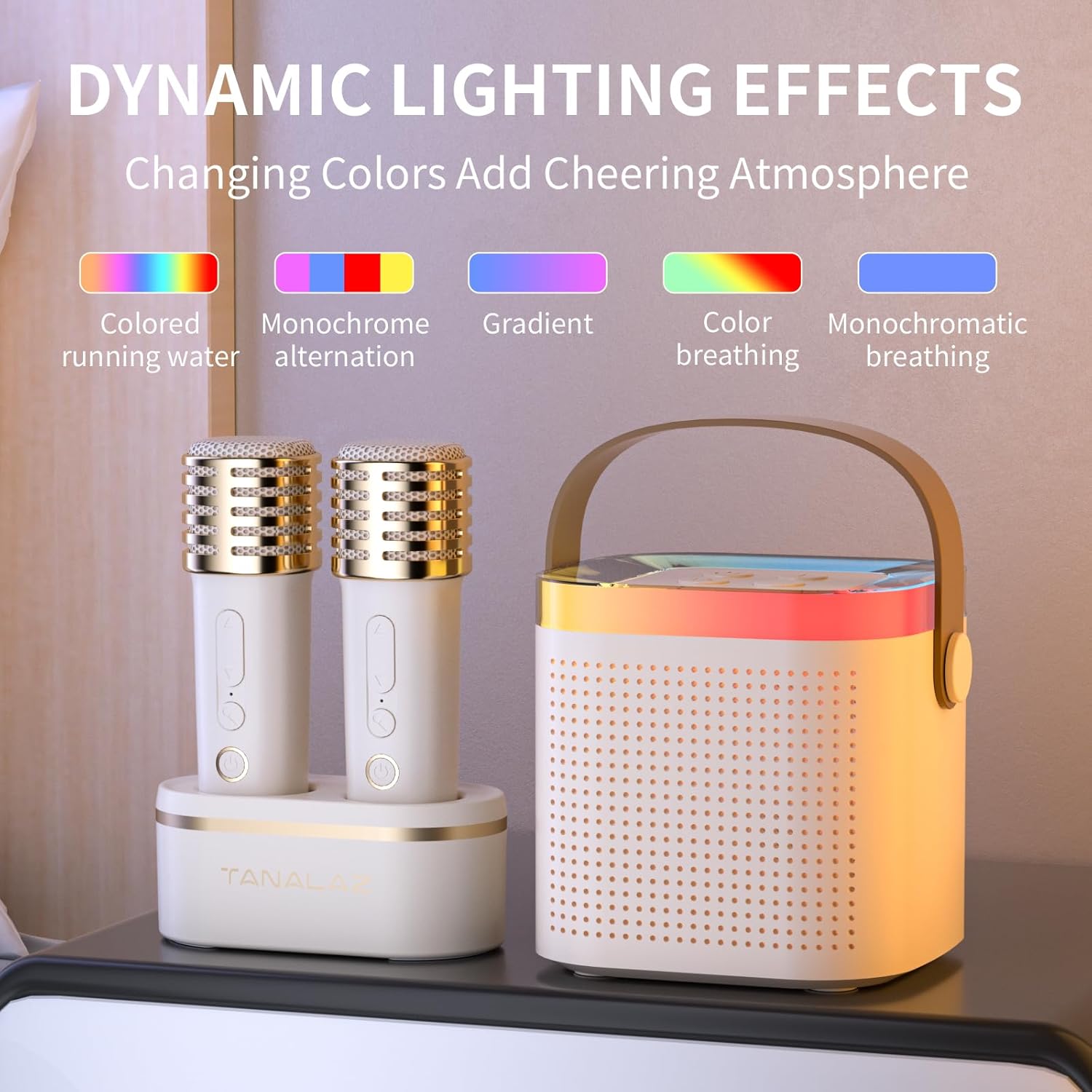
4.5 LED Party Lights
The speaker features dynamic LED lights that enhance the party atmosphere.
- Press the light button on the speaker's top panel to cycle through different lighting modes.
- Available modes include: Colored running water, Monochrome alternation, Gradient, Color breathing, and Monochromatic breathing.
Video 1: Demonstration of the outdoor Bluetooth speaker with party LED lights, showcasing its portability and dynamic lighting.
4.6 Контрола јачине звука
- Јачина звучника: Use the '+' and '-' buttons on the speaker's top panel to adjust the overall music playback volume.
- Јачина звука микрофона: Use the volume up/down buttons on each microphone to adjust its individual volume.
5. Одржавање
5.1 Чишћење
To maintain the appearance and functionality of your karaoke machine:
- Wipe the surfaces of the speaker and microphones with a soft, dry cloth.
- Не користите абразивна средства за чишћење, воскове или раствараче јер могу оштетити завршну обраду.
- Избегавајте улазак влаге у било какве отворе.
5.2 Складиштење
When not in use for extended periods, store the device in a cool, dry place away from direct sunlight and extreme temperatures. It is recommended to fully charge the batteries every 3 months to prolong their lifespan.
КСНУМКС. Решавање проблема
| Проблем | Могући узрок | Решење |
|---|---|---|
| Нема напајања / Уређај се не укључује. | Ниска батерија. | Charge the speaker and microphones fully using the USB Type-C cable. |
| Нема звука из звучника. | Volume too low; Incorrect input mode; Device not paired. | Increase speaker volume. Ensure correct mode (Bluetooth, AUX, TF). Re-pair Bluetooth device. |
| Микрофон не ради. | Microphone off; Low battery; Not paired to speaker. | Turn on microphone. Charge microphone. Power cycle both speaker and microphones to re-establish connection. |
| Bluetooth connection unstable or drops. | Уређај је предалеко; Препреке; Сметње. | Move the connected device closer to the speaker (within 10m). Remove obstructions. Avoid strong electromagnetic interference. |
| Voice changer not working. | Неправилно притискање дугмета. | Ensure you are pressing the 'M' button on the microphone. |
7. Спецификације
Видео 2: Анимирани прелазview of the portable microphone and speaker, highlighting the DSP smart chip and sound quality.
| Феатуре | Детаљ |
|---|---|
| Број модела | К71Про |
| Бранд | ТАНАЛАЗ |
| Димензије производа | 3.66 x 6.33 x 5.62 inches (Speaker) |
| Тежина артикла | 1.1 фунти |
| Технологија повезивања | Bluetooth 5.3, AUX, TF Card |
| Величина звучника | 57mm Large Horn |
| Микрофони | 2 бежична микрофона |
| Спеакер Баттери | Литијумска батерија од 1200 mAh (уграђена) |
| Трајање батерије звучника | 4-6 hours (up to 10 hours at medium volume) |
| Порт за пуњење | УСБ Типе-Ц |
| Улазни волtage | 5 Волтс |
| Посебне карактеристике | Portable, LED Party Lights, Voice Changer |


8. Гаранција и подршка
For detailed warranty information, product registration, or technical support, please refer to the documentation included with your purchase or contact TANALAZ customer service directly through the platform where you purchased the product. Please have your model number (K71Pro) and purchase date ready when contacting support.
You can also visit the official TANALAZ store on Amazon for more information: TANALAZ Store