
FULODE V18
FULODE V18 Digital Mixer User Manual
Professional 8-Channel Compact Audio Mixing Console
Модел: В18
Производ је завршенview
The FULODE V18 Digital Mixer is a versatile 8-channel compact audio mixing console designed for a wide range of applications, including live performances, studio recording, podcasting, and DJing. It features 16 built-in DSP effects, a professional 6-band EQ, USB connectivity, Bluetooth, and PC debugging capabilities, offering comprehensive sound control and flexibility.
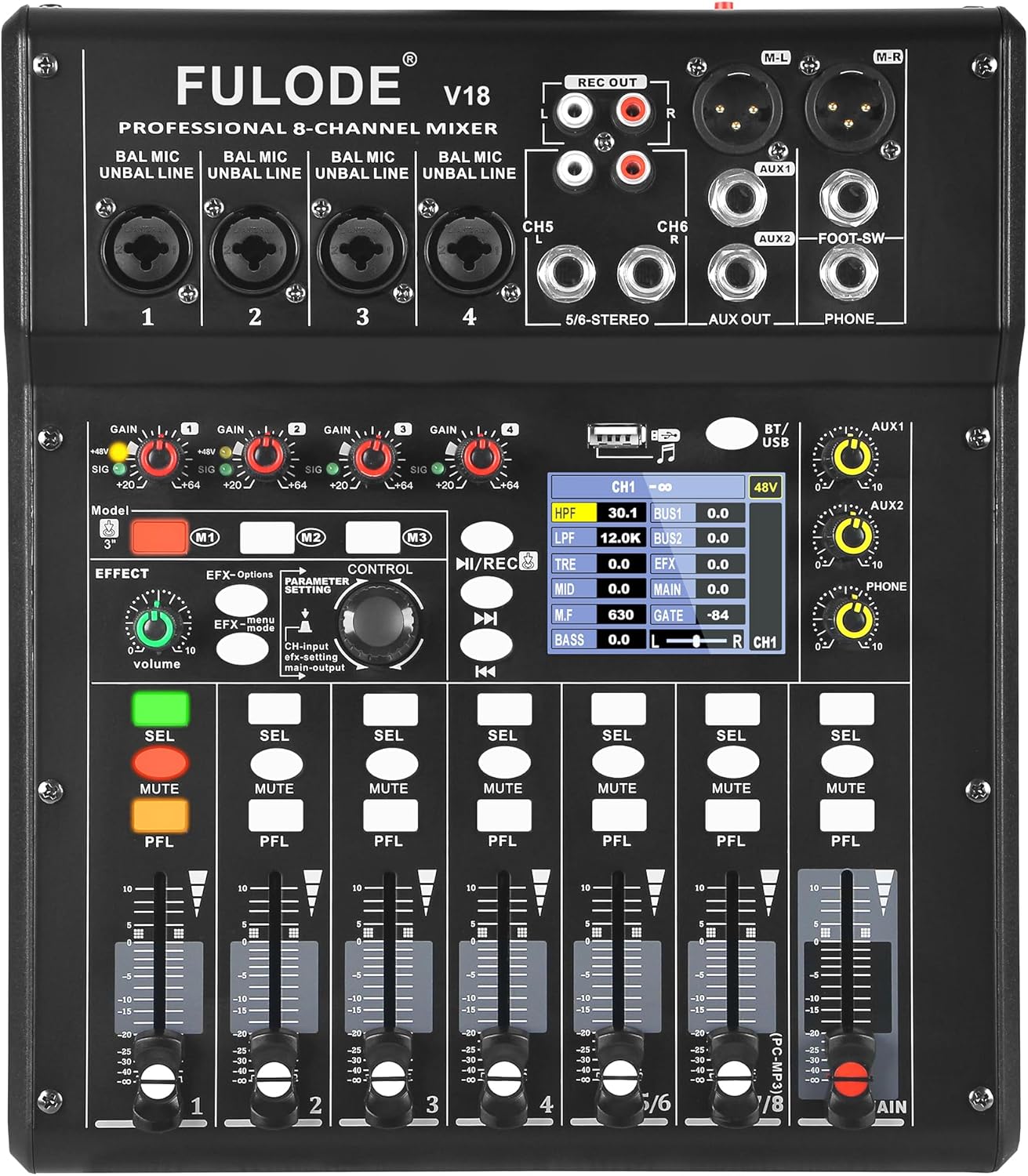
Слика 1: Предња страна view of the FULODE V18 Digital Mixer, showcasing its controls and display.
Кључне карактеристике:
- 16 ДСП ефекти: Customizable sound with adjustable parameters for precise audio shaping.
- 4-Band EQ per Channel + 6-Band Master EQ: Advanced tone shaping with High-Pass Filter (HPF) and Low-Pass Filter (LPF) for clear highs, rich mids, and solid lows.
- USB Mixer with PC Tuning Software: Connect to a computer for precise sound tuning and real-time parameter control, with 3 recallable custom presets.
- Bluetooth Streaming & USB/MP3 Playback: Supports Bluetooth 5.0 for wireless streaming and direct music playback from USB flash drives.
- Оптички улаз: High-fidelity, interference-free digital audio signal input.
- Фантомско напајање од 48V: Independent phantom power on channels 1 & 2 for condenser microphones.
- Channel Mute & Footswitch Control: Dedicated mute buttons per channel and footswitch support for hands-free effect switching.
Водич за подешавање
Follow these steps for initial setup of your FULODE V18 Digital Mixer:
- Распакивање: Carefully remove all components from the packaging. Verify that all items listed in the "What's Included" section are present.
- Прикључак за напајање: Connect the provided power adapter to the DC 12V/5A input on the rear panel of the mixer. Plug the adapter into a suitable power outlet.
- Укључено: Press the "POWER ON" button located on the rear panel to turn on the mixer. The 2.8" TFT display will illuminate, showing the welcome screen.
- Улазне везе:
- Microphones/Line Inputs (Channels 1-4): Use XLR or 1/4" TRS cables to connect microphones or line-level instruments to the respective input jacks.
- Stereo Inputs (Channels 5/6 - 7/8): Use 1/4" TRS or RCA cables for stereo line-level devices.
- Оптички улаз: Connect digital audio sources via the optical input for high-fidelity sound.
- Излазне везе:
- Main Output (M-L/M-R): Connect to your main PA system or studio monitors using XLR cables.
- AUX Outputs (AUX1/AUX2): Connect to external effects processors or monitor systems.
- Headphone Output (PHONE): Connect your headphones for monitoring.
- РЕЦ ОУТ: Connect to a recording device using RCA cables.

Figure 2: Product dimensions and included accessories, including USB cable, optical cable, and power line.
Видео 1: Оверview of the FULODE V18 Digital Mixer's features and connectivity, including power-on sequence and various input/output options. This video demonstrates the physical connections and initial boot-up of the device.
Упутство за употребу
Channel Controls and EQ
Each input channel (1-8) features individual gain control, a 4-band equalizer, and a channel fader for precise level adjustment. The main output also includes a powerful 6-band EQ for overall sound shaping.
- Гаин Цонтрол: Adjust the input sensitivity for each channel to prevent clipping or ensure sufficient signal.
- 4-Band Channel EQ: Use the dedicated knobs to adjust High-Pass Filter (HPF), Low-Pass Filter (LPF), Treble, Mid, and Bass frequencies for individual channels.
- Цханнел Фадерс: Control the volume level of each channel sent to the main mix.
- Дугме за утишавање: Instantly silence a channel.
- PFL (Pre-Fader Listen) Button: Allows you to monitor the channel's signal before the fader, useful for setting gain levels.

Figure 3: Visual representation of the 4-band professional EQ, Pro-Grade HPF/LPF, Multi-Bus Routing, and Smart Noise Gate features.
DSP Effects and Presets
The V18 mixer includes 16 professional DSP effect presets. You can select and adjust parameters for each effect to customize your sound.
- Effect Knob: Rotate to select from the 16 built-in effects.
- Подешавање параметара: Use the control knob to adjust specific parameters of the selected effect, such as delay time or reverb decay.
- Preset Mode Shortcut (M1, M2, M3): Save up to 3 customized presets for quick recall during performances or recording sessions.
- Контрола ножног прекидача: Connect an optional footswitch to the "FOOT-SW" jack for hands-free effect switching, ideal for solo performers.

Figure 4: The mixer's display showing the selection and adjustment of 16 built-in effect presets.
УСБ и Блуетоотх повезивање
The mixer offers versatile playback options via USB and Bluetooth.
- УСБ репродукција: Insert a USB flash drive into the USB port to play MP3 files directly. Use the transport controls (play/pause, next/previous) on the mixer to navigate tracks.
- Блуетоотх стриминг: Activate Bluetooth on the mixer and pair with your mobile device (phone, tablet, or MP3 player) to stream audio wirelessly.
- PC Debugging/Tuning: Connect the mixer to your computer via the USB 2.0 port. Use the dedicated PC tuning software for ultra-precise sound adjustments and real-time parameter control.

Figure 5: Illustration of the built-in Bluetooth feature for wireless audio streaming.

Слика 6: Завршеноview of versatile audio inputs including USB drive, USB 2.0 for computer connection, and optical input.
Figure 7: The mixer connected to a computer, demonstrating the PC tuning software for precise adjustments and recallable modes.
Пхантом Повер
Channels 1 and 2 provide independent 48V phantom power, essential for operating condenser microphones. Activate phantom power only when using condenser microphones that require it. Ensure other devices are disconnected or phantom power is off before connecting non-phantom powered equipment to avoid damage.

Figure 8: The 48V phantom power switch and channel mute button, crucial for microphone compatibility and live control.
Одржавање
Proper maintenance ensures the longevity and optimal performance of your FULODE V18 Digital Mixer:
- Чишћење: Use a soft, dry cloth to wipe the surface of the mixer. For stubborn dirt, a slightly damp Може се користити прхана крпа, а затим сува крпа. Избегавајте абразивна средства за чишћење, раствараче или воскове.
- Заштита од прашине: Keep the mixer covered when not in use to prevent dust accumulation, especially around faders and knobs.
- Услови животне средине: Operate and store the mixer in a dry environment, away from direct sunlight, extreme temperatures, and high humidity.
- Управљање кабловима: Ensure cables are neatly organized and not under strain to prevent damage to connectors and ports.
Решавање проблема
This section addresses common issues you might encounter with your FULODE V18 Digital Mixer:
| Проблем | Могући узрок | Решење |
|---|---|---|
| No sound output from main mix. |
|
|
| Изобличен звук. |
|
|
| Блутут се не повезује. |
|
|
| Microphone not working (condenser mic). |
|
|
Спецификације
| Феатуре | Детаљ |
|---|---|
| Бранд | ФУЛОДЕ |
| Број модела | В18 |
| Број канала | 8 |
| ДСП ефекти | 16 built-in, adjustable parameters |
| Изједначавање | 4-Band EQ per channel, 6-Band Master EQ, HPF/LPF filters |
| Технологија повезивања | Bluetooth 5.0, USB 2.0, Optical Input |
| Пхантом Повер | 48V (independent on channels 1 & 2) |
| Дисплаи | 2.8" TFT Display |
| Извор напајања | Цордед Елецтриц |
| Волtage | 110 волти (АЦ) |
| Тежина артикла | 5.69 фунти |
| Димензије производа | 11.45 к 9.72 к 2.59 инча (29.1 к 24.7 к 6.6 цм) |
Гаранција и подршка
FULODE is committed to your satisfaction. This mixer is packed with advanced features to meet professional audio needs. If you have any questions about setup, functions, or performance, our dedicated support team is always ready to help. Please contact us anytime for assistance.
For support, please refer to the contact information provided with your product packaging or visit the official FULODE webсајту.
Ask a question about this manual
Ask about setup, troubleshooting, compatibility, parts, safety, or missing instructions. Manuals+ will review the question and use this page’s manual context to help answer it.