
1. Увод
The BOSEAN BH-W01 is a portable 3-in-1 Electromagnetic Field (EMF) meter designed for detecting Electric Field (EF), Magnetic Field (MF), and Radio Frequency (RF) radiation. This device features an integrated sensor for accurate signal capture and a 2.4-inch TFT color display for intuitive data visualization. It is suitable for use in various environments, including homes, offices, computer rooms, and communication base stations, to identify and manage radiation sources.

Слика 1: Фронт view of the BOSEAN BH-W01 Portable 3-in-1 EMF Meter, showing its display and control buttons.
2. Карактеристике производа
- 3-in-1 EMF Detection: Measures Electric Field (EF), Magnetic Field (MF), and Radio Frequency (RF) with high precision.
- Интуитиван екран: Features a 2.4-inch TFT color screen for real-time, maximum, and average value display, along with dynamic line graphs for trend visualization.
- Вишеструки режими аларма: Supports audible, LED light, vibration, and on-screen alarms. Numeric values and curves change color when thresholds are exceeded.
- Широка примена: Suitable for measuring radiation levels from electronic devices like mobile phones, routers, microwaves, and identifying excessive radiation sources in various environments.
- Пуњива батерија: Equipped with an 1800mAh Lithium-ion battery, rechargeable via Type-C port.
- Аутоматско искључивање: Configurable auto-shutdown timer (e.g., 15 minutes) to conserve battery.

Слика 2: Illustration of the BOSEAN BH-W01's 3-in-1 measurement capabilities for Electric Field (EF), Magnetic Field (MF), and Radio Frequency (RF).
3. Подешавање и пуњење
3.1 Почетно пуњење
Пре прве употребе, потпуно напуните уређај.
- Locate the Type-C charging port on the side or bottom of the device.
- Connect the provided Type-C USB cable to the device and the other end to a standard USB power adapter (not included) or a computer USB port.
- The charging indicator on the display will show the charging status. Allow the device to charge until the battery icon indicates a full charge.

Слика 3: The BOSEAN BH-W01 features a Type-C charging port and an 1800mAh rechargeable battery.
3.2 Укључивање/искључивање
- Да бисте укључили, притисните и држите Hold/Power дугме док се дисплеј не осветли.
- За искључивање притисните и држите тастер Hold/Power дугме док се екран не искључи.
4. Операција
4.1 Разумевање екрана
The 2.4-inch TFT color display provides comprehensive information about the measured fields. Refer to the diagram below for an explanation of each indicator and function.

Слика 4: Detailed diagram of the BOSEAN BH-W01 display interface and button functions.
| бр. | Функција | бр. | Функција |
|---|---|---|---|
| 1 | Sound Alarm Icon (Mute icon appears if alarm is off) | 9 | Real-Time Magnetic Field (MF) Measurement |
| 2 | Alarm Light Icon | 10 | Real-Time Radio Frequency (RF) Measurement |
| 3 | Vibration Alarm Icon | 11 | Alarm Status Indicators: Low, Medium, High |
| 4 | Auto Shutdown Timer Icon | 12 | Graph Display Icon |
| 5 | Hold (Data Hold) | 13 | Real-Time Measurement Value |
| 6 | Ниво батерије | 14 | Average Measurement Value |
| 7 | Индикатор пуњења | 15 | Maximum Measurement Value |
| 8 | Real-Time Electric Field (EF) Measurement | 16 | Real-Time Curve Chart |
4.2 режима мерења
The device automatically measures EF, MF, and RF simultaneously.
- Electric Field (EF): Measures in V/m (Volts per meter). Range: 1 ~ 1999 V/m.
- Magnetic Field (MF): Measures in mG (milligauss) or µT (microtesla). Range: 0.1 ~ 1999.9 mG / 0.01 ~ 99.99 µT.
- Радио фреквенција (РФ): Measures in mW/m² (milliwatts per square meter). Range: 0.1 ~ 999.9 mW/m².

Слика 5: Common sources of Electric Field (EF), Magnetic Field (MF), and Radio Frequency (RF) radiation.
4.3 Функције дугмета
- Дугме јединице: Press to cycle through measurement units for Magnetic Field (mG/µT) or to adjust other unit-related settings if available.
- Hold/Power Button:
- Short press: Activates/deactivates Data Hold function, freezing the current readings on the display.
- Long press: Powers the device on or off.
- Дугме за режим: Press to cycle through display modes (e.g., real-time values, graph display) or to adjust alarm settings.
4.4 Interpreting Readings and Alarms
The device displays real-time, average, and maximum values. The color of the numeric values and curves will change to indicate different radiation levels (e.g., green for low, yellow for medium, red for high).
- Прагови аларма: The device has pre-set thresholds for low, medium, and high radiation levels. When a measured value exceeds a threshold, the corresponding alarm (audible, LED, vibration, screen color change) will activate.
- Аларм преоптерећења: If the electromagnetic radiation exceeds the measurable range, an overload alarm will be triggered.
- Упозорење о батерији: The device continuously monitors battery status and provides alerts for low power.
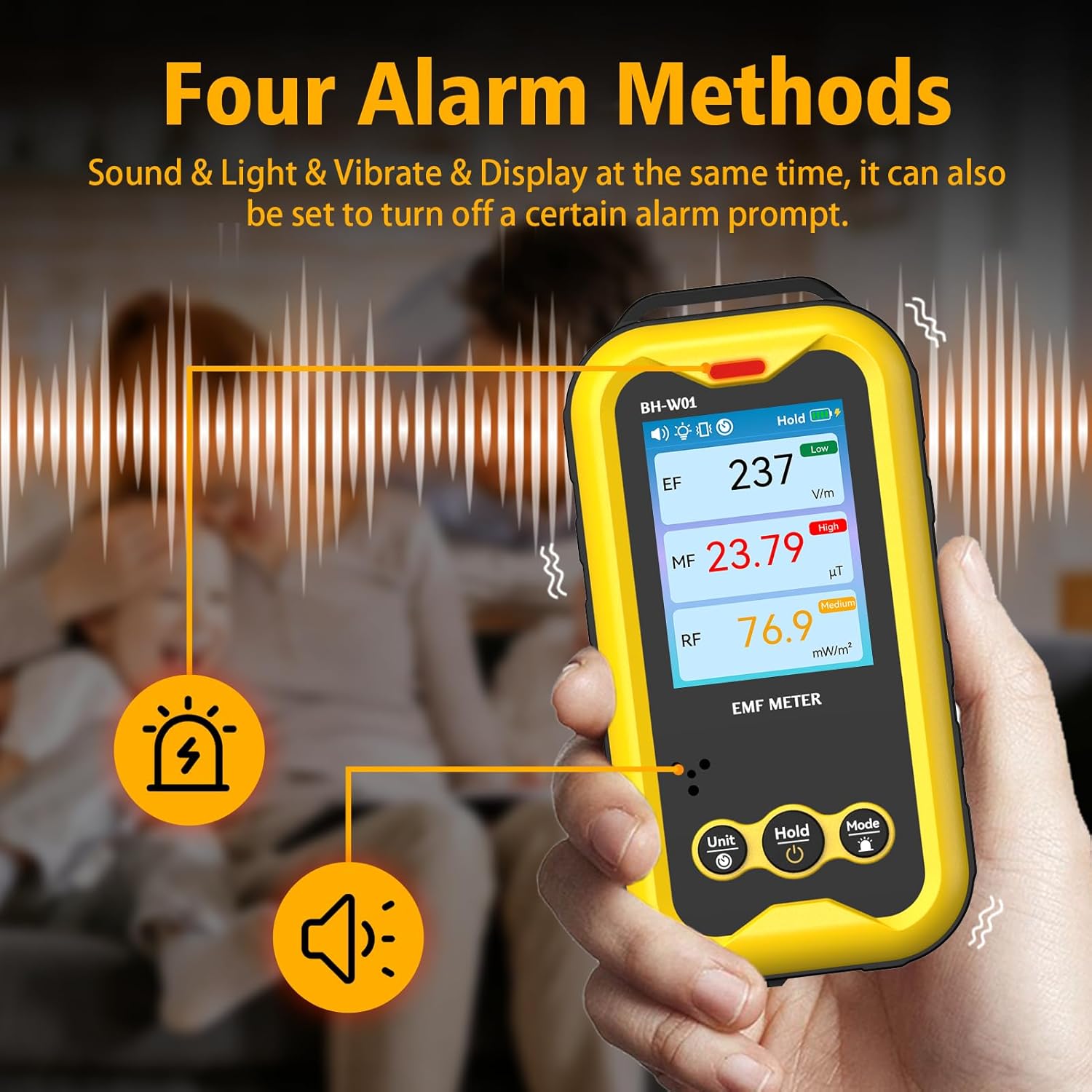
Слика 6: The BOSEAN BH-W01 offers four distinct alarm methods: sound, light, vibration, and display changes.
4.5 Real-Time Curve Chart
The device can display a real-time curve chart (Figure 4, item 16) to visualize the dynamic changes in magnetic field strength over time. This feature helps in observing trends and identifying intermittent radiation sources.
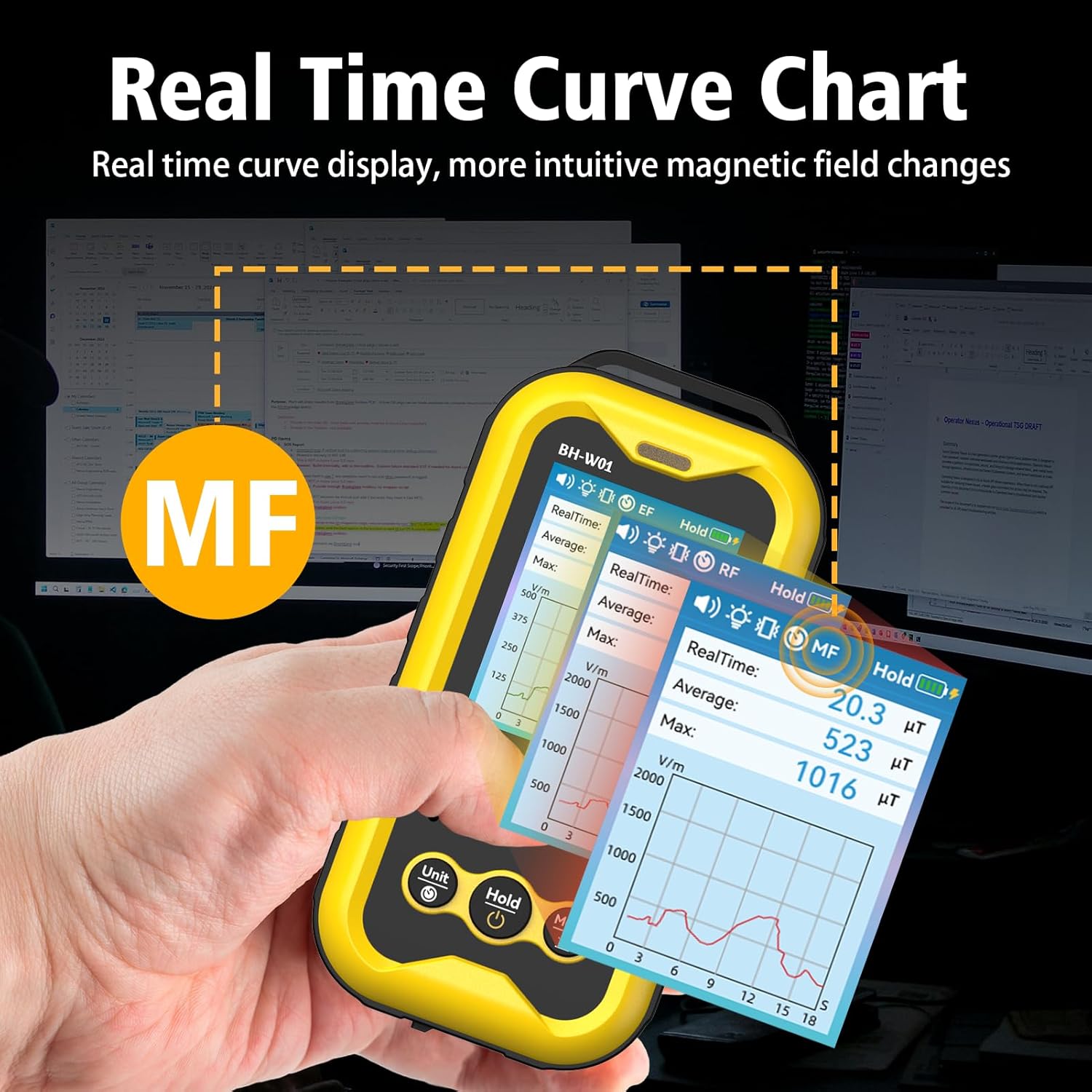
Слика 7: The real-time curve chart provides a visual representation of magnetic field changes over time.
5. Одржавање
- Чишћење: Користите меку, суву крпу за чишћење уређаја. Не користите абразивна средства за чишћење или раствараче.
- Складиштење: Уређај чувајте на хладном и сувом месту, даље од директне сунчеве светлости и екстремних температура.
- Одржавање батерије: To prolong battery life, avoid fully discharging the battery frequently. If storing for an extended period, charge the device to approximately 50% and recharge every few months.
- Избегавајте утицај: Protect the device from drops and strong impacts, which can damage internal components.
КСНУМКС. Решавање проблема
- Уређај се не укључује:
- Уверите се да је батерија напуњена. Повежите уређај са извором напајања помоћу Type-C кабла.
- Press and hold the Power button for several seconds.
- Нетачна очитавања:
- Ensure the device is held steadily during measurement. Rapid movements can affect accuracy.
- Keep the device away from strong magnetic fields or other electronic devices that might interfere with readings, unless those are the intended measurement targets.
- The device's calibration is based on manual operation; hold it by hand for best results.
- Alarms not working:
- Check the alarm settings using the Mode button to ensure they are enabled.
- Verify that the measured values exceed the set thresholds.
- Display is blank or frozen:
- Try restarting the device by holding the Power button.
- Ако проблем и даље постоји, контактирајте корисничку подршку.
7. Спецификације
| Параметар | Валуе |
|---|---|
| Број модела | BH-W01 |
| Бранд | BOSEAN (Manufacturer) / GLXY (Sub-brand/Distributor) |
| Димензије (Д к Ш к В) | 6.5 к 2.7 к 12.7 цм |
| Тежина | 240 грама |
| Electric Field (EF) Range | 1 V/m до 1999 V/m |
| Magnetic Field (MF) Range | 0.1 mG to 1999.9 mG (0.01 µT to 99.99 µT) |
| Radio Frequency (RF) Range | 0.1 mW/m² to 999.9 mW/m² |
| Дисплаи | 2.4-инчни TFT екран у боји |
| Извор напајања | 1 литијум-јонска батерија (укључена) |
| Капацитет батерије | 1800мАх |
| Порт за пуњење | Тип-Ц УСБ |
| Ауто Схутдовн | Configurable (e.g., 15 minutes) |
8. Безбедносне информације
- Не покушавајте да отворите или модификујете уређај. То може поништити гаранцију и представљати безбедносне ризике.
- Држите уређај даље од воде и других течности.
- Avoid exposing the device to extreme temperatures or high humidity.
- Dispose of the battery and device according to local regulations. Do not dispose of in household waste.
- This device is for informational measurement purposes only and should not be used as a substitute for professional safety assessments or medical advice.
9. Гаранција и подршка
Specific warranty details are typically provided with the product packaging or by the retailer at the time of purchase. For technical support, warranty claims, or further assistance, please refer to the contact information provided by your seller or the manufacturer, BOSEAN.
Manufacturer: BOSEAN
Model: BH-W01