
TOPTRO TP1
Упутство за употребу паметног пројектора TOPTRO TP1
Модел: ТП1
1. Увод
This manual provides detailed instructions for the setup, operation, and maintenance of your TOPTRO TP1 Smart Projector. The TP1 is designed to deliver a high-quality home cinema experience with its native 1080P resolution, 4K decoding support, integrated smart system with licensed streaming applications, Dolby Audio, and advanced connectivity options.
2. Производ је готовview
2.1 Садржај пакета
- ТОПТРО ТП1 паметни пројектор
- Повер Цорд
- ХДМИ кабл
- Ремоте Цонтрол
- Упутство за употребу
- Комплет за чишћење
2.2 Кључне карактеристике
- Званично лиценциране апликације за стримовање: Access Netflix, Prime Video, YouTube, and more directly.
- Подршка за Долби аудио: Enhanced sound experience with built-in 2*10W speakers.
- Нативна резолуција 1080P: Full HD display with 4K video decoding capability.
- 800 ANSI лумена: Bright and clear image projection.
- 360° Adjustable Stand: Flexible projection angles for various surfaces.
- Auto Focus & Auto Keystone: Automatic image correction for quick setup.
- WiFi 6 & Two-Way Bluetooth 5.2: Fast wireless connectivity and versatile audio options.
- Вишеструки начини инсталације: Supports ceiling, desktop, tripod, and wall mounting.

Image 2.1: The TOPTRO TP1 Smart Projector, showcasing its compact design and integrated stand. Key features such as Netflix, 1080P, Dolby Audio, and Auto Focus are visually represented around the projector.
3. Водич за подешавање
3.1 Прикључак за напајање
- Прикључите кабл за напајање на улазни порт за напајање пројектора.
- Укључите други крај кабла за напајање у одговарајућу електричну утичницу.
- Притисните дугме за напајање на пројектору или даљинском управљачу да бисте укључили уређај.
3.2 Почетно смештање
Position the projector on a stable surface. The 360° adjustable stand allows for flexible placement, including projecting onto walls or ceilings. Ensure the projection path is clear of obstructions.
3.3 Даљински управљач
Insert two AAA batteries (not included) into the remote control. Point the remote control towards the projector's IR receiver for optimal response.
3.4 Мрежна веза
- Upon first startup, follow the on-screen prompts to select your language and region.
- Navigate to the network settings and select your desired Wi-Fi network.
- Enter the Wi-Fi password to establish a connection. The projector supports Wi-Fi 6 (5G/2.4G dual-band) for stable streaming.
4. Упутство за употребу
4.1 Smart System Navigation
The TOPTRO TP1 features an intelligent system with pre-installed applications. Use the remote control's directional buttons and 'OK' button to navigate the interface. The home screen provides access to streaming services, apps, and settings.

Image 4.1: The projector displaying its smart interface, featuring icons for Netflix, YouTube, Prime Video, Hulu, Plex, and an open browser, accessible via the remote control.
4.2 Апликације за стримовање
Directly access officially licensed applications such as Netflix, Prime Video, and YouTube. Log in with your existing accounts to enjoy a wide range of content. Ensure a stable internet connection for optimal streaming performance.
4.3 Репродукција медија
The projector supports playback from various sources:
- УСБ диск: Insert a USB drive into the USB port to play local media files.
- ХДМИ улаз: Connect external devices like laptops, gaming consoles (PS5), or TV sticks via the HDMI port.
- Бежично пресликавање екрана: Connect iOS and Android smartphones or iPads wirelessly (Google phones are not supported for direct mirroring).
5. Повезивање
5.1 Ви-Фи 6
The TP1 is equipped with the latest Wi-Fi 6 technology, supporting both 5G and 2.4G dual-band frequencies. This ensures a smoother and more stable wireless connection for streaming and online activities.
5.2 Two-Way Bluetooth 5.2
The two-way Bluetooth 5.2 functionality allows the projector to:
- Connect to External Speakers: Pair with Bluetooth-enabled speakers for enhanced audio output.
- Act as a Bluetooth Speaker: Stream audio from your phone or laptop to the TP1, utilizing its built-in speakers.

Image 5.1: The TOPTRO TP1 Projector demonstrating its Wi-Fi 6 and two-way Bluetooth 5.2 capabilities, showing wireless connection to external speakers and a smartphone for gaming.
5.3 Physical Ports
The projector includes the following ports:
- ХДМИ порт: For connecting devices like Fire TV Stick, Roku, laptops, and gaming consoles.
- УСБ порт: For connecting USB drives.
- 3.5 мм прикључак за слушалице: За повезивање жичних слушалица или екстерних звучника.
5.4 CEC & ARC Functions
The HDMI port supports CEC (Consumer Electronics Control) and ARC (Audio Return Channel) functions:
- ЦИК: Allows you to control connected HDMI devices (e.g., a TV stick) using the projector's remote control. To enable, select the HDMI signal source, enter settings via the remote's menu button, and turn on CEC.
- АРЦ: Enables audio output from the projector to an ARC-compatible speaker or soundbar connected via HDMI. Ensure the external audio device is set to HDMI ARC mode.
6. Аудио функције
The TOPTRO TP1 is equipped with advanced audio capabilities to enhance your viewинг искуство.
6.1 Dolby Audio Support
Experience rich and clear sound effects with Dolby Audio support, providing an immersive audio environment for movies and music.
6.2 Уграђени звучници
The projector features two integrated 10W speakers, delivering robust sound output suitable for most environments. For larger spaces or enhanced audio, external speakers can be connected via Bluetooth or the 3.5mm audio jack.

Image 6.1: The TOPTRO TP1 Projector creating an immersive audio experience with Dolby Audio, projecting an image of a cellist with sound waves illustrating the audio output.
7. Подешавање слике
The TP1 projector offers several features for optimizing image quality and projection alignment.
7.1 Ауто Фоцус
The projector automatically adjusts the focus to ensure a sharp and clear image. This feature activates upon startup or when the projector is moved.
7.2 Ауто Кеистоне Цоррецтион
The auto keystone function automatically corrects vertical image distortion, ensuring a rectangular screen even when the projector is placed at an angle.
7.3 4-Point Correction
For precise image alignment, the 4-point correction feature allows manual adjustment of each corner of the projected image to achieve a perfect rectangular shape.
7.4 Digital Zoom (50%-100%)
Adjust the size of the projected image from 100% down to 50% without physically moving the projector, providing flexibility for various screen sizes and distances.

Image 7.1: Visual representation of the projector's Auto Focus, Auto Vertical Keystone, 4-Point Correction, and Digital Zoom capabilities, ensuring a clear and properly aligned image.
7.5 Projection Throw Ratio
With a 1.1:1 projection throw ratio, the TP1 can project a large screen even in small spaces, making it suitable for various room sizes.
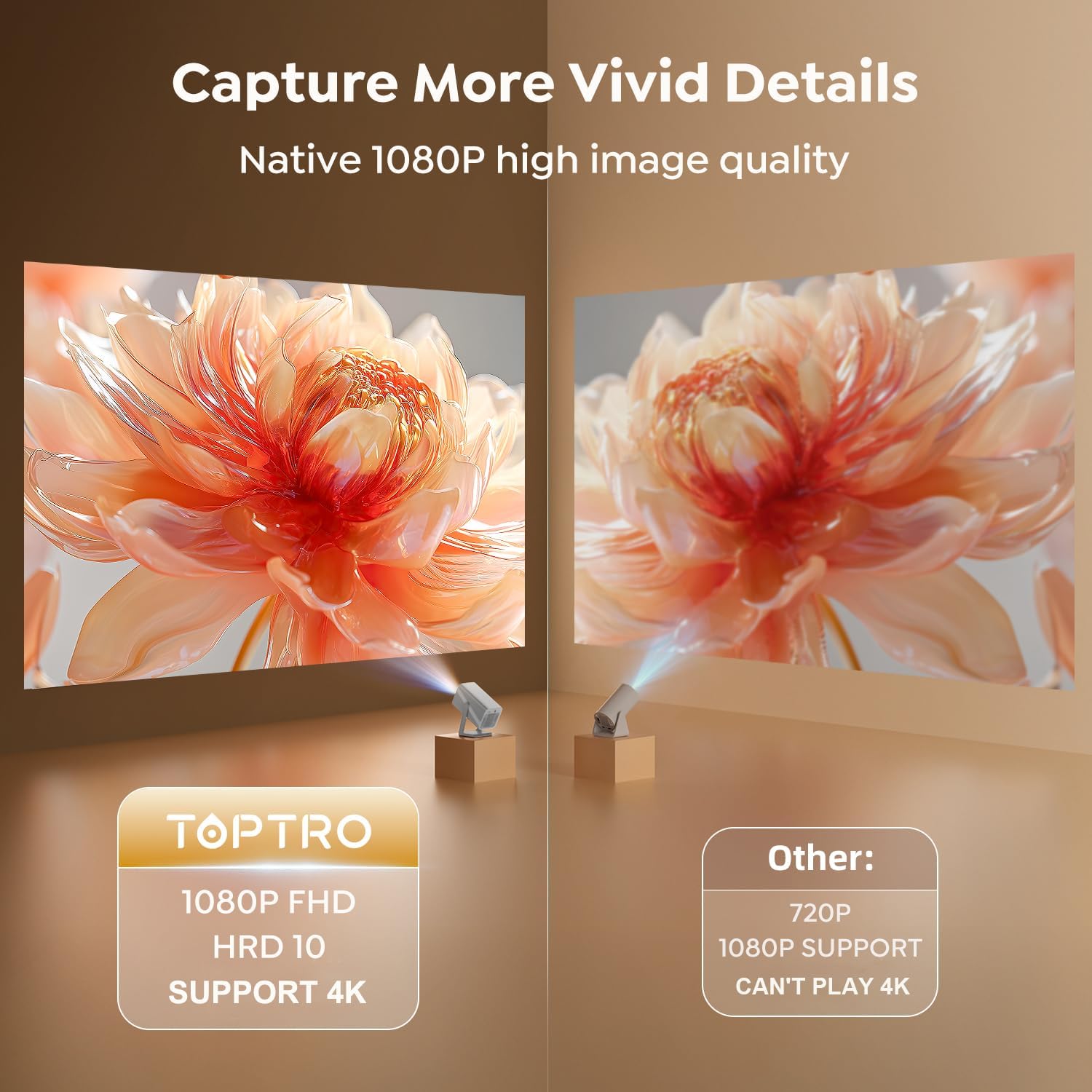
Image 7.2: A side-by-side comparison illustrating the superior clarity and detail of the TOPTRO TP1's native 1080P FHD image quality compared to a standard 720P projector.
8. Методе инсталације
The TOPTRO TP1 projector offers versatile installation options to suit different environments and preferences.
8.1 360° Rotatable Stand
The integrated 360° rotatable stand allows you to easily adjust the projection angle, enabling projection onto walls, ceilings, or floors without additional accessories.

Image 8.1: The TOPTRO TP1 Projector positioned to project an image onto the ceiling, highlighting the flexibility of its 360° adjustable stand.
8.2 Опције монтаже
The projector supports various mounting configurations:
- Desktop/Tabletop: Поставите пројектор на равну површину.
- Статив: Utilize the 1/4'' screw hole on the base to mount the projector on a tripod.
- Монтажа на плафон: Secure the projector to the ceiling using a compatible mount (sold separately).
- Zidni nosač: Attach the projector to a wall using a compatible mount (sold separately).
9. Спецификације
| Феатуре | Спецификација |
|---|---|
| Бранд | ТОПТРО |
| Број модела | ТП1 |
| Димензије производа | 24 к 12.2 к 11.6 цм |
| Тежина артикла | 1.1 кг |
| Боја | Сребро |
| Форм Фацтор | Портабле |
| Native Screen Resolution | 1920 к 1080 (ФХД) |
| Максимална резолуција екрана | 3840 x 2160 (4K Decoding) |
| Осветљеност | КСНУМКС АНСИ Луменс |
| Дисплаи Типе | ЛЦД |
| Технологија повезивања | 3.5mm Jack, Bluetooth 5.2, HDMI, USB, Wi-Fi 6 (5G/2.4G) |
| Волtage | 110 Волтс |
| Ватtage | 60 вати |
| Посебне карактеристике | 360° Rotatable Stand, Auto Keystone Correction, Precise Focus, Digital Zoom, Built-in Officially-Licensed Apps (Netflix/Prime Video/YouTube), Dolby Audio, Built-In 2*10W Speakers, Two-way Bluetooth 5.2 |
| Препоручена употреба | Education, Gaming, Home Cinema |
| Тип монтаже | Ceiling/Floor/Tabletop/Wall Mount |
КСНУМКС. Решавање проблема
This section addresses common issues you might encounter with your TOPTRO TP1 projector.
10.1 Нема слике или је слика замућена
- Проверите снагу: Уверите се да је пројектор правилно повезан на напајање и укључен.
- Ауто фокус: Allow the projector a few seconds to perform auto-focus. If still blurry, manually adjust focus via settings.
- Кеистоне Цоррецтион: Verify auto keystone correction is active or perform 4-point correction manually if the image is distorted.
- Чистоћа сочива: Use the provided cleaning kit to gently clean the projector lens.
10.2 Нема звука
- Ниво јачине звука: Проверите подешавања јачине звука пројектора и уверите се да није искључен звук.
- Спољни аудио: If using external speakers, ensure they are properly connected (Bluetooth or 3.5mm jack) and their volume is adjusted. For ARC, confirm the external device is set to HDMI ARC mode.
- Source Audio: Verify the audio output settings on your connected source device (e.g., laptop, TV stick).
10.3 Проблеми са Wi-Fi везом
- Network Availability: Уверите се да је ваша Wi-Fi мрежа активна и у домету.
- Лозинка: Двапут проверите тачност лозинке за Ви-Фи.
- Рестартовање рутера: Покушајте да поново покренете свој Wi-Fi рутер.
- Интерференција сигнала: Move the projector closer to the router or away from potential interference sources.
10.4 Даљински управљач не реагује
- батерије: Замените батерије у даљинском управљачу.
- Линија вида: Уверите се да постоји јасна линија вида између даљинског управљача и ИР пријемника пројектора.
11. Гаранција и подршка
TOPTRO is committed to providing reliable products and excellent customer service.
11.1 Информације о гаранцији
- 1-Year Money-Back Guarantee: If you are not satisfied with your purchase, you may be eligible for a full refund within one year.
- 3-Year Free Replacement Warranty: The projector is covered by a three-year warranty for free replacement in case of manufacturing defects.
- Доживотна техничка подршка: TOPTRO provides professional technical support for the lifetime of the product.
11.2 Контактирајте подршку
Should you encounter any issues or require assistance, please refer to the quick guide included in your package for contact details. TOPTRO aims to provide a solution within 24 hours of your inquiry.
Ask a question about this manual
Ask about setup, troubleshooting, compatibility, parts, safety, or missing instructions. Manuals+ will review the question and use this page’s manual context to help answer it.