
1. Производ је готовview
The Attoe AK680 is a wired mechanical gaming keyboard designed for performance and customization. It features a compact 60% layout, RGB backlighting, hot-swappable switches, and durable double-shot PBT keycaps. This manual provides essential information for setting up, operating, and maintaining your keyboard.

Figure 1: Attoe AK680 Mechanical Gaming Keyboard.
2. Садржај пакета
Проверите да ли су све ставке присутне у пакету:
- Attoe AK680 Mechanical Gaming Keyboard
- УСБ-Ц кабл
- Кеицап Пуллер
- Switch Puller (often integrated with keycap puller or separate)
- Кориснички приручник (овај документ)
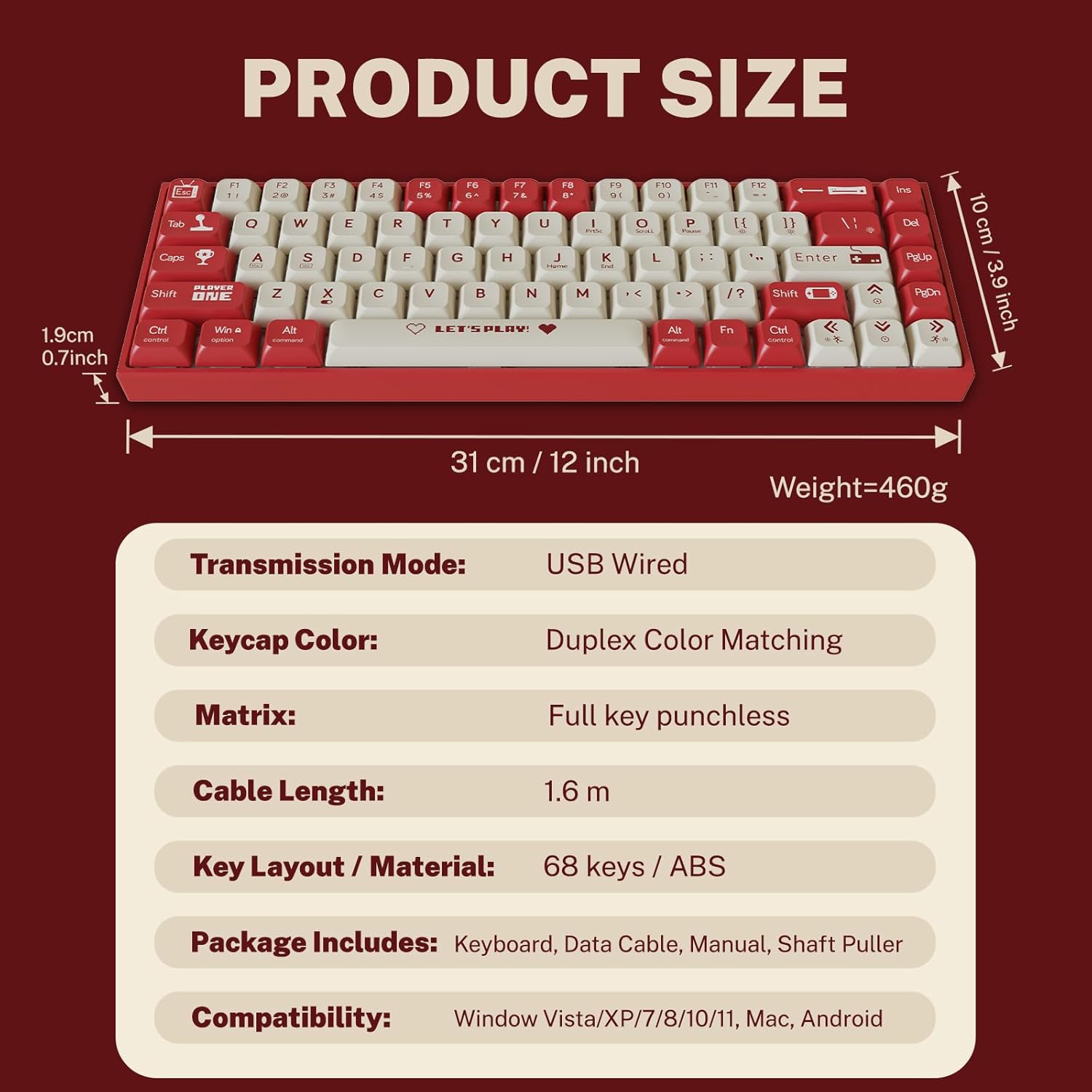
Figure 2: Package contents and product dimensions.
3. Упутства за подешавање
3.1 Повезивање тастатуре
- Locate the USB-C port on the back or side of the keyboard.
- Повежите један крај приложеног USB-C кабла са USB-C портом тастатуре.
- Connect the other end of the USB-A connector to an available USB port on your computer.
- Ваш оперативни систем ће аутоматски препознати тастатуру. За основне функционалности обично нису потребни додатни драјвери.
3.2 Компатибилност система
The Attoe AK680 keyboard is compatible with the following operating systems:
- Виндоус Виста / XP / 7 / 8 / 10 / 11
- мацОС
- Андроид

Figure 3: Multi-system compatibility of the keyboard.
4. Упутство за употребу
4.1 Основне функције тастатуре
The AK680 features a 68-key layout, providing essential keys while maintaining a compact form factor. All keys support anti-ghosting, ensuring accurate input even during rapid key presses.

Figure 4: The 68-key layout for efficient use.
4.2 РГБ позадинско осветљење
The keyboard features 16.8 million color RGB backlighting with various effects. Specific key combinations (often involving the Fn key) are used to cycle through lighting modes, adjust brightness, and change colors. Refer to the quick start guide or product page for detailed key combinations for lighting control.

Figure 5: RGB Backlighting in operation.
4.3 Прекидачи са могућношћу замене током рада
The AK680 supports hot-swappable 3-pin and 5-pin mechanical switches. This allows you to easily change switches without soldering, customizing the typing feel to your preference. Use the included switch puller for safe removal and installation.
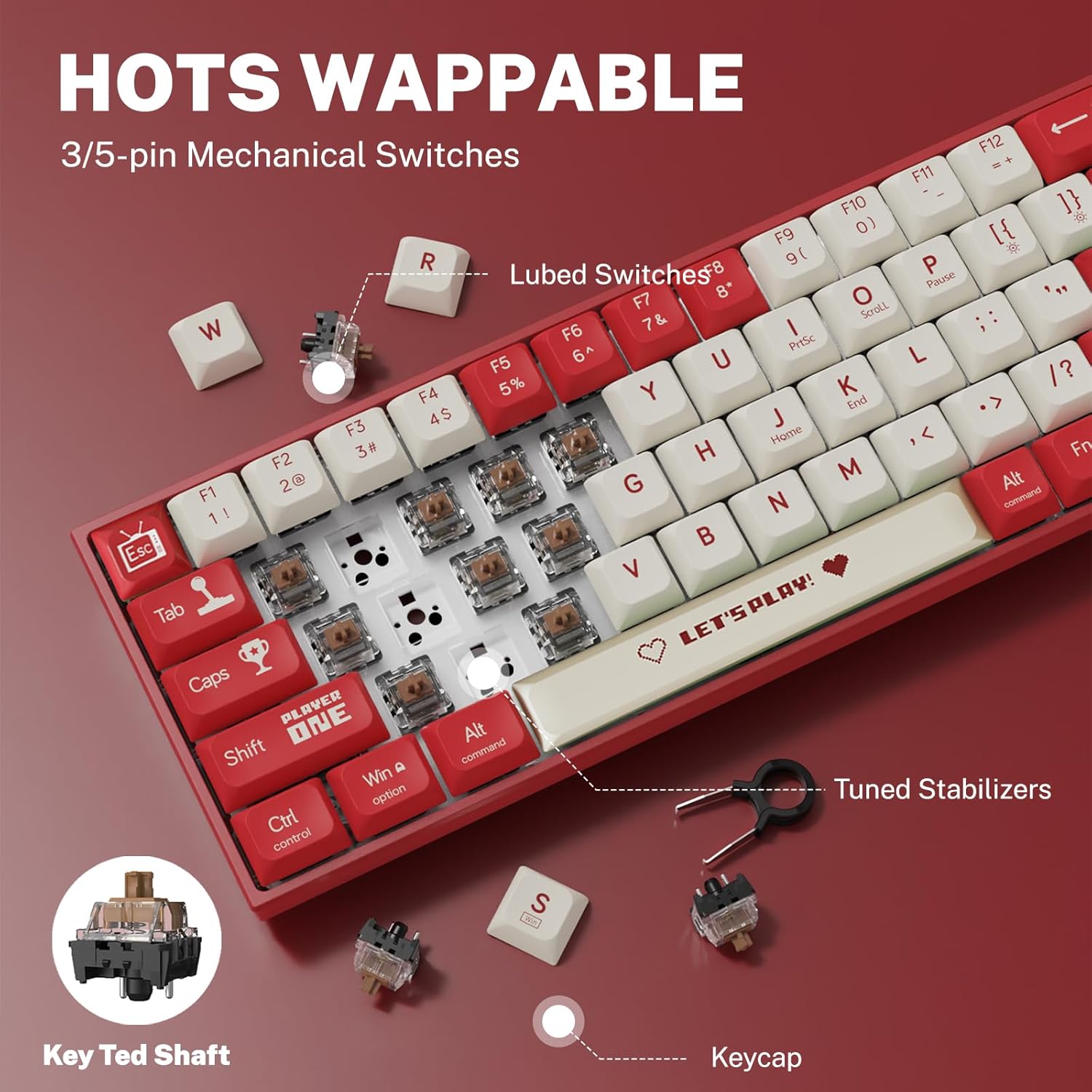
Figure 6: Hot-swappable switch mechanism.
5. Одржавање
5.1 Чишћење тастатуре
- Генерално чишћење: Користите меку, суву крпу да обришете површину тастатуре. За тврдокорну прљавштину, благо обришитеampи крпу са водом или благим, неабразивним средством за чишћење.
- Between Keycaps: Користите компримовани ваздух да уклоните прашину и остатке између тастера.
- Чишћење капица тастера: For thorough cleaning, remove keycaps using the provided keycap puller. Wash keycaps with mild soap and water, rinse thoroughly, and ensure they are completely dry before reattaching.
5.2 Замена тастера и прекидача
The AK680's hot-swappable design allows for easy replacement of keycaps and switches.
- Уклањање тастера: Use the keycap puller to gently grip and lift keycaps straight up.
- Уклањање прекидача: After removing the keycap, use the switch puller to carefully grip the top and bottom clips of the switch and pull it straight out.
- Инсталирање прекидача: Align the new switch's pins with the holes on the PCB. Press down firmly until the switch clicks into place. Ensure pins are not bent.
- Инсталирање тастатура: Align the keycap with the switch stem and press down gently until it is seated securely.

Figure 7: Components of a mechanical switch and tools for maintenance.
КСНУМКС. Решавање проблема
- Тастатура не реагује:
- Уверите се да је USB-C кабл безбедно повезан и са тастатуром и са рачунаром.
- Покушајте да повежете тастатуру са другим УСБ портом на рачунару.
- Тестирајте тастатуру на другом рачунару да бисте искључили проблеме специфичне за систем.
- Кључеви се не региструју:
- Remove the keycap and switch for the affected key. Reinstall the switch, ensuring it is properly seated and its pins are not bent.
- Clean any debris that might be obstructing the switch mechanism.
- RGB Backlighting Not Working:
- Check if the backlighting is turned off or set to minimum brightness using the keyboard's function keys.
- Уверите се да тастатура добија довољно напајања са УСБ порта.
7. Спецификације
| Феатуре | Детаљ |
|---|---|
| Број модела | АК680 |
| Бранд | Attoe |
| Врста везе | Жични (USB-C) |
| Број кључева | 68 кључа |
| Кључна технологија | Mechanical Shaft (Red/Teal Shaft), Hot-Swappable (3-pin/5-pin) |
| Кеицап Материал | Двоструки ПБТ |
| Позадинско осветљење | RGB (16.8 милиона боја) |
| Анти-Гхостинг | Full Keys Anti-Ghosting |
| Цабле Ленгтх | 1.6 метара |
| Димензије производа | 12 к 3.9 к 0.7 инча (31 к 10 к 1.9 цм) |
| Тежина артикла | 1.01 фунти (460 г) |
| Компатибилност | Windows Vista/XP/7/8/10/11, macOS, Android |
| Водоотпорна функција | IPX4 rated protection (splash resistant) |
8. Гаранција и подршка
Attoe provides a 12-месечна гаранција for the AK680 Mechanical Gaming Keyboard from the date of purchase.
If you encounter any problems or have questions regarding your product, please contact Attoe customer service. We are committed to providing the best service and will respond within 24 hours to assist you.
For support, please refer to the contact information provided with your purchase or visit the official Attoe webсајту.