AULA WIN60 HE PRO 60% Mechanical Gaming Keyboard User Manual
Model: WIN60 HE PRO | Brand: AULA
1. Увод
This manual provides detailed instructions for the AULA WIN60 HE PRO 60% Mechanical Gaming Keyboard. Designed for high-performance gaming, this keyboard features Hall Effect magnetic switches, rapid trigger mode, an 8000Hz polling rate, and customizable RGB lighting. Please read this manual thoroughly to ensure proper setup, operation, and maintenance of your keyboard.
Figure 1: AULA WIN60 HE PRO 60% Mechanical Gaming Keyboard with highlighted features.
2. Подешавање
2.1 Отпакивање
Пажљиво извадите све компоненте из паковања. Уверите се да су присутне следеће ставке:
AULA WIN60 HE PRO Keyboard
УСБ-Ц кабл
Кеицап Пуллер
Extra Switches (if included)
Video 1: Unboxing the AULA WIN60 HE Gaming Keyboard, showing the contents including the keyboard, USB-C cable, and switch puller.
2.2 Повезивање тастатуре
Locate the USB-C port on the back of the keyboard.
Connect the provided USB-C cable to the keyboard.
Укључите други крај УСБ-Ц кабла у слободан УСБ порт на рачунару.
The keyboard will automatically be recognized by your operating system (Windows PC/Laptop compatible).
Note: This keyboard is not compatible with PlayStation 5/4 (PS5/PS4) and OBOX.
2.3 Инсталација драјвера (Web-Based)
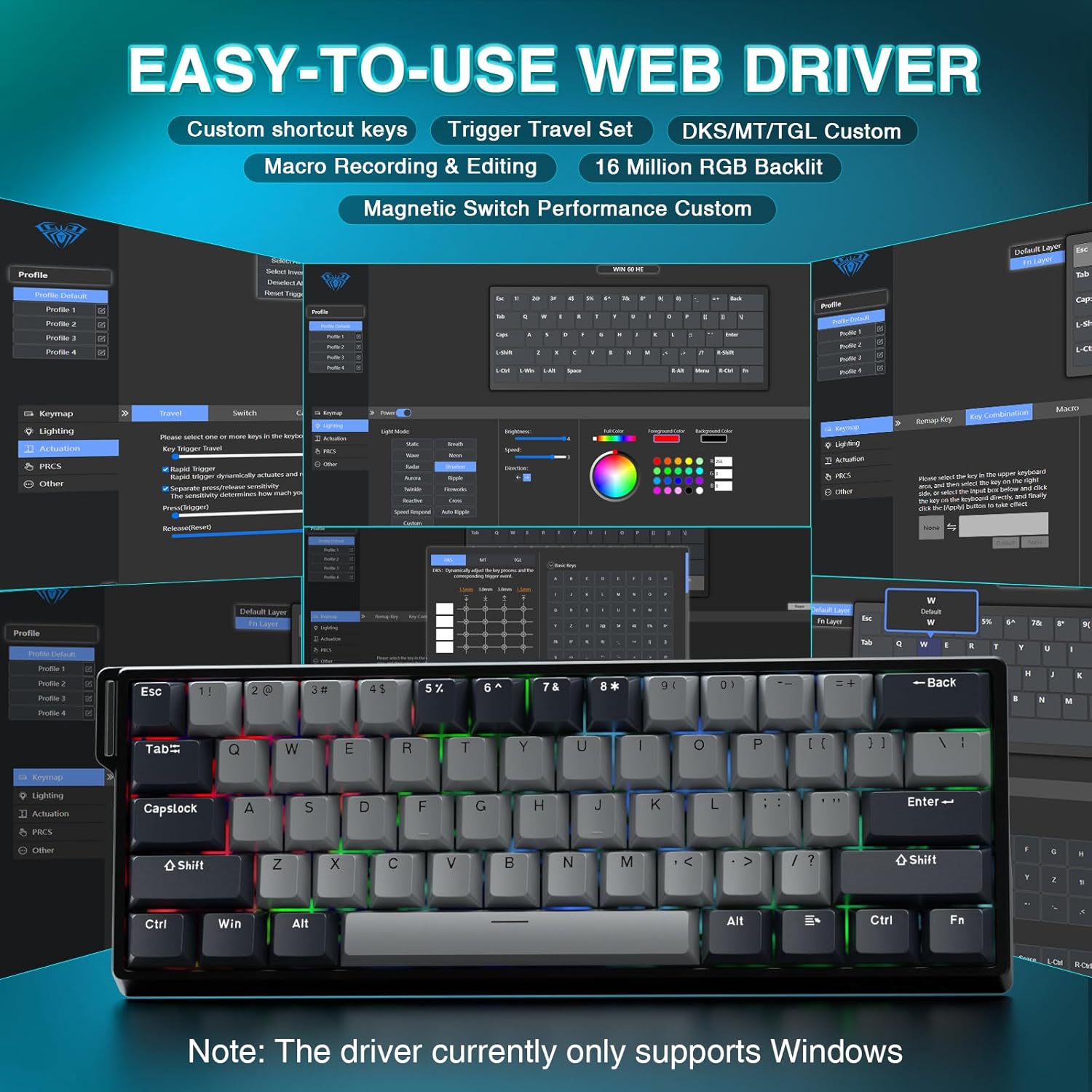
The AULA WIN60 HE PRO utilizes a web-based driver for customization, eliminating the need for software downloads.
Уверите се да је ваш рачунар повезан на интернет.
Отворите жељени web претраживач.
Navigate to the official AULA web driver portal (refer to the product packaging or manufacturer's website for the exact URL).
Тхе web interface will allow you to customize settings directly.
Figure 2: Easy-to-use web driver interface for customization.
Напомена: Тхе web driver currently only supports Windows operating systems.
3. Операција
3.1 Hall Effect Magnetic Switches & Rapid Trigger
The AULA WIN60 HE PRO features advanced Hall Effect magnetic switches, which detect key presses using magnetic fields rather than physical contact. This design provides:
Подесиво активирање: Customize the actuation point of each key to your preference for faster response or more deliberate presses.
Режим брзог окидања: Allows keys to activate and deactivate based on movement rather than a fixed actuation point, enabling ultra-fast repeated inputs and precise control, especially beneficial for FPS games. The ultra-low RT step distance is 0.02mm.
Трајност: Absence of physical contact reduces wear and tear.
Figure 3: Rapid Trigger technology for enhanced gaming performance.
Video 2: Demonstrating the hot-swappable magnetic switches, including Gray Wood Magnetic Switch and Wing Chun Magnetic Switch variants.
3.2 8000Hz брзина анкетирања
The keyboard features an 8000Hz polling rate, meaning it reports key presses to your computer 8000 times per second. This results in:
Ultra-Fast Response Times: Minimizes input lag for immediate in-game actions.
Прецизна контрола: Ensures every keystroke is registered accurately and without delay.
Figure 4: 8000Hz Hyper-Polling Technology for minimal latency.
3.3 Dynamic RGB Lighting
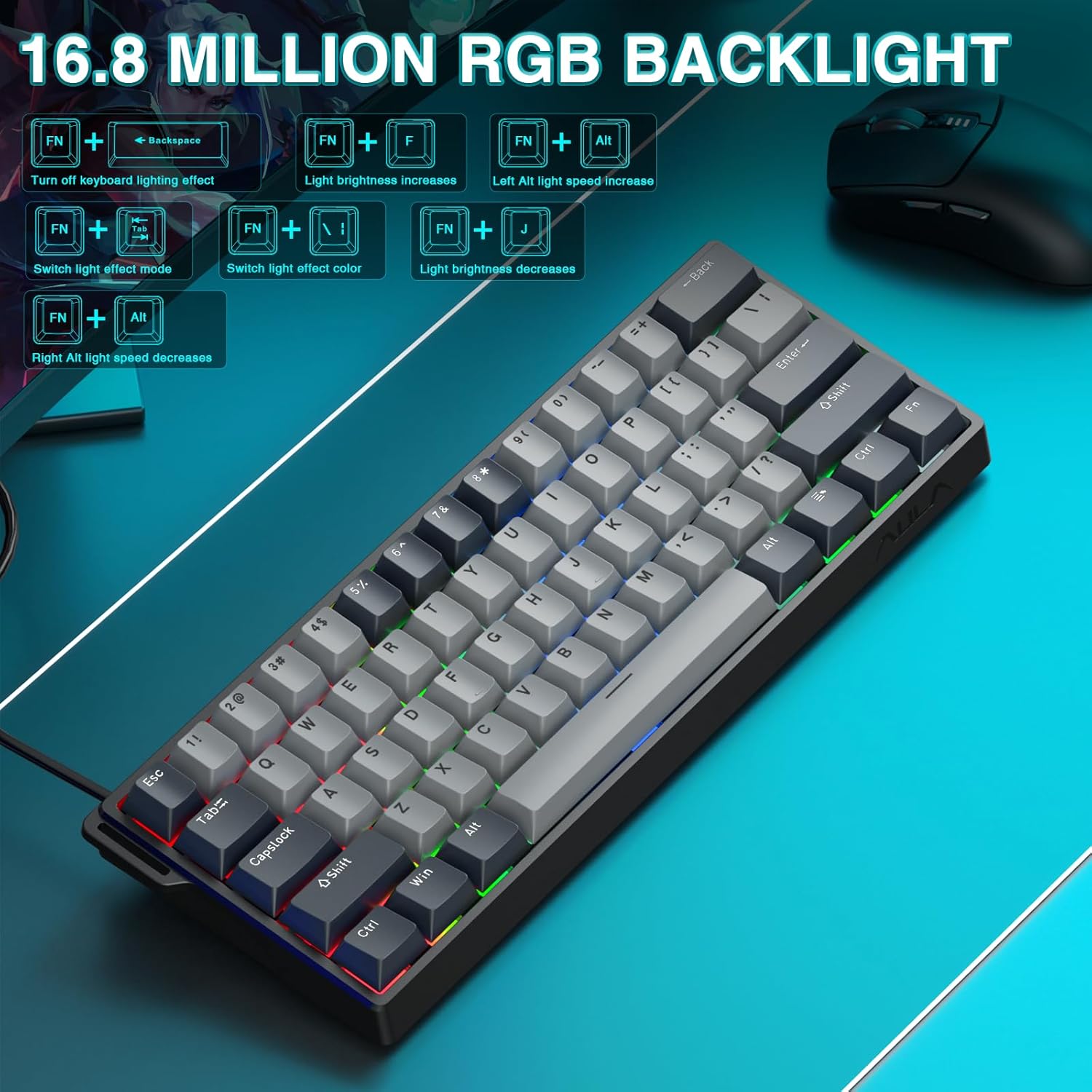
The keyboard offers 16.8 million customizable RGB color options and various lighting effects. Use the following key combinations for quick adjustments:
Ремапирање тастера: Assign any function to any key.
Креирање макроа: Record and assign complex sequences of commands to a single key.
Прилагођавање РГБ осветљења: Fine-tune lighting effects, colors, and patterns beyond the basic hotkeys.
Подешавање тачке активирања: Precisely set the actuation distance for each magnetic switch.
Приступите web driver as described in Section 2.3.
4. Одржавање
4.1 Чишћење тастатуре
Да бисте одржали оптималне перформансе и изглед:
Искључите тастатуру из рачунара пре чишћења.
Користите меку крпу која не оставља длачицеampводом или благим раствором за чишћење да бисте обрисали капице тастера и кућиште.
За прашину и прљавштину између тастера користите компримовани ваздух.
Избегавајте јаке хемикалије или абразивне материјале.
4.2 Прекидачи са могућношћу замене током рада
The AULA WIN60 HE PRO features hot-swappable magnetic switches, allowing for easy replacement or customization without soldering.
Користите приложену алатку за извлачење капица тастера да бисте пажљиво уклонили капицу тастера.
Use a switch puller (not explicitly mentioned as included, but implied by "hot-swappable" and video) to carefully remove the switch.
Align the new switch with the socket and press firmly until it clicks into place.
Замените поклопац тастера.
Caution: Apply gentle force to avoid damaging the switch sockets.
КСНУМКС. Решавање проблема
5.1 Тастатура не реагује
Уверите се да је USB-C кабл безбедно повезан и са тастатуром и са рачунаром.
Покушајте да повежете тастатуру са другим УСБ портом на рачунару.
Тестирајте тастатуру на другом рачунару да бисте искључили проблеме специфичне за систем.
Поново покрените рачунар.
5.2 RGB осветљење не ради
Check if the lighting is turned off using the FN + Бацкспаце хоткеи.
Подесите осветљеност помоћу FN + [ or FN + ].
Осигурајте web driver settings haven't disabled lighting.
5.3 Keys Sticking or Not Registering
Очистите околину оштећеног тастера да бисте уклонили све остатке.
If a specific switch is faulty, consider replacing it using the hot-swappable feature (refer to Section 4.2).
Check the actuation point settings in the web driver; it might be set too high or too low for your preference.
6. Спецификације
Феатуре
Детаљ
Модел
WIN60 HE PRO
Тип тастатуре
60% Mechanical Gaming Keyboard
Тип прекидача
Hall Effect Magnetic Switch, Hot-Swappable
Повезивање
USB-C жични
Поллинг Рате
8000Хз
Посебне карактеристике
Rapid Trigger Mode, Adjustable Actuation, RGB Backlit, Programmable Keys, Hotkeys and Media Keys, Portable
Компатибилни уређаји
Laptop, PC Windows (Not compatible with PS5/PS4, OBOX)
Димензије производа
11 к 5 к 1.1 инча (27.94 к 12.7 к 2.79 цм)
Тежина артикла
2.18 фунте (0.99 кг)
Произвођач
АУЛА
Figure 6: Detailed comparison of AULA WIN60 HE series magnetic switches.
7. Гаранција и подршка
For warranty information, technical support, or service inquiries, please refer to the warranty card included with your product or visit the official AULA/CORBOBO website. You may also contact the seller directly through your purchase platform for assistance.
Ask about setup, troubleshooting, compatibility, parts, safety, or missing instructions. Manuals+ will review the question and use this page’s manual context to help answer it.