
ANTHBOT Genie600
Упутство за употребу роботске косилице ANTHBOT Genie600
Model: Genie600
1. Увод
Welcome to the ANTHBOT Genie600 Robot Lawn Mower user manual. The Genie600 is an advanced robotic lawnmower designed to provide effortless and precise lawn care. Featuring a unique RTK+4-Eye Vision positioning system, wire-free operation, and intelligent obstacle avoidance, it ensures your lawn is perfectly maintained with minimal effort.

За брзи крајview of what's included with your Genie600, watch the video below:
Video: ANTHBOT Genie AI Robot Lawn Mower What You Get. This video provides a detailed look at the components included in the ANTHBOT Genie600 package.
2. Кључне карактеристике
2.1 RTK+4-Eye Vision Accurate Positioning System
The Genie600 utilizes a Full Band RTK system combined with human-like 3D vision positioning technology for reliable, high-precision navigation. This dual positioning system ensures uninterrupted mowing, even in areas with weak or no GPS signals, such as under dense trees or near buildings.

2.2 No Perimeter Wires
Experience hassle-free lawn care with the Genie600's innovative borderless design. Unlike traditional mowers that require complex perimeter wire installations, the Genie600 allows you to start mowing right out of the box, saving time and effort.

2.3 ACC Hands-free Auto Mapping & Intelligent Obstacle Avoidance
The Genie600 features advanced AI boundary recognition and Adaptive Cruise Control (ACC) technology for precise automatic lawn mapping. Its 4-camera system identifies boundaries and creates optimal cutting routes, reducing manual intervention. A 300° field-of-view camera with built-in AI algorithms detects over 1000 types of common garden objects, ensuring strong obstacle avoidance and safety, including timely avoidance of animals.


2.4 Multi-zone & No-go-zone Management
Customize mowing settings for over 20 lawn zones to suit your specific needs. The ANTHBOT Smart App allows real-time remote control and monitoring. You can also set no-go zones (e.g., around a swimming pool) for increased safety and accuracy.

2.5 Intelligent Hosting Mode
When activated, the Intelligent Hosting Mode allows the robot mower to intelligently generate and adjust mowing schedules based on your lawn's size, seasonal changes, location, weather conditions, and time. This ensures scientific and optimized lawn care, even when you are away.
3. Водич за подешавање
3.1 Распакивање и почетни преглед
Carefully unpack all components from the box. Verify that all parts are present according to the packing list. The package typically includes the Robot Lawn Mower, Charging Station, RTK unit, screws, and tools & instruction manual.

3.2 RTK Base Station Placement
The RTK unit is crucial for precise positioning. Place it in an open area with a clear sky view of at least 120 degrees above, and no walls or buildings within 3 meters. Ensure it is securely installed.

For detailed guidance on choosing the optimal installation location for your RTK unit, please watch this video:
Video: How to Choose the Right Installation Location. This video provides essential tips for placing your RTK unit to ensure optimal performance.
3.3 Подешавање станице за пуњење
Position the charging station on a flat, level surface in an area with good signal reception. Connect the power adapter to the charging station and plug it into a suitable outdoor power outlet. Ensure the charging pins are clean and unobstructed.

3.4 Инсталација и повезивање апликације
Download the ANTHBOT app from your mobile device's app store (Google Play or Apple App Store). Follow the in-app instructions to connect your Genie600 to your home Wi-Fi network and complete the initial setup. The app allows for multi-zone management, scheduling, monitoring, and OTA updates.

If you encounter any network or app connection issues, please refer to this video for troubleshooting steps:
Video: How to Resolve Network & App Connection Failure. This video guides you through common solutions for connectivity problems.
4. Упутство за употребу
4.1 Мапирање вашег травњака
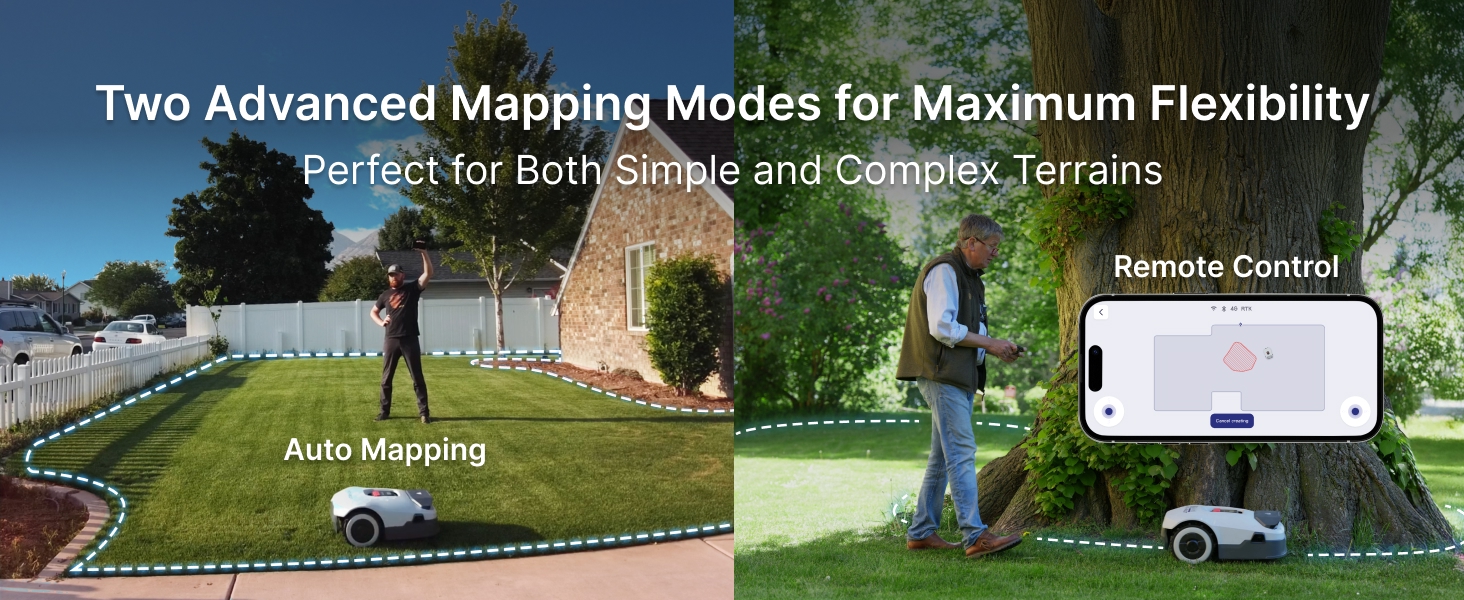
The Genie600 offers two mapping modes: Auto ACC Mapping and Manual Mapping. Auto ACC Mapping allows the mower to automatically define boundaries, while Manual Mapping gives you precise control via the app to outline your mowing area. No complex boundary installation is needed.

4.2 Setting Mowing Schedules
Use the ANTHBOT app to set customized mowing schedules. The Intelligent Hosting Mode can automatically adjust schedules based on weather, grass growth, and other factors for optimal lawn health.
4.3 Managing Zones (Multi-zone & No-go-zone)
The app allows you to configure up to 30 zones for precise, targeted mowing. You can also designate no-go zones to prevent the mower from entering specific areas, enhancing safety and accuracy.
Learn how to map multiple zones with your Genie600:
Video: How to Map Multiple Zones. This video demonstrates the process of setting up and managing different mowing zones.
4.4 Precision Edge-Cutting & Slope Climbing
The Genie600 features an advanced Edge-Cutting Mode for a clean finish along borders. It can also handle slopes of up to 45% (24°), ensuring comprehensive coverage even on uneven terrain.


4.5 Adjustable Cutting Height
The Genie600 features an adjustable cutting height mechanism. When facing obstacles like branches, its blade disc automatically lifts, enabling seamless navigation without getting stuck. This smart function ensures smooth operation, preventing damage to both the machine and encountered obstacles. The cutting height can be adjusted between 1.18 inches (30mm) and 2.76 inches (70mm).

5. Одржавање
5.1 Чишћење косилице
The Genie600 has an IPX6 waterproof rating, making it easy to clean. You can use a tool to rinse the mower's bottom and clean any weeds near the blade. Regularly remove grass clippings and debris from the wheels, chassis, and cutting deck to ensure optimal performance.

5.2 Преглед и замена сечива
Periodically inspect the cutting blades for wear or damage. Dull or damaged blades can affect cutting quality. Replace blades as needed following the instructions in the detailed user manual (PDF).
5.3 Ажурирања софтвера (ОТА)
The Genie600 supports Over-The-Air (OTA) updates. Ensure your mower is connected to Wi-Fi to receive the latest software improvements and features automatically via the ANTHBOT app.
КСНУМКС. Решавање проблема
This section provides solutions to common issues you might encounter with your ANTHBOT Genie600. For a comprehensive guide, please refer to the official Troubleshooting Guide (PDF) available on the product page.
6.1 Уобичајена питања и решења
- Mower not charging: Ensure the charging station is powered on and the mower is correctly docked. Clean the charging contacts on both the mower and the station.
- Mower getting stuck frequently: Check for obstacles in the mowing area. Review your mapped zones and no-go zones in the app. Adjust cutting height if the grass is too tall.
- Лоше перформансе сечења: Inspect the blades for sharpness and damage. Replace if necessary. Ensure the cutting height is appropriate for your lawn.
- Проблеми са повезивањем апликације: Verify your Wi-Fi signal strength. Restart the mower and your mobile device. Refer to the 'How to Resolve Network & App Connection Failure' video in the Setup section.
If you require further assistance, you can contact online support directly through the app:
Video: How to Contact Online Support on the APP. This video demonstrates how to access and use the in-app support feature.
7. Техничке спецификације
| Феатуре | Спецификација |
|---|---|
| Бранд | АНТХБОТ |
| Модел | Genie600 (US-Genie600-2) |
| Извор напајања | Баттери Поверед |
| Материјал | Алуминијум, Пластика |
| Боја | Греи |
| Тежина артикла | 46 фунти |
| Димензије производа | 25"Д к 11"Ш к 16"В |
| Ширина сечења | 7.9 инча |
| Подесива висина кошења | 1.18 - 2.76 Inches (30-70mm) |
| Оперативни режим | Аутоматски |
| Max. Mowing Area | 0.20 Ацре |
| Slope Climbing Ability | Up to 45% (24°) |
| Ниво буке | ≤58 дБ(А) |
| Водоотпорна оцена | ИПКС6 |
8. Гаранција и подршка
8.1 Гаранција на производ
The ANTHBOT Genie600 Robot Lawn Mower comes with a 2-year manufacturer's warranty. Please retain your proof of purchase for warranty claims. For detailed terms and conditions, refer to the official warranty documentation.

8.2 Корисничка подршка
For technical assistance, troubleshooting, or any inquiries regarding your Genie600, please contact ANTHBOT customer support. You can reach us via:
- APP Live Chat: Available directly through the ANTHBOT mobile application.
- Емаил: Refer to the contact information provided in the official User Manual (PDF).
- Тим техничке службе: Dedicated support for complex issues.

You can also find additional resources and detailed instructions in the official PDF documents:
Ask a question about this manual
Ask about setup, troubleshooting, compatibility, parts, safety, or missing instructions. Manuals+ will review the question and use this page’s manual context to help answer it.