
1. Увод
This manual provides essential instructions for the safe and effective use of your Hello Kitty Kuromi Wireless Bluetooth Earbuds. Please read this manual thoroughly before using the product and retain it for future reference.
2. Садржај пакета
Проверите да ли су све ставке присутне у пакету:
- Hello Kitty Kuromi Wireless Bluetooth Earbuds (2)
- Rotating Charging Case
- УСБ кабл
- Кориснички приручник (овај документ)
3. Производ је готовview
3.1 Компоненте
The Hello Kitty Kuromi Wireless Bluetooth Earbuds system consists of two earbuds and a rotating charging case. The charging case features a unique flip-face design, allowing you to change Kuromi's expression.
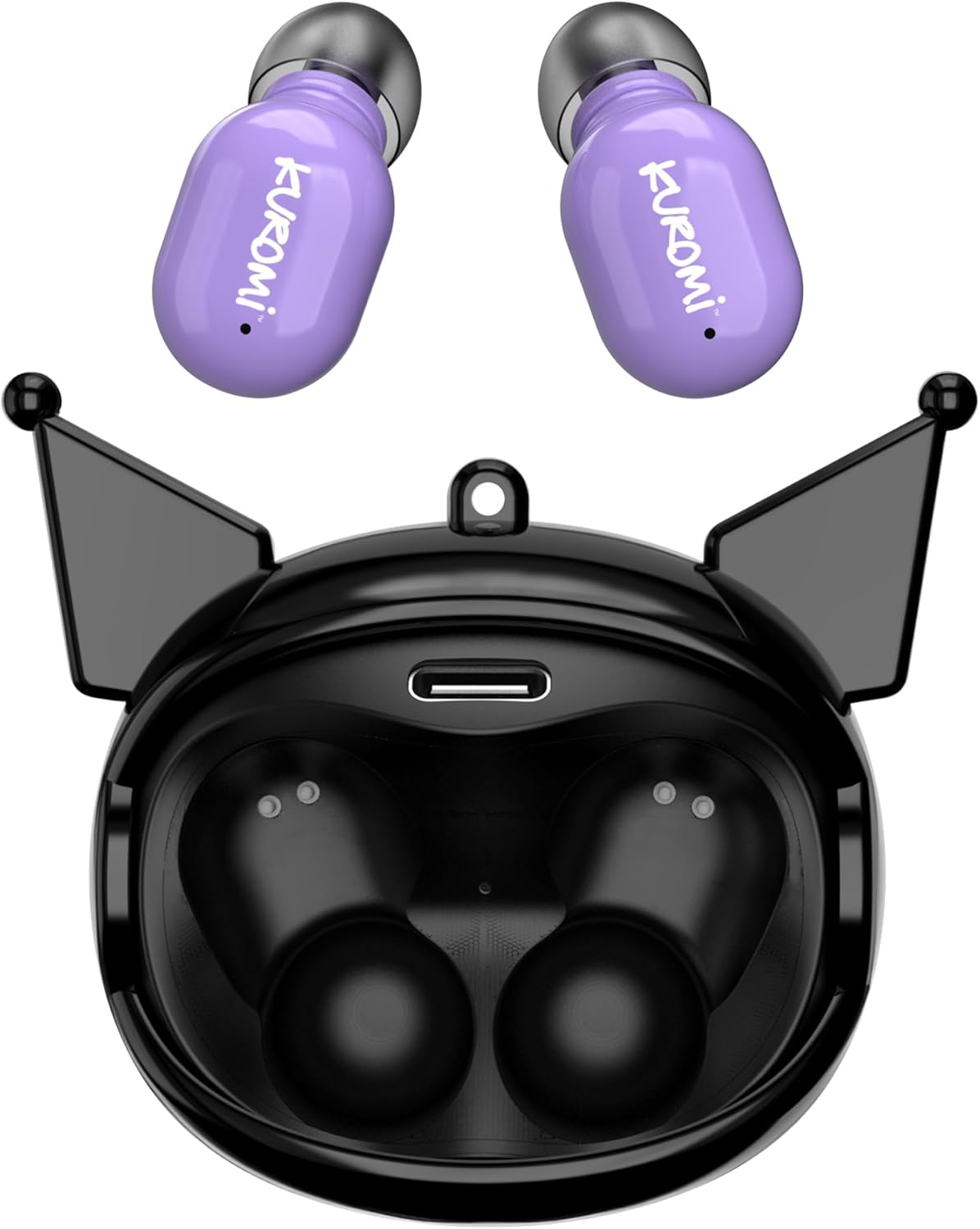
This image displays the two purple Kuromi wireless earbuds positioned above their open black charging case. The charging case features the Kuromi character design with pointed ears and an open compartment for the earbuds, revealing the charging contacts and a USB-C port.

The closed black charging case is shown, featuring Kuromi's default facial expression with a pink skull on her forehead and a neutral mouth.

The closed black charging case displays Kuromi's winking facial expression, with one eye closed and a small pink heart near her mouth.

The closed black charging case features Kuromi's heart-eyes facial expression, with two pink hearts replacing her eyes and an open-mouthed smile.
3.2 Контроле
The earbuds feature touch controls for various functions. Specific touch gestures may vary; refer to the 'Operating Instructions' section for details.
4. Подешавање
4.1 Почетно пуњење
Пре прве употребе, потпуно напуните слушалице и кућиште за пуњење.
- Connect the provided USB cable to the charging port on the case and to a compatible USB power source.
- Ставите обе слушалице у кутијицу за пуњење. Уверите се да су правилно постављене.
- The charging indicator lights (if present) will illuminate to show charging status. A full charge typically takes approximately 1 hour.
4.2 Блуетоотх упаривање
Да бисте повезали слушалице са уређајем:
- Уверите се да су слушалице напуњене и извађене из кућишта за пуњење. Требало би аутоматски да уђу у режим упаривања.
- На свом уређају (паметном телефону, таблету итд.) омогућите Блутут.
- Тражи доступним Блуетоотх уређајима.
- Select "HKTWSRKU" or a similar name from the list of devices.
- Once connected, the earbuds will indicate successful pairing (e.g., a voice prompt or LED change).
- Слушалице ће се аутоматски поново повезати са последњим упареним уређајем када се изваде из футроле, ако је Блутут омогућен на уређају.
5. Упутство за употребу
5.1 Укључивање/искључивање
- Укључено: Извадите слушалице из кућишта за пуњење. Аутоматски ће се укључити.
- Искључивање: Place the earbuds back into the charging case. They will power off and begin charging automatically.
5.2 Репродукција музике
Use the touch controls on the earbuds:
- Пусти/паузирај: Додирните једном било коју слушалицу.
- Следећа нумера: Двапут додирните десну слушалицу.
- Претходни запис: Двапут додирните леву слушалицу.
- Контрола јачине звука: Volume is typically controlled via your connected device.
5.3 Управљање позивима
The built-in microphone allows for hands-free calling:
- Одговори на позив: Tap once on either earbud when a call comes in.
- Заврши позив: Додирните једном било коју слушалицу током позива.
- Одбиј позив: Press and hold either earbud for approximately 2 seconds.
5.4 Flip-Face Feature
The charging case features a rotating mechanism to change Kuromi's facial expression. Gently rotate the front panel of the case to cycle through the available expressions.
6. Пуњење
6.1 Пуњење слушалица
Place the earbuds into the charging case. They will automatically begin to charge from the case's internal battery.
6.2 Пуњење кућишта
When the charging case battery is low, connect it to a power source using the provided USB cable. The case's indicator lights will show charging status. A full charge for the case typically takes about 1 hour.
7. Одржавање и њега
- Чишћење: Користите меку, суву крпу за чишћење слушалица и кућишта за пуњење. Не користите јаке хемикалије или абразивне материјале.
- Складиштење: Чувајте слушалице у њиховој футроли за пуњење када их не користите како бисте их заштитили и одржали напуњеним. Избегавајте екстремне температуре.
- Изложеност води: These earbuds are not waterproof. Avoid exposure to water or excessive moisture.
- Утицај: Handle the earbuds and case with care to prevent damage from drops or impacts.
КСНУМКС. Решавање проблема
If you encounter issues, refer to the following table:
| Проблем | Могуће решење |
|---|---|
| Слушалице се не упарују | Ensure earbuds are charged. Turn off and on Bluetooth on your device. Forget the device in your Bluetooth settings and re-pair. |
| Нема звука из слушалица | Check device volume. Ensure earbuds are connected. Try playing different audio. |
| Слушалице се не пуне | Ensure earbuds are correctly seated in the case. Check if the charging cable is securely connected to the case and power source. |
| Микрофон не ради | Ensure earbuds are properly connected. Check microphone permissions on your device. |
9. Спецификације
Key technical details for the Hello Kitty Kuromi Wireless Bluetooth Earbuds:
| Феатуре | Детаљ |
|---|---|
| Назив модела | Wireless Earbuds (HKTWSRKU) |
| Технологија повезивања | Блуетоотх 5.3 |
| Трајање батерије (време репродукције) | До 4 сати по пуњењу |
| Време пуњења | Отприлике 1 сат |
| Контролни метод | Додирните |
| Постављање уха | Ин Еар |
| Посебна карактеристика | Rotating Charging Case with Flip-Face Feature |
| Укључене компоненте | Rotating Charging Case, USB Cable, User Manual |
| Произвођач | Јужни Телеком |
| Тежина артикла | 3.52 унци |
10. Информације о гаранцији
For warranty details, please refer to the documentation included with your purchase or contact the retailer where the product was acquired. Warranty terms and conditions may vary by region and retailer.
11. Подршка
If you require further assistance or have questions not covered in this manual, please contact the manufacturer or your retailer's customer support. Keep your purchase receipt and product model number (HKTWSRKU) available when seeking support.