
Увод
This manual provides detailed instructions for the HOU Combo Keyboard Case, designed to enhance your iPad experience with a detachable keyboard, multi-touch trackpad, and comprehensive protection. Please read this manual thoroughly before using the product to ensure proper operation and longevity.
Компатибилност
The HOU Combo Keyboard Case is compatible with the following 10.2-inch iPad models:
- iPad 9th Generation (2021): Model Numbers A2602, A2603, A2604, A2605
- iPad 8th Generation (2020): Model Numbers A2270, A2428, A2429, A2430
- iPad 7th Generation (2019): Model Numbers A2200, A2197, A2198

Figure 1: Visual guide to compatible iPad models.
Карактеристике производа
- Магнетни одвојиви дизајн: The keyboard connects magnetically to the case, allowing for easy attachment and detachment. This enables independent use of the case and keyboard.
- 360° Rotating Stand: The integrated stand supports both landscape and portrait viewing modes, with adjustable angles from 90° to 170°.
- Свеобухватна заштита: Constructed from high-strength silicone, the case provides 360° all-around protection for your iPad, including reinforced corners.
- Интегрисани држач за оловке: An elastic rear pen holder and magnetic pencil slot secure your Apple Pencil, preventing loss.
- High-Performance Keyboard: Features a 78-key layout with high-resilience keys for a comfortable typing experience.
- Позадинско осветљење са 7 боја: The keyboard includes a 7-color backlight with three adjustable brightness levels for various lighting conditions.
- Responsive Multi-Touch Trackpad: A large, high-precision touchpad supports full iOS gestures for fluid navigation and multitasking.
- Ултра лаган и преносив: The entire unit is designed for portability, with the case weighing only 290g and the total weight around 590g.
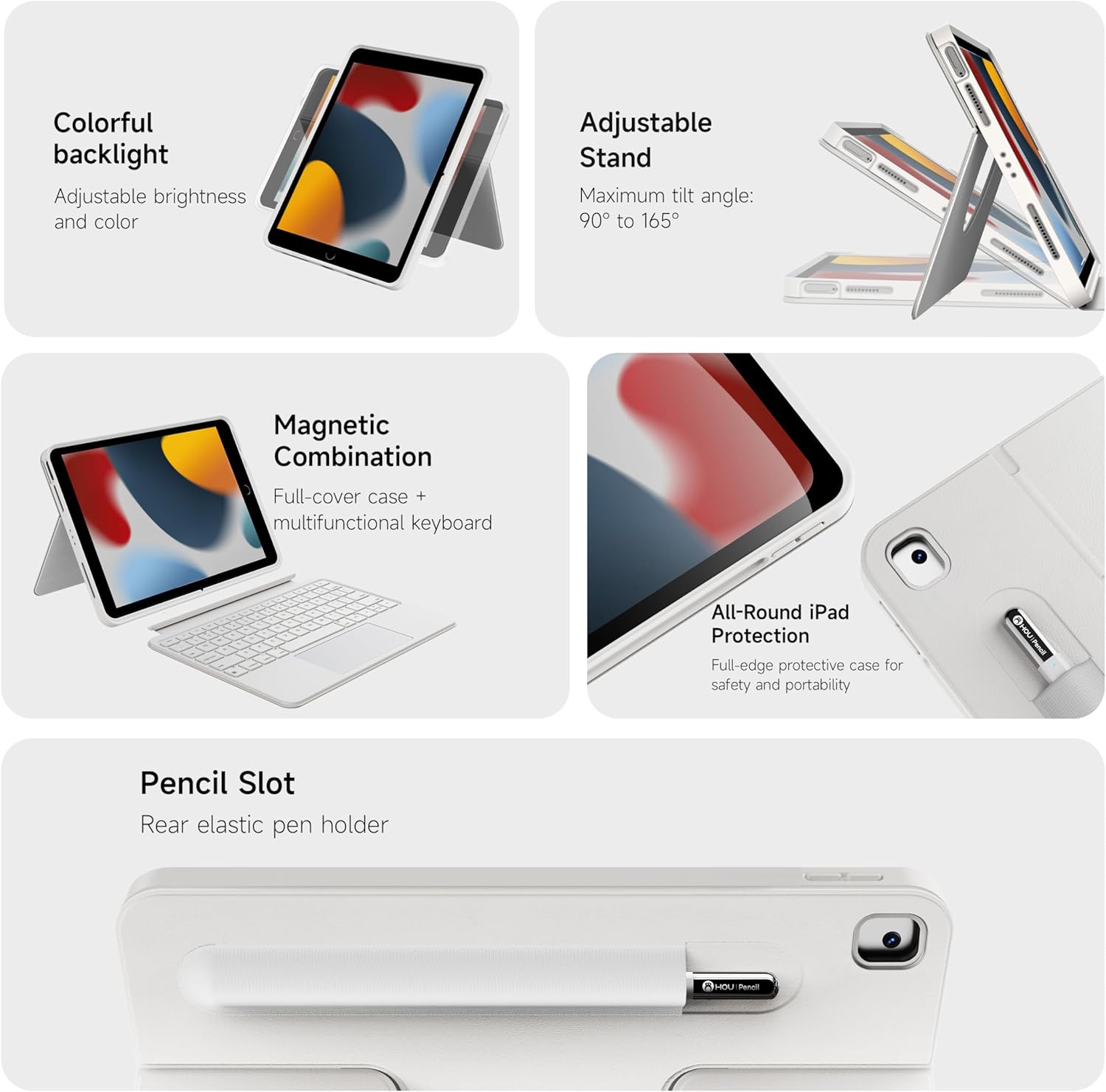
Слика 2: Завршеноview кључних карактеристика производа.

Слика 3: Детаљно view of keyboard and touchpad features.

Figure 4: The 78-key keyboard layout.
Упутства за подешавање
- Пуњење тастатуре: Before first use, fully charge the keyboard using the provided USB-C cable. The charging port is located on the side of the keyboard.
- Insert iPad into Case: Carefully place your iPad into the protective silicone case, ensuring all ports and buttons align correctly with the case cutouts. The reinforced corners provide a snug fit and enhanced protection.
- Attach Keyboard (Optional): The keyboard attaches magnetically to the case. Simply align the keyboard with the bottom edge of the iPad case until it snaps into place.
- Укључивање тастатуре: Locate the power switch on the side of the keyboard and slide it to the "On" position. A small indicator light will illuminate.
- Блуетоотх упаривање:
- On your iPad, go to "Settings" > "Bluetooth".
- Ensure Bluetooth is turned "On".
- The iPad will search for nearby devices. Select "HOU Keyboard" (or similar name) from the list of available devices.
- Follow any on-screen prompts to complete the pairing process. Once paired, the keyboard will automatically connect to your iPad when powered on and within range.
Video 1: Demonstrates the setup and features of the HOU Combo Keyboard Case, including magnetic detachment, stand functionality, and keyboard operation.
Упутство за употребу
- Using the Trackpad: The large multi-touch trackpad supports various iOS gestures for navigation, scrolling, and app control. Refer to your iPad's iOS settings for a full list of supported gestures.
- Adjusting Keyboard Backlight: Press the dedicated backlight key (often indicated by a light bulb icon) to cycle through 7 different colors and three brightness levels.
- Utilizing the 360° Rotating Stand: The integrated stand allows you to position your iPad in both landscape and portrait orientations. The stand can rotate 360 degrees and adjust angles from 90° to 170° for optimal viewинг.
- Detaching the Keyboard: To use your iPad as a tablet, simply pull the keyboard away from the magnetic connection. The case can be used independently.
- Securing Apple Pencil: Place your Apple Pencil in the elastic holder or magnetic slot on the back of the case for secure storage.

Слика 5: Прamples of the keyboard case in use for productivity and leisure.

Figure 6: The ultra-light design of the keyboard case emphasizes its portability.

Figure 7: The keyboard case transforms your iPad into a functional laptop.
Одржавање
- Чишћење: Користите меку, дamp cloth to wipe down the case and keyboard. Avoid harsh chemicals or abrasive materials. Ensure the keyboard is powered off before cleaning.
- Одржавање батерије: To prolong battery life, avoid fully discharging the keyboard frequently. Charge it regularly, especially if it will be stored for an extended period.
- Складиштење: Када се не користи, футролу за тастатуру чувајте на хладном и сувом месту, даље од директне сунчеве светлости и екстремних температура.
Решавање проблема
- Тастатура се не повезује:
- Уверите се да је тастатура укључена и потпуно напуњена.
- Проверите подешавања Bluetooth-а на вашем iPad-у да бисте потврдили да је тастатура упарена и повезана. Ако није, покушајте поново да је упарите.
- Поново покрените и iPad и тастатуру.
- Трекпед не реагује:
- Уверите се да је тастатура повезана путем Блутут-а.
- Проверите подешавања iPad-а за функционалност тракпеда.
- Очистите површину додирне табле да бисте уклонили све остатке.
- Тастери не реагују:
- Verify the keyboard is powered on and connected.
- Ensure the keyboard battery is not critically low.
Спецификације
| Феатуре | Детаљ |
|---|---|
| Бранд | ХОУ |
| Компатибилни уређаји | iPad 9th, 8th, 7th Generation (10.2 inch) |
| Технологија повезивања | Блуетоотх |
| Опис тастатуре | Мултимедија |
| Посебне карактеристике | Backlit, Detachable Case, Hotkeys and Media Keys, Portable, Trackpad, 360° Rotatable Stand |
| Боја | Бела (RGB позадинско осветљење) |
| Материјал | Силицоне |
| Тежина артикла | 1.98 фунти (приближно 0.9 кг) |
| Case Weight (approx.) | 0.64 фунти (приближно 290 г) |
| Укључене компоненте | Keyboard, Case |
Гаранција и подршка
For warranty information and customer support, please refer to the product packaging or contact HOU customer service directly. Keep your purchase receipt for warranty claims.