
1. Увод
This manual provides detailed instructions for the setup, operation, and maintenance of your Transformers GK01 Wireless Mechanical Keyboard. The GK01 is a versatile keyboard featuring tri-mode connectivity (Bluetooth 5.0, 2.4GHz wireless, and USB-C wired), a 101-key layout, RGB backlighting, and hot-swappable switches for a customizable typing experience.

Figure 1.1: Transformers GK01 Wireless Mechanical Keyboard.
2. Садржај пакета
Молимо вас да проверите да ли су све ставке наведене у наставку укључене у ваш пакет:
- Transformers GK01 Wireless Mechanical Keyboard
- УСБ-Ц на УСБ-А кабл
- 2.4 GHz бежични USB адаптер
- 2-у-1 поклопац за тастере и прекидач за извлачење
- Кориснички приручник (овај документ)
- Spare Switches (2 pieces)
- Поклопац тастатуре
3. Подешавање и повезивање
3.1. Tri-Mode Connection Overview
The GK01 keyboard supports three connection modes: USB-C wired, 2.4GHz wireless, and Bluetooth 5.0. You can connect to up to five devices simultaneously and switch between them seamlessly.

Figure 3.1: Tri-Mode Connection Capabilities.
3.2. USB-C Wired Connection
- Пронађите USB-C порт на тастатури.
- Повежите један крај приложеног USB-C кабла са тастатуром.
- Connect the other end of the USB-C cable to an available USB-A port on your computer.
- Тастатура ће бити аутоматски препозната и спремна за употребу.
3.3. Бежична веза од 2.4 GHz
- Locate the 2.4GHz wireless USB dongle.
- Прикључите адаптер у слободан USB-A порт на рачунару.
- On the keyboard, ensure the mode switch (usually on the side or back) is set to 2.4GHz mode.
- Тастатура би требало да се аутоматски повеже. Ако се не повеже, притисните Фн + Р да започне упаривање.

Figure 3.2: USB-C Port and 2.4GHz Dongle Location.
3.4. Bluetooth 5.0 веза
The keyboard supports connecting to up to three Bluetooth devices (BT1, BT2, BT3).
- On the keyboard, set the mode switch to Bluetooth mode.
- To enter pairing mode for a specific Bluetooth channel, press and hold Фн + К (за БТ1), Фн + В (за БТ2), или Фн + Е (for BT3) for 3-5 seconds until the indicator light flashes rapidly.
- On your device (PC, tablet, smartphone), open Bluetooth settings and search for new devices.
- Select "Transformers GK01" from the list of available devices.
- Once connected, the indicator light on the keyboard will stop flashing.
- Да бисте пребацивали између упарених Bluetooth уређаја, једноставно притисните Фн + К, Фн + В, или Фн + Е.
4. Основна операција
4.1. Keyboard Layout and Anti-Ghosting
The GK01 features a 101-key layout, providing a full set of keys including a numeric keypad. All keys are equipped with anti-ghosting technology, ensuring that every keystroke is registered accurately, even when multiple keys are pressed simultaneously.
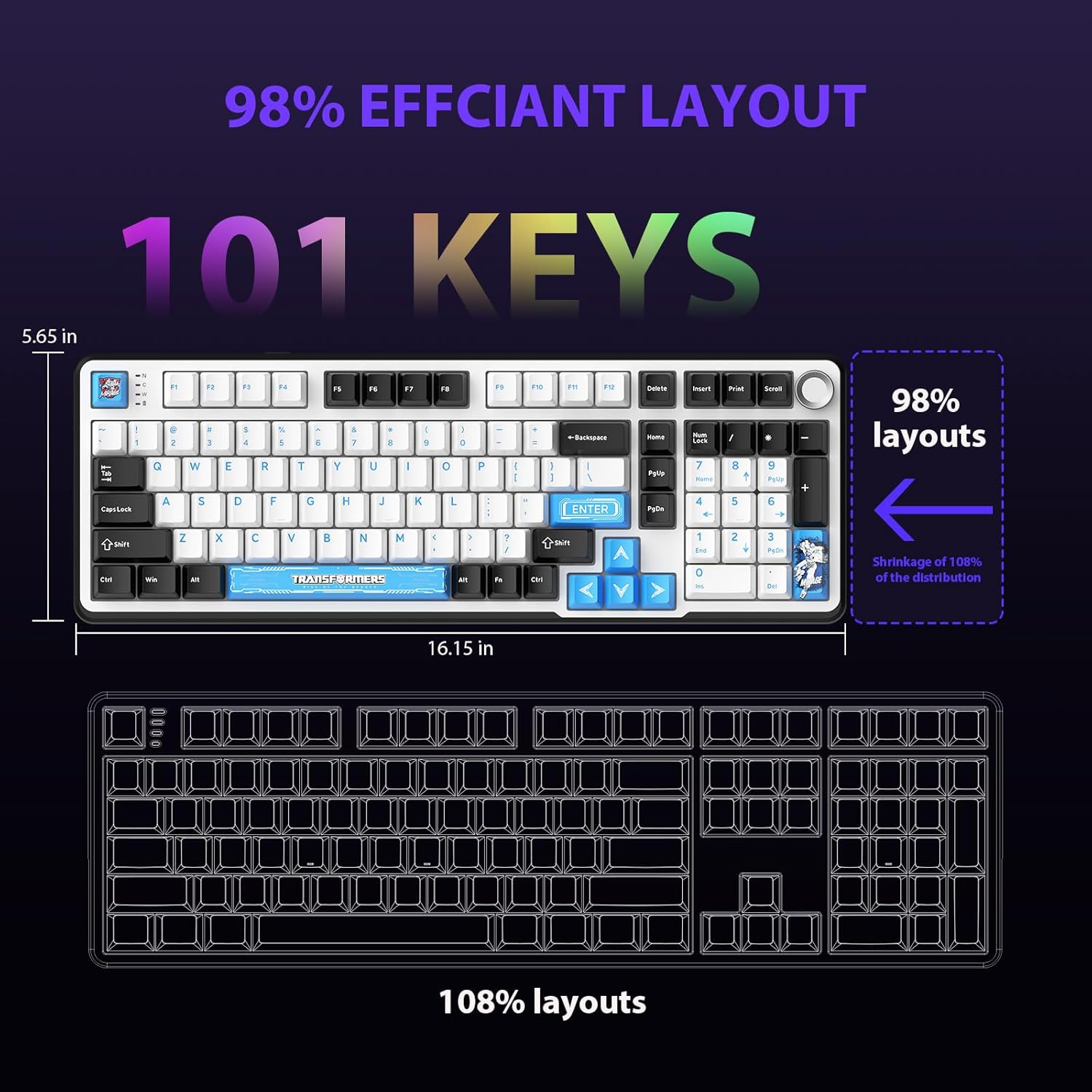
Figure 4.1: 101-Key Layout.
4.2. Multimedia Control Knob
The dedicated knob located on the top right of the keyboard provides convenient multimedia control:
- Ротирајте у смеру казаљке на сату: Повећајте јачину звука.
- Rotate Counter-Clockwise: Смањите јачину звука.
- Притисните доле: Искључи/укључи звук.
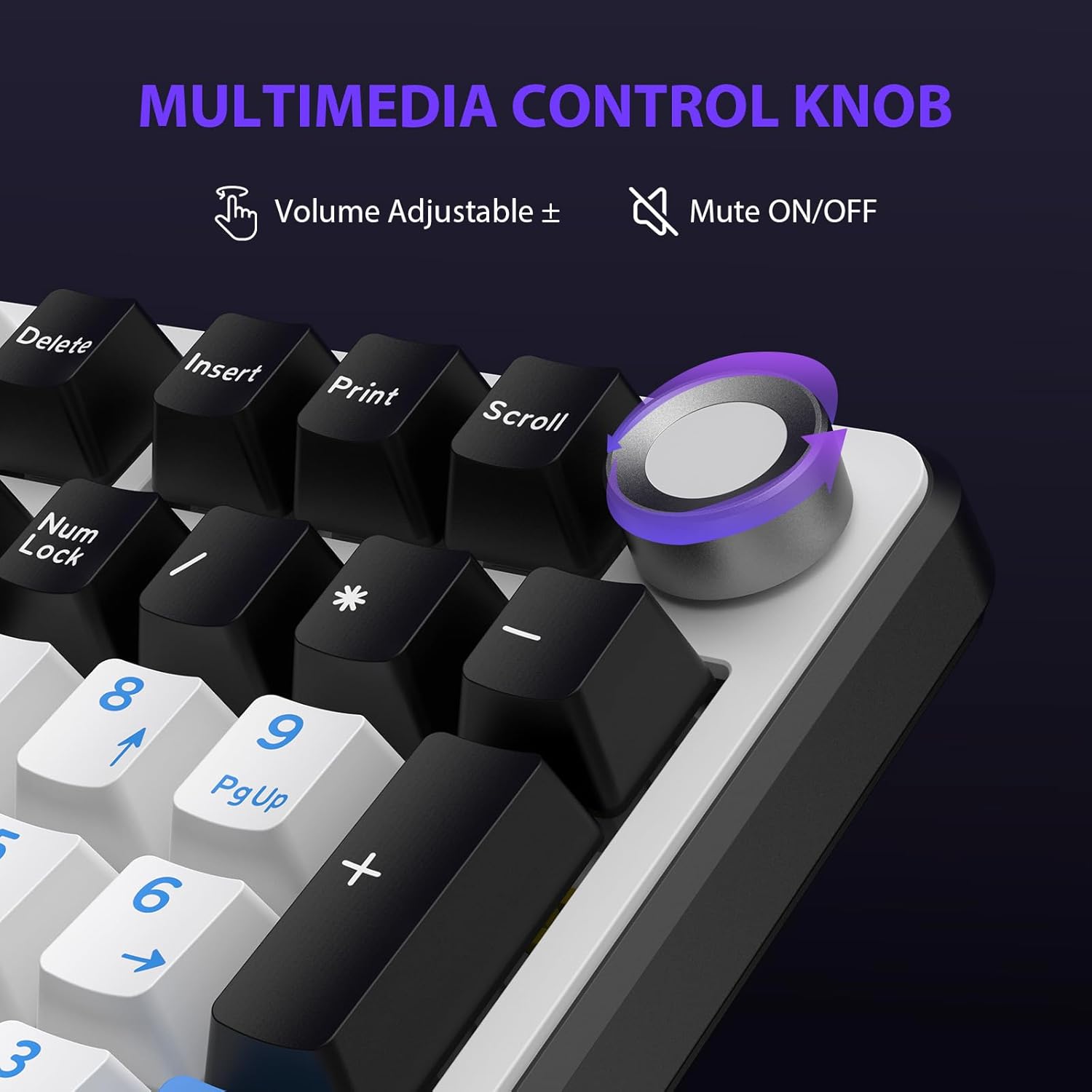
Figure 4.2: Multimedia Control Knob.
4.3. Контрола RGB позадинског осветљења
The GK01 keyboard features 16.8 million color RGB backlighting with various effects.
- Фн + [Right Arrow]: Adjust 5 brightness levels.
- Фн + [Left Arrow]: Adjust 5 speed levels for dynamic effects.
- Фн + [Инсерт]: Switch between 20 different backlight modes.
- Фн + [Ентер]: Switch color order within certain modes.
- Фн + [Кс]: Turn off light / activate power-saving mode.
- Фн + [Бацкспаце]: Switch color order within certain modes.

Figure 4.3: RGB Backlight Controls.
5. Напредне функције
5.1. Прекидачи са могућношћу брзе замене
The GK01 keyboard is equipped with pre-lubricated Cybertron linear switches and supports solder-free hot-swapping. This allows you to easily replace switches with compatible 3-pin or 5-pin mechanical switches without soldering.
Да бисте заменили прекидач:
- Using the provided 2-in-1 keycap and switch puller, gently remove the keycap from the desired switch.
- Insert the switch puller onto the switch, ensuring it grips the top and bottom clips of the switch.
- Gently pull the switch straight up to remove it from the PCB.
- Поравнајте пинове новог прекидача са отворима на штампаној плочи. Уверите се да су пинови прави како бисте избегли савијање.
- Чврсто притисните нови прекидач на место док не кликне.
- Поново причврстите поклопац тастера.

Figure 5.1: Hot-Swappable Switch Replacement.
5.2. Programmable Software
The GK01 supports custom software for advanced customization, including key remapping, macro creation, and detailed RGB lighting effects.
- The software is compatible only with the Windows operating system.
- The keyboard must be connected via USB-C wired mode to use the software.
- For driver download, please visit the official Transformers Keyboard website or refer to the link provided in the product packaging.
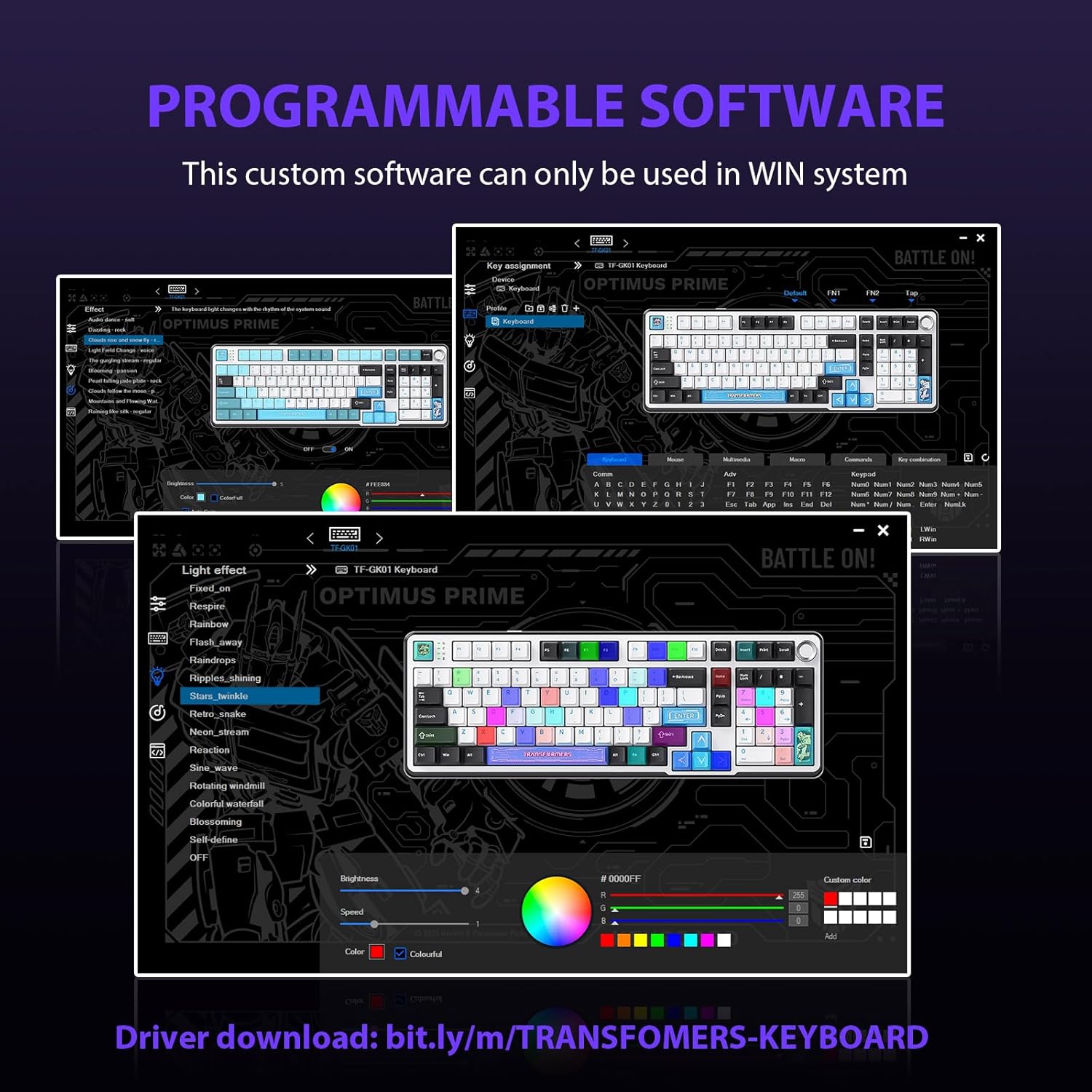
Figure 5.2: Programmable Software Interface.
5.3. Gasket Mounted Structure
The keyboard features a five-layer sound-absorbing and shock-absorbing gasket mounted structure. This design effectively reduces hollow noise and provides a softer, more consistent typing feel by isolating the plate from the case.
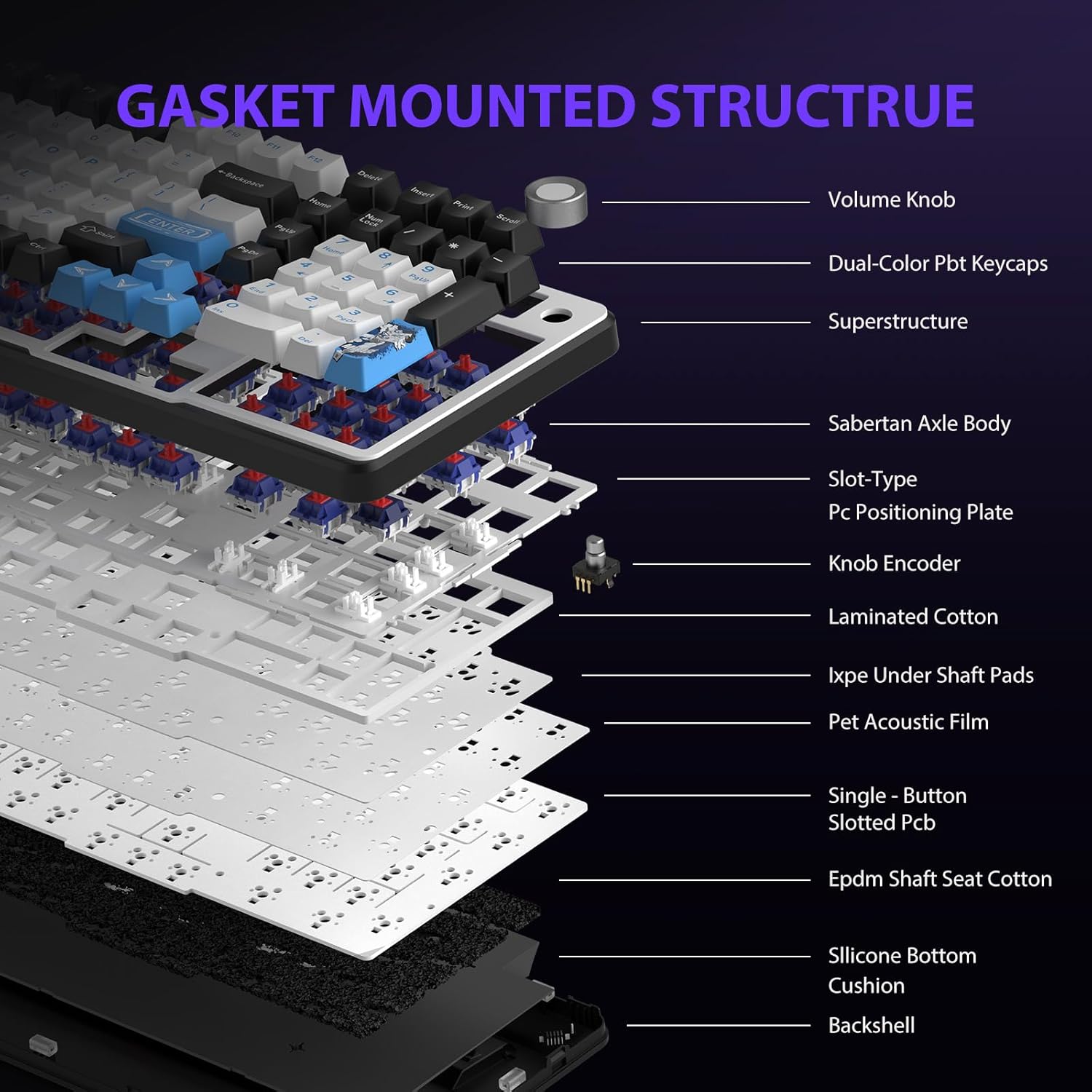
Figure 5.3: Gasket Mounted Structure Components.
6. Управљање батеријом
The GK01 keyboard is equipped with a 4000mAh rechargeable battery.
- Пуњење: Connect the keyboard to a USB power source using the provided USB-C cable. The indicator light will show charging status.
- Трајање батерије: A fully charged battery provides extended usage time. Actual battery life may vary based on usage patterns and RGB lighting intensity.
- Штедња енергије: The keyboard will enter a power-saving sleep mode after a period of inactivity to conserve battery. Press any key to wake it up.
7. Одржавање
7.1. Чишћење тастатуре
- Искључите тастатуру из свих извора напајања пре чишћења.
- Користите меку крпу која не оставља длачицеampводом или благим раствором за чишћење да бисте обрисали капице тастера и кућиште.
- За прашину и прљавштину између тастера користите компримовани ваздух или малу четку.
- Избегавајте употребу јаких хемикалија или абразивних материјала.
7.2. Keycap and Switch Care
- The PBT keycaps are designed for durability and fade resistance.
- Refer to Section 5.1 for instructions on safely removing and replacing keycaps and switches.
- Ensure the keyboard feet are clean and free of debris for stable placement.

Figure 7.1: Adjustable Keyboard Feet.
КСНУМКС. Решавање проблема
| Проблем | Могући узрок | Решење |
|---|---|---|
| Тастатура не реагује у бежичном режиму. | Low battery, incorrect mode selected, dongle not connected, Bluetooth not paired. | Charge the keyboard. Ensure the mode switch is set correctly (2.4GHz or BT). Re-insert the 2.4GHz dongle. Re-pair Bluetooth connection. Try wired mode to confirm keyboard functionality. |
| Тастери се не региструју или се куцају двапут. | Loose switch, software issue, debris under keycap. | Ensure switches are fully seated. Clean under keycaps. If using programmable software, ensure it's updated or try resetting keyboard settings. |
| RGB backlight not working or stuck. | Backlight turned off, software conflict. | Притисните Фн + Кс to toggle backlight. Check programmable software settings. |
| Не могу се повезати преко Bluetooth-а. | Keyboard not in pairing mode, device Bluetooth off, interference. | Ensure keyboard is in Bluetooth pairing mode (Fn + Q/W/E long press). Ensure device Bluetooth is on and discoverable. Move closer to the device. |
9. Спецификације
| Феатуре | Детаљ |
|---|---|
| Број модела | ТФ-ГК01 |
| Повезивање | Bluetooth 5.0, бежични 2.4GHz, USB-C жични |
| Тип тастатуре | Механички |
| Лаиоут | 101 тастера (пуна величина) |
| Прекидачи | Pre-lubed Cybertron Linear Switches, Hot-Swappable (3-pin/5-pin compatible) |
| Кеицапс | Heat-sublimated PBT |
| Позадинско осветљење | RGB (16.8 Million Colors, 20 modes, music rhythm effects via driver) |
| Капацитет батерије | 4000мАх |
| Димензије производа | 16.15 к 5.65 к 1.63 инча (41.02 к 14.35 к 4.14 цм) |
| Тежина артикла | 2.24 фунте (1.02 кг) |
| Компатибилни уређаји | Лаптоп, рачунар, паметни телефон, таблет |
| Посебне карактеристике | Anti-Ghosting (all keys), Multimedia Control Knob, Programmable Keys (via software), Rechargeable |
10. Гаранција и подршка
For information regarding warranty coverage, technical support, or service inquiries, please refer to the warranty card included with your product or visit the official Transformers Keyboard webсајту.
Произвођач: Трансформерс