
1. Увод
This manual provides detailed instructions for the installation, operation, and maintenance of your Potegrap Outdoor Security Camera (Model T-CQ1052-W20V). Please read this manual thoroughly before using the product to ensure proper function and safety. Keep this manual for future reference.
The Potegrap T-CQ1052-W20V is a high-definition outdoor security camera designed for comprehensive home surveillance. It features 2K resolution, dual-band 2.4GHz and 5GHz WiFi connectivity, 360-degree pan and tilt functionality, advanced motion detection with tracking, color night vision, two-way audio, and optional AI-powered features with cloud storage.
2. Безбедносне информације
- Ensure the power adapter is suitable for your local power supply and is properly grounded.
- Не излажите камеру екстремним температурама ван њеног радног опсега (-20°C до 50°C).
- Избегавајте постављање камере у близини јаких електромагнетних поља.
- Не покушавајте да растављате или модификујете камеру. То ће поништити гаранцију.
- Држите камеру и њену додатну опрему ван домашаја деце.
- Clean the camera lens with a soft, dry cloth only.
3. Садржај пакета
Молимо вас да проверите пакет за следеће ставке:
- Potegrap Outdoor Security Camera (Model T-CQ1052-W20V) - 2 units
- Повер Адаптерс
- Монтажни завртњи и анкери
- Монтажни образац
- Кориснички приручник (овај документ)

Слика 3.1: Two Potegrap T-CQ1052-W20V outdoor security cameras, highlighting their 2K resolution, 5G WiFi capability, and US-based cloud storage option. A smartphone screen displays a live view из камере.
4. Производ је готовview
4.1 Кључне карактеристике
- 2K HD резолуција: Пружа јасан и детаљан видео снимакtage (2560x1440).
- Двопојасни ВиФи: Supports both 2.4GHz and 5GHz networks for flexible and stable connectivity.
- Покривеност од 360°: Features 355° horizontal pan and 90° vertical tilt for comprehensive area monitoring.
- Advanced Motion Detection & Tracking: Automatically detects and follows moving objects.
- Ноћни вид у боји: Пружа видео у пуном колору чак и у условима слабог осветљења.
- Двосмерни аудио: Уграђени микрофон и звучник за комуникацију у реалном времену.
- Режим приватности: Physically rotates the camera lens for enhanced privacy when needed.
- Флексибилно складиштење: Supports local TF (Micro SD) card storage (up to 128GB, not included) and optional US-based cloud storage.
- AI Features (Subscription Required): Includes person, vehicle, and animal detection, along with a 911 emergency alarm integration.
- Отпоран на временске услове: Designed to operate in various outdoor conditions, from -4°F to 122°F (-20°C to 50°C).

Слика 4.1: A banner image promoting the Potegrap AI-Powered WiFi Camera, emphasizing its smart and safe features including 911 Emergency Alarm, US-Based Cloud storage, and integrated AI capabilities.

Слика 4.2: This image explains the camera's dual-band WiFi support, indicating that it can connect to both 2.4GHz (longer transmission distance) and 5GHz (superior network performance) networks.
5. Подешавање
5.1 Инсталација апликације и креирање налога
- Download the official Potegrap security camera application from your smartphone's app store (available for iOS and Android).
- Отворите апликацију и пратите упутства на екрану да бисте креирали нови налог или се пријавите ако га већ имате.
5.2 Физичка инсталација
The camera is designed for both indoor and outdoor use. Choose a location that provides the desired viewing angle and has access to a power outlet.
- Use the provided mounting template to mark the drill holes on your chosen surface (wall or ceiling).
- Избушите рупе и уметните зидне анкере ако се монтира на гипсане плоче или зид.
- Secure the camera's mounting bracket using the provided screws.
- Причврстите камеру на носач за монтажу.
- Прикључите адаптер за напајање на камеру и укључите га у утичницу.

Слика 5.1: This banner emphasizes the camera's easy installation for both indoor and outdoor environments, showing a person installing it outdoors and examples of its placement inside a home and outside.
5.3 Повезивање на Ви-Фи
- Ensure your smartphone is connected to the same Wi-Fi network (2.4GHz or 5GHz) you intend to connect the camera to.
- In the app, tap 'Add Device' or the '+' icon.
- Select your camera model and follow the in-app instructions, which typically involve scanning a QR code displayed on your phone with the camera or entering Wi-Fi credentials.
- Wait for the camera to connect to the network. A voice prompt or LED indicator will confirm successful connection.
5.4 SD Card Installation (Optional)
For local storage, insert a TF (Micro SD) card (up to 128GB, not included) into the designated slot on the camera. Ensure the camera is powered off before inserting or removing the card. Format the SD card via the app after installation for optimal performance.
6. Руковање камером
6.1 Уживо View и контрола панорамирања/нагиба
Open the Potegrap app and select your camera to access the live view. Use the on-screen controls to pan (rotate horizontally 355°) and tilt (rotate vertically 90°) the camera lens to adjust your viewугао уласка.
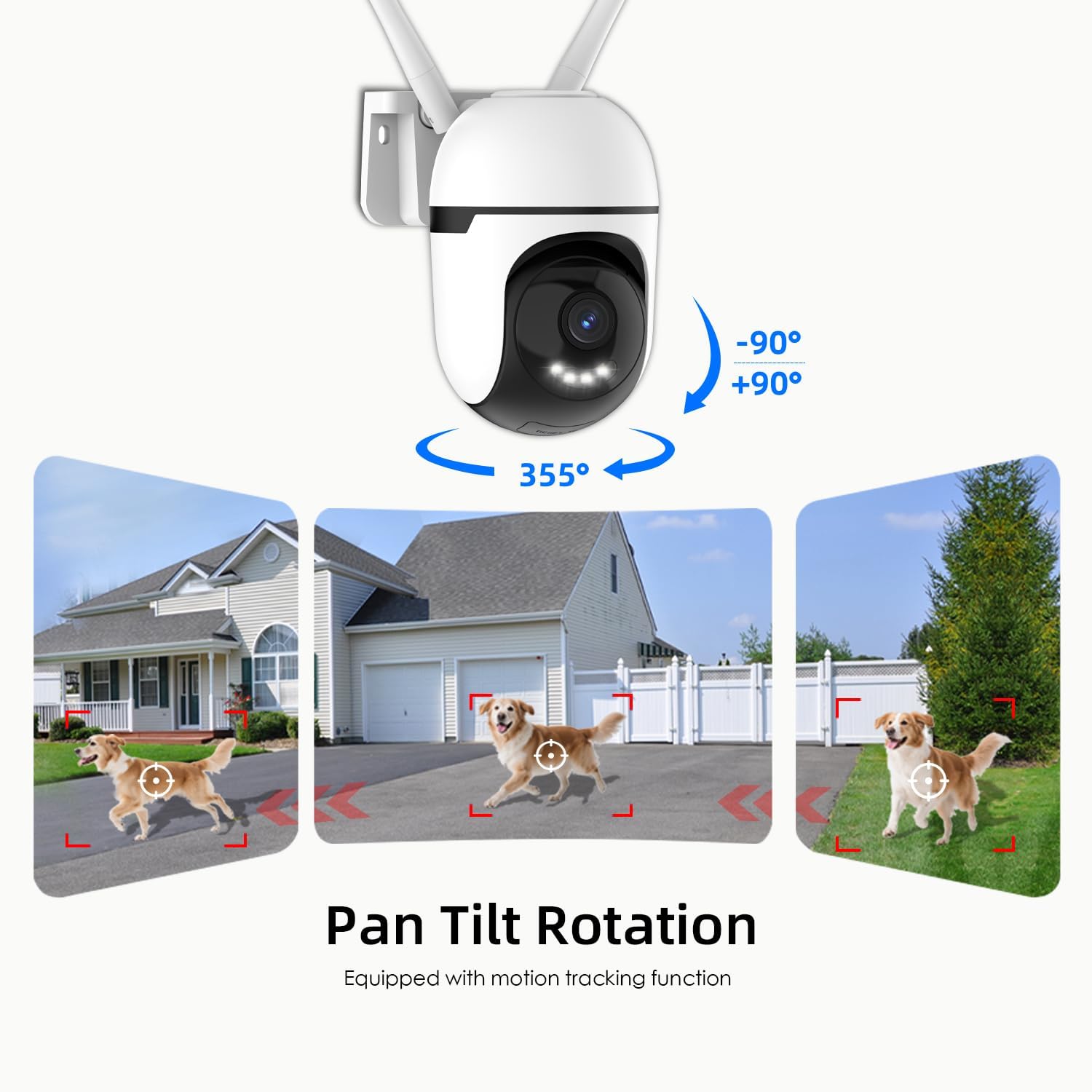
Слика 6.1: This graphic demonstrates the camera's pan and tilt functionality, allowing for a 360-degree horizontal view (355°) and vertical adjustment (90°), illustrated by different perspectives of a dog in a yard.

Слика 6.2: This image highlights the camera's 360-degree coverage (355° pan, 90° tilt) and motion tracking, showing its ability to monitor a wide area including children playing and a dog.
6.2 Детекција и праћење покрета
The camera can detect motion and automatically track moving objects within its field of view. You will receive real-time alerts on your smartphone when motion is detected.
- Омогући/онемогући: Приступите подешавањима камере у апликацији да бисте укључили или искључили детекцију покрета.
- Осетљивост: Подесите осетљивост детекције покрета да бисте смањили лажне аларме.
- Зоне детекције: Set specific areas within the camera's view for motion detection to focus on, ignoring irrelevant areas.

Слика 6.3: This image illustrates the camera's auto-tracking motion detection, showing the camera following a moving subject (a child) within its field of view.

Слика 6.4: An illustration of how to set up custom detection zones to reduce unnecessary alerts, showing a dog within a defined zone and a corresponding motion detection notification.
6.3 2-Way Talk
Use the two-way audio feature to communicate with individuals near the camera. Tap the microphone icon in the live view to speak, and listen through the camera's speaker.

Слика 6.5: This image illustrates the two-way talk feature, enabling real-time audio communication between a person near the camera outdoors and another person using the mobile app indoors.
6.4 Ноћни вид
The camera offers multiple night vision modes:
- Classic IR Night Vision: Standard black and white infrared view.
- Ноћни вид у боји: Utilizes built-in lights to provide full-color video in low-light conditions.
- Интелигентни ноћни вид: Stays in IR mode and switches to color night vision upon detection of motion.
Adjust night vision settings in the app to suit your preferences.

Слика 6.6: This image compares the camera's night vision capabilities: classic infrared (black and white), full-color night vision, and intelligent night vision that activates color upon detection.
6.5 Режим приватности
Activate Privacy Mode via the app to physically rotate the camera lens downwards, ensuring your privacy when the camera is not needed for surveillance.

Слика 6.7: The camera's privacy mode is shown, where the lens physically rotates to obscure the view, and the mobile application confirms the mode is active.
6.6 Снимање и складиштење
Камера подржава континуирано снимање 24/7 и снимање активирано догађајима. Фуtagе се може чувати на два начина:
- Local TF Card Storage: Insert a Micro SD card (up to 128GB) for local storage without a subscription. Ensure the card is formatted through the app.
- US-Based Cloud Storage: An optional subscription service provides cloud storage, often including advanced AI analysis features.
Приступ снимљен фооtage through the playback section of the Potegrap app.

Слика 6.8: This image details the storage options: US-based cloud storage (subscription needed for AI functions) and local TF card storage (up to 128GB, not included) for secure data.
6.7 AI Features (Subscription Required)
Enhance your security with AI-powered features, available with a cloud storage subscription:
- Откривање особе: Differentiates human shapes from other moving objects.
- Детекција возила: Identifies vehicles, reducing irrelevant alerts.
- Animal Detection: Recognizes animals, useful for pet monitoring or filtering wildlife alerts.
- 911 Emergency Alarm: Integrates with emergency services for rapid response during critical events.

Слика 6.9: The camera's intelligent alarm feature is depicted, showing a detected person and an option within the mobile application to initiate a 911 emergency call.
7. Одржавање
- Чишћење: Regularly wipe the camera lens and body with a soft, dry cloth to remove dust and dirt. Do not use harsh chemicals or abrasive cleaners.
- Ажурирања фирмвера: Check the app periodically for firmware updates. Keeping your camera's firmware updated ensures optimal performance and security.
- Циклус напајања: Ако камера има проблема, покушајте да је искључите из извора напајања на 10 секунди, а затим је поново укључите.
КСНУМКС. Решавање проблема
| Проблем | Могући узрок | Решење |
|---|---|---|
| Камера не успева да се повеже са Wi-Fi мрежом. | Incorrect Wi-Fi password; camera too far from router; router settings (e.g., firewall). | Verify Wi-Fi password. Move camera closer to router. Ensure router supports 2.4GHz or 5GHz. Temporarily disable firewall for setup. Reset camera and try again. |
| Poor video quality or blurry image. | Прљаво сочиво; недовољно осветљење; проблеми са пропусним опсегом мреже. | Clean the camera lens. Ensure adequate lighting for optimal color night vision. Check your internet speed. |
| Упозорења о детекцији покрета су пречеста или не раде. | Sensitivity set too high/low; detection zone not configured correctly. | Adjust motion detection sensitivity in the app. Configure specific detection zones to focus on relevant areas. |
| Не могу view снимљено фооtage from SD card. | SD card not formatted; SD card full or corrupted; app issue. | Ensure the SD card is correctly inserted and formatted via the app. Check if the SD card is full. Some advanced playback features or continuous recording may require a cloud subscription. |
| AI features (person/vehicle detection, 911 alarm) are not active. | Subscription required for AI features. | These advanced AI features typically require an active cloud storage subscription. Check your subscription status in the app. |
| Камера не реагује. | Power issue; software glitch. | Check power connection. Perform a power cycle (unplug and replug). If issues persist, perform a factory reset (refer to app for instructions). |
9. Спецификације
| Феатуре | Детаљ |
|---|---|
| Број модела | T-CQ1052-W20V |
| Бранд | Потеграп |
| Резолуција | 2K HD (2560x1440), 3 MP |
| Повезивање | Dual-band 2.4GHz & 5GHz WiFi |
| Извор напајања | Цордед Елецтриц |
| Опсег померања/нагиба | 355° хоризонтално, 90° вертикално |
| Нигхт Висион | Color Night Vision, IR Night Vision, Intelligent Night Vision |
| Опције складиштења | TF (Micro SD) Card (up to 128GB, not included), US-Based Cloud Storage (subscription required) |
| Аудио | Two-Way Talk (Built-in microphone and speaker) |
| Радна температура | -4°Ф до 122°Ф (-20°Ц до 50°Ц) |
| Димензије (Д к Ш к В) | 3.9 к 3.1 к 4.3 инча |
| Тежина артикла | 1.57 фунте (0.71 килограма) |
| Компатибилни уређаји | Паметни телефон (iOS, Android) |
10. Гаранција и подршка
For warranty information, please refer to the documentation included with your purchase or contact Potegrap customer support. Protection plans may be available for extended coverage.
If you encounter any issues or have questions regarding your Potegrap security camera, please contact our customer support team through the official Potegrap website or the contact information provided in the app.