
1. Увод
This manual provides essential information for setting up, operating, and maintaining your NIMO 15.6-inch FHD Laptop. Please read this guide thoroughly to ensure optimal performance and longevity of your device. Keep this manual for future reference.
2. Шта је у кутији
- 1 x NIMO N155 Laptop
- 1 x Type-C 65W PD Fast Charger
- 1 к Упутство за употребу
- Windows 11 Home (Pre-installed)
- 2 Years Warranty, 90 Days Return Information
3. Производ је готовview
The NIMO 15.6-inch FHD Laptop is designed for efficiency and convenience, featuring a robust AMD Ryzen 5 processor, ample memory, and fast storage. Its sleek design and comprehensive connectivity options make it suitable for various tasks.
3.1. Laptop Components

Figure 1: NIMO 15.6-inch FHD Laptop (Rose Gold variant)
This image displays the NIMO 15.6-inch FHD Laptop in Rose Gold, showcasing its full-size keyboard, large touchpad, and the vibrant display. Key features like fingerprint sensor, Type-C PD charger, and backlit keyboard are highlighted on the screen.
3.2. Портови и конектори

Figure 2: NIMO Laptop Ports Diagram
This diagram illustrates the available ports on the NIMO laptop, including Micro SD card reader, USB 2.0, USB 3.2 Gen1, Audio Jack, Kensington Lock on one side, and Type-C, USB 3.2 Gen1 Full-function, HDMI 1.4, and a Charge LED on the other side.
- УСБ 3.0 портови: За брзи пренос података и повезивање периферних уређаја.
- УСБ 2.0 порт: За повезивање стандардних УСБ уређаја.
- Порт типа Ц: Supports 65W Power Delivery (PD) for fast charging and data transfer.
- ХДМИ КСНУМКС: За повезивање са екстерним екранима.
- Читач микро СД картица: За проширење складишног простора или пренос fileс са меморијских картица.
- Аудио прикључак: За повезивање слушалица или екстерних звучника.
- Utor za Kensington Lock: For physical security of the device.
4. Подешавање
4.1. Прво укључивање
- Распакујте лаптоп и сву додатну опрему из кутије.
- Connect the 65W Type-C PD Fast Charger to the laptop's Type-C port and a power outlet.
- Open the laptop lid. The laptop may power on automatically. If not, press the power button located on the top right of the keyboard.
- Пратите упутства на екрану да бисте завршили подешавање система Windows 11 Home, укључујући језик, регион, мрежну везу и креирање корисничког налога.
4.2. Повезивање на мрежу
During the initial setup or at any time, you can connect your NIMO laptop to a Wi-Fi network:
- Кликните на икону Wi-Fi мреже у системској палети (доњи десни угао екрана).
- Изаберите жељену Wi-Fi мрежу са листе.
- Унесите мрежну лозинку ако се то затражи и кликните на „Повежи се“.
5. Упутство за употребу
5.1. Управљање напајањем
- Укључено: Притисните дугме за напајање.
- Режим спавања: Затворите поклопац или кратко притисните дугме за напајање.
- Искључи: Кликните на дугме Старт, затим на Напајање > Искључи.
- Поново покрени: Кликните на дугме Старт, затим на Напајање > Рестартуј.
5.2. Тастатура и тачпед
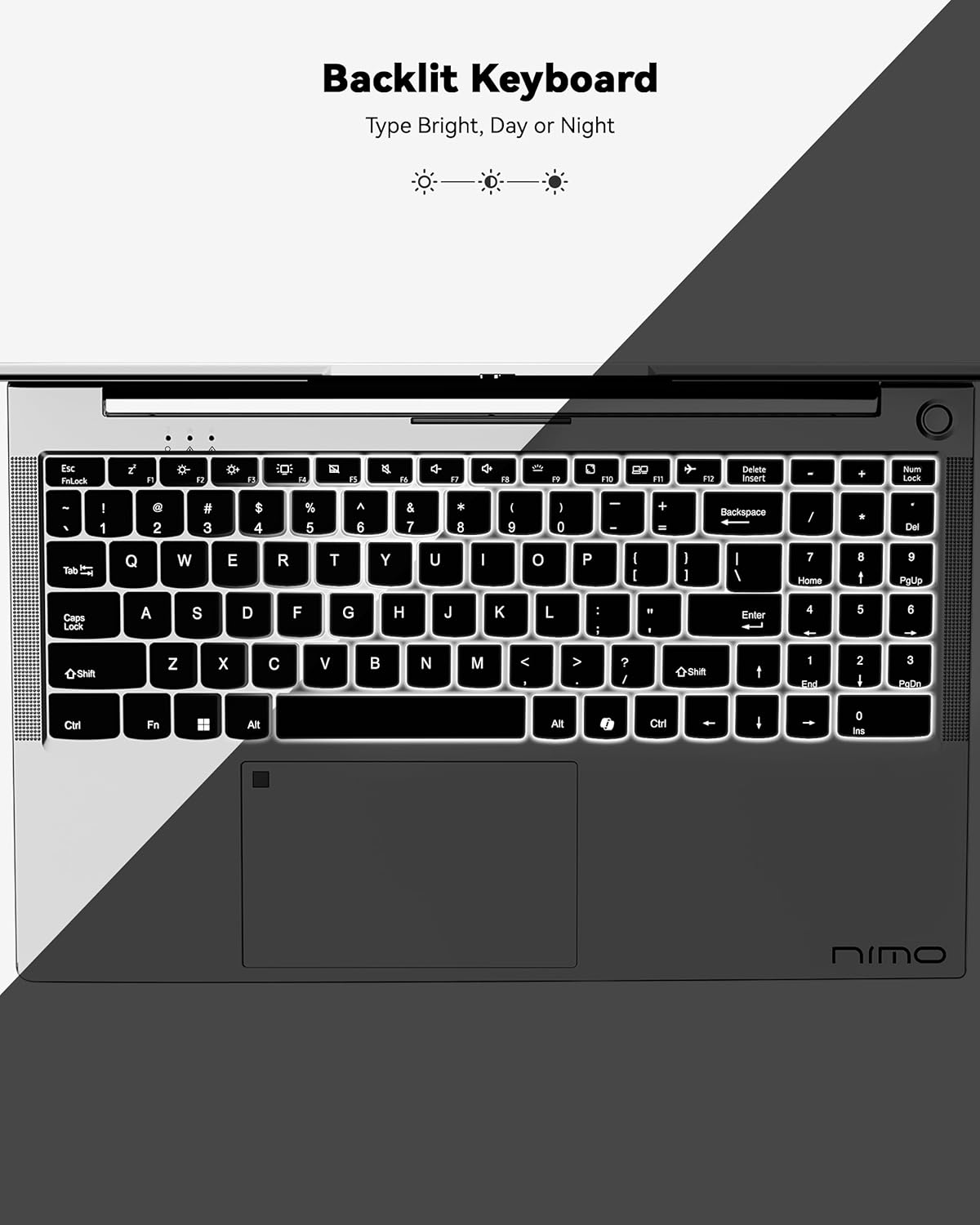
Слика 3: Тастатура са позадинским осветљењем
This image highlights the backlit keyboard feature of the NIMO laptop, demonstrating how the keys illuminate for typing in low-light conditions.
- Тастатура са позадинским осветљењем: Притисните Фн + Ф5 (or the key with the keyboard backlight icon) to toggle the backlight on/off or adjust brightness.
- Тоуцхпад: Supports multi-touch gestures for scrolling, zooming, and navigation. Refer to Windows settings for customization.
- Сензор отиска прста: Located on the touchpad for secure and instant login. Set up your fingerprint in Windows Settings > Accounts > Sign-in options.

Figure 4: Fingerprint Sensor on Touchpad
This image shows a close-up of the NIMO laptop's touchpad, clearly indicating the integrated fingerprint sensor for quick and secure access.
5.3. Webцам
The laptop features a 2MP webcam for video calls and conferences. Ensure proper lighting for best image quality.
5.4. Аудио
The integrated speakers provide clear audio. You can also connect headphones or external speakers via the audio jack.
6. Кључне карактеристике
- Vivid 15.6" Full HD Display: Enjoy stunning visuals with the 15.6" Full HD (1920x1080) IPS anti-glare display, featuring an 85% screen-to-body ratio and micro-edge design.
- Моћне перформансе: Equipped with an AMD Ryzen 5 processor, 16GB DDR4 RAM, and a 1TB PCIe SSD for fast boot-ups, seamless multitasking, and efficient handling of applications.
- Upgradable Components: The RAM and SSD slots are expandable, allowing for future memory and storage upgrades.
- 65W USB-C PD Fast Charger: The included charger provides rapid power delivery, offering 2 hours of use from just 15 minutes of charging. It is also versatile for charging other compatible devices.
- Secure & Instant Login: Integrated fingerprint reader on the touchpad ensures quick and secure access to your device.
- Ergonomic Backlit Keyboard: Work comfortably in any environment with the backlit keyboard, featuring adjustable brightness.
- Беспрекорно повезивање: Features Wi-Fi 6 and Bluetooth 5.2 for stable, high-speed wireless connections, along with multiple USB 3.0 ports and HDMI for versatile peripheral connections.
Video 1: NIMO Laptop - Perfect for Work and Study, Anytime, Anywhere
This video demonstrates the NIMO laptop's versatility for various tasks, highlighting its portability and performance for work, study, and entertainment in different settings.
Video 2: NIMO 15.6 FHD Laptop for Students Home Work
This video showcases the NIMO 15.6 FHD laptop as an ideal device for students, home users, and professionals, emphasizing its suitability for educational and work-related tasks.
7. Одржавање
- Чишћење: Користите меку крпу која не оставља влакна за чишћење екрана и спољашњости. Избегавајте јаке хемикалије.
- Одржавање батерије: To prolong battery life, avoid fully discharging the battery frequently. Store the laptop in a cool, dry place.
- Ажурирања софтвера: Редовно ажурирајте оперативни систем Windows и управљачке програме како бисте осигурали оптималне перформансе и безбедност.
- вентилација: Ensure the laptop's ventilation openings are not blocked to prevent overheating. Use on a hard, flat surface.
КСНУМКС. Решавање проблема
- Лаптоп се не укључује: Ensure the charger is securely connected and the battery has sufficient charge. Try a different power outlet.
- Екран је празан: Connect to an external monitor to check if the display is the issue. Restart the laptop.
- Проблеми са Wi-Fi повезивањем: Restart your router and the laptop. Check Wi-Fi settings and ensure airplane mode is off.
- Споре перформансе: Close unnecessary applications, check for malware, and ensure sufficient free storage space. Consider upgrading RAM or SSD if performance remains an issue.
- Тастатура или тачпед не реагују: Поново покрените лаптоп. Проверите да ли постоје ажурирања драјвера у Управитељу уређаја.
For persistent issues, please refer to the support section or contact NIMO customer service.
9. Спецификације
| Феатуре | Спецификација |
|---|---|
| Величина екрана на стојећем екрану | 15.6 инча |
| Резолуција екрана | 1920 к 1080 пиксела (Фулл ХД) |
| Процесор | AMD Ryzen 5 (3.7 GHz) |
| РАМ | 16 GB DDR4 (Upgradable) |
| Брзина меморије | 4800 МХз |
| Хард Дриве | 1024 GB SSD (Upgradable) |
| Грапхицс Цопроцессор | AMD Integrated graphics |
| Оперативни систем | Виндовс 11 Хоме |
| Вирелесс Типе | 802.11a/b/g/n/ac (Wi-Fi 6) |
| Блуетоотх | Блуетоотх 5.2 |
| Број УСБ 2.0 портова | 1 |
| Број УСБ 3.0 портова | 3 |
| Просечно трајање батерије | 9 сата |
| Тежина артикла | 5 фунти |
| Димензије производа | 14.07 к 8.98 к 0.76 инча |
| Позади Webцам Ресолутион | 2 МП |
| Посебне карактеристике | Позадинско осветљење тастатуре, читач отиска прста, HD аудио, нумеричка тастатура |
10. Гаранција и подршка
Your NIMO laptop comes with a Двогодишња гаранција произвођача. Additionally, NIMO offers a 90-day hassle-free return and exchange policy. Our dedicated support team is available to assist with any issues or replacements.
10.1. Контактирајте подршку
- For product-related questions or technical assistance, please contact NIMO customer service via their official webсајт, имејл или телефон.
- Contact information can typically be found on the NIMO official webсајт или страница производа.
11. Безбедносне информације
- Use only original chargers and regularly inspect cables for damage.
- Handle the laptop by its base and consider using a protective case. Avoid placing heavy objects on it.
- Place the laptop on a hard, flat surface to ensure proper ventilation and prevent overheating. Keep it away from extreme temperatures and moisture.
- Do not overcharge the battery. Discontinue use if the battery swells or shows signs of damage.
- Set strong passwords, keep software updated, use antivirus protection, and regularly back up your data.
- In case of liquid spills, immediately unplug the laptop and allow it to dry completely before attempting to power it on.
- For any technical issues, consult qualified professionals. Do not attempt to disassemble or repair the device yourself.
12. Правно одрицање одговорности
This laptop is provided "as is," with no express or implied warranties except for the manufacturer's limited warranty (if applicable). Implied warranties of merchantability or fitness for a specific purpose are disclaimed. NIMO is not liable for damages resulting from misuse (e.g., non-approved chargers, unauthorized repairs), physical damage, or failure to follow safety guidelines, including data loss or business interruption. Users are responsible for regularly backing up their data. This disclaimer does not exclude liability for manufacturing defects or violations of mandatory local laws. By using the NIMO laptop, you accept these terms, which are governed by applicable jurisdiction laws.