
Увод

Image: Hamilton 1.1 cu ft Countertop Touchscreen Microwave Oven.
This manual provides essential information for the safe and efficient operation of your Hamilton 1.1 Cu. Ft. Countertop Touchscreen Microwave Oven. Please read this manual thoroughly before use and retain it for future reference.
Важна безбедносна упутства
Када користите електричне уређаје, увек треба поштовати основне мере предострожности како бисте смањили ризик од пожара, електричног удара и повреда особа, укључујући следеће:
- Прочитајте сва упутства пре употребе уређаја.
- Немојте укључивати пећницу ако су врата или заптивке на вратима оштећене.
- Не загревајте течности или другу храну у затвореним посудама јер могу експлодирати.
- Дозволите деци да користе пећницу без надзора само када су дата адекватна упутства како би дете могло да користи пећницу на безбедан начин и да разуме опасности од неправилне употребе.
- Refer to the "Child Safety Lock" section for specific instructions on this feature.
Карактеристике производа
- Powerful 1000W output for efficient cooking.
- 10 adjustable power levels for versatile cooking and reheating.
- User-friendly touchscreen control panel with LED display.
- Convenience cooking controls for popular foods (e.g., potatoes, popcorn, frozen dinners, pizza, beverages).
- 8 Smart Sensor auto cooking menus for precise results.
- Integrated child safety lock for enhanced security.
- Sleek white finish with stainless-steel accents.
Спецификације
| Атрибут | Детаљ |
|---|---|
| Бранд | Хамилтон |
| Број модела | ХБ8436193153-02 |
| Капацитет | 1.1 кубних стопа |
| Ватtage | 1000 вати |
| Волtage | 120 волти (АЦ) |
| Димензије (Д к Ш к В) | 21 cm x 12 cm x 19 cm |
| Врста инсталације | Цоунтертоп |
| Материјал (спољашњост) | Челик |
| Материјал (унутрашњост) | нерђајући челик |
| Укључене компоненте | Гласс Турнтабле |
Сетуп
- Распакивање: Carefully remove the microwave oven and all packing materials from the carton. Check for any damage, such as dents or a misaligned door. Do not operate if damaged.
- Пласман: Place the microwave on a flat, stable surface that can support its weight. Ensure adequate ventilation by leaving at least 4 inches of space around the sides, back, and top of the oven. Do not block air vents.
- Монтажа грамофона: Place the turntable ring in the center of the oven cavity. Then, place the glass turntable securely on top of the turntable ring. Ensure it rotates freely.
- Прикључак за напајање: Plug the microwave oven into a grounded 120V AC electrical outlet.

Слика: Унутрашњост view of the Hamilton microwave, highlighting the removable glass turntable for easy cleaning.
Упутство за употребу
Основна операција
- Подешавање сата:
- Притисните тастер ЦЛОЦК дугме.
- Use the number pads to enter the current time.
- Притисните тастер ЦЛОЦК поново дугме за потврду.
- Кување у микроталасној пећници:
- Ставите храну у посуду погодну за микроталасну пећницу на стаклени обртни тањир.
- Добро затворите врата.
- Унесите жељено време кувања помоћу нумеричке тастатуре.
- Притисните тастер НИВО СНАГЕ button to adjust power if needed (default is 100%). Use number pads to select power level (1-10).
- Притисните СТАРТ/+30 СЕЦ да почнете да кувате.
- Експрес кувар: For quick cooking, simply press the 1 МИН, 2 МИН, или 3 МИН buttons for instant cooking at full power. Press ПАУЗИ/ОТКАЖИ to stop or clear settings. Press +30СЕЦ to add 30 seconds to cooking time.
- Одмрзавање:
- Притисните тастер ВЕИГХТ ДЕФРОСТ or ОДМРЗАВАЊЕ ВРЕМЕНА дугме.
- Follow the prompts on the LED display to enter weight or time.
- Притисните СТАРТ/+30 СЕЦ.
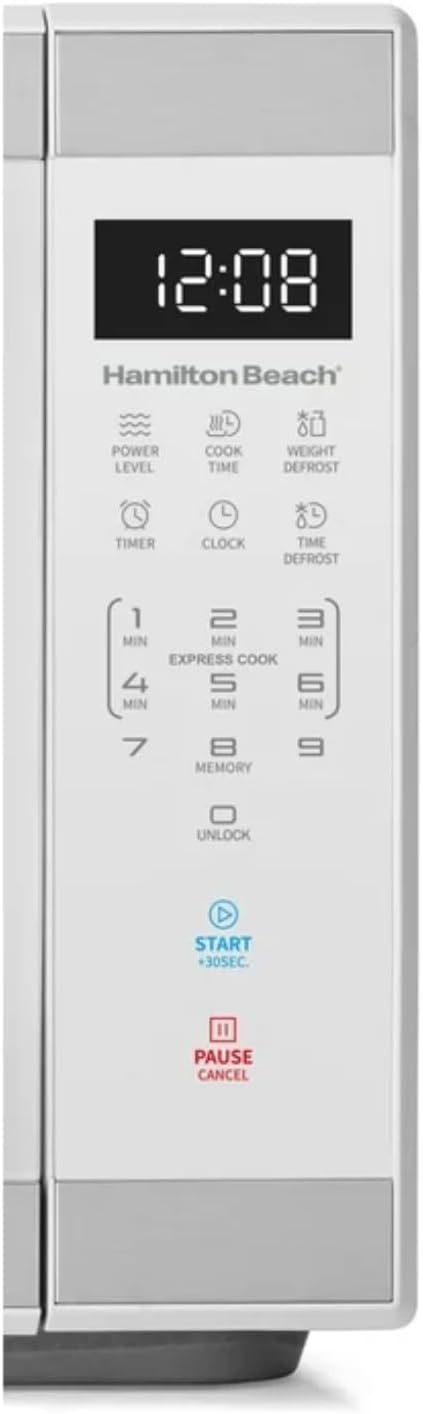
Слика: Детаљна view of the intuitive touchscreen control panel and LED display.
Сигурносна брава за децу
This microwave features a child safety lock to prevent unintended operation. The door automatically locks when cooking starts.
To Open Microwave During or After Use:
- Притисните тастер 0/ОТКЉУЧАЈ or ПАУЗИ/ОТКАЖИ пад.
- Grasp the handle and open the door.
To Deactivate the Child Safety Lock:
- Притисните тастер 0/ОТКЉУЧАЈ pad for 3 seconds. The display will indicate "Loc".
- Притисните тастер 7 пад.
- Притисните тастер 9 pad. The display will show "ULoc".
To re-activate the child safety lock, repeat the above steps.
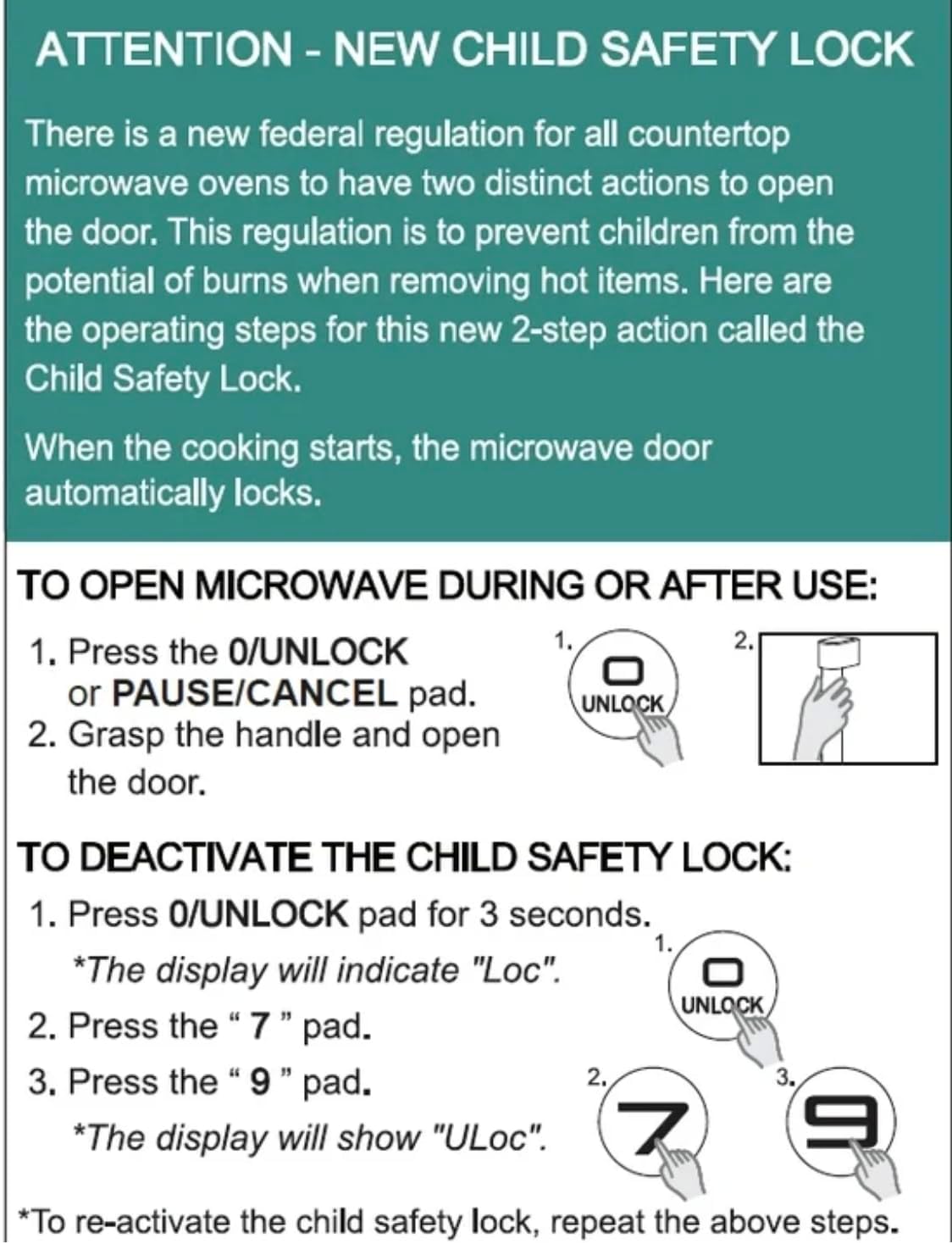
Image: Instructions for the new child safety lock feature, including how to open the door and deactivate the lock.
Одржавање и чишћење
- Унутрашње чишћење: Обришите унутрашњост рерне огласомamp cloth after each use. For stubborn stains, use a mild detergent. Ensure the interior is dry before next use.
- Спољно чишћење: Очистите спољашњу површину меком,amp тканина. Немојте користити абразивна средства за чишћење или јаке хемикалије.
- Чишћење грамофона: The glass turntable and turntable ring can be removed for cleaning. They are dishwasher safe or can be hand-washed with warm, soapy water.
- Заптивке за врата: Regularly inspect the door seals and surrounding areas for any damage or food residue. Clean as needed to ensure proper sealing.
Решавање проблема
| Проблем | Могући узрок / решење |
|---|---|
| Пећница се неће покренути. |
|
| Храна се не кува равномерно. |
|
| Light bulb is out. | Contact customer support for bulb replacement. Do not attempt to replace it yourself. |
| Display shows "Loc". | Child safety lock is activated. Follow instructions in the "Child Safety Lock" section to deactivate. |
Гаранција и подршка
For warranty information or technical support, please refer to the warranty card included with your purchase or contact Hamilton customer service. Keep your proof of purchase for warranty claims.
Служба за кориснике: Молимо вас да посетите произвођача webсајт или погледајте паковање производа за контакт податке.