
1. Увод
Thank you for choosing the Everest KM-319BT Multi-Device Wireless Keyboard and Mouse Set. This product offers versatile connectivity options including 2.4G wireless and two Bluetooth channels (BT1, BT2), allowing seamless switching between multiple devices. The keyboard features a QWERTY layout with 108 keys and rainbow backlighting, while the mouse provides 6 buttons and adjustable DPI settings. This manual provides detailed instructions for setup, operation, maintenance, and troubleshooting to ensure optimal performance and user experience.
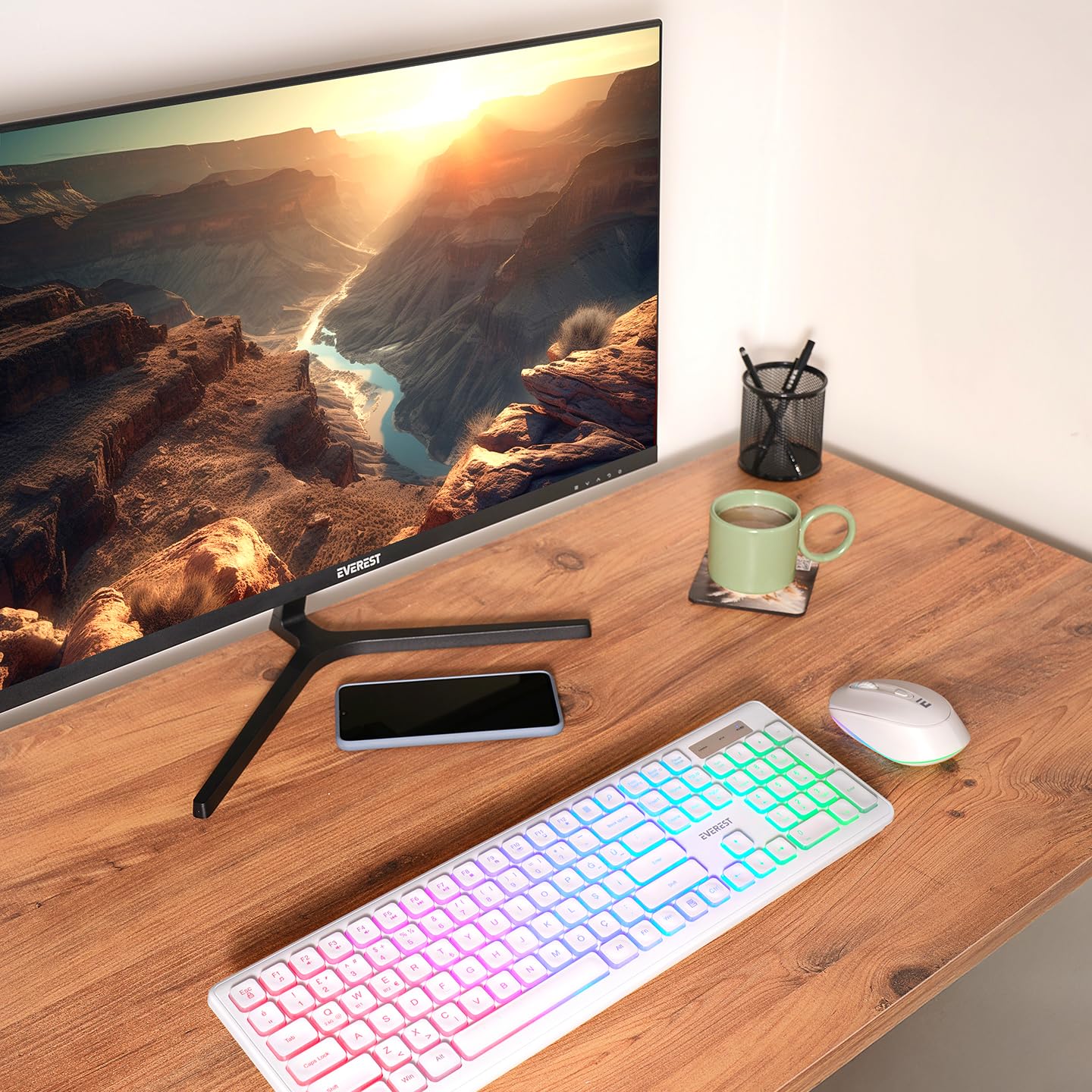
This image displays the Everest KM-319BT wireless keyboard and mouse set. The keyboard features a full QWERTY layout with rainbow backlighting, while the mouse is a compact, ergonomic design.
2. Подешавање
2.1. Садржај пакета
- Everest KM-319BT Wireless Keyboard
- Everest Wireless Mouse
- USB 2.4G Receiver (usually stored inside the mouse or keyboard battery compartment)
- Упутство за употребу
2.2. Пуњење уређаја
The keyboard and mouse are equipped with built-in rechargeable batteries. Before first use, or when the battery indicator shows low power, connect the devices to a power source using a compatible USB cable (not always included, check package contents).
- Батерија за тастатуру: 1500 mA capacity.
- Батерија за миш: 650 mA capacity.
An indicator light on each device will typically show charging status and turn off or change color when fully charged.
2.3. Повезивање са вашим уређајем
The KM-319BT set supports three connection modes: 2.4G wireless via USB receiver, Bluetooth 1, and Bluetooth 2.
2.3.1. 2.4G Wireless Connection (USB Dongle)
- Remove the USB 2.4G receiver from the mouse's battery compartment.
- Укључите УСБ пријемник у слободан УСБ порт на рачунару.
- Turn on the keyboard and mouse. They should automatically connect to your computer.
- Тастатура и миш су сада спремни за употребу.
2.3.2. Блутут веза (BT1 / BT2)
To connect via Bluetooth, ensure your device has Bluetooth enabled.
- Пређите на Bluetooth режим: On the keyboard, press the dedicated Bluetooth channel key (e.g., Фн + КСНУМКС за БТ1, Фн + КСНУМКС for BT2). On the mouse, locate the mode switch button (if available) and switch to BT mode.
- Уђите у режим упаривања:
- тастатура: Press and hold the Bluetooth channel key (e.g., Фн + КСНУМКС or Фн + КСНУМКС) for 3-5 seconds until the indicator light flashes, indicating pairing mode.
- миш: Press and hold the Bluetooth pairing button (often on the underside) for 3-5 seconds until the indicator light flashes.
- Упарите са својим уређајем:
- On your computer or mobile device, go to Bluetooth settings.
- Тражи нових уређаја.
- Select "Everest KM-319BT Keyboard" and "Everest KM-319BT Mouse" from the list of available devices.
- Пратите сва упутства на екрану да бисте довршили процес упаривања.
3. Операција
3.1. Пребацивање између уређаја
The KM-319BT keyboard and mouse allow you to switch between up to three connected devices (one 2.4G, two Bluetooth).
- тастатура: Press the dedicated channel keys to switch:
- Фн + 3: Пребаците се на 2.4G бежични режим.
- Фн + 1: Switch to Bluetooth 1 mode.
- Фн + 2: Switch to Bluetooth 2 mode.
- миш: Use the mode switch button on the underside of the mouse to cycle between 2.4G, BT1, and BT2 modes.
3.2. Функције тастатуре
- QWERTY распоред: Стандардни QWERTY распоред са 108 тастером за удобно куцање.
- Позадинско осветљење у дугиним бојама: The keyboard features rainbow backlighting. Use the dedicated backlight key (often Фн + Сцролл Лоцк or a specific light icon key) to cycle through lighting modes or turn it on/off.
- Мултимедијални тастери: Many function keys (F1-F12) have secondary multimedia functions when pressed in combination with the Fn key. Refer to the keycap legends for specific functions (e.g., volume control, media playback).
3.3. Функције миша
- 6 Дугмад: Standard left/right click, scroll wheel, and additional side buttons or DPI button.
- ДПИ подешавање: The mouse supports adjustable DPI settings (800-1200-1600 DPI). Press the DPI button (usually located below the scroll wheel) to cycle through the sensitivity levels.
4. Одржавање
4.1. Чишћење
- тастатура: Use a soft, dry cloth to wipe the surface. For deeper cleaning, use a slightly damp cloth with mild soap, ensuring no liquid enters the keyboard. Compressed air can be used to remove debris from between keys.
- миш: Wipe the mouse surface with a soft, dry cloth. Clean the optical sensor on the underside with a cotton swab if tracking issues occur.
- Не користите јаке хемикалије или абразивна средства за чишћење.
4.2. Брига о батерији
- If using rechargeable batteries, ensure they are charged regularly.
- Извадите батерије ако уређај неће бити коришћен дуже време како бисте спречили цурење.
КСНУМКС. Решавање проблема
5.1. Тастатура/миш не реагује
- Проверите батерије: Ensure batteries have sufficient charge. Recharge if necessary.
- Прекидач: Verify that the keyboard and mouse power switches are in the "ON" position.
- 2.4Г веза:
- Уверите се да је УСБ пријемник безбедно прикључен у исправан УСБ порт.
- Покушајте да прикључите пријемник на други УСБ порт.
- Ensure the keyboard/mouse is set to 2.4G mode (Фн + КСНУМКС for keyboard, mode switch for mouse).
- Блуетоотх веза:
- Уверите се да је Блуетоотх омогућен на вашем уређају.
- Ensure the keyboard/mouse is set to the correct Bluetooth channel (BT1 or BT2).
- Try re-pairing the device: Go to your device's Bluetooth settings, remove the existing pairing for the keyboard/mouse, and then re-pair following the instructions in Section 2.3.2.
- сметње: Move the keyboard/mouse closer to the receiver/device. Avoid placing them near other wireless devices that might cause interference.
5.2. Backlighting Not Working
- Ensure the backlight function is enabled using the dedicated key combination (e.g., Фн + Сцролл Лоцк).
- Check battery level; low battery might disable backlighting to conserve power.
5.3. Mouse Tracking Issues
- Очистите оптички сензор на доњој страни миша.
- Уверите се да користите миш на одговарајућој површини (не јако рефлектујућој или провидној).
- Adjust DPI settings using the DPI button.
6. Спецификације
| Феатуре | Спецификација |
|---|---|
| Бранд | Everest (Manufacturer: Lunatic) |
| Модел | KM-319BT |
| Тип повезивања | 2.4G Wireless (USB Dongle), Bluetooth 1, Bluetooth 2 |
| Распоред тастатуре | КВЕРТИ |
| Број тастера на тастатури | 108 Кеис |
| Димензије тастатуре | 443 к 144.5 к 24.5 мм |
| Батерија за тастатуру | 1500 mA (Rechargeable) |
| Позадинско осветљење тастатуре | Rainbow Backlighting |
| Број тастера миша | 6 Дугмад |
| Димензије миша | 107 к 65 к 36 мм |
| Батерија за миш | 650 mA (Rechargeable) |
| ДПИ миша | 800-1200-1600 ДПИ |
| Боја | Бела |
| Тежина производа | 0.78 килограма |
7. Информације о гаранцији
The Everest KM-319BT Multi-Device Wireless Keyboard and Mouse Set comes with a 24-месечна гаранција from the date of purchase. This warranty covers manufacturing defects and malfunctions under normal use. It does not cover damage caused by misuse, accidents, unauthorized modifications, or normal wear and tear.
Сачувајте доказ о куповини за гаранцијске захтеве.
8. Корисничка подршка
If you encounter any issues or have questions regarding your Everest KM-319BT Keyboard and Mouse Set that are not covered in this manual, please contact our customer support team.
For support, please visit the official Everest webсајт или погледајте контакт информације које се налазе на паковању производа.
Подршка на мрежи: www.everest.com.tr/support (Прampлинк, замените стварним ако је доступан)