
1. Увод
Thank you for choosing the Roadstar RDM-710DSP Bluetooth 3xUSB Car Stereo. This manual provides essential information for the proper installation, operation, and maintenance of your new car stereo. Please read this manual thoroughly before using the product to ensure optimal performance and safety.
The RDM-710DSP is a mechless car stereo designed to provide high-quality audio and versatile connectivity options for your vehicle. It features Bluetooth 5.0 for wireless audio streaming and hands-free calling, three USB inputs for media playback, and a sophisticated Digital Sound Processor (DSP) with a 32-band equalizer for precise audio customization.
2. Карактеристике производа
- Mechless Car Stereo design (no CD/DVD mechanism)
- Multi-color display with seven selectable color options
- Digital Sound Processor (DSP) with 32-band equalizer
- ТДА7388 amplifier for robust audio output
- Bluetooth 5.0 for wireless audio streaming and hands-free communication
- Three USB inputs for diverse media playback and charging
- FM radio tuner (5807)
- Six RCA outputs for external ampлифиер везе
- Наменски излаз за субвоофер
- High Pass Filter (HPF) and Low Pass Filter (LPF) functions for audio crossover management
- Time and day display function
- ISO standards compliant for easy installation
- Folder selection feature for organized media browsing
- Controllable via included remote control
- Mobile application control support
3. Садржај пакета
Молимо вас да проверите пакет за следеће ставке:
- Roadstar RDM-710DSP Car Stereo Unit
- Електрична инсталација
- Прибор за монтажу (шрафови, носачи)
- Ремоте Цонтрол
- Кориснички приручник (овај документ)
Ако неки предмети недостају или су оштећени, одмах контактирајте свог продавца.
4. Безбедносне информације
- Инсталација: Always have the unit installed by a qualified technician to prevent damage to the unit or your vehicle. Incorrect wiring can cause fire or electrical shock.
- Напајање: Повежите уређај само на напајање од 12V једносмерне струје са негативним уземљењем.
- Безбедност вожње: Do not operate the unit in a way that distracts you from driving. Always keep your attention on the road.
- Ниво јачине звука: Keep the volume at a level where you can still hear outside traffic sounds. Excessive volume can impair your hearing.
- Влага: Do not expose the unit to moisture or water to prevent electrical shock.
- Чишћење: За чишћење користите меку, суву крпу. Немојте користити абразивна средства за чишћење или раствараче.
5. Подешавање и инсталација
5.1 Ожичење
The RDM-710DSP is designed to be ISO standards compliant, simplifying wiring. Refer to the wiring diagram provided with the unit for specific connections. Ensure all connections are secure and properly insulated to prevent short circuits.
- Снага: Connect the yellow wire to the constant 12V supply, the red wire to the accessory 12V supply (switched by ignition), and the black wire to a good chassis ground.
- говорници: Connect speaker wires to the corresponding vehicle speaker wires. Pay attention to polarity (+/-).
- Антена: Connect the vehicle's FM antenna to the antenna input.
- РЦА излази: За спољну amplifiers, connect the six RCA outputs (Front L/R, Rear L/R, Subwoofer) to your ampуноси животног система.
5.2 Монтажа јединице
Insert the metal mounting sleeve into the dashboard opening. Bend the tabs outward to secure the sleeve. Slide the RDM-710DSP unit into the mounting sleeve until it clicks into place. Ensure the unit is firmly secured.
5.3 Почетно укључивање
After installation, turn on your vehicle's ignition. The unit should power on. Follow any on-screen prompts for initial setup, such as setting the clock.
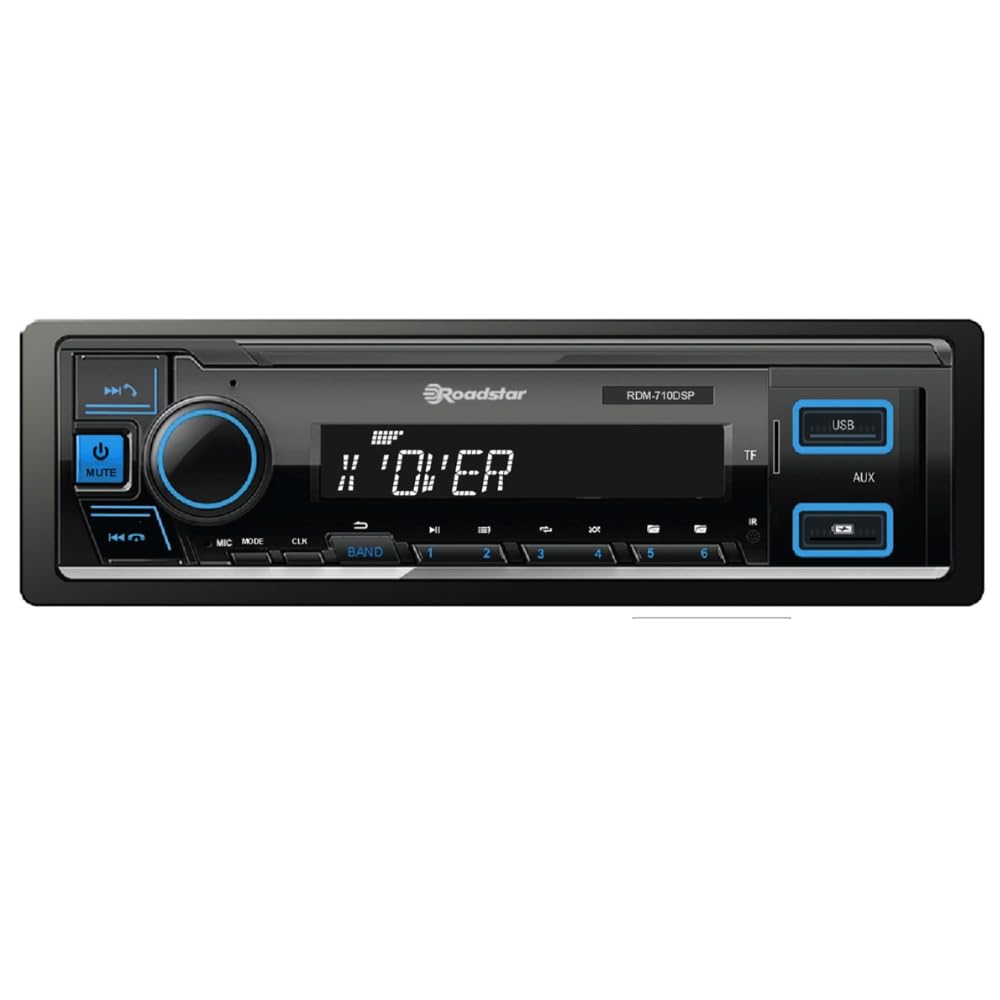
Слика 1: Фронт view of the Roadstar RDM-710DSP Car Stereo. This image displays the main unit with its multi-color display, control buttons, and USB ports.
6. Упутство за употребу
6.1 Основне контроле
- Дугме за напајање: Притисните да бисте укључили/искључили јединицу.
- Дугме за јачину звука: Rotate to adjust the volume level. Press to access audio settings.
- Дугме за режим: Press to cycle through available sources (FM, Bluetooth, USB1, USB2, USB3, AUX).
- Приказ: The multi-color display shows current source, track information, radio frequency, time, and day. You can customize the display color through the settings menu.
6.2 Remote Control and Mobile App
The unit can be controlled using the included remote control. Point the remote control towards the unit's IR sensor. For advanced control, download the dedicated mobile application from your smartphone's app store. Pair your phone via Bluetooth to use the app.
7. Блуетоотх повезивање
7.1 Pairing a Bluetooth Device
- Turn on the RDM-710DSP and select the Bluetooth source using the Mode button.
- Омогућите Блуетоотх на свом мобилном уређају и потражите доступне уређаје.
- Select "RDM-710DSP" from the list of found devices.
- If prompted, enter the PIN code (usually "0000").
- Once paired, the unit will confirm the connection, and you can stream audio or make calls.
7.2 Bluetooth Audio Streaming (A2DP)
After pairing, you can play music from your Bluetooth-enabled device. Use the unit's controls or your phone to play, pause, skip tracks, and adjust volume.
7.3 Hands-Free Calling (HFP)
When a call comes in, the unit will display the caller ID (if supported). Press the Answer button on the unit or remote to accept the call. Use the unit's microphone for communication and the car speakers for audio output.
8. УСБ репродукција
The RDM-710DSP features three USB inputs. Connect a USB flash drive containing audio files (e.g., MP3, WMA) to any of the USB ports. The unit will automatically switch to USB mode and begin playback.
- Навигација: Use the forward/backward buttons to skip tracks. Use the folder selection feature to browse through directories on your USB device.
- Подржани формати: The unit supports common audio formats. Refer to the technical specifications for a complete list.
- Пуњење: USB ports may also provide charging capabilities for compatible devices.
9. Рад радио-станице
Press the Mode button to select FM radio. The unit will display the current frequency.
- Аутоматско скенирање: Press and hold the seek buttons to automatically scan for and store strong stations.
- Ручно подешавање: Briefly press the seek buttons to manually tune to the next frequency.
- Унапред подешене станице: Use the numeric buttons (if available on the unit or remote) to select preset stations.
10. Подешавања звука
The RDM-710DSP features a powerful Digital Sound Processor (DSP) to customize your audio experience.
- Екуализер: Access the 32-band equalizer through the audio settings menu. Adjust individual frequency bands to tailor the sound to your preference.
- ХПФ/ЛПФ: High Pass Filter (HPF) and Low Pass Filter (LPF) settings allow you to define the frequency range sent to your speakers and subwoofer, optimizing sound quality and preventing distortion.
- Излаз субвоофера: Adjust the subwoofer level and phase through the audio settings.
- РЦА излази: The six RCA outputs provide clean, pre-amplified signals for connecting external amplifiers, allowing for a more powerful and customized sound system.
11. Одржавање
- Чишћење јединице: Use a soft, dry cloth to wipe the front panel. Do not use harsh chemicals, solvents, or abrasive cleaners, as they may damage the finish or display.
- УСБ портови: Keep USB ports free from dust and debris.
- Општа нега: Избегавајте излагање уређаја екстремним температурама, директној сунчевој светлости током дужег периода или прекомерној влази.
КСНУМКС. Решавање проблема
If you encounter problems with your RDM-710DSP, refer to the following table for common issues and solutions.
| Проблем | Могући узрок | Решење |
|---|---|---|
| Нема струје | Incorrect wiring; Blown fuse; Vehicle ignition off | Check power and ground connections; Replace fuse if necessary; Turn vehicle ignition ON. |
| Нема звука | Volume too low; Mute function active; Incorrect speaker wiring; Amplifier not powered (if external) | Increase volume; Deactivate mute; Check speaker connections and polarity; Ensure external ampЛифиер је напајан. |
| Блуетоотх се не повезује | Bluetooth not enabled on phone; Unit not in pairing mode; Device already paired to another unit | Enable Bluetooth on your phone; Ensure unit is in Bluetooth mode; Forget device on phone and re-pair. |
| USB уређај није препознат | Неподржано file system; Damaged USB device; Incompatible file формату | Ensure USB is FAT32 formatted; Try a different USB device; Check supported file формати. |
| Даљински управљач не ради | Dead battery; Obstruction between remote and unit; Remote not pointed correctly | Replace remote battery; Remove obstructions; Point remote directly at the unit's IR sensor. |
Ако проблем и даље постоји након што сте испробали ова решења, обратите се корисничкој подршци.
13. Спецификације
| Феатуре | Спецификација |
|---|---|
| Модел | RDM-710DSP |
| Бранд | Роадстар |
| Блуетоотх верзија | 5.0 |
| УСБ портови | 3 |
| Еквилајзер | 32-појасни ДСП |
| РЦА излази | 6 (Front L/R, Rear L/R, Subwoofer) |
| Ampлифиер ИЦ | ТДА7388 |
| Тунер | FM (5807) |
| Тежина | 0.65 килограма |
| Укључене компоненте | Аутомобилски стерео уређај |
14. Гаранција и подршка
14.1 Информације о гаранцији
Warranty information for the Roadstar RDM-710DSP is not specified in the product details. Please refer to your purchase receipt or contact your retailer for details regarding warranty coverage and terms.
14.2 Корисничка подршка
For technical assistance, troubleshooting beyond this manual, or service inquiries, please contact your authorized Roadstar dealer or visit the official Roadstar webсајт за ресурсе подршке.