Увод
This manual provides essential information for setting up, operating, maintaining, and troubleshooting your Thunderobot Zero 18 Pro 5070 Ti Gaming Laptop. Please read this guide thoroughly to ensure optimal performance and longevity of your device.
Шта је у кутији
Приликом распакивања, проверите да ли су присутне све доле наведене ставке:
- THUNDEROBOT Zero Laptop
- Повер Адаптер
- Кориснички приручник (овај документ)
- Гарантни лист
If any items are missing or damaged, contact your retailer or Thunderobot customer support immediately.
Сетуп
Прво укључивање
- Прикључите адаптер за напајање на улазни порт за напајање лаптопа, а затим у зидну утичницу.
- Отворите поклопац лаптопа.
- Притисните дугме за напајање да бисте укључили лаптоп.
- Пратите упутства на екрану да бисте завршили подешавање система Windows 11 Home.
Повезивање периферних уређаја
Utilize the available ports to connect external devices such as a mouse, keyboard, external display, or other accessories. Refer to the "Connectivity (Ports)" section for port details.
Упутство за употребу
Укључивање/искључивање
- To power on: Press the power button located on the keyboard deck.
- To shut down: Click the Start button, then Power, and select "Shut down".
- To restart: Click the Start button, then Power, and select "Restart".
- To sleep: Close the laptop lid or click the Start button, then Power, and select "Sleep".
Keyboard and RGB Lighting
The laptop features a full-size keyboard with per-key customizable RGB backlighting and a dedicated numeric keypad.
- Per-Key RGB Backlight: Customize individual key lighting through the AI Intelligent Control Center software.
- Функцијски тастери: Користите Fn key in combination with other keys for various functions (e.g., volume control, screen brightness, keyboard backlight adjustment).
- Performance Mode Switching: Dedicated keys (Fn+Space) allow for quick toggling between performance profiles.
- One-Click Cooling: A dedicated key (often near the numeric keypad) can activate maximum cooling. Ensure cooling mode is exited before using the first three keys to switch modes.
Дисплаи Феатурес
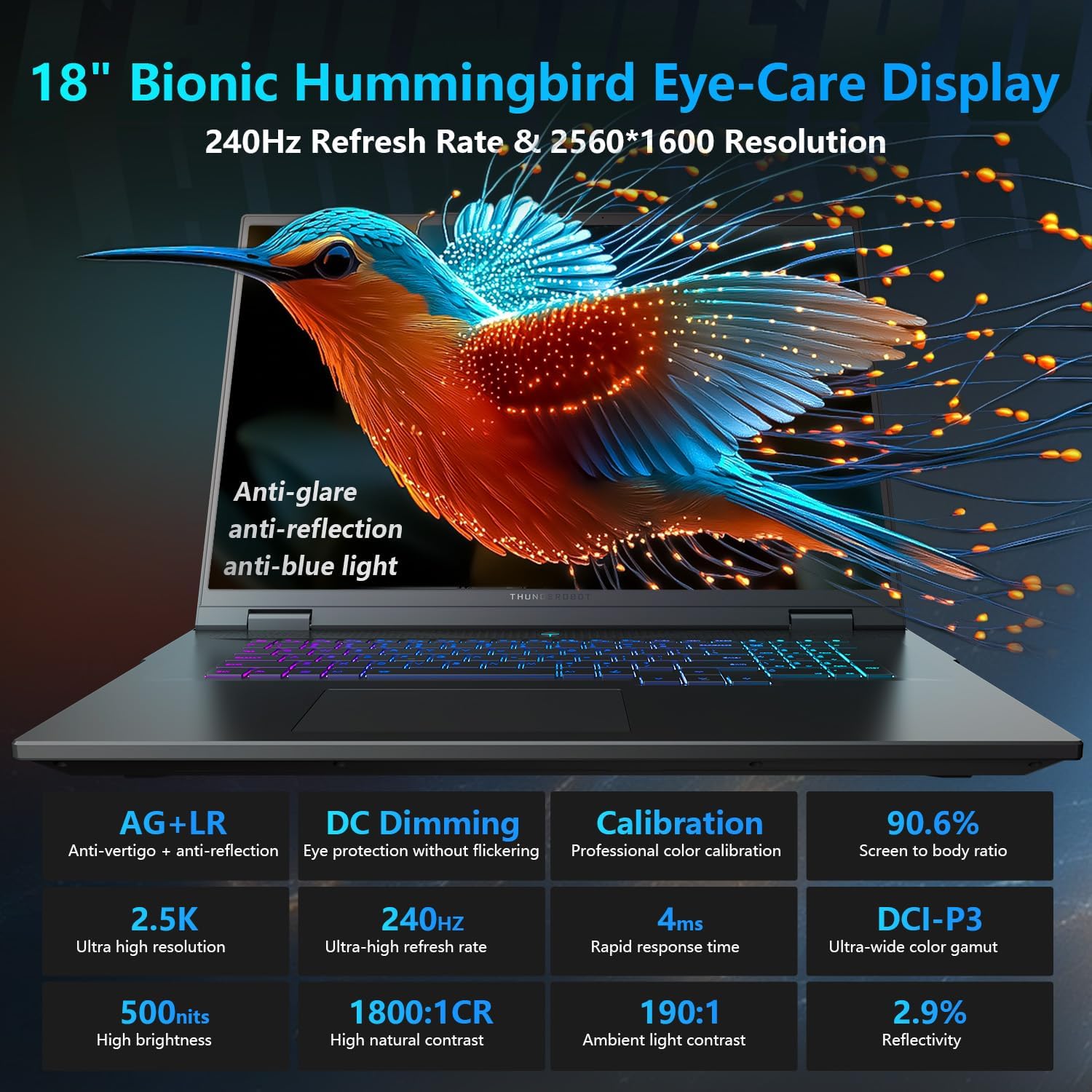
The 18-inch QHD+ (2560x1600) Bionic Hummingbird Eye-Care display offers a 240Hz refresh rate and 4ms response time for clear and fluid visuals. It includes anti-glare, anti-reflection, and anti-blue light technologies for eye comfort.

Connectivity (Ports)
The laptop is equipped with various ports for extensive connectivity:
- 3 x Superspeed USB Type-A ports
- 2 x Superspeed USB Type-C ports (including Thunderbolt 5 support)
- 1 x HDMI port (HDMI 2.1)
- 1 x RJ-45 Ethernet port
- 1 x Audio Port (3.5mm)
- UHS-II SD читач картица
- Wi-Fi 6E for high-speed wireless internet
- Bluetooth for wireless peripheral connections

Систем за хлађење
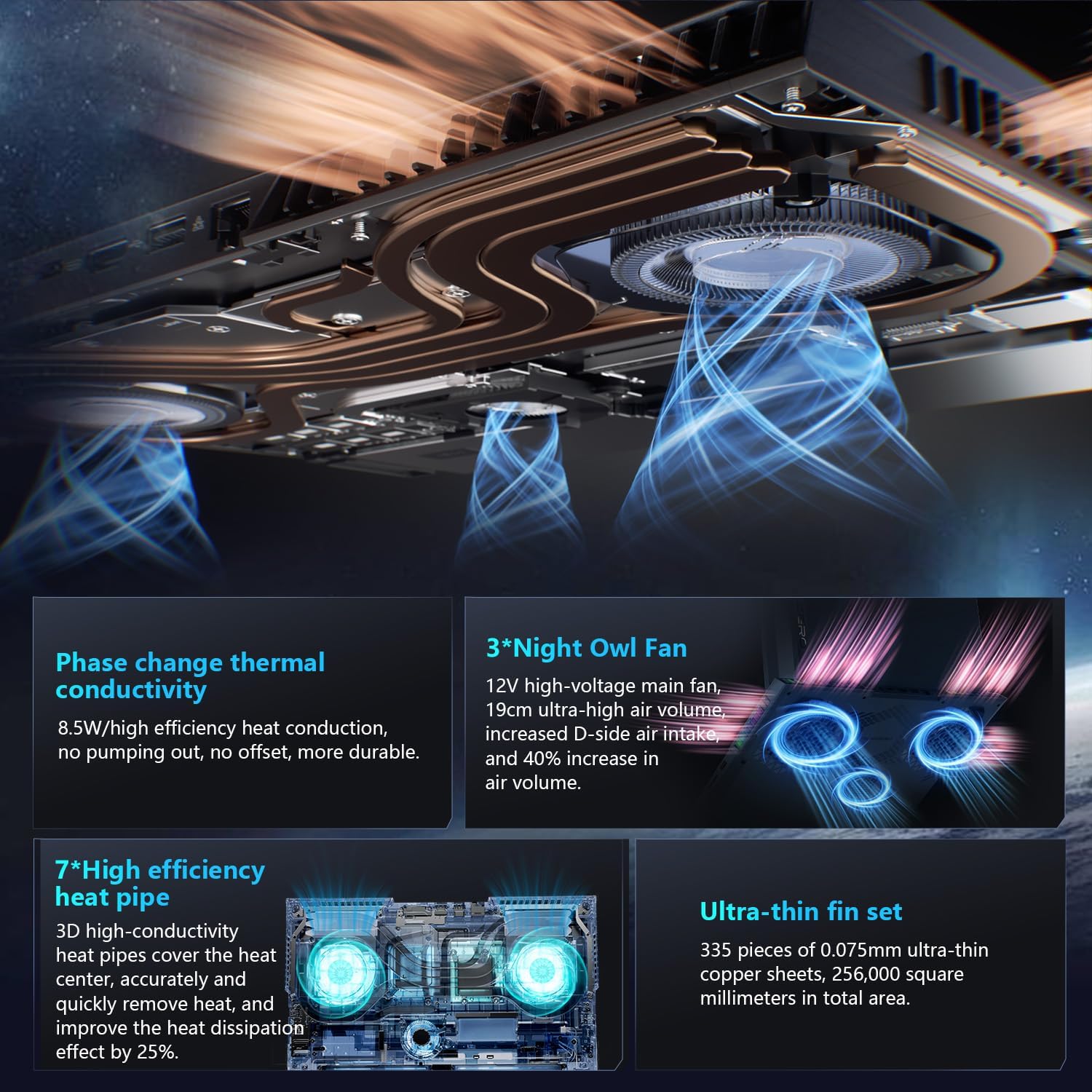
The advanced cooling system features 3 Night Owl fans, 7 high-efficiency heat pipes, and 338 ultra-thin copper fins to ensure optimal thermal management during intensive use, allowing for 270W super performance release.
AI Intelligent Control Center
The AI Intelligent Control Center software allows for comprehensive system management, including performance tuning, intelligent light adjustment, and personalized customization. This includes monitoring CPU/GPU temperatures and fan speeds.
- Performance Tuning: Adjust power settings for quiet, balanced, or turbo modes.
- Intelligent Light Adjustment: Customize keyboard, strip, and logo RGB lighting effects.
- Надгледање система: View real-time CPU and GPU status.
Note: System mode switching in Control Center requires the device to be connected to a power source.
Одржавање
Чишћење лаптопа
- Екран: Лагано користите меку крпу која не оставља длачице дampводом или средством за чишћење екрана. Избегавајте јаке хемикалије.
- Тастатура и кућиште: Користите меку крпу за брисање површина. За прашину у пукотинама користите компримовани ваздух.
- Вентс: Периодично чистите отворе за хлађење компримованим ваздухом како бисте спречили накупљање прашине, што може утицати на перформансе.
Баттери Царе
- Избегавајте често потпуно пражњење батерије.
- Чувајте лаптоп на хладном и сувом месту ако га не користите дуже време.
- За оптимално здравље батерије, избегавајте екстремне температуре.
Ажурирања софтвера
Regularly check for and install operating system updates (Windows Update) and driver updates (via Thunderobot's official website or the AI Intelligent Control Center) to ensure system stability and performance.
Решавање проблема
| Проблем | Могући узрок | Решење |
|---|---|---|
| Лаптоп се не укључује. | Нема напајања, празна батерија или проблем са хардвером. |
|
| Екран је празан или црн. | Проблем са подешавањима екрана, повезаним спољним монитором или хардвером. |
|
| Прегревање током употребе. | Blocked vents, high performance settings, or dust buildup. |
|
| Проблеми са Wi-Fi везом. | Ви-Фи је онемогућен, проблеми са драјверима или проблеми са рутером. |
|
For further assistance, please contact Thunderobot customer support.
Спецификације
| Феатуре | Детаљ |
|---|---|
| Назив модела | Zero 18 Pro |
| Процесор | Intel Core Ultra 9 275HX (24 Cores, 24 Threads, up to 5.40GHz) |
| Графика | NVIDIA GeForce RTX 5070 Ti (8 GB GDDR6 Dedicated) |
| РАМ | 32 GB DDR5 (4800 MHz) |
| Складиштење | 2 TB PCIe M.2 SSD |
| Дисплаи | 18-inch QHD+ (2560x1600) 240Hz Bionic Hummingbird Eye-Care Display |
| Оперативни систем | Виндовс 11 Хоме |
| Повезивање | Wi-Fi 6E, Bluetooth, 3x USB-A, 2x USB-C (Thunderbolt 5), HDMI 2.1, RJ-45, Audio Port |
| Тастатура | Per-Key RGB Backlit, Numeric Keypad |
| Димензије (ДкШкВ) | 16.04 к 11.78 к 1.41 инча |
| Тежина артикла | 15 фунти |
| Извор напајања | АЦ & Батерија |
Гаранција и подршка
Every Thunderobot laptop includes a 12-месечна гаранција, offering expert support, thorough diagnostics, and genuine parts if a repair is needed. Additionally, a 90-дневна гаранција is provided on all warranty replacement parts, ensuring hassle-free repairs. Your complete satisfaction is our commitment.
For technical support, warranty claims, or service inquiries, please visit the official Thunderobot website or contact their customer service department. Keep your purchase receipt and serial number handy for faster service.