
Увод
The Surfans F28 is a high-fidelity portable music player designed to deliver an immersive audio experience. Featuring dual ESS9018 DACs, a 4.4mm balanced output, and comprehensive Bluetooth 5.2 support including LDAC and aptX HD, the F28 supports a wide range of lossless audio formats. This manual provides detailed instructions for setting up, operating, maintaining, and troubleshooting your device to ensure optimal performance and longevity.

Слика 1: Предња и задња страна view of the Surfans F28 HiFi Music Player.
Садржај пакета
Молимо вас да проверите да ли се у вашем пакету налазе све доле наведене ставке:
- 1x Surfans F28 HiFi Music Player
- 1к УСБ-Ц кабл за пуњење
- 1x 128GB Micro SD Card (pre-installed or included separately)
- 1x Упутство за употребу (овај документ)

Figure 2: Illustration of typical package contents.
Производ је завршенview
Familiarize yourself with the various components and controls of your F28 music player.
Кључне карактеристике:
- Dual ESS9018 DACs: For high-resolution audio decoding and minimal distortion.
- 4.4 мм балансирани излаз: Provides enhanced audio quality and power for demanding headphones.
- 3.5 мм једнострани излаз: Standard audio output for common headphones.
- Двосмерни Bluetooth 5.2: Supports LDAC and aptX HD for high-quality wireless audio transmission and reception.
- 3.5-инчни IPS екран осетљив на додир: For intuitive navigation and control.
- ALPS Analog Volume Knob: For precise volume adjustments.
- Прошириво складиште: Supports Micro SD cards up to 512GB.
- УСБ-Ц порт: За пуњење и пренос података.

Figure 3: The F28 player showcasing its display and audio capabilities.

Figure 4: The dual ESS9018K2M DAC chips, central to the F28's high-fidelity audio.

Figure 5: Top panel with 4.4mm balanced and 3.5mm single-ended audio outputs, and the ALPS analog volume knob.
Сетуп
1. Пуњење уређаја
Before first use, fully charge the F28. Connect the included USB-C cable to the player's USB-C port and the other end to a USB power adapter (5V/1A recommended) or a computer's USB port. The charging indicator will show the charging status. A full charge typically takes several hours.
2. Уметање микро СД картице
The F28 supports Micro SD cards up to 512GB. Locate the Micro SD card slot on the bottom of the device. Gently insert the Micro SD card with the gold contacts facing down until it clicks into place. To remove, push the card in slightly until it springs out.

Figure 6: Inserting the Micro SD card and connecting via USB-C for data transfer.
3. Пренос музике Files
Connect the F28 to your computer using the USB-C cable. The player will appear as a removable storage device. You can then drag and drop your music files directly into the Micro SD card's folders. The F28 supports various lossless formats including DSD (DSF/DFF), FLAC/WAV (up to 384kHz), AIFF/APE, as well as MP3/AAC.

Figure 7: Supported audio file formats for the F28 player.
Упутство за употребу
1. Укључивање/искључивање
- Укључено: Press and hold the power button (located on the side) until the screen illuminates.
- Искључивање: Press and hold the power button until a power-off prompt appears, then confirm.
2. Основна навигација
The F28 features a 3.5-inch IPS touchscreen for primary navigation. Swipe gestures and taps are used to select options and move between menus. Physical buttons on the side provide additional control for playback (play/pause, next/previous track) and menu navigation.
3. Репродукција музике
From the main menu, select "My Music" or "Folder" to browse your audio files. Tap on a song to begin playback. The playback screen displays track information, progress, and playback controls.
4. Контрола јачине звука
Adjust the volume using the gold-colored ALPS analog knob located on the top right of the device. Rotate clockwise to increase volume and counter-clockwise to decrease. The volume level will be displayed on the screen.
5. Блуетоотх повезивање
The F28 supports Bidirectional Bluetooth 5.2 with LDAC and aptX HD codecs for high-quality wireless audio. To pair with Bluetooth headphones or speakers:
- Go to "System Settings" and select "Bluetooth".
- Укључите Блуетоотх.
- The player will scan for available devices. Select your device from the list to pair.
The F28 can also act as a Bluetooth receiver, allowing you to stream audio from your phone or PC to the player.

Figure 8: The F28 features a Bluetooth 5.2 chip for stable and high-quality wireless connections.
6. Подешавања еквилајзера
The F28 includes an equalizer to customize your sound. Navigate to the "Equalizer" option in the settings. You can choose from various presets or create a custom sound profile by adjusting the frequency bands.
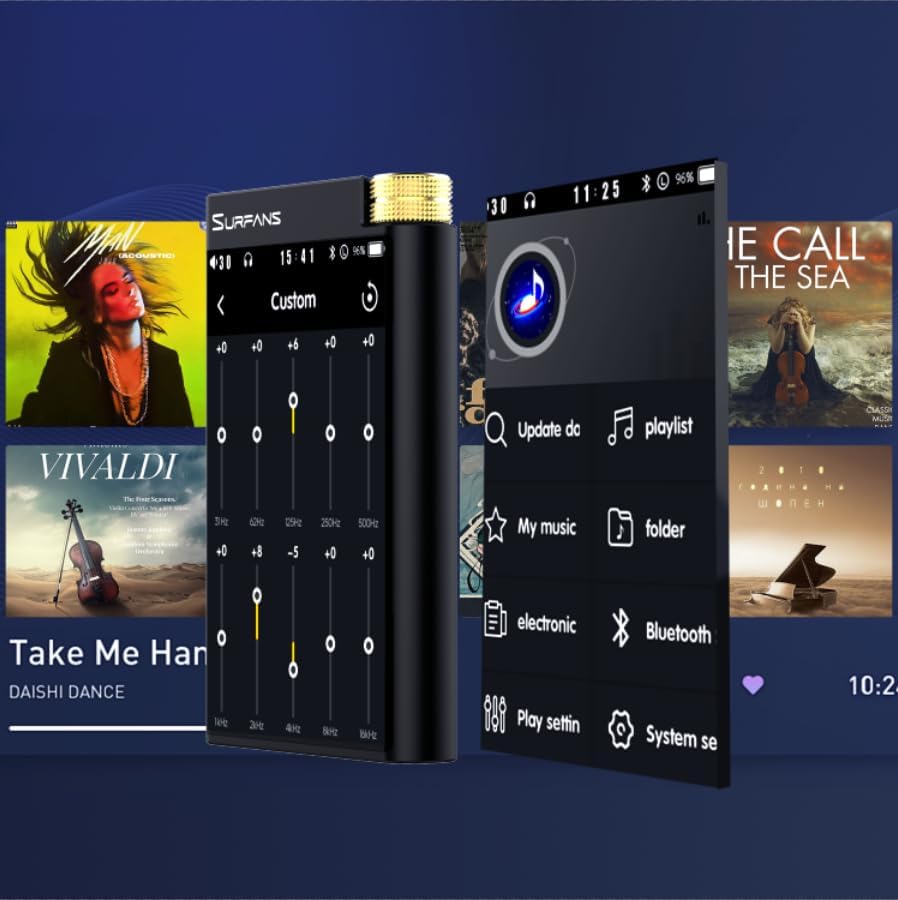
Figure 9: Customizing audio with the built-in equalizer.
7. Connecting to External Devices
Use the 4.4mm balanced or 3.5mm single-ended output to connect to headphones, amplifiers, or speakers. The USB-C port also supports USB DAC functionality, allowing the F28 to act as an external sound card for your computer.

Figure 10: The F28 can be connected to various audio systems, including acting as a USB DAC for computers.
Одржавање
- Чишћење: Користите меку, суву крпу за чишћење уређаја. Избегавајте употребу абразивних средстава за чишћење или растварача.
- Складиштење: Чувајте плејер на хладном и сувом месту, даље од директне сунчеве светлости и екстремних температура.
- Одржавање батерије: Да бисте продужили век трајања батерије, избегавајте често потпуно пражњење батерије. Ако је складиштите дуже време, пуните је до око 50% сваких неколико месеци.
Решавање проблема
| Проблем | Могући узрок | Решење |
|---|---|---|
| Уређај се не укључује. | Слаба батерија; уређај се замрзнуо. | Charge the device for at least 30 minutes. If still unresponsive, try holding the power button for 10-15 seconds for a hard reset. |
| Touchscreen is unresponsive or slow. | Привремени софтверски квар; сметње заштитника екрана. | Restart the device. Ensure the screen is clean and free of debris. If using a screen protector, ensure it is properly applied and not too thick. |
| Проблеми са упаривањем преко Bluetooth-а. | Device not in pairing mode; distance; interference. | Ensure both devices are in pairing mode and within range. Turn off and on Bluetooth on both devices. Clear previous pairings if necessary. |
| Low volume via Bluetooth. | Volume settings on both devices; codec compatibility. | Increase volume on both the F28 and the connected Bluetooth device. Ensure optimal codec (LDAC/aptX HD) is selected if supported by the receiving device. |
| Музика files not recognized or played in incorrect order. | Корумпиран files; file system indexing issue. | Осигурати files are in supported formats. Re-scan the music library from the player's settings. If issues persist, try reformatting the Micro SD card (backup data first) and re-transferring files. Note: Some players may sort by filename alphabetically rather than track number metadata. |
Спецификације
| Феатуре | Детаљ |
|---|---|
| Назив модела | F28 128G |
| Димензије производа | 0.7 к 2.6 к 4.7 инча |
| Тежина артикла | 9.6 унци |
| ДАЦ Цхип | Dual ESS9018K2M |
| Подржани аудио формати | DSD (DSF/DFF), FLAC/WAV (up to 384kHz/32-bit), AIFF/APE, MP3/AAC, WMA Lossless |
| Блуетоотх верзија | 5.2 (Bidirectional, supports LDAC/aptX HD) |
| Величина екрана | 3.5-инчни IPS екран осетљив на додир |
| Интерна меморија | 128GB (included Micro SD card) |
| Екпандабле Стораге | Up to 512GB via Micro SD card |
| Батерија | 1x 12V battery (included), approx. 12-hour playback |
| Излазни портови | 4.4 мм балансирани, 3.5 мм једнострани |
| Технологија повезивања | Aux, Bluetooth 5.2, USB-C |
| Посебна карактеристика | Еквилајзер |
Гаранција и подршка
For warranty information and technical support, please refer to the official Surfans webсајт или директно контактирајте њихову корисничку службу. Сачувајте рачун као доказ о куповини за потребе гаранције.
You can visit the official Surfans Store on Amazon for more information and support: Surfans Audio Store


