
Важне информације о безбедности
Please read all safety instructions before using this product to ensure proper and safe operation.
- Do not expose the earbuds or charging case to extreme temperatures.
- Избегавајте испуштање или примену прекомерне силе на уређај.
- Чувати ван домашаја деце и кућних љубимаца.
- Use only a 5V adapter to charge the charging case to prevent battery damage.
- Do not use the earbuds in the bath or while swimming.
Садржај пакета
Проверите да ли су све ставке присутне у вашем пакету:
- ZIUTY A1 Wireless Earbuds (x1 pair)
- Portable Charging Case (x1)
- УСБ-Ц кабл за пуњење (к1)
- Eartips (pre-installed size M, plus 2 extra pairs in sizes S & L)
- Кориснички приручник (овај документ)
Производ је завршенview
Familiarize yourself with the components of your ZIUTY A1 Wireless Earbuds.
Слушалице и торбица за пуњење
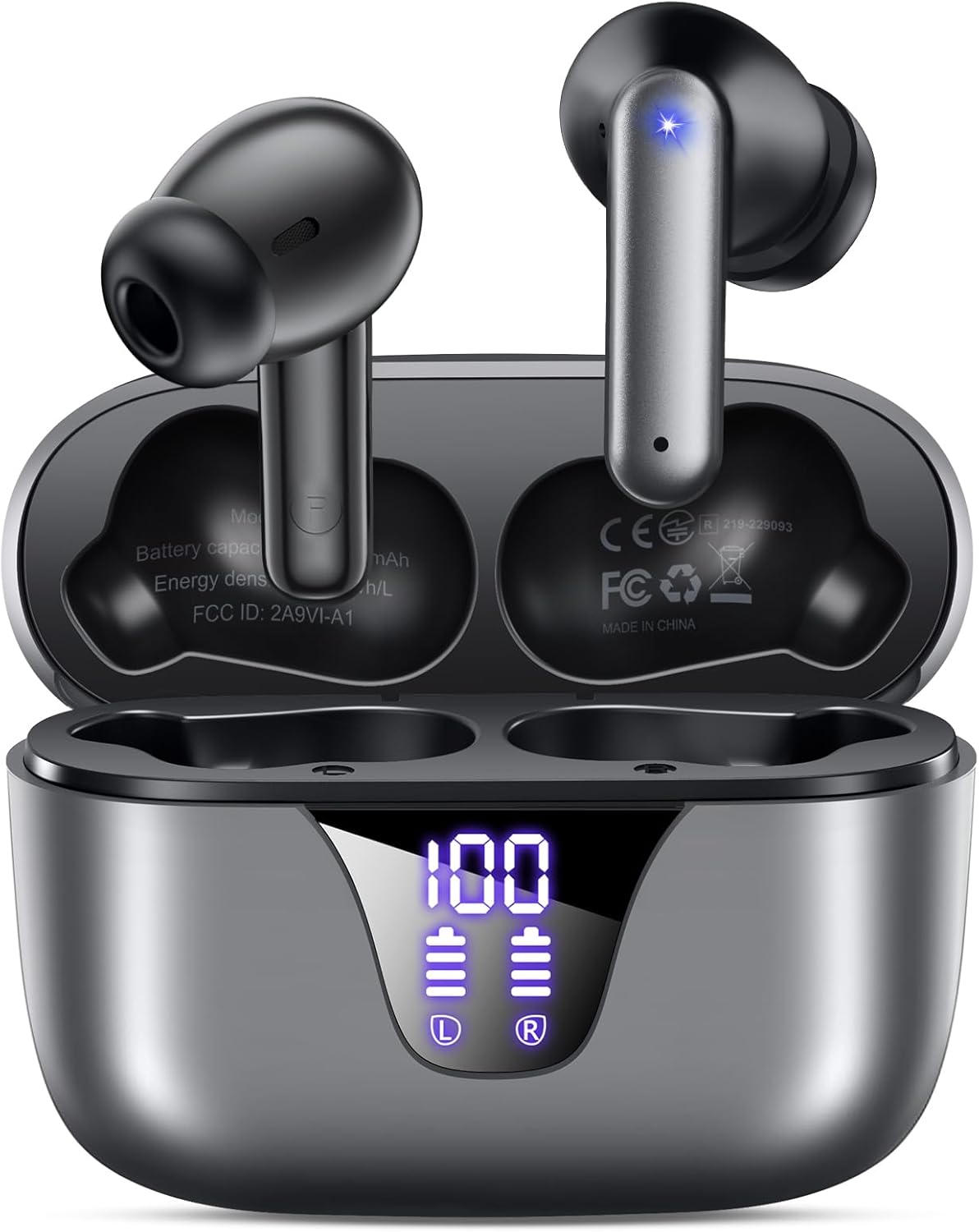
Image: ZIUTY A1 Wireless Earbuds shown inside their open charging case. The case features an LED digital display indicating battery levels for both the case and individual earbuds.
ЛЕД приказ снаге

Image: Close-up of the ZIUTY A1 charging case's LED display, showing '100' for the case battery and individual battery icons for the left (L) and right (R) earbuds.
The charging case features an LED digital display that shows the exact remaining power percentage (0-100%) for the case and individual battery levels for each earbud.
Сетуп
1. Пуњење слушалица и футроле
Пре прве употребе, потпуно напуните слушалице и кућиште за пуњење.
- Ставите слушалице у кутијицу за пуњење. Уверите се да су правилно постављене у одговарајуће отворе (Л за лево, Д за десно).
- Connect the USB-C charging cable to the charging port on the case and the other end to a 5V USB power adapter (not included).
- The LED display on the case will show the charging status. A full charge typically takes approximately 2 hours.

Image: ZIUTY A1 earbuds resting in their charging case, with the LED display showing battery levels.

Image: Diagram illustrating how to connect the USB-C cable to the charging case and a 5V power adapter for charging.
2. Ношење слушалица
For optimal sound quality and comfort, select the correct ear tip size and ensure a secure fit.
- Choose the ear tips (S, M, L) that provide the best seal and comfort for your ears.
- Insert the earbuds into your ears, gently twisting them to find a snug and stable position.
- The ergonomic semi-in-ear design is intended for a comfortable fit during various activities.

Image: Diagram showing the ergonomic design of the earbuds and the three available ear tip sizes (S, M, L) for a customized fit.

Image: Step-by-step visual guide on how to correctly insert and adjust the earbuds for a secure fit.
3. Упаривање са Блуетоотх уређајем
Слушалице ће аутоматски ући у режим упаривања када се изваде из кућишта за пуњење.
- Отворите кућиште за пуњење и извадите обе слушалице. Оне ће се аутоматски укључити и покушати да се упаре једна са другом.
- На свом уређају (паметном телефону, таблету, лаптопу) омогућите Блутут и потражите доступне уређаје.
- Select "A1" from the list of found devices.
- Када се повежу, чућете звучну потврду и слушалице ће бити спремне за употребу.
- The earbuds will automatically reconnect to the last paired device when removed from the case.

Image: Illustration showing the ZIUTY A1 earbuds connecting via Bluetooth 5.3 to a smartphone, indicating a stable and fast connection.

Image: Diagram demonstrating the one-step auto-pairing process when the earbuds are removed from the charging case.
Упутство за употребу
Додирните контроле
The ZIUTY A1 earbuds feature intuitive touch controls for managing audio playback and calls.

Image: Diagram illustrating the touch control area on the earbuds and various functions like Play/Pause, Voice Assistant, Answer/Hang up, Previous/Next Track, and Volume adjustment.

Image: A more detailed visual guide to the touch controls, showing specific tap and hold gestures for different commands.
| Акција | Функција |
|---|---|
| Један додир (Л/Д) | Пуштање/паузирање музике, одговарање/прекидање позива |
| Двоструки додир (Л) | Превиоус Трацк |
| Двоструки додир (R) | Нект Трацк |
| Троструки додир (Л/Д) | Активирајте гласовни помоћник (Сири, Гоогле помоћник) |
| Press and Hold (L) | Утишавање звука |
| Press and Hold (R) | Волуме Уп |
| Press and Hold (L/R) during incoming call | Одбаци позив |
Упућивање и примање позива
Use the touch controls to manage your phone calls:
- Одговори/заврши позив: Једном додирните било коју слушалицу.
- Одбиј позив: Press and hold either earbud during an incoming call.

Image: Illustration showing a user interacting with a voice assistant (Siri) via the earbuds for clear call support.
Гласовни асистент
Activate your device's voice assistant by triple-tapping either earbud. This allows you to issue commands such as making calls or checking information hands-free.
Одржавање
Чишћење
Редовно чишћење помаже у одржавању оптималних перформанси и хигијене.
- Clean the charging contacts on both the earbuds and inside the charging case with a dry cotton swab or alcohol pad.
- Gently clean the mesh of the ear tips to remove any dust or earwax that might affect sound volume.
- Wipe the exterior of the earbuds and case with a soft, dry cloth.

Image: Visual guide demonstrating how to clean the earbud charging contacts and ear tip mesh to resolve potential volume or charging issues.
Складиштење
Када се не користе, чувајте слушалице у њиховој футроли за пуњење како бисте их заштитили и осигурали да остану напуњене.
Решавање проблема
If you encounter issues with your ZIUTY A1 earbuds, refer to the following common solutions:
- Слушалице се не упарују једна са другом: Place both earbuds back into the charging case, close the lid, wait a few seconds, then open the lid and remove them again. They should automatically pair.
- Слушалице се не повезују са уређајем: Ensure Bluetooth is enabled on your device and the earbuds are in pairing mode. Forget the device from your Bluetooth list and attempt to re-pair.
- Нема звука или је јачина звука ниска: Check the volume levels on both your device and the earbuds. Ensure the ear tips are clean and properly seated in your ears. Refer to the cleaning instructions in the Maintenance section.
- Проблеми са пуњењем: Ensure the charging cable is securely connected and the power adapter is 5V. Clean the charging contacts on both the earbuds and the case.
- Accidental touch control activation: When adjusting the earbuds in your ear, grasp them by the sides to avoid touching the control area.
Спецификације
Key technical specifications for the ZIUTY A1 Wireless Earbuds:
| Феатуре | Спецификација |
|---|---|
| Назив модела | A1 |
| Технологија повезивања | Бежично (Bluetooth 5.3) |
| Блуетоотх домет | До 15 метара (49 стопе) |
| Трајање батерије слушалица | До 8 сати |
| Укупно време репродукције (са футролом) | До 50 сати |
| Капацитет батерије кућишта за пуњење | 500 мАх |
| Време пуњења | Отприлике 2 сата |
| Величина аудио драјвера | 14.5 мм динамички управљачки програм |
| Фреквенцијски опсег | 20 Hz - 20,000 Hz |
| Ниво отпорности на воду | ИПКС7 (отпоран на воду) |
| Тип контроле | Контрола додиром |
| Тежина слушалице | Approximately 0.14 oz (3.9g) per earbud |
| Укључене компоненте | Earbuds, Charging Case, USB-C Cable, Eartips, User Manual |
Гаранција и подршка
Информације о гаранцији
ZIUTY provides an 18-month battery promise for this product. This warranty covers defects in materials and workmanship under normal use.
Корисничка подршка
For any questions, technical assistance, or warranty claims, please contact ZIUTY customer service. Refer to the product packaging or the official ZIUTY webсајт за актуелне контакт податке.