
1. Увод
This manual provides essential information for the proper setup, operation, and maintenance of your FUNYET FUNPAD 10-inch Android Tablet. Please read this guide thoroughly before using your device to ensure optimal performance and longevity.
2. Шта је у кутији
Проверите да ли су све ставке присутне у пакету:
- FUNYET FUNPAD 10-inch Android Tablet
- Повер Адаптер
3. Производ је готовview
The FUNYET FUNPAD is a 10-inch Android tablet featuring an Octa-Core processor, 8GB RAM, 128GB storage, and a metal shell design. It is equipped with dual cameras, Wi-Fi 5, and Bluetooth 5.0 for versatile use.
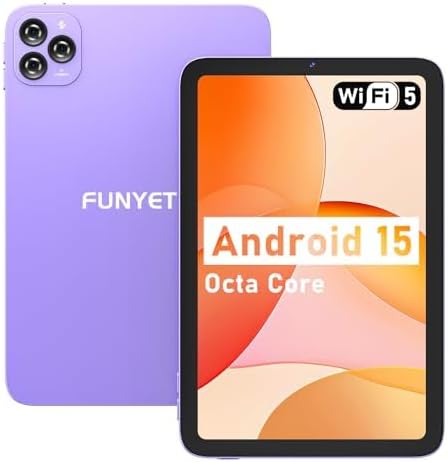
Слика: Предња и задња страна view of the FUNYET FUNPAD 10-inch Android Tablet, showcasing its purple metal shell and camera module.
3.1 Device Layout and Components

Image: Diagram illustrating the various ports and buttons on the FUNYET FUNPAD tablet. This includes the Micro SD Slot, Power On/Off button, Volume buttons, Type-C (Full Function) port, Auto Focus 8MP Rear Camera, Fixed Focus 2MP Front Camera, Flashlight, and Dual Speakers.
- Дугме за напајање: Located on the side, used to power the device on/off or put it to sleep.
- Дугмад за јачину звука: Подесите ниво аудио излаза.
- Порт типа Ц: За пуњење и пренос података.
- Мицро СД слот: Insert a Micro SD card for expandable storage.
- Предња камера: 2МП камера за видео позиве и селфије.
- Задња камера: 8MP autofocus camera with flashlight for capturing photos and videos.
- Двоструки звучници: Обезбедите аудио излаз.
4. Подешавање
4.1 Почетно пуњење
Before first use, fully charge the tablet using the provided power adapter and Type-C cable. The battery indicator on the screen will show charging status.
4.2 Укључивање/искључивање
- За укључивање: Press and hold the Power button until the FUNYET logo appears.
- За искључивање: Притисните и држите дугме за напајање, а затим изаберите „Искључивање“ из опција на екрану.
- Рестартовати: Притисните и држите дугме за напајање, а затим изаберите „Рестарт“ из опција.
4.3 Чаробњак за почетно подешавање
При првом укључивању, таблет ће вас водити кроз процес почетног подешавања. Пратите упутства на екрану да бисте:
- Изаберите свој језик.
- Повежите се на Ви-Фи мрежу.
- Подесите свој Google налог (опционо, али се препоручује за преузимање апликација).
- Конфигуришите датум и време.
5. Упутство за употребу
5.1 Основна навигација
The FUNYET FUNPAD features an In-cell multi-touch display. Use standard Android gestures:
- Додирните: Изаберите ставку или отворите апликацију.
- Превуците: Померајте се кроз екране или листе.
- Прстохват: Увећајте или умањите слике и web странице.
- Дуго притисните: Приступите контекстуалним менијима или померите иконе.
5.2 Wi-Fi повезивање
Да бисте се повезали на Ви-Фи мрежу:
- Иди на Подешавања > Мрежа и интернет > Ви-Фи.
- Укључи/искључи Wi-Fi On.
- Изаберите жељену мрежу са листе.
- Унесите лозинку ако се то од вас затражи, а затим додирните Повежите се.
5.3 Блуетоотх упаривање
To pair with a Bluetooth device (e.g., headphones, speakers):
- Иди на Подешавања > Повезани уређаји > Блуетоотх.
- Укључите Блуетоотх On.
- Уверите се да је ваш Bluetooth уређај у режиму упаривања.
- Изаберите свој уређај са листе доступних уређаја и пратите упутства на екрану да бисте завршили упаривање.
5.4 Употреба камере
The tablet features an 8MP autofocus rear camera and a 2MP fixed-focus front camera.

Image: Visual representation of the FUNYET FUNPAD tablet's camera capabilities, highlighting the 8MP rear camera with autofocus and flashlight, and the 2MP front camera. Example photos are displayed.
- Отворите Камера апп.
- Додирните икону камере да бисте пребацивали између предње и задње камере.
- Додирните дугме затварача да бисте снимили фотографију или покренули/зауставили снимање видеа.
5.5 Управљање складиштем
The tablet comes with 128GB of internal storage. You can expand this by inserting a Micro SD card (up to 1TB capacity).

Image: The FUNYET FUNPAD tablet screen showing icons for 128GB ROM, 8GB RAM, and 1TB Micro SD expansion, indicating ample storage and expandability.
Да бисте управљали складиштем:
- Иди на Подешавања > Складиштење.
- View internal storage usage and manage files.
- Insert a Micro SD card into the designated slot to expand storage.
5.6 Управљање батеријом
The tablet is equipped with a 6000mAh battery for extended usage.

Image: The FUNYET FUNPAD tablet being used for various activities like watching videos and video calls, illustrating its long-lasting 6000mAh battery.
- To check battery status, go to Подешавања > Батерија.
- For optimal battery life, avoid extreme temperatures and use the provided charger.
5.7 ГПС навигација
The tablet supports GPS, GLONASS, and BDS for accurate location services. Ensure location services are enabled in Подешавања > Локација for navigation apps to function correctly.
6. Одржавање
6.1 Чишћење уређаја
- Користите меку крпу која не оставља влакна за чишћење екрана и кућишта.
- Избегавајте употребу јаких хемикалија или абразивних материјала.
- Не прскајте средства за чишћење директно на екран.
6.2 Ажурирања софтвера
Regularly check for and install software updates to ensure your tablet has the latest features and security enhancements. Go to Подешавања > Систем > Ажурирање система.
6.3 Одржавање батерије
- Избегавајте често потпуно пражњење батерије.
- Do not expose the tablet to extreme heat or cold.
- If the tablet will not be used for an extended period, charge it to about 50% before storing.
КСНУМКС. Решавање проблема
If you encounter issues with your FUNYET FUNPAD, refer to the following common solutions:
| Проблем | Могуће решење |
|---|---|
| Таблет се не укључује | Ensure the battery is charged. Connect the tablet to the charger for at least 30 minutes, then try powering on again. |
| Проблеми са Ви-Фи везом | Restart the tablet and your Wi-Fi router. Forget the network in Wi-Fi settings and reconnect. Ensure you are within range. |
| Споре перформансе или замрзавање | Close unnecessary background apps. Clear cache for problematic apps. Restart the tablet. Check for available storage space. |
| Екран не реагује | Perform a forced restart by holding the Power button for approximately 10-15 seconds. If the issue persists, consider a factory reset (data will be lost). |
| Device reboots unexpectedly | Ensure the device is updated to the latest software. Check for conflicting apps. If the issue persists, a factory reset may be necessary. |
7.1 Ресетовање на фабричка подешавања
Фабричко враћање ће обрисати све податке са таблета и вратити га на оригинална фабричка подешавања. Ово треба сматрати последњом мером за сталне проблеме са софтвером.
- Back up any important data.
- Иди на Подешавања > Систем > Опције ресетовања > Обриши све податке (ресетовање на фабричка подешавања).
- Confirm your choice and follow the on-screen instructions.
8. Спецификације
Key technical specifications for the FUNYET FUNPAD 10-inch Android Tablet:
| Феатуре | Спецификација |
|---|---|
| Величина екрана | 10 инча |
| Резолуција екрана | 800x1280 пиксела |
| Процесор | 1.6 GHz Octa-Core (Spreadtrum T606) |
| Грапхицс Цопроцессор | Мали-Г57 |
| РАМ | 8 ГБ |
| Интерна меморија | 128 ГБ |
| Екпандабле Стораге | Мицро СД (до 1ТБ) |
| Оперативни систем | Андроид |
| Вирелесс Типе | 802.11ac (Wi-Fi 5) |
| Блуетоотх | Блуетоотх 5.0 |
| Задња камера | 8МП аутоматски фокус |
| Предња камера | 2МП Фиксни фокус |
| Батерија | 6000мАх |
| Тежина артикла | 1.74 фунти |
| Димензије производа | 9.48 к 6.28 к 0.3 инча |
9. Гаранција и подршка
FUNYET is dedicated to providing quality electronic products. We offer a 30-day free exchange policy and a 1-year free repair service for all our products.
If you have any questions or require assistance with your FUNYET FUNPAD tablet, please contact FUNYET support. We aim to reply to all inquiries within 24 hours.
For further information or to explore other products, visit the official FUNYET store: FUNYET Store on Amazon