
RECCAZR B0F8NPXKWL
RECCAZR Wireless Keyboard and Mouse Combo User Manual
Model: B0F8NPXKWL
Увод
This manual provides instructions for the RECCAZR Wireless Keyboard and Mouse Combo, designed for comfortable and efficient use. This combo features an ergonomic wave-key keyboard with a palm rest and a silent mouse with adjustable DPI settings, connecting wirelessly via a 2.4GHz USB receiver.
Кључне карактеристике укључују:
- Ergonomic wave-key design and integrated palm rest for natural typing posture.
- 2.4GHz wireless connection with a single nano USB receiver for both devices.
- Spill-resistant keyboard design for enhanced durability.
- Silent mouse with 3 adjustable DPI levels (800-1200-1600) and quiet clicks.
- Wide compatibility with Windows, Mac OS, and Linux operating systems.
Упутства за подешавање
1. Распакивање и компоненте
Уверите се да су све компоненте присутне:
- Бежична ергономска тастатура
- Бежични тихи миш
- Nano USB Receiver (stored in the mouse battery compartment)
- Упутство за употребу
2. Инсталација батерије
The keyboard requires 1 AA battery and the mouse requires 1 AA battery (batteries not included).
- Пронађите одељак за батерију на доњој страни тастатуре и миша.
- Отворите поклопац одељка за батерије.
- Insert one AA battery into each device, ensuring correct polarity (+/-).
- Затворите поклопац одељка за батерије.

Figure 1: Battery installation and power management features. The USB receiver is stored next to the mouse battery compartment.
3. Connecting the Devices
The keyboard and mouse share a single nano USB receiver.
- Remove the nano USB receiver from the battery compartment of the mouse.
- Укључите УСБ пријемник у слободан УСБ порт на рачунару.
- Turn on the keyboard and mouse using their respective ON/OFF switches, located on the underside of each device.
- The devices should connect automatically. No additional drivers or software are required.

Figure 2: Wireless connection setup. The 2-in-1 USB receiver enables a stable 2.4GHz connection up to 33 feet.
Упутство за употребу
Употреба тастатуре
The ergonomic keyboard features a wave-key layout and an integrated palm rest for comfortable typing. It includes standard F-keys (function keys) and a number pad for efficient data entry.
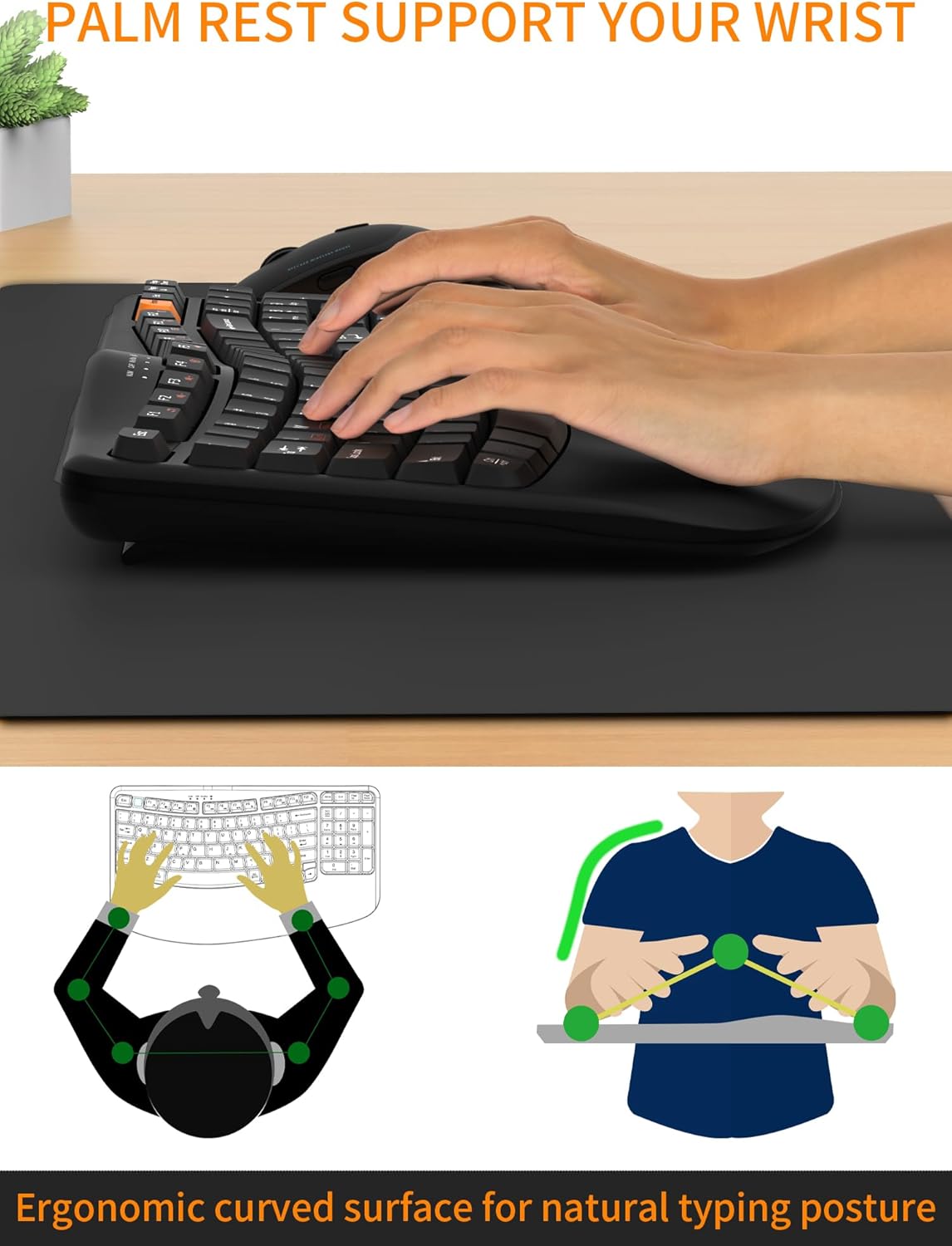
Figure 3: Ergonomic design with palm rest for improved wrist comfort.
Function Keys (F-keys)
The keyboard includes a row of F-keys (F1-F12) that can perform various functions depending on your operating system and active applications. Some keys may have secondary functions accessible by pressing the Fn тастер истовремено.
Compatibility Layouts
The keyboard supports both Windows and Mac OS layouts. Use the following key combinations to switch between modes:
- ФН + К: Mac OS layout (Option, Cmd, Clear)
- ФН + В: Windows layout (Win, Alt, Num Lock)
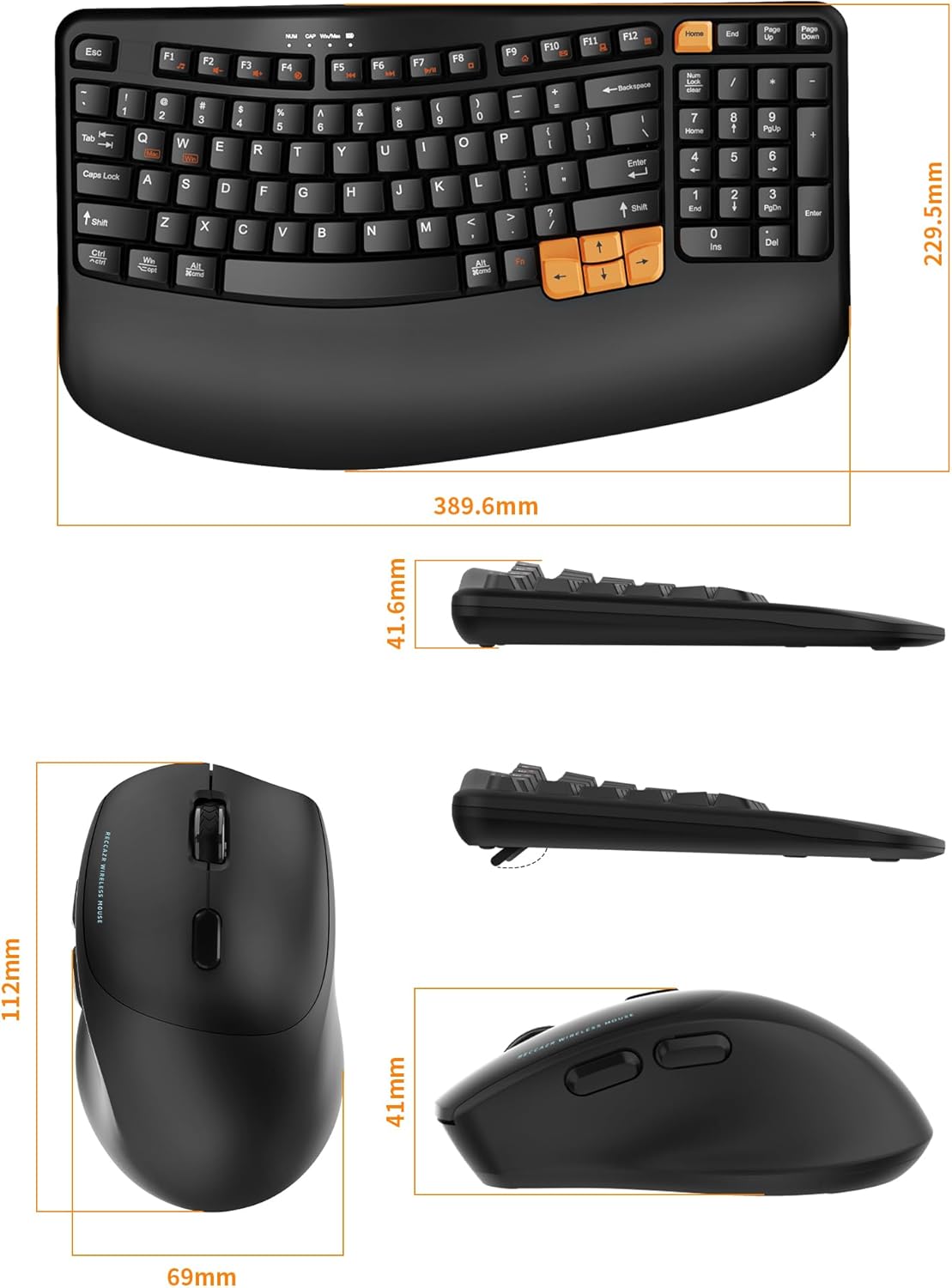
Figure 4: Keyboard compatibility with Windows and Mac operating systems.
Употреба миша
The silent ergonomic mouse provides comfortable navigation with quiet clicks, reducing noise in shared environments.
ДПИ Адјустмент
The mouse features 3 adjustable DPI (Dots Per Inch) levels to control cursor sensitivity. Press the DPI button, usually located near the scroll wheel, to cycle through the settings: 800, 1200, and 1600 DPI.
Додатна дугмад
The mouse includes dedicated "Next" and "Previous" buttons on the side for convenient web page browsing.

Figure 5: Features of the silent ergonomic mouse, including DPI adjustment and navigation buttons.
Одржавање
Чишћење
Да бисте очистили тастатуру и миш, користите меку,amp cloth. Avoid using harsh chemicals or abrasive cleaners. Ensure devices are powered off before cleaning.
Дизајн отпоран на проливање
The keyboard features a spill-resistant design with drainage holes at the bottom to protect against minor liquid spills. In case of a spill:
- Immediately disconnect the USB receiver from your computer.
- Turn off the keyboard and remove the battery.
- Invert the keyboard to allow liquid to drain through the drainage holes.
- Allow the keyboard to dry completely before reinserting the battery and reconnecting.
Напомена: The spill-resistant feature is designed for minor spills and does not guarantee protection against heavy liquid exposure or submersion.

Figure 6: Spill-resistant keyboard design.
Решавање проблема
If you encounter issues with your RECCAZR Wireless Keyboard and Mouse Combo, please refer to the following common solutions:
- Уређаји не реагују:
- Ensure the ON/OFF switches on both the keyboard and mouse are in the "ON" position.
- Проверите да ли су батерије правилно постављене и да ли су довољно напуњене. Замените батерије ако је потребно.
- Уверите се да је USB пријемник безбедно прикључен на исправан USB порт на рачунару. Покушајте са другим USB портом.
- Move the keyboard and mouse closer to the USB receiver to rule out range issues. The effective range is up to 33 feet (10 meters).
- Кашњење или повремена веза:
- Смањите сметње тако што ћете друге бежичне уређаје (нпр. Wi-Fi рутере, бежичне телефоне) удаљити од пријемника.
- Уверите се да између уређаја и пријемника нема великих металних предмета.
- Try plugging the USB receiver into a different USB port, preferably a direct port on the computer rather than a hub.
- Specific keys or mouse buttons not working:
- Check for physical obstructions or debris under the keys/buttons.
- If a spill occurred, ensure the device is completely dry.
- Re-establish the connection by unplugging and re-plugging the USB receiver.
- Курсор миша је неправилан или се не креће глатко:
- Clean the mouse sensor on the underside of the mouse.
- Уверите се да користите миш на одговарајућој површини (не јако рефлектујућој или провидној).
- Подесите DPI подешавање помоћу дугмета DPI на мишу.
Спецификације
| Феатуре | Детаљ |
|---|---|
| Бранд | РЕЦЦАЗР |
| Модел | Wireless Keyboard and Mouse Combo (B0F8NPXKWL) |
| Технологија повезивања | 2.4 GHz бежични (USB пријемник) |
| Домет | До 10 метара (33 стопе) |
| Распоред тастатуре | QWERTY, Full-size with Number Pad |
| Број кључева | 97 |
| Специјалне функције тастатуре | Ergonomic Wave Keys, Integrated Palm Rest, Spill-Resistant Design, Foldable Stands |
| Нивои DPI миша | 800, 1200, 1600 (Подесиво) |
| Карактеристике миша | Silent Clicks, Next/Previous Buttons |
| Извор напајања | Battery Powered (1x AA for keyboard, 1x AA for mouse - not included) |
| Компатибилни оперативни системи | Windows XP/Vista/7/8/10/11, Mac OS, Linux |
| Keyboard Dimensions (approx.) | 389.6 мм (Д) к 229.5 мм (Ш) к 41.6 мм (В) |
| Mouse Dimensions (approx.) | 112 мм (Д) к 69 мм (Ш) к 41 мм (В) |
| Тежина артикла | 1.4 Kilograms (combined) |

Figure 7: Physical dimensions of the keyboard and mouse.
Гаранција и подршка
RECCAZR products are designed for reliability and performance. For any issues or inquiries regarding your Wireless Keyboard and Mouse Combo, please contact our customer support.
Корисничка подршка: If you encounter any problems during use, please contact us via Amazon email. We are committed to providing a satisfactory solution.
Молимо погледајте документацију о куповини за конкретне услове гаранције.
Ask a question about this manual
Ask about setup, troubleshooting, compatibility, parts, safety, or missing instructions. Manuals+ will review the question and use this page’s manual context to help answer it.