
E-ACE DMMRUTXB
E-ACE 4.3-Inch Dual Lens Car DVR Rearview Миррор Дасх Цам кориснички приручник
Model: DMMRUTXB
1. Производ је готовview
The E-ACE 4.3-inch Dual Lens Car DVR Rearview Mirror Dash Cam is designed to enhance driving safety by providing comprehensive video recording of your journeys. This device integrates a front-facing camera and supports an optional rear-facing camera, offering a wide field of view and continuous recording capabilities. Its sleek design replaces your existing rearview mirror, providing a discreet and integrated solution for vehicle surveillance.
Key features include a 4.3-inch high-definition display, dual-lens recording, night vision, loop recording, and a G-sensor for automatic incident detection.

Image: The E-ACE rearview mirror dash cam displaying both front and rear camera feeds on its integrated screen.
2. Садржај пакета
Молимо вас да проверите пакет за следеће ставке:
- E-ACE Rearview Mirror Dash Cam Unit
- Цар Цхаргер
- Fixed Bandages (for mounting)
- Упутство за употребу
- Читач картица
- Опционо: Задњи View Camera + Cable (6M or 10M, depending on variant)
- Optional: Buck Line (for parking monitoring power)
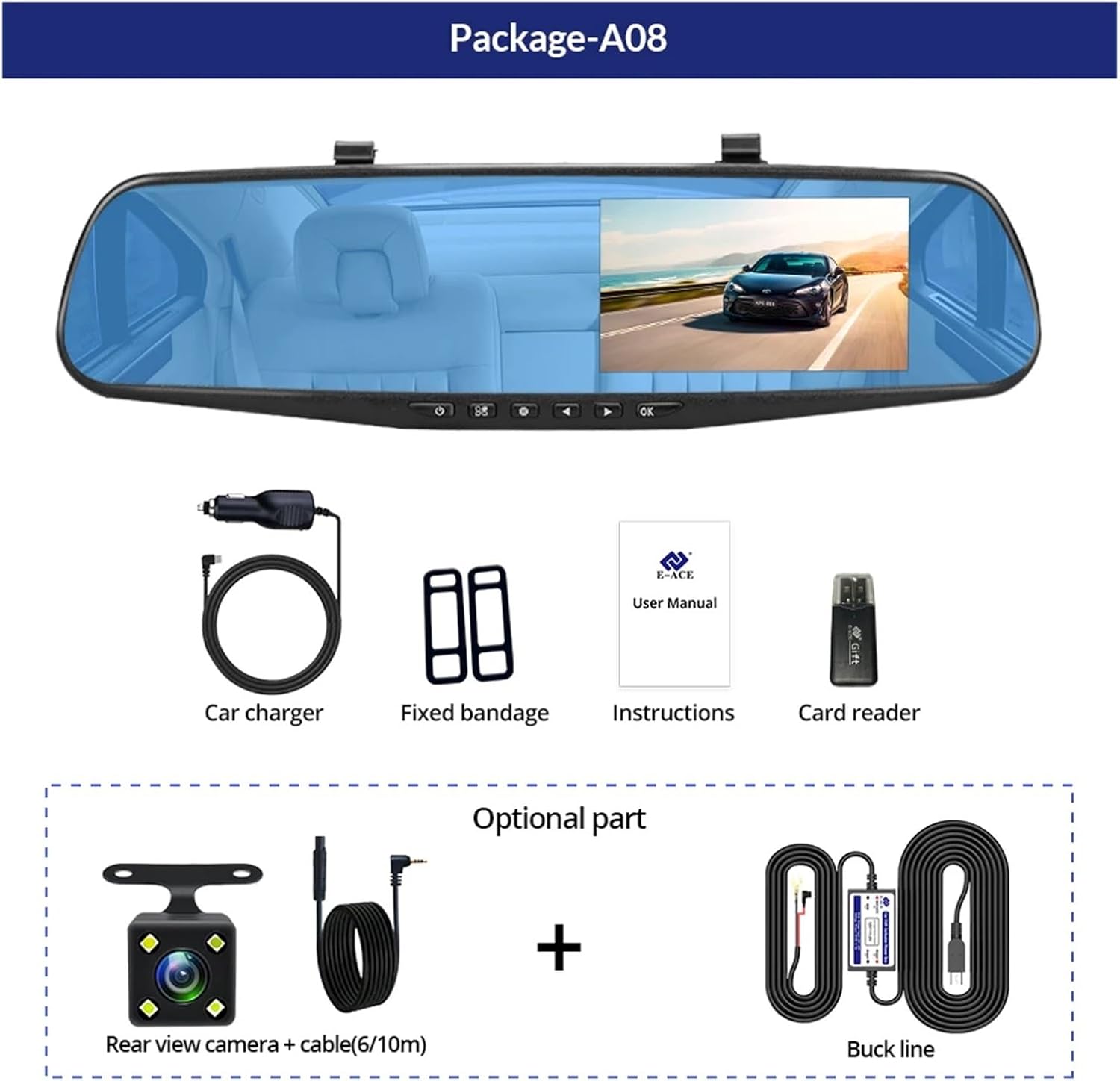
Image: A visual representation of the items included in the E-ACE dash cam package, showing the main unit and accessories.
3. Карактеристике производа
- 4.3-inch High-Definition Display: Provides clear visibility for real-time monitoring and playback.
- Dual Lens Design: Captures both front and rear footage simultaneously for comprehensive coverage.
- Built-in Night Vision Technology: Ensures clear recordings in low-light conditions.
- Инсталација прилагођена кориснику: Sleek rearview mirror design integrates seamlessly into your vehicle.
- Лооп Рецординг: Аутоматски преписује најстарији footagе када је меморијска картица пуна, обезбеђујући континуирано снимање.
- G-Sensor Feature: Detects sudden movements or impacts and automatically locks the current video file да би се спречило његово преписивање.
- Надзор паркирања: Records video when motion or impact is detected while the vehicle is parked (requires buck line connection).
- 170-Degree Wide Angle: Пружа широк view пута испред.
- Реверзна слика: Displays the rear camera view with parking guidelines when reversing.
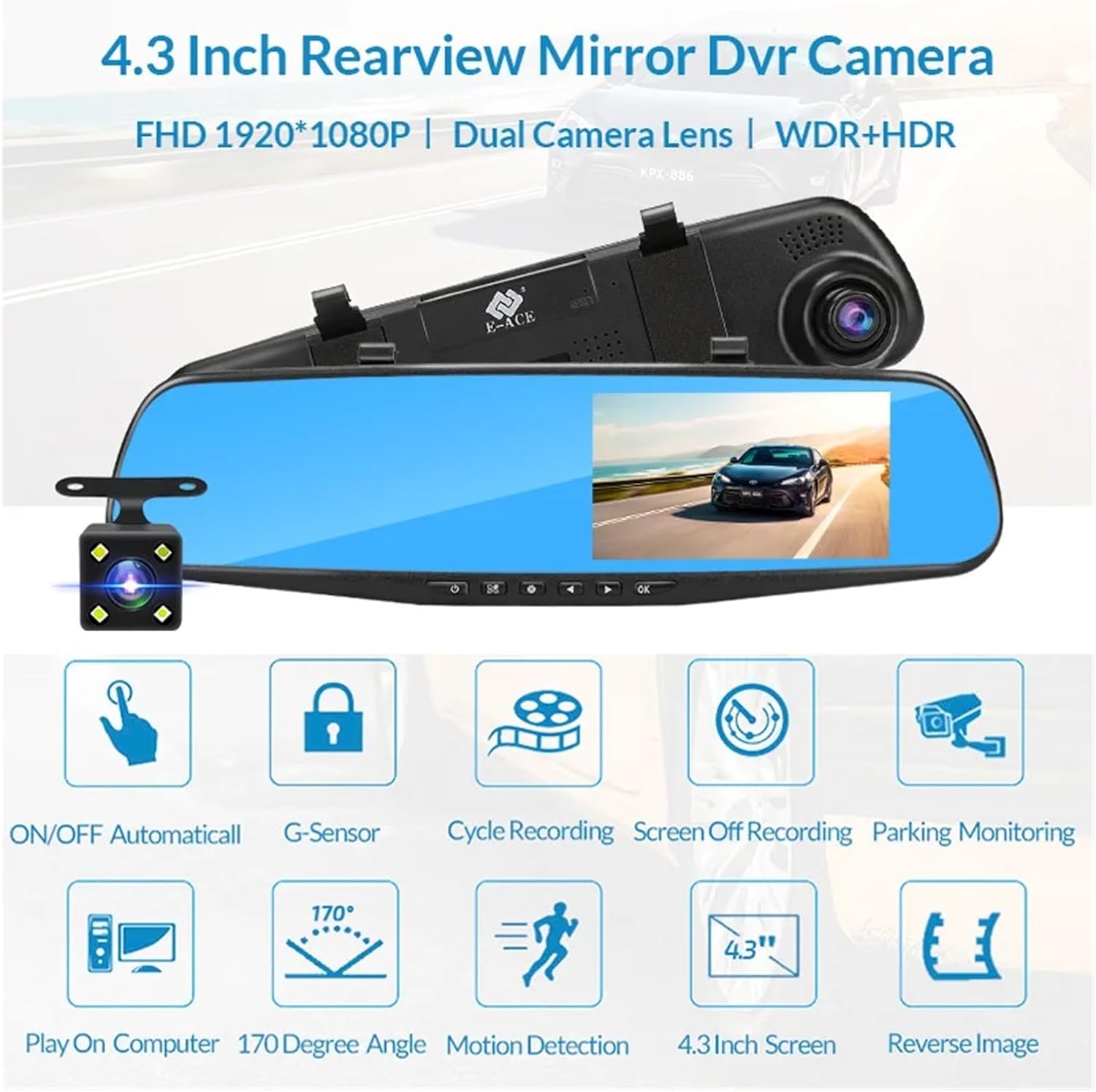
Image: An illustration highlighting the various functional features of the E-ACE dash cam.
4. Идентификација компоненте
Familiarize yourself with the various parts and controls of your E-ACE dash cam:

Image: A detailed diagram identifying the buttons, ports, and features on the E-ACE dash cam unit.
- Дугме за укључивање/искључивање: Укључује или искључује уређај.
- Дугме менија: Приступа подешавањима и опцијама.
- Дугме за режим: Switches between video recording, photo, and playback modes.
- Дугме ГОРЕ: Navigates up in menus or adjusts settings.
- Дугме доле: Navigates down in menus or adjusts settings.
- Дугме ОК: Потврђује изборе или покреће/зауставља снимање.
- Слот за ТФ картицу: Insert your MicroSD (TF) card here.
- AV-IN Port: Повезује задњу камеру.
- УСБ порт: За напајање и пренос података.
- Дугме за ресетовање: Resets the device to factory settings (use a thin pin).
- микрофон: Records audio inside the vehicle.
5. Подешавање и инсталација
5.1 Уметање меморијске картице
Before installation, insert a high-speed MicroSD (TF) card (Class 10 or higher, up to 64GB recommended) into the TF Card Slot (7) with the contacts facing the screen. Ensure the card is inserted correctly until it clicks into place.
5.2 Монтирање камере за аутомобил
- Attach the fixed bandages to the back of the dash cam unit.
- Securely strap the dash cam over your vehicle's existing rearview mirror using the fixed bandages. Ensure it is centered and stable.
5.3 Повезивање напајања
- Connect the car charger to the USB Port (9) on the dash cam.
- Укључите други крај ауто пуњача у утичницу за упаљач у вашем возилу.
- Route the power cable neatly along the windshield trim to avoid obstructing your view.
5.4 Инсталирање задње камере (опционо)
- Connect the rear camera cable to the AV-IN Port (8) on the dash cam.
- Route the rear camera cable from the dash cam to the rear of your vehicle. This typically involves tucking the cable under the headliner and along the side pillars.
- Mount the rear camera on the rear windshield or near the license plate using its adhesive or screws. Ensure it has a clear view пута иза.
- If using the reverse image function, connect the red wire from the rear camera cable to your vehicle's reverse light power supply.
6. Упутство за употребу
6.1 Укључивање/искључивање
- аутоматски: The dash cam will automatically power on and start recording when your vehicle's ignition is turned on (if connected to a switched power source).
- Упутство: Press and hold the ON/OFF Button (1) to manually power the device on or off.
6.2 Основни рад
- Пребаците режиме: Press the Mode Button (3) to cycle between Video Recording, Photo, and Playback modes.
- Приступни мени: In any mode, press the Menu Button (2) to enter the settings menu. Use the UP (4) and Down (5) buttons to navigate, and OK (6) to select.
- Започни/Заустави снимање: In Video Recording mode, press the OK Button (6) to manually start or stop recording.
6.3 Режими приказа
While recording, you can typically switch between different display views by pressing the UP or Down buttons:
- Front Camera Only
- Rear Camera Only
- Picture-in-Picture (Front main, Rear sub-window)
- Picture-in-Picture (Rear main, Front sub-window)
6.4 Снимање у петљи
Set the loop recording duration (e.g., 1, 3, or 5 minutes) in the settings menu. When the memory card is full, the oldest unlocked fileбиће пребрисани новим снимцима.
6.5 Г-сензор
The G-sensor automatically detects collisions or sudden braking. When triggered, it locks the current video file, preventing it from being overwritten by loop recording. Adjust sensitivity in the settings.
6.6 Надгледање паркирања (опционо)
If the buck line is installed, the dash cam can monitor your vehicle while parked. When motion or impact is detected, it will automatically record a short video. Enable this feature in the settings.
6.7 Подешавање датума и времена
It is important to set the correct date and time in the system settings for accurate timestampна вашим снимцима.
7. Одржавање
- Чишћење: Use a soft, dry cloth to clean the lens and screen. Avoid abrasive cleaners or solvents.
- меморијска картица: Format the MicroSD card regularly (e.g., once a month) within the dash cam's settings to maintain optimal performance and prevent data corruption. Back up important fileс пре форматирања.
- температура: Avoid exposing the device to extreme temperatures, as this can affect battery life and component integrity.
- Ажурирања фирмвера: Проверите произвођача website periodically for firmware updates that may improve performance or add features.
КСНУМКС. Решавање проблема
| Проблем | Могући узрок | Решење |
|---|---|---|
| Камера у аутомобилу се не укључује. | No power supply; faulty charger; loose connection. | Check car charger connection and vehicle's cigarette lighter. Try a different USB cable/charger. |
| Снимање се аутоматски зауставља. | Memory card full; slow memory card; G-sensor sensitivity too high. | Format the memory card. Use a Class 10 or higher MicroSD card. Lower G-sensor sensitivity in settings. |
| Видео фооtagе је замућено. | Заштитна фолија на објективу; прљаво сочиво; неправилан фокус. | Remove any protective film. Clean the lens with a soft cloth. |
| Задња камера не приказује слику. | Loose connection; faulty cable/camera. | Check the AV-IN connection. Ensure the rear camera is properly installed. |
| Уређај се замрзава или руши. | Software issue; memory card error. | Press the Reset Button (10) with a thin pin. Format the memory card. |
9. Спецификације
- Назив модела: DMMRUTXB
- Приказ: 4.3 инча
- камера: Dual Lens (Front & Rear support)
- Видео резолуција: FHD 1920x1080P (Front)
- Карактеристике: Loop Recording, G-Sensor, Night Vision, Parking Monitoring, 170-degree wide angle
- Складиштење: Supports MicroSD (TF) card, Class 10 or higher (up to 64GB)
- Повезивање: USB, AV-IN (for rear camera)
- Тежина артикла: Отприлике 1.76 унци (50 грама)
- Димензије пакета: Приближно 0.39 к 0.39 к 0.39 инча
- Произвођач: DMMRUTXB
10. Гаранција и подршка
За информације о гаранцији и техничку подршку, погледајте документацију коју сте добили уз куповину или се директно обратите продавцу/произвођачу. Сачувајте рачун као доказ о куповини.
Ask a question about this manual
Ask about setup, troubleshooting, compatibility, parts, safety, or missing instructions. Manuals+ will review the question and use this page’s manual context to help answer it.